مقدمة
The RIGEXPERT AA-230 ZOOM is a powerful antenna analyzer designed for testing, checking, tuning, and repairing antennas and antenna feedlines. It operates within a frequency range of 0.1 to 230 MHz, making it suitable for a wide array of amateur radio and professional applications. This manual provides essential information for the proper setup, operation, and maintenance of your device.
Please read this manual thoroughly before using the AA-230 ZOOM to ensure safe and efficient operation.
محتويات الحزمة والإعداد
Before beginning, ensure all components are present and undamaged. Carefully unpack the device and its accessories.

Figure 1: The AA-230 ZOOM antenna analyzer as it appears in its retail packaging, ready for unboxing.

Figure 2: The AA-230 ZOOM device alongside its essential accessories, including the USB cable, N-UHF adapter, and four AAA alkaline batteries.
المكونات المتضمنة:
- RIGEXPERT AA-230 ZOOM Antenna Analyzer Unit
- 4 x 1.5V AAA Alkaline Batteries
- كابل يو اس بي
- N-UHF Adapter
- Strap Cover
- دليل المستخدم (هذا المستند)
تركيب البطارية:
- Locate the battery compartment on the rear of the AA-230 ZOOM unit.
- افتح غطاء حجرة البطارية.
- Insert four (4) 1.5V AAA alkaline batteries, ensuring correct polarity (+/-) as indicated inside the compartment.
- أغلق غطاء حجرة البطارية جيدًا.
ملحوظة: The device can operate for up to 4 hours of continuous measurement or up to 2 days in standby mode on a full charge of alkaline batteries. Always use fresh alkaline batteries for optimal performance.
التوصيل بجهاز كمبيوتر:
The AA-230 ZOOM features a USB port for connection to a computer, enabling data transfer and potential firmware updates. Use the provided USB cable for this connection.

Figure 3: The bottom of the AA-230 ZOOM, highlighting the USB port for computer connectivity and power input.
تعليمات التشغيل
This section details the basic operation of your RIGEXPERT AA-230 ZOOM antenna analyzer.
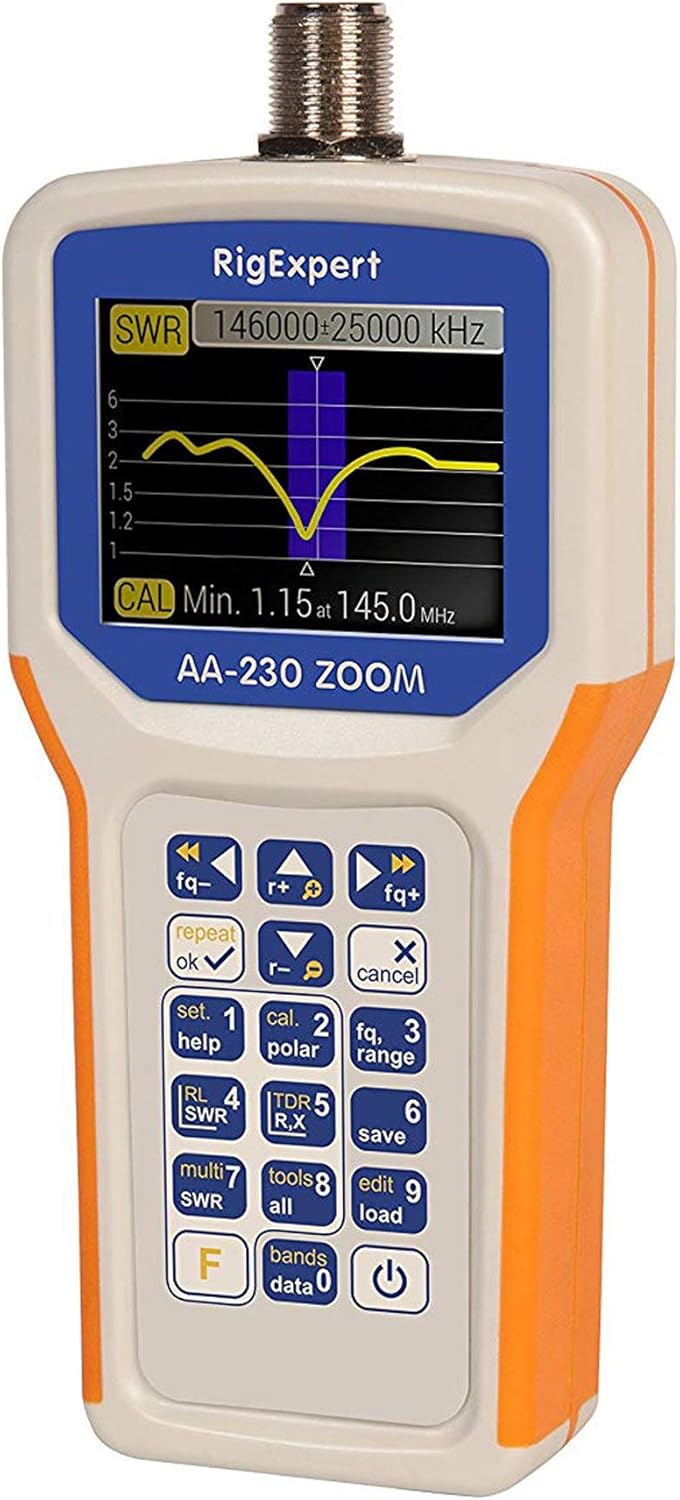
Figure 4: The main display of the AA-230 ZOOM showing an SWR sweep, along with the keypad for navigation and function selection.

الشكل 5: تفصيلي view of the AA-230 ZOOM's screen, displaying a numerical SWR reading of 2.3 and corresponding return loss in dB.
التشغيل/الإيقاف:
- لتشغيل الجهاز، اضغط مع الاستمرار على قوة button (usually located at the bottom right of the keypad) until the screen illuminates.
- لإيقاف التشغيل ، اضغط مع الاستمرار على قوة اضغط على الزر مرة أخرى حتى يتم إيقاف تشغيل الشاشة.
وظائف لوحة المفاتيح:
The AA-230 ZOOM features a tactile keypad for navigating menus and selecting functions. Key functions include:
- التحكم في التردد: استخدم fq- و fq+ buttons to adjust the operating frequency.
- OK/Repeat: Confirms selections or repeats the last measurement.
- Cancel/X: Cancels an operation or exits a menu.
- Set/Help (1): Accesses settings or displays help information.
- Cal/Polar (2): Initiates calibration or changes polarization.
- Fq/Range (3): Adjusts frequency range for sweeps.
- RL/SWR (4): Displays Return Loss or SWR.
- TDR/R,X (5): Activates Time Domain Reflectometer mode or displays Resistance and Reactance.
- Save (6): يحفظ بيانات القياس الحالية.
- Multi SWR (7): For multi-frequency SWR measurements.
- Tools/All (8): Accesses additional tools or displays all parameters.
- Edit/Load (9): Edits saved data or loads configurations.
- Bands/Data (0): Selects frequency bands or accesses stored data.
- F (الوظيفة): الوصول إلى الوظائف الثانوية للمفاتيح.
Performing SWR Measurements:
- Connect the antenna or load to be tested to the N-type connector on the top of the AA-230 ZOOM. Use the N-UHF adapter if necessary.
- قم بتشغيل الجهاز.
- Navigate to the SWR measurement mode using the keypad (e.g., press RL/SWR (4)).
- Adjust the frequency using fq- و fq+ buttons to the desired test frequency.
- The display will show the SWR value numerically and/or graphically.
- For a frequency sweep, use the Fq/Range (3) button to set the start and end frequencies.
صيانة
Proper maintenance ensures the longevity and accuracy of your AA-230 ZOOM.
تنظيف:
- امسح الجهاز بقطعة قماش ناعمة وجافة.
- للأوساخ العنيدة، استخدمي القليل من damp امسح بقطعة قماش مبللة بصابون خفيف، ثم جففها على الفور.
- Do not use abrasive cleaners, solvents, or harsh chemicals, as these can damage the casing أو الشاشة.
العناية بالبطارية:
- قم بإزالة البطاريات إذا لم يتم استخدام الجهاز لفترة طويلة لمنع التسرب.
- تخلص من البطاريات المستخدمة وفقا للوائح المحلية.
تخزين:
- قم بتخزين الجهاز في مكان بارد وجاف، بعيدًا عن أشعة الشمس المباشرة ودرجات الحرارة القصوى.
- Use the provided strap cover for protection during storage and transport.

Figure 6: The AA-230 ZOOM with its protective strap cover, which helps shield the device from dust and minor impacts during storage or transport.
استكشاف الأخطاء وإصلاحها
If you encounter issues with your AA-230 ZOOM, refer to the following common problems and solutions:
| مشكلة | السبب المحتمل | حل |
|---|---|---|
| الجهاز لا يعمل. | البطاريات الميتة أو المثبتة بشكل غير صحيح. | تأكد من قطبية البطارية. استبدلها ببطاريات قلوية AAA جديدة. |
| Inaccurate SWR readings. | Improper calibration; faulty cable/connector; external interference. | Perform a calibration. Check all cable connections. Ensure no strong RF sources are nearby. |
| الشاشة فارغة أو متجمدة. | خلل برمجي؛ انخفاض مستوى البطارية. | Remove and reinsert batteries to perform a hard reset. Ensure batteries are charged. |
| Cannot connect to PC via USB. | Faulty USB cable; driver issue; incorrect port. | Try a different USB port or cable. Install necessary drivers from the RIGEXPERT website if prompted by your PC. |
تحديد
Detailed technical specifications for the RIGEXPERT AA-230 ZOOM Antenna Analyzer.
| نطاق التردد | 0.1 إلى 230 ميجا هرتز |
| Frequency Step Resolution | 1 كيلو هرتز |
| Impedance Compatibility | 25, 50, 75, and 100 Ohm systems |
| SWR Measurement Range | 1-100 (numerical mode) / 1-10 (graphical mode) |
| R and X Range | 0-10000, -10000-10000 (numerical) / 0-1000, -1000-1000 (graphical) |
| موصل مخرج التردد اللاسلكي | نوع N |
| Signal Output Form | موجة مربعة |
| طاقة الإخراج | -10 ديسيبل (عند حمل 50 أوم) |
| مزود الطاقة | 4 x 1.5V AAA Alkaline Batteries |
| عمر البطارية | Up to 4 hours continuous measurement / Up to 2 days standby |
| عرض | Color TFT, 290 x 220 pixels |
| لوحة المفاتيح | ضد للماء |
| واجهة الكمبيوتر | منفذ يو اس بي |
| الأبعاد (الارتفاع × العرض × العمق) | 182 × 82 × 32 ملم (7.17 × 3.23 × 1.26 بوصة) |
| وزن | 236 جرام (0.52 رطل) |
| درجة حرارة التشغيل | 0 درجة مئوية إلى + 40 درجة مئوية (32 درجة فهرنهايت إلى + 104 درجة فهرنهايت) |
| رقم الموديل | أأ-230 |
| رمز المنتج الموحد | 644730932592 |
الضمان والدعم
For detailed warranty information, please refer to the warranty card included with your product or visit the official RIGEXPERT webقد تختلف شروط الضمان حسب المنطقة والتاجر.
For technical support, software updates, or additional resources, please visit the official RIGEXPERT support page or contact their customer service directly. Always provide your product model (AA-230) and serial number (if applicable) when seeking support.
Official RIGEXPERT Webموقع: www.rigexpert.com


