
1. المقدمة
The Aduro Amplify LED Wireless Speaker, model BSP15, is a portable audio device designed for wireless music playback and hands-free calling. It features integrated LED lighting with multiple settings to enhance the audio experience. This manual provides instructions for the proper setup, operation, and maintenance of your speaker.
ماذا يوجد في الصندوق:
- أدورو Amplify LED Wireless Speaker (BSP15)
- كابل الشحن
2. معلومات السلامة
- Do not expose the speaker to water or moisture. This product is not water-resistant.
- Avoid extreme temperatures. Do not place near heat sources or in direct sunlight for extended periods.
- لا تحاول تفكيك السماعة أو تعديلها. قد يؤدي ذلك إلى إلغاء الضمان والتسبب في تلفها.
- استخدم فقط كابل الشحن المقدم أو ما يعادله المعتمد.
- يحفظ بعيدًا عن متناول الأطفال.
3. مواصفات المنتج
- الربط اللاسلكي: يتصل بالهواتف الذكية والأجهزة اللوحية وغيرها من الأجهزة التي تدعم تقنية البلوتوث.
- Easy-Touch Pairing: Simplifies the process of connecting to your device.
- ميكروفون مدمج: Allows for hands-free phone calls.
- مخرجات صوتية عالية الجودة: Delivers clear and loud audio.
- Multiple LED Settings: Offers various light modes to complement your audio experience.
4. انتهت الضوابطview
The Aduro Amplify speaker features intuitive controls located on the top panel for easy access to functions.
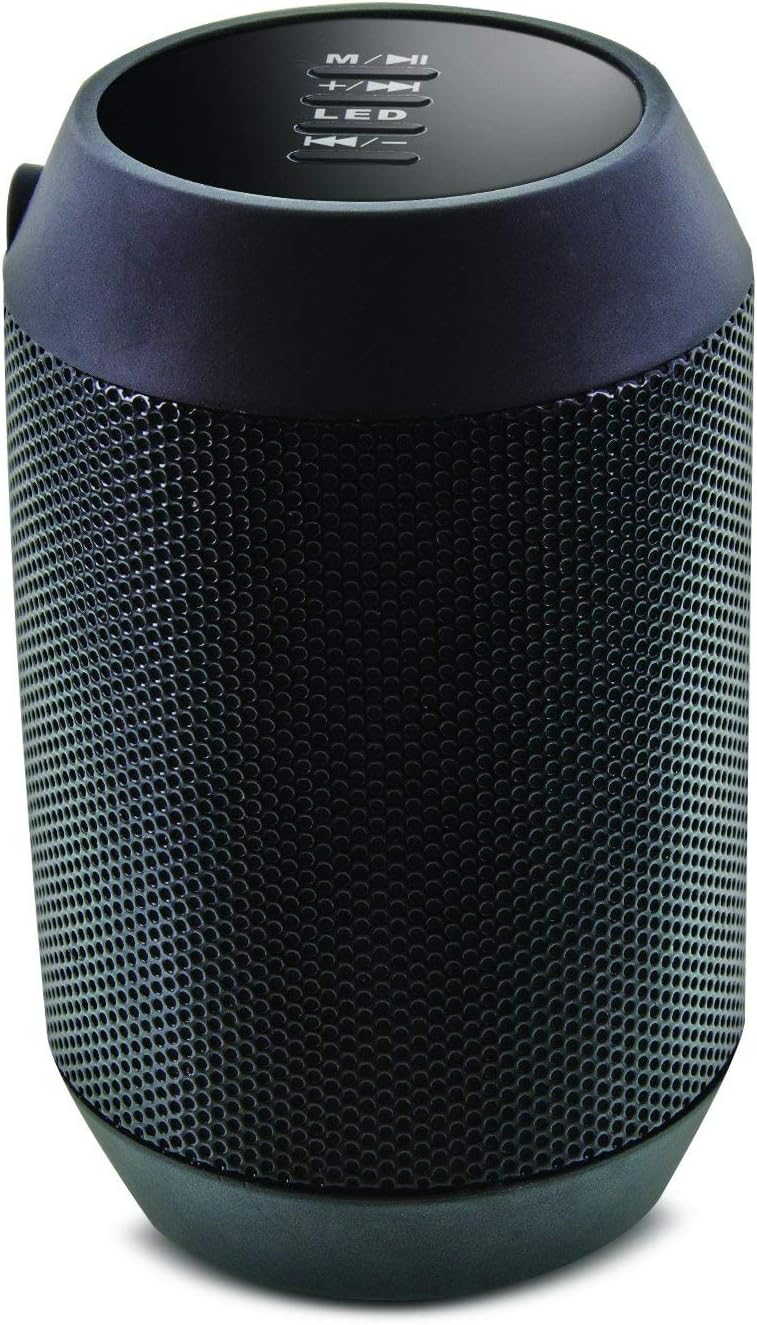
الصورة: أعلى view of the Aduro Amplify speaker, highlighting the control panel. From top to bottom, buttons include: M/▶█ (Mode/Play/Pause), +/▶▶ (Volume Up/Next Track), LED (LED Mode Control), ◀◀/- (Volume Down/Previous Track).
- M/▶█ Button: Press to switch between modes (e.g., Bluetooth, AUX). Press and hold to power on/off. Short press to Play/Pause music.
- +/▶▶ Button: Short press to increase volume. Press and hold to skip to the next track.
- زر LED: Press to cycle through different LED light modes.
- ◀◀/- Button: Short press to decrease volume. Press and hold to go to the previous track.
5. تعليمات الإعداد
5.1 شحن السماعة
Before first use, fully charge the speaker. Connect the provided charging cable to the speaker's charging port and the other end to a USB power source (e.g., computer USB port, USB wall adapter). The LED indicator will show charging status and turn off or change color when fully charged.
5.2 تشغيل/إيقاف التشغيل
- لتشغيل: اضغط مع الاستمرار على M/▶█ button for approximately 3 seconds until you hear an audible prompt or see the LED indicator light up.
- لإيقاف التشغيل: اضغط مع الاستمرار على M/▶█ button for approximately 3 seconds until you hear an audible prompt or the LED indicator turns off.
5.3 اقتران بلوتوث
لتوصيل مكبر الصوت بجهاز يدعم تقنية البلوتوث:
- Ensure the speaker is powered on and in Bluetooth pairing mode. The LED indicator will typically flash rapidly, indicating it is ready to pair.
- On your smartphone, tablet, or other device, navigate to the Bluetooth settings.
- قم بتمكين البلوتوث وابحث عن الأجهزة المتاحة.
- Select "Aduro BSP15" (or similar name) from the list of found devices.
- Once paired, the speaker will emit an audible confirmation, and the LED indicator will typically stop flashing and remain solid.
- سيحاول مكبر الصوت تلقائيًا إعادة الاتصال بآخر جهاز مقترن به عند تشغيله.
5.4 وصلة سلكية (AUX)
For devices without Bluetooth, you can use a 3.5mm audio cable (not included) to connect to the speaker's AUX input port. Once connected, the speaker should automatically switch to AUX mode. If not, press the M/▶█ button to cycle to AUX mode.
6. تعليمات التشغيل
6.1 تشغيل الصوت
- تشغيل/إيقاف مؤقت: اضغط لفترة قصيرة على M/▶█ زر.
- رفع الصوت: اضغط لفترة قصيرة على +/▶▶ زر.
- اخفض الصوت: اضغط لفترة قصيرة على ◀◀/- زر.
- المسار التالي: اضغط مع الاستمرار على +/▶▶ زر.
- المسار السابق: اضغط مع الاستمرار على ◀◀/- زر.
6.2 المكالمات بدون استخدام اليدين
عند الاتصال عبر البلوتوث، يتيح الميكروفون المدمج في السماعة إجراء المكالمات بدون استخدام اليدين.
- الرد على المكالمة: اضغط لفترة قصيرة على M/▶█ زر عند رنين مكالمة واردة.
- إنهاء المكالمة: اضغط لفترة قصيرة على M/▶█ الزر أثناء المكالمة.
- رفض المكالمة: اضغط مع الاستمرار على M/▶█ زر عند رنين مكالمة واردة.
6.3 LED Light Settings
اضغط على قاد button to cycle through the available light modes. The speaker offers various visual effects, including pulsating lights that react to music.
7. الصيانة
7.1 التنظيف
Wipe the speaker with a soft, dry cloth. Do not use abrasive cleaners, alcohol, or other chemical solvents, as these may damage the surface.
7.2 التخزين
عند عدم الاستخدام لفترات طويلة، يُحفظ مكبر الصوت في مكان بارد وجاف بعيدًا عن أشعة الشمس المباشرة ودرجات الحرارة العالية. يُنصح بشحن البطارية دوريًا للحفاظ على عمرها الافتراضي.
8. استكشاف الأخطاء وإصلاحها
- لن يتم تشغيل مكبر الصوت:
تأكد من شحن البطارية. وصّل كابل الشحن وحاول مرة أخرى بعد بضع دقائق. - لا يمكن الاقتران بجهاز بلوتوث:
Ensure the speaker is in pairing mode (LED flashing). Make sure Bluetooth is enabled on your device and it is within range (typically 10 meters/30 feet). Turn both devices off and on again, then try pairing. Ensure no other devices are currently connected to the speaker. - لا يوجد صوت أو مستوى الصوت منخفض:
Check the volume levels on both the speaker and your connected device. Ensure the speaker is correctly paired or the AUX cable is fully inserted. If using AUX, ensure the correct mode is selected. - أضواء LED لا تعمل:
Press the LED button to cycle through modes. If still unresponsive, power cycle the speaker.
9. المواصفات

الصورة: الجانب view of the Aduro Amplify LED Wireless Speaker, showing its cylindrical design and speaker grille.
| اسم الموديل | بي إس بي 15 |
| رقم موديل العنصر | LU4-01-BSP15 |
| ماركة | أدورو |
| مادة | بلاستيك |
| نوع السماعة | مكبر الصوت الفرعي |
| المميزات الخاصة | Built-in Microphone, Portable |
| تكنولوجيا الاتصال | لاسلكي (بلوتوث) |
| الاتصالات اللاسلكية | بلوتوث |
| وضع إخراج الصوت | ستيريو |
| الحد الأقصى لقوة خرج السماعة | 5 واط |
| طريقة التحكم | يلمس |
| أبعاد المنتج | 6 بوصة عمق × 3.8 بوصة عرض × 3.5 بوصة ارتفاع |
| وزن العنصر | 6.7 أونصة |
| مستوى مقاومة الماء | غير مقاوم للماء |
| مصدر الطاقة | كهربائي سلكي (للشحن) |
10. الضمان والدعم
10.1 الضمان المحدود
This Aduro product is covered by a limited warranty against defects in materials and workmanship under normal use. The duration and terms of the warranty may vary. Please refer to the warranty card included with your purchase or contact Aduro customer support for specific details.
10.2 دعم العملاء
For technical assistance, warranty claims, or product inquiries, please contact Aduro customer support. Contact information can typically be found on the manufacturer's official webالموقع أو على عبوة المنتج.
Manufacturer: Aduro