
1. المقدمة
The Perixx PERIDUO-712B is a compact wireless keyboard and mouse combo designed for efficiency and convenience. This set includes a space-saving mini keyboard and a 3-button optical mouse, ideal for various environments such as home, office, or travel. It features a stable 2.4 GHz wireless connection and plug-and-play setup for immediate use.

Image 1.1: The Perixx PERIDUO-712B Wireless Mini Keyboard and Mouse Set, showcasing its compact design and included nano receiver.
محتويات الحزمة:
- شنومكس x لوحة المفاتيح اللاسلكية
- شنومكس x فأرة لاسلكية
- 1 × مستقبل USB نانو
- 1 × دليل المستخدم (هذه الوثيقة)
2. البدء (الإعداد)
Follow these steps to set up your Perixx PERIDUO-712B wireless keyboard and mouse set.
2.1 تركيب البطارية
- لوحة المفاتيح: Locate the battery compartment on the underside of the keyboard. Insert two (2) AA alkaline batteries (not included), ensuring correct polarity.
- الفأر: Locate the battery compartment on the underside of the mouse. Insert one (1) AA alkaline battery (not included), ensuring correct polarity.
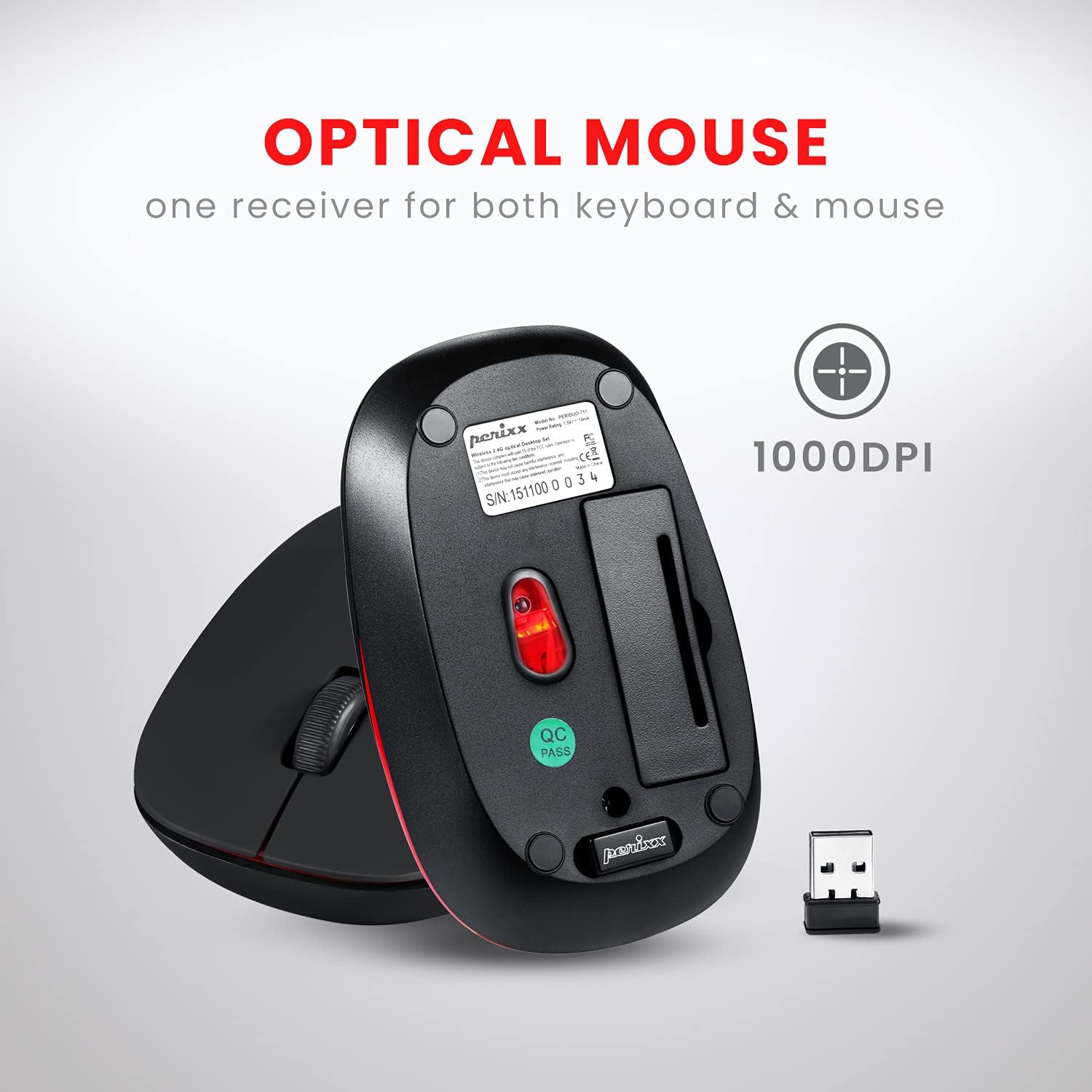
Image 2.1: Underside of the mouse, indicating the battery compartment and the storage slot for the USB nano receiver.
2.2 توصيل جهاز الاستقبال
The USB nano receiver connects both the keyboard and mouse to your computer.
- قم بإزالة جهاز استقبال USB النانوي من فتحة التخزين الموجودة أسفل الماوس.
- قم بتوصيل جهاز استقبال USB النانوي بمنفذ USB متاح على جهاز الكمبيوتر الخاص بك.
- Your computer will automatically detect and install the necessary drivers. No additional software is required.
- لوحة المفاتيح والماوس جاهزتان للاستخدام الآن.
3. تعليمات التشغيل
3.1 استخدام لوحة المفاتيح
تتميز لوحة المفاتيح بتصميم منخفض الارتفاعfile design with membrane switches for comfortable and quiet typing. It has a standard US English QWERTY layout.

Image 3.1: Detailed diagram illustrating the keyboard layout, including standard keys and function key assignments.
Multimedia Function Keys (Fn + F1-F12):
The keyboard includes 12 integrated multimedia hotkeys for quick access to various functions. To activate these functions, press and hold the Fn key, then press the corresponding مفتاح F (F1-F12).
- الجبهة الوطنية + خروج: مشغل الوسائط
- الجبهة الوطنية + F1: المسار السابق
- الجبهة الوطنية + F2: تشغيل/إيقاف مؤقت
- الجبهة الوطنية + F3: المسار التالي
- الجبهة الوطنية + F4: صامت
- الجبهة الوطنية + F5: خفض الصوت
- الجبهة الوطنية + F6: رفع الصوت
- الجبهة الوطنية + F7: بيت
- الجبهة الوطنية + F8: بحث
- الجبهة الوطنية + F9: بريد إلكتروني
- الجبهة الوطنية + F10: آلة حاسبة
- الجبهة الوطنية + F11: المفضلة
- الجبهة الوطنية + F12: جهاز الكمبيوتر الخاص بي

Image 3.2: Visual guide to the multimedia function keys and their corresponding actions.
3.2 استخدام الماوس
The 3-button optical mouse provides precise tracking and a comfortable grip with its soft rubber coating. It operates at 1000 DPI.
- الزر الأيسر: الاختيار والتفعيل القياسيان.
- انقر على اليمين: الوصول إلى قائمة السياق.
- عجلة التمرير: Scroll documents and web الصفحات. يمكن أيضًا الضغط عليها لوظيفة النقر بالزر الأوسط.

Image 3.3: The Perixx mouse, highlighting its ergonomic design, nano receiver, 3-button functionality, 30 ft operating range, and 75g weight.
4. الرعاية والصيانة
- تنظيف: استخدم قطعة قماش ناعمة وجافة لتنظيف لوحة المفاتيح والماوس. لإزالة الأوساخ المستعصية، افركها برفق.ampامسح بقطعة قماش مبللة بالماء أو بمحلول تنظيف خفيف. تجنب المواد الكيميائية القاسية أو المواد الكاشطة.
- استبدال البطارية: Replace batteries when performance degrades. Always use fresh alkaline batteries of the specified type (AA).
- تخزين: When not in use for extended periods, remove batteries to prevent leakage. Store the USB nano receiver in its dedicated slot on the mouse to prevent loss.
- بيئة: Avoid exposing the devices to extreme temperatures, direct sunlight, or excessive moisture.
5. استكشاف الأخطاء وإصلاحها
If you encounter issues with your PERIDUO-712B set, refer to the following common solutions:
| مشكلة | حل |
|---|---|
| لوحة المفاتيح أو الفأرة لا تستجيب |
|
| انقطاع الاتصال أو تأخره |
|
| مشاكل تتبع الماوس |
|
| Caps Lock indicator light behaves erratically |
|
6. المواصفات الفنية

Image 6.1: Technical drawing showing precise dimensions of the keyboard and mouse.
| ميزة | التفاصيل |
|---|---|
| نموذج | PERIDUO-712B |
| الاتصال | 2.4 جيجا هرتز اللاسلكي |
| نطاق التشغيل | حتى 30 قدم (10 متر) |
| أبعاد لوحة المفاتيح | 11.46 × 5.43 × 0.77 بوصة (291 × 138 × 19.5 ملم) |
| لوحة المفاتيح الوزن | 0.78 رطل (حوالي 354 جرام) |
| تخطيط لوحة المفاتيح | US English QWERTY, 84 keys |
| أبعاد الماوس | 4.09 × 2.44 × 1.33 بوصة (104 × 62 × 34 ملم) |
| وزن الفأر | حوالي 75 جرام |
| مؤشر الماوس DPI | 1000 نقطة في البوصة |
| مصدر الطاقة | Keyboard: 2 x AA batteries; Mouse: 1 x AA battery (not included) |
| نظام التشغيل المتوافق | Windows 7, 8, 10, 11 (and older versions like XP, Vista) |
7. الضمان والدعم
7.1 معلومات الضمان
The Perixx PERIDUO-712B Wireless Mini Keyboard and Mouse Set is backed by a ضمان محدود لمدة 12 شهرًا. This warranty covers manufacturing defects from the date of purchase. Please retain your proof of purchase for warranty claims.
7.2 دعم العملاء
For technical assistance, warranty claims, or general inquiries, please visit the official Perixx website or contact their customer support directly. Information regarding spare USB receivers can also be found on the Perixx website or Amazon.
الشركة المصنعة: Perixx Computer GmbH
لمزيد من المعلومات، قم بزيارة: متجر بيريكس على أمازون