
1. المقدمة
This manual provides essential instructions for the installation, operation, maintenance, and troubleshooting of the APC Smart-UPS SRT3000RMXLT 3kVA 208V Rackmount Uninterruptible Power Supply (UPS). Please read this manual thoroughly before installing or operating the equipment to ensure proper usage and safety.
2. معلومات السلامة
Observe all warnings and operating instructions in this manual. Failure to do so may result in injury or equipment damage.
- السلامة الكهربائية: تحتوي هذه الوحدة على مجلد خطيرtages. Do not attempt to disassemble the UPS. Servicing should only be performed by qualified personnel.
- سلامة البطارية: Batteries can present a risk of electrical shock and high short-circuit current. Remove watches, rings, or other metal objects before handling batteries. Use tools with insulated handles.
- وزن: The UPS is heavy. Use proper lifting techniques and ensure adequate support during installation.
- بيئة: Install the UPS indoors in a controlled environment, free from excessive dust, moisture, and extreme temperatures.
3. محتويات العبوة
Carefully unpack the UPS and inspect for shipping damage. The package should contain the following items:
- APC Smart-UPS SRT3000RMXLT Unit
- Power Supply (Built-In)
- الأجهزة المتصاعدة على الرف
- قرص توثيقي
- كابل يو اس بي
- كابل تسلسلي
4. الإعداد
4.1 التثبيت المادي
The SRT3000RMXLT is designed for rack installation. Ensure the rack is stable and capable of supporting the UPS weight (approximately 69 pounds).
- Mount the UPS into a standard 19-inch rack using the provided rack-mounting hardware.
- تأكد من وجود تهوية كافية حول الوحدة. لا تسد فتحات التهوية.

الشكل 4.1: الجبهة view of the APC Smart-UPS SRT3000RMXLT. This image shows the front panel with the display and ventilation grille.
4.2 توصيل جهاز UPS
Connect the UPS to the utility power and your equipment.
- Connect the UPS input power cord to a dedicated 208V AC outlet. The UPS uses a Type B - 3 pin (North American) power plug.
- Connect your equipment to the output receptacles on the rear of the UPS. The unit provides 12 IEC 320 C13/C14 outlets.
- For communication, connect the USB cable or serial cable from the UPS to your computer or network management card.
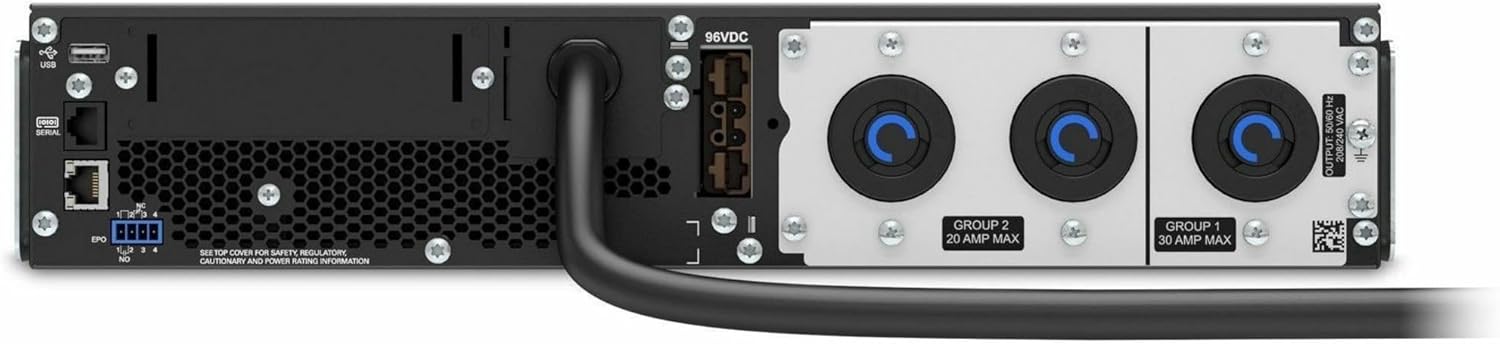
الشكل 4.2: خلفي view of the APC Smart-UPS SRT3000RMXLT. This image displays the various input and output ports, including USB, serial, EPO, and the 12 output receptacles, along with the main power input.
4.3 التشغيل الأولي
After all connections are secure:
- اضغط على زر الطاقة الموجود على اللوحة الأمامية لتشغيل جهاز UPS.
- The UPS will perform a self-test and the display will show the current status.
- Allow the batteries to charge for at least 6 hours before relying on them for extended backup time.
5. تشغيل جهاز UPS
5.1 شاشة اللوحة الأمامية وعناصر التحكم
The front panel features an LCD display and control buttons for monitoring and configuring the UPS.
- شاشة LCD: Shows real-time status, load, battery charge, input/output voltage, and event logs.
- زر ESC: Exits the current menu or cancels an operation.
- زر موافق: تأكيد التحديد أو الدخول إلى القائمة.
- الأسهم لأعلى/لأسفل: تصفح خيارات القائمة أو اضبط الإعدادات.
5.2 التشغيل الأساسي
- تشغيل: اضغط مع الاستمرار على زر الطاقة حتى تضيء الشاشة.
- إيقاف التشغيل: Press and hold the power button until the UPS powers down. Ensure all connected equipment is safely shut down first.
- وضع البطارية: في حالة انقطاع التيار الكهربائيtage, the UPS will automatically switch to battery power. The display will indicate 'On Battery'.
- اختبار ذاتي: Initiate a manual self-test through the front panel menu to verify battery and UPS functionality.
6. الصيانة
6.1 استبدال البطارية
The UPS uses sealed lead-acid batteries. Battery life is typically 3-5 years, depending on environmental conditions and usage. Replace batteries when the UPS indicates a 'Battery Fault' or 'Replace Battery' warning.
- Contact APC support or a certified service technician for battery replacement.
- Always use genuine APC replacement battery cartridges (RBCs) to ensure compatibility and optimal performance.
- أعد تدوير البطاريات القديمة بطريقة مسؤولة.
6.2 التنظيف
Keep the UPS free from dust and debris to ensure proper ventilation.
- Use a soft, dry cloth to clean the exterior of the UPS.
- لا تستخدم المنظفات السائلة أو المذيبات.
- التأكد من خلو فتحات التهوية من العوائق.
7. استكشاف الأخطاء وإصلاحها
يقدم هذا القسم حلولاً للمشاكل الشائعة. في حال وجود مشاكل أكثر تعقيدًا، يُرجى التواصل مع الدعم الفني.
| مشكلة | السبب المحتمل | حل |
|---|---|---|
| لا يعمل جهاز UPS | No input power; Battery disconnected or discharged | Check power cord connection; Ensure utility power is present; Allow batteries to charge. |
| يصدر جهاز UPS صوت تنبيه متواصل | On battery power; Overload condition | Check utility power; Reduce connected load. |
| 'Replace Battery' indicator | اقتراب نهاية عمر البطارية | Order and replace the battery cartridge. |
| UPS not providing power to outlets | Output circuit breaker tripped; UPS in fault mode | Reset circuit breaker; Check display for fault codes and consult manual. |
8. المواصفات
Key technical specifications for the APC Smart-UPS SRT3000RMXLT.
| ميزة | مواصفة |
|---|---|
| رقم الموديل | SRT3000RMXLT |
| ماركة | مؤتمر القمة العربي |
| سعة الطاقة الناتجة | 3000 فولت أمبير / 2700 واط |
| حجم الإخراج الاسميtage | 208 فولت تيار متردد |
| حجم الإدخال الاسميtage | 208 فولت تيار متردد / 230 فولت تيار متردد |
| تردد الإدخال | 60 هرتز |
| توصيلات الإخراج | 12 x IEC 320 C13/C14 |
| نوع البطارية | حمض الرصاص |
| وقت إعادة الشحن النموذجي | 6 ساعة |
| Typical Backup Time (Full Load) | 4 دقائق |
| عامل الشكل | رف |
| الأبعاد (الارتفاع × العرض × العمق) | 9 × 23 × 34 بوصة |
| وزن | 69 رطل |
| درجة حرارة التشغيل | 0 - 40 درجة مئوية (32 - 104 درجة فهرنهايت) |
9. الضمان والدعم
9.1 معلومات الضمان
APC provides a standard warranty for this product. Please refer to the warranty card included with your product or visit the official APC webالموقع للحصول على شروط وأحكام الضمان التفصيلية الخاصة بمنطقتك.
9.2 الدعم الفني
For technical assistance, product information, or troubleshooting beyond the scope of this manual, please contact APC customer support. Have your model number (SRT3000RMXLT) and serial number ready when contacting support.
- قم بزيارة موقع APC الرسمي webالموقع للحصول على موارد الدعم والأسئلة الشائعة ومعلومات الاتصال.
- Online resources often include updated manuals, firmware, and diagnostic tools.