
مقدمة
This manual provides comprehensive instructions for the safe and efficient operation, maintenance, and troubleshooting of your KitchenAid 2.0 cu. ft. Over-the-Range Microwave with Sensor Cooking. Please read all instructions carefully before using the appliance and retain this manual for future reference.

الصورة: الجبهة view of the KitchenAid 2.0 cu. ft. Over-the-Range Microwave in Stainless Steel.
تعليمات السلامة الهامة
عند استخدام الأجهزة الكهربائية، يجب اتباع احتياطات السلامة الأساسية، بما في ذلك ما يلي:
- اقرأ كافة التعليمات قبل استخدام الجهاز.
- لا تقم بتشغيل الفرن إذا كان الباب أو أختام الباب تالفة.
- لا تقم بتسخين السوائل أو الأطعمة الأخرى في أوعية مغلقة لأنها عرضة للانفجار.
- لا تحاول ذلكampأو إجراء أي تعديلات أو إصلاحات على الباب أو لوحة التحكم أو مفاتيح القفل الآمن أو أي جزء آخر من الفرن.
- لا تسمح للأطفال باستخدام الفرن دون إشراف إلا بعد إعطائهم التعليمات المناسبة حتى يتمكن الطفل من استخدام الفرن بطريقة آمنة ويفهم مخاطر الاستخدام غير السليم.
- لا تستخدم مواد كيميائية أو أبخرة أكالة في هذا الجهاز.
- Always ensure proper ventilation during operation.
يثبت
التفريغ والتنسيب
Carefully remove all packaging materials. Ensure the microwave is placed on a flat, stable surface or properly installed over a range. Refer to the separate installation instructions for detailed mounting procedures. Ensure adequate clearance around the appliance for proper ventilation.

Image: KitchenAid microwave installed above a range in a kitchen setting.
تركيب القرص الدوار
Place the turntable support ring in the center of the microwave oven cavity. Position the glass turntable plate securely on the support ring. Ensure the turntable rotates freely.
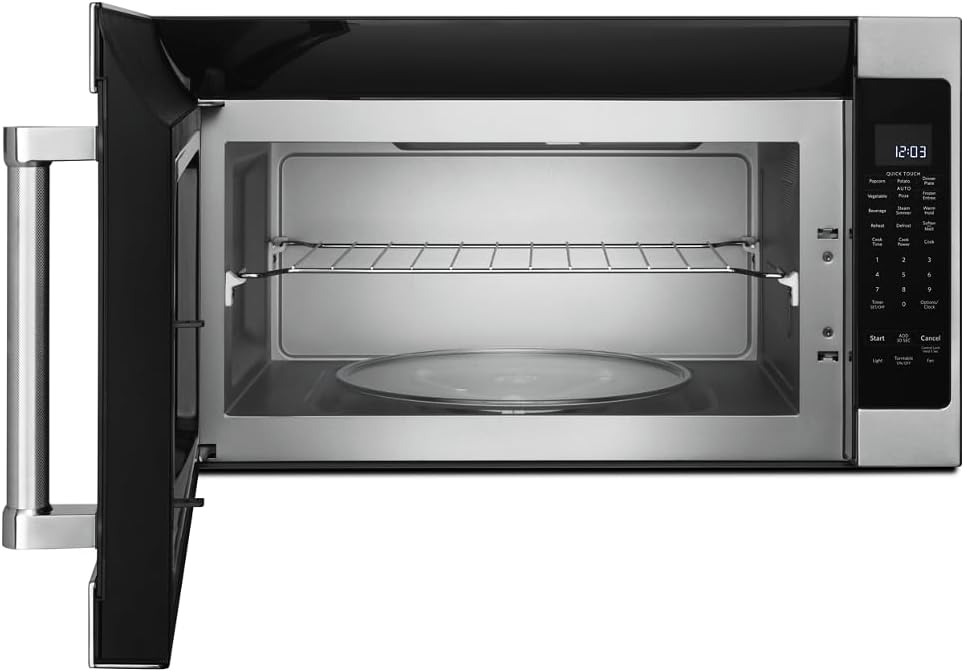
الصورة: الداخلية view of the microwave showing the glass turntable and support ring.
تعليمات التشغيل
التشغيل الأساسي
- ضبط الساعة: Press 'Options/Clock', then enter the current time using the number pad. Press 'Options/Clock' again to confirm.
- البداية السريعة: Press 'Start' to begin cooking immediately for 30 seconds at 100% power. Press 'Add 30 Sec' to add 30 seconds to the cooking time.
- وقت الطبخ: Press 'Cook Time', enter the desired cooking time, then press 'Start'.
- Cook Power: After setting 'Cook Time', press 'Cook Power', enter the desired power level (1-10, 10 being 100%), then press 'Start'.
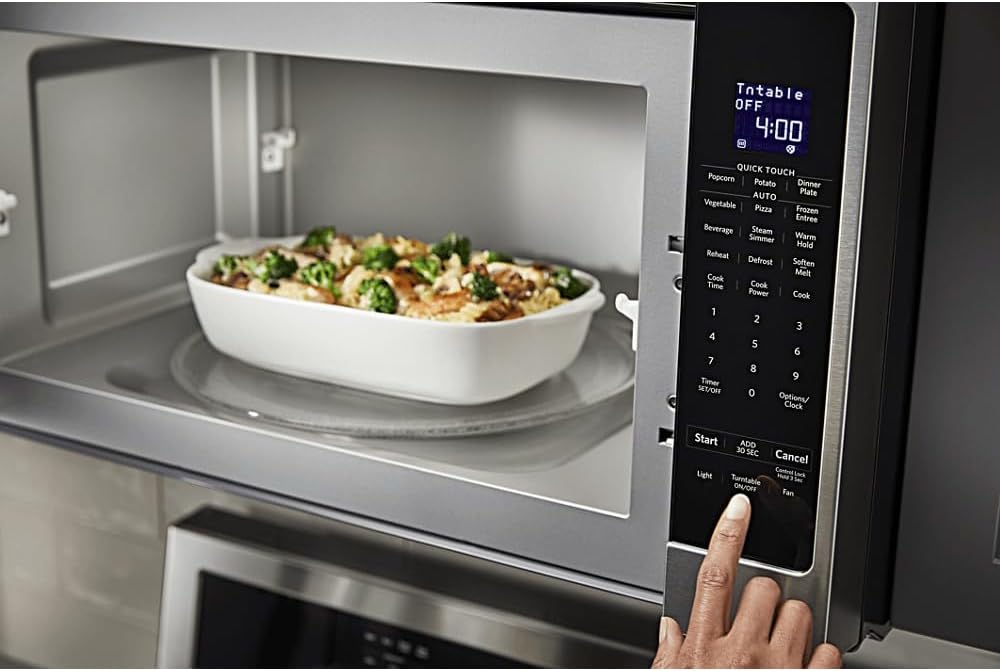
الصورة: مفصلة view of the microwave's control panel with various cooking options.
Quick Touch Functions
The microwave features several one-touch cooking options:
- الفشار: For automatic popcorn popping.
- البطاطس: لخبز البطاطس.
- بيتزا: لإعادة تسخين شرائح البيتزا.
- المشروبات: لتسخين المشروبات.
- إعادة التسخين: For reheating various food items.
- تذويب: For defrosting food by weight or time.
الطبخ بالاستشعار
The sensor cooking feature automatically adjusts cooking time and power levels based on the food's moisture content. Select the desired sensor cooking option (e.g., 'Vegetable', 'Frozen Entree', 'Dinner Plate') and press 'Start'. The microwave will detect when the food is cooked.

Image: Interior of the microwave showing food items on the turntable and a removable rack.
المميزات الخاصة
- Steam Simmer: For steaming or simmering foods.
- عقد دافئ: Keeps cooked food warm for an extended period.
- تليين / تذوب: For softening butter, melting chocolate, or other similar tasks.
- ضوء: Controls the under-cabinet light.
- تشغيل/إيقاف تشغيل القرص الدوار: Allows you to stop the turntable rotation for larger dishes.
- مروحة: يتحكم في سرعة مروحة العادم.

Image: A person's hand operating the control panel of the KitchenAid microwave.
صيانة
تنظيف الداخل
Clean the interior of the microwave regularly with a mild detergent and a soft cloth. For stubborn food splatters, place a bowl of water with lemon slices inside and microwave for a few minutes to loosen residue, then wipe clean.
تنظيف الجزء الخارجي
Wipe the exterior surfaces, including the control panel and door, with a soft cloth and mild detergent. For stainless steel surfaces, use a stainless steel cleaner and polish in the direction of the grain.
صيانة الفلتر
The microwave is equipped with grease filters and may have a charcoal filter. Clean the grease filters monthly by washing them in hot, soapy water or in a dishwasher. Replace the charcoal filter (if present) approximately every 6 to 12 months, depending on usage.
استكشاف الأخطاء وإصلاحها
If you experience issues with your microwave, consult the following common problems and solutions:
| مشكلة | السبب المحتمل | حل |
|---|---|---|
| الميكروويف لا يبدأ | لم يتم إغلاق الباب بشكل صحيح؛ سلك الطاقة غير موصول؛ المصهر المنفوخ/قاطع الدائرة المعطل. | Ensure door is securely closed; Check power connection; Reset circuit breaker or replace fuse. |
| عدم تسخين الطعام بالتساوي | لم يتم تحريك الطعام أو تدويره؛ مستوى الطاقة غير صحيح؛ القرص الدوار لا يدور. | Stir or rotate food during cooking; Adjust power level; Ensure turntable is correctly placed and functioning. |
| أصوات غير عادية أثناء التشغيل | لم يتم تثبيت القرص الدوار بشكل صحيح؛ يوجد جسم غريب في التجويف. | Re-seat turntable; Check for and remove any obstructions. |
إذا استمرت المشكلة بعد محاولة هذه الحلول، فيرجى الاتصال بدعم العملاء.
تحديد
| ميزة | التفاصيل |
|---|---|
| ماركة | كيتشن إيد |
| رقم الموديل | KMHS120ESS |
| أبعاد المنتج (العمق × العرض × الارتفاع) | 16.13 بوصة × 30 بوصة × 17.13 بوصة |
| سعة | 2.0 قدم مكعب |
| واتtage | 1000 واط |
| مادة | الفولاذ المقاوم للصدأ |
| نوع التثبيت | على نطاق |
| ميزة خاصة | Turntable, Sensor Cooking |
| نوع وحدة التحكم | زر |
| عدد البرامج | 10 |
| وظيفة المؤقت | متاح |
| المكونات المضمنة | Glass Turntable, Turntable Support Ring, Removable Rack |
الضمان والدعم
معلومات الضمان
This KitchenAid appliance comes with a limited warranty. Please refer to the warranty card included with your product for specific terms, conditions, and duration of coverage. Keep your proof of purchase for warranty claims.
دعم العملاء
For technical assistance, service, or to order replacement parts, please contact KitchenAid Customer Service. Contact details can typically be found on the manufacturer's webالموقع أو على بطاقة تسجيل المنتج الخاصة بك.
الدعم عبر الإنترنت: قم بزيارة موقع KitchenAid الرسمي webموقع مخصص للأسئلة الشائعة، وتسجيل المنتجات، وجدولة الخدمات.
الدعم عبر الهاتف: يرجى الرجوع إلى وثائق المنتج لمعرفة رقم هاتف خدمة العملاء المناسب في منطقتك.