
1. المقدمة
The Sony SBH54 is a versatile Stereo Bluetooth Headset designed for wireless communication and audio playback. It offers both handset and headset functionalities, allowing you to take and make calls, view messages, listen to music, and tune into FM radio directly from its display. Crafted from premium metal with a splash-proof design, it combines elegance with durability.
Key features include Bluetooth Wireless 3.0, NFC technology for easy pairing, an OLED display, and built-in noise cancellation for clear audio during calls. The headset supports A2DP profile and can connect to two devices simultaneously.
2. انتهى المنتجview
The SBH54 features a compact design that fits comfortably in your hand. It includes an OLED display for information at a glance and physical controls for media and call management.
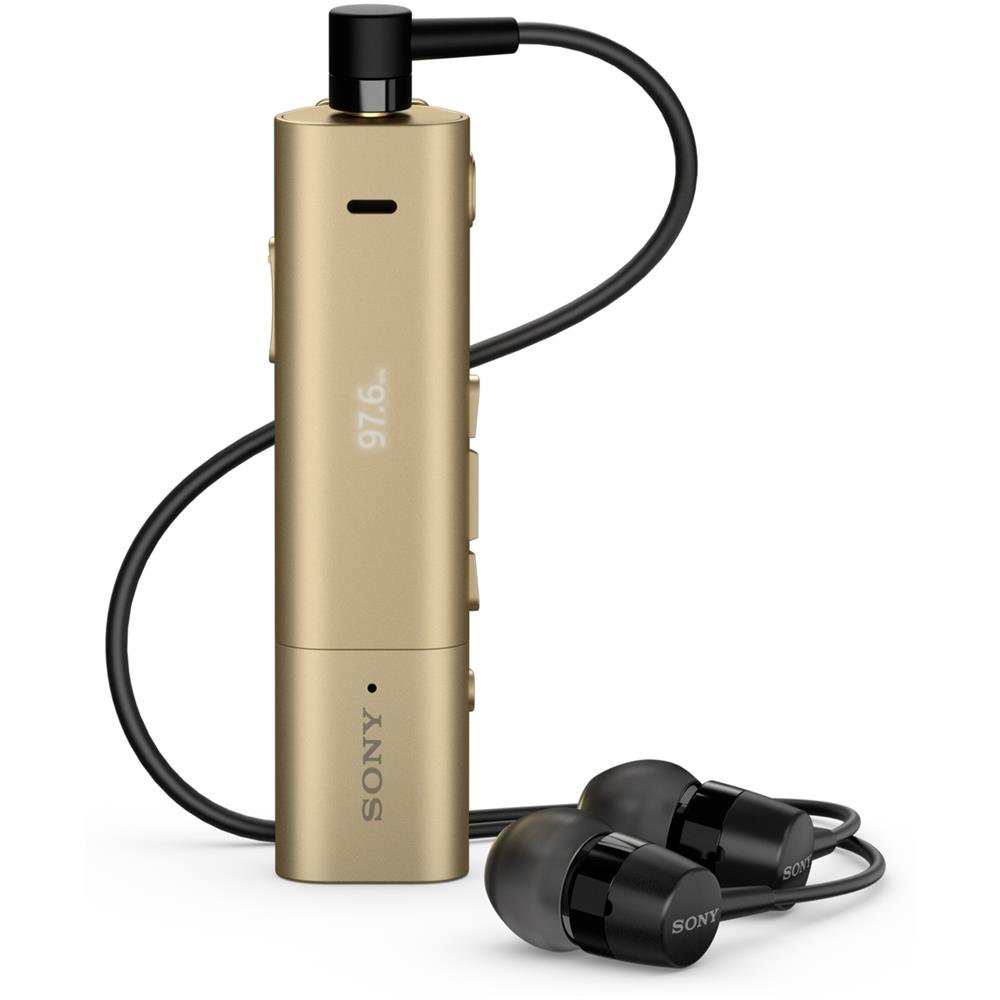
Image: Sony SBH54 Gold Stereo Bluetooth Headset. This image displays the compact, gold-colored headset with its integrated clip and display screen.
الضوابط والمؤشرات:
- شاشة OLED: Shows caller ID, messages, music track information, and FM radio frequency.
- زر متعدد الوظائف: For call answering/ending, play/pause music.
- أزرار التحكم في الصوت: ضبط مستوى الصوت.
- أزرار التنقل: For menu navigation and track skipping.
- ميكروفون: Integrated for voice calls.
- مقبس سماعة الرأس: 3.5mm port for connecting the included premium headphones.
- منفذ الشحن: منفذ Micro USB لشحن الجهاز.
3. الإعداد
3.1 شحن سماعة الرأس
- Connect the supplied USB cable to the headset's charging port and to a USB power adapter or a computer's USB port.
- سيظهر مؤشر البطارية على الشاشة حالة الشحن.
- اشحن سماعة الرأس بالكامل قبل الاستخدام لأول مرة.
3.2 Pairing with a Device (Bluetooth)
- تأكد من شحن سماعة الرأس وإيقاف تشغيلها.
- Press and hold the power button until the headset enters pairing mode (indicated by a specific light pattern or message on the display).
- على هاتفك الذكي أو أي جهاز آخر يدعم تقنية Bluetooth، قم بتمكين Bluetooth وابحث عن الأجهزة المتوفرة.
- حدد "SBH54" من قائمة الأجهزة التي تم العثور عليها.
- إذا طُلب منك ذلك، أدخل رمز المرور "0000" (أربعة أصفار).
- بمجرد الاقتران، ستشير سماعة الرأس إلى اتصال ناجح.
3.3 Pairing with a Device (NFC)
For devices with NFC (Near Field Communication):
- تأكد من تفعيل خاصية NFC على هاتفك الذكي وأن الشاشة غير مقفلة.
- Touch the NFC detection area of your smartphone to the NFC detection area on the SBH54 headset.
- اتبع أي مطالبات تظهر على الشاشة لإكمال عملية الاقتران.
4. تشغيل سماعة الرأس
4.1 تشغيل/إيقاف التشغيل
- لتشغيل: اضغط مع الاستمرار على زر الطاقة حتى تضيء الشاشة.
- لإيقاف التشغيل: اضغط مع الاستمرار على زر الطاقة حتى يتم إيقاف تشغيل الشاشة.
4.2 إجراء واستقبال المكالمات
- الرد على مكالمة: When a call comes in, press the multi-function button.
- إنهاء المكالمة: During a call, press the multi-function button.
- رفض المكالمة: Press and hold the multi-function button when a call comes in.
- إجراء مكالمة: Dial the number on your phone. The call will automatically route to the headset. You can also use voice commands if supported by your phone.
- وظيفة الهاتف: The compact SBH54 can be used as an unobtrusive handset for calls.
- إلغاء الضوضاء: The headset features echo, wind, and noise cancellation for clear voice transmission.
- صوت عالي الدقة: Enhances voice clarity for both parties during a call.
4.3 تشغيل الموسيقى
- تشغيل/إيقاف مؤقت: اضغط على الزر متعدد الوظائف.
- المسار التالي: Press the forward navigation button.
- المسار السابق: Press the backward navigation button.
- التحكم في مستوى الصوت: استخدم أزرار رفع/خفض الصوت.
4.4 راديو FM
- تفعيل راديو FM: Navigate through the headset menu to select the FM Radio function.
- اضبط المحطات: Use the navigation buttons to scan or manually tune to FM frequencies.
- حفظ الإعدادات المسبقة: The headset may allow saving favorite stations (refer to on-screen prompts).
5. الصيانة
- تنظيف: امسح سماعة الرأس بقطعة قماش ناعمة وجافة. تجنب استخدام المواد الكيميائية القاسية أو المواد الكاشطة.
- مقاومة الماء: The SBH54 has a splash-proof design. This means it can withstand light splashes of water but should not be submerged or exposed to heavy rain. Ensure the charging port cover is securely closed.
- تخزين: قم بتخزين سماعة الرأس في مكان بارد وجاف بعيدًا عن أشعة الشمس المباشرة ودرجات الحرارة القصوى.
- العناية بالبطارية: لإطالة عمر البطارية، تجنب تفريغها بالكامل بشكل متكرر. اشحنها بانتظام.
6. استكشاف الأخطاء وإصلاحها
المشاكل الشائعة والحلول:
- سماعة الرأس لا تعمل: تأكد من شحن البطارية. وصّل الجهاز بمصدر طاقة وحاول مرة أخرى.
- لا يمكن الاقتران بجهاز:
- تأكد من أن سماعة الرأس في وضع الاقتران.
- تأكد من تمكين البلوتوث على جهازك.
- قم بتقريب سماعة الرأس من جهازك.
- أعد تشغيل كل من سماعة الرأس والجهاز.
- قم بمسح اتصالات البلوتوث السابقة على جهازك وحاول الاقتران مرة أخرى.
- لا يوجد صوت أو جودة صوت رديئة:
- تحقق من مستويات الصوت في كل من سماعة الرأس والجهاز المتصل.
- تأكد من أن سماعة الرأس ضمن نطاق جهازك.
- افصل اتصال Bluetooth وأعد توصيله.
- Ensure the headphones are properly plugged into the 3.5mm jack.
- راديو FM لا يعمل: تأكد من وجودك في منطقة ذات استقبال جيد لإشارة FM.
7. المواصفات
| ميزة | التفاصيل |
|---|---|
| ماركة | سوني |
| رقم الموديل | SBH54GD |
| لون | ذهب |
| وضع الأذن | في الأذن |
| عامل الشكل | في الأذن |
| التحكم في الضوضاء | إلغاء الضوضاء النشط |
| وزن العنصر | 0.1 كيلوغرام |
| نوع برنامج تشغيل الصوت | سائق ديناميكي |
| نطاق التردد | 20 هرتز - 20,000 هرتز |
| مواد التغليف | معدن |
| الأجهزة المتوافقة | الهواتف الذكية، وأجهزة الكمبيوتر المحمولة، والأجهزة اللوحية، والأجهزة التي تدعم تقنية البلوتوث |
| مستوى مقاومة الماء | مقاوم للماء (مقاوم للرذاذ) |
| تكنولوجيا الاتصال | بلوتوث، NFC |
| التكنولوجيا اللاسلكية | بلوتوث، NFC |
| نسخة البلوتوث | 3.0 |
| نوع التحكم | التحكم في وسائل الإعلام |
| طريقة التحكم | بعيد |
8. الضمان والدعم
For warranty information and customer support, please refer to the documentation included with your purchase or visit the official Sony support webقد تختلف شروط الضمان المحددة حسب المنطقة والتاجر.
الدعم عبر الإنترنت: www.sony.com/electronics/support