
1. المقدمة
This manual provides detailed instructions for installing, configuring, and maintaining your GIGABYTE GA-B150M-D3H Micro ATX motherboard. The GA-B150M-D3H is designed to support 6th Generation Intel Core Processors and features Dual Channel DDR4 memory, PCIe Gen3 x4 M.2 connector, SATA Express, and 8-channel HD audio with Audio Noise Guard.
Please read this manual thoroughly before beginning installation to ensure proper setup and operation.
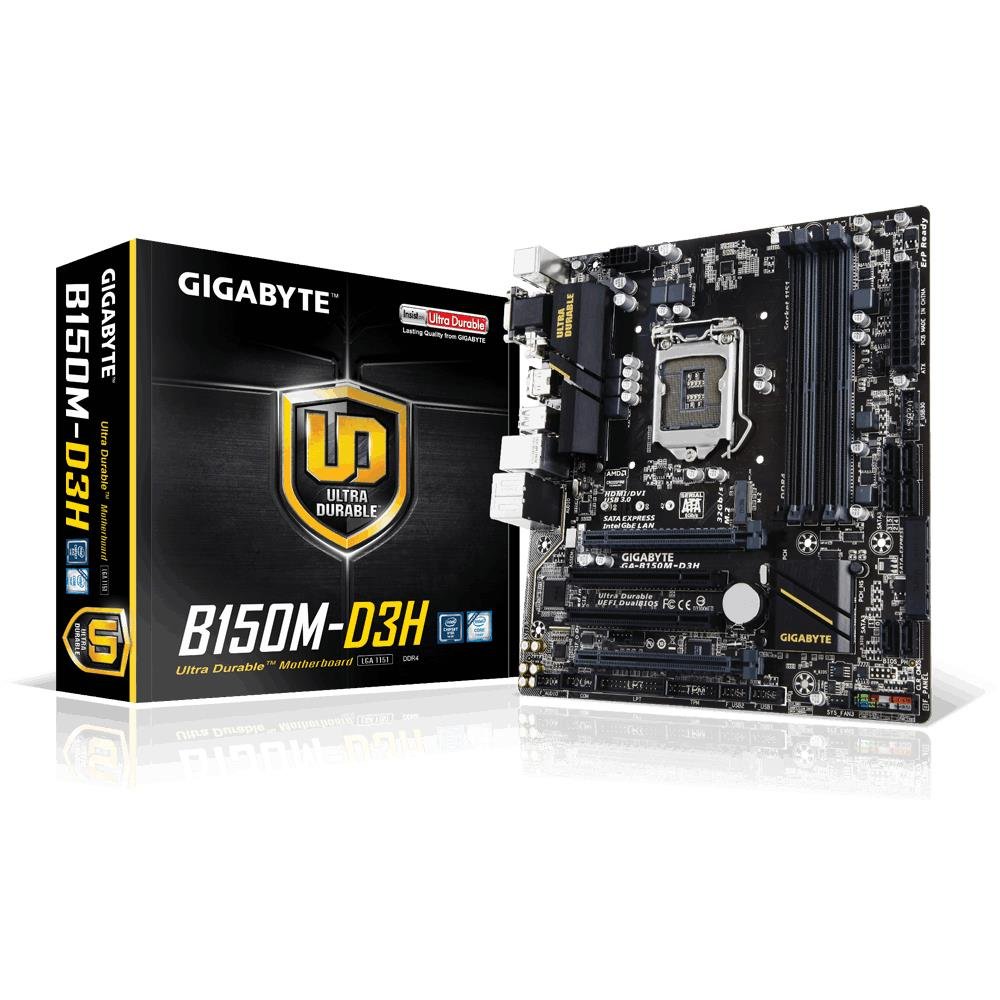
Image 1.1: GIGABYTE GA-B150M-D3H Micro ATX Motherboard. This image displays the overall layout of the motherboard, highlighting its compact Micro ATX form factor and various component slots.
2. معلومات السلامة
اتبع احتياطات السلامة التالية لمنع تلف اللوحة الأم وإصابة نفسك:
- Always disconnect the power cord from the wall outlet before touching any components.
- ارتدِ سوارًا مضادًا للكهرباء الساكنة على معصمك أو المس جسمًا معدنيًا مؤرضًا بشكل متكرر لتفريغ الكهرباء الساكنة.
- قم بالتعامل مع اللوحة الأم من حوافها لتجنب لمس المكونات الحساسة.
- احفظ اللوحة الأم بعيدًا عن الرطوبة ودرجات الحرارة القصوى.
- تأكد من وجود تهوية مناسبة داخل علبة الكمبيوتر لمنع ارتفاع درجة الحرارة.
3. محتويات العبوة
تأكد من وجود جميع العناصر في حزمة اللوحة الأم الخاصة بك:
- GIGABYTE GA-B150M-D3H Motherboard
- دليل المستخدم
- I / O Shield
- كابلات ساتا
- قرص مضغوط/قرص DVD للسائق
Note: Contents may vary slightly depending on region or revision.
4. تخطيط اللوحة الأم
Familiarize yourself with the various components and connectors on the GA-B150M-D3H motherboard.
Image 4.1: GIGABYTE GA-B150M-D3H Motherboard Layout. This image provides a visual reference for the location of key components such as the CPU socket, DIMM slots, PCIe slots, SATA ports, and M.2 connector.
المكونات الرئيسية:
- مقبس المعالج LGA 1151: For 6th Generation Intel Core Processors.
- فتحات DDR4 DIMM (4): Supports Dual Channel DDR4 memory up to 2133 MHz.
- فتحات PCIe: Includes PCIe Gen3 x16 for graphics cards and PCIe x1 slots for expansion.
- M.2 Connector: Supports PCIe NVMe & SATA SSDs with up to 32Gb/s data transfer.
- SATA Express Connector: For up to 16Gb/s data transfer.
- منافذ SATA بسرعة 6 جيجابت/ثانية: For connecting traditional SATA storage devices.
- موصل طاقة ATX ذو 24 سنًا: مدخل الطاقة الرئيسي.
- 8-Pin ATX 12V Power Connector: CPU power input.
- رؤوس اللوحة الأمامية: For power button, reset button, LED indicators, and USB ports.
- موصلات الصوت: 8-channel HD Audio with high quality capacitors and Audio Noise Guard.
5. الإعداد والتثبيت
اتبع هذه الخطوات لتثبيت اللوحة الأم ومكوناتها بشكل صحيح.
5.1. تثبيت وحدة المعالجة المركزية
- Locate the LGA 1151 CPU socket.
- افتح ذراع مقبس وحدة المعالجة المركزية وارفع لوحة التحميل.
- قم بمحاذاة وحدة المعالجة المركزية مع المقبس بعناية، مع التأكد من تطابق المثلث الذهبي على وحدة المعالجة المركزية مع المثلث الموجود على المقبس. لا تُدخل وحدة المعالجة المركزية بالقوة في المقبس.
- قم بإنزال لوحة التحميل وثبتها بالرافعة.
5.2. تركيب مبرد وحدة المعالجة المركزية
Refer to your CPU cooler's instruction manual for specific installation steps. Ensure thermal paste is applied correctly between the CPU and cooler base.
5.3. تثبيت الذاكرة (RAM)
- افتح المشابك الموجودة في كلا طرفي فتحات DDR4 DIMM.
- قم بمحاذاة وحدة الذاكرة مع الفتحة، مع التأكد من أن الشق الموجود على الوحدة يتطابق مع المفتاح الموجود في الفتحة.
- اضغط بقوة على كلا طرفي وحدة الذاكرة حتى تستقر المشابك في مكانها.
- For dual-channel performance, install memory modules in matching colored slots (e.g., DIMM1 and DIMM2).
5.4. Installing Expansion Cards
- Remove the metal bracket from the desired PCIe slot on your computer case.
- Align the expansion card with the PCIe slot and press down firmly until it is seated correctly.
- Secure the card with a screw to the computer case.
5.5. توصيل أجهزة التخزين
- أجهزة SATA: Connect one end of the SATA data cable to a SATA 6Gb/s port on the motherboard and the other end to your hard drive or SSD. Connect the SATA power cable from your power supply to the device.
- M.2 SSD: أدخل محرك الأقراص الصلبة M.2 SSD في فتحة M.2 بزاوية، ثم ادفعه لأسفل برفق وثبته بالبرغي المرفق.
- SATA Express: If using a SATA Express device, connect it to the designated SATA Express connector.
5.6. توصيل موصلات اللوحة الأمامية
Connect the cables from your computer case's front panel (power button, reset button, HDD LED, power LED, front USB, front audio) to the corresponding headers on the motherboard. Refer to the motherboard layout diagram for exact locations and pin assignments.
5.7. توصيل مصدر الطاقة
- Connect the 24-pin ATX main power connector from your power supply to the 24-pin power socket on the motherboard.
- Connect the 8-pin ATX 12V CPU power connector to the 8-pin socket near the CPU.
- تأكد من أن جميع توصيلات الطاقة آمنة.
6. تعليمات التشغيل
6.1. التمهيد الأول
After assembling all components, connect your monitor, keyboard, and mouse. Power on the system. The system should display the GIGABYTE splash screen and then enter the BIOS/UEFI setup or attempt to boot from a connected storage device.
6.2. إعداد BIOS/UEFI
للدخول إلى إعدادات BIOS/UEFI، اضغط على ديل key repeatedly during the boot process when the GIGABYTE logo appears. Here you can configure system settings, boot order, and monitor hardware status. The GA-B150M-D3H features GIGABYTE UEFI Dual BIOS for enhanced reliability.
6.3. تثبيت برنامج التشغيل
After installing your operating system, install the necessary drivers for the motherboard components. These can be found on the included driver CD/DVD or downloaded from the official GIGABYTE website. Key drivers include chipset, audio (Realtek ALC892 codec), LAN, and any integrated graphics drivers.
6.4. تثبيت نظام التشغيل
Insert your operating system installation media (USB drive or DVD) and configure the boot order in the BIOS/UEFI to boot from it. Follow the on-screen instructions to install your preferred operating system (e.g., Windows 8.1, Windows 10).
7. الصيانة
7.1. التنظيف
نظّف الجزء الداخلي من جهاز الكمبيوتر بانتظام لمنع تراكم الغبار، الذي قد يؤدي إلى ارتفاع درجة الحرارة. استخدم الهواء المضغوط لإزالة الغبار من المراوح، ومشتتات الحرارة، ومكونات اللوحة الأم. تأكد من إيقاف تشغيل الجهاز وفصله عن الكهرباء قبل التنظيف.
7.2. تحديثات BIOS
GIGABYTE periodically releases BIOS updates to improve system stability, compatibility, and performance. Visit the official GIGABYTE website for your motherboard model (GA-B150M-D3H) to check for the latest BIOS version and follow the provided instructions for updating. Exercise caution during BIOS updates, as an interruption can render the motherboard inoperable.
8. استكشاف الأخطاء وإصلاحها
يتناول هذا القسم المشكلات الشائعة التي قد تواجهها.
8.1. No Power / System Does Not Turn On
- Check if the power supply is connected correctly to the motherboard (24-pin and 8-pin connectors).
- تأكد من أن مفتاح مصدر الطاقة في وضع التشغيل.
- تأكد من أن كابل زر الطاقة في اللوحة الأمامية متصل بشكل صحيح بموصل اللوحة الأم.
- اختبر مصدر الطاقة باستخدام نظام آخر أو جهاز اختبار مصدر الطاقة.
8.2. لا يوجد مخرج عرض
- Ensure the monitor is connected to the correct graphics output (either integrated graphics on the motherboard or a dedicated graphics card).
- أعد تركيب بطاقة الرسومات ووحدات الذاكرة.
- Try booting with only one memory module installed.
- تأكد من تشغيل الشاشة وضبطها على مصدر الإدخال الصحيح.
8.3. عدم استقرار النظام/الأعطال
- تحقق من درجات حرارة وحدة المعالجة المركزية ووحدة معالجة الرسومات للتأكد من أنها ضمن حدود التشغيل الآمنة.
- Verify that all drivers are installed and up to date.
- قم بتشغيل أدوات تشخيص الذاكرة للتحقق من وجود خلل في ذاكرة الوصول العشوائي (RAM).
- Ensure the power supply provides sufficient and stable power to all components.
9. المواصفات
Detailed technical specifications for the GIGABYTE GA-B150M-D3H motherboard:
| ميزة | مواصفة |
|---|---|
| اسم الموديل | GA-B150M-D3H |
| عامل الشكل | مايكرو ATX (24.4 سم × 22.5 سم) |
| مقبس وحدة المعالجة المركزية | إل جي إيه 1151 |
| المعالجات المتوافقة | 6th Generation Intel Core Processors |
| مجموعة الشرائح | Intel B150 Express Chipset |
| تكنولوجيا الذاكرة | دي دي ار 4 |
| فتحات الذاكرة | 4 x DDR4 DIMM sockets (Dual Channel) |
| الحد الأقصى لسعة الذاكرة | 16 جيجا بايت |
| سرعة ساعة الذاكرة | 2133 ميجا هرتز |
| فتحات PCIe | 1 x PCI Express x16, 1 x Total PCIe Ports |
| واجهات التخزين | PCIe Gen3 x4 M.2, SATA Express, SATA 6Gb/s |
| ترميز الصوت | Realtek ALC892 codec, 8-channel HD Audio |
| منافذ USB | إجمالي 8 منافذ USB (بما في ذلك USB 2.0) |
| موصل الطاقة الرئيسي | ATX ذو 24 سنًا |
| موصل طاقة وحدة المعالجة المركزية | 8-Pin ATX 12V |
| مميزات فريدة | GIGABYTE UEFI Dual BIOS, Audio Noise Guard with LED Trace Path Lighting, App Center (Easy Tune, Cloud Station) |
10. الضمان والدعم
For warranty information, please refer to the warranty card included in your product package or visit the official GIGABYTE webقد تختلف شروط وأحكام الضمان حسب المنطقة.
For technical support, driver downloads, BIOS updates, and further product information, please visit the GIGABYTE official support webموقع:
https://www.gigabyte.com/Support
When contacting support, please have your motherboard model (GA-B150M-D3H) and serial number ready.