
مقدمة
This manual provides detailed instructions for the Inateck Bluetooth 4.1 Sport Headset, Model P20 (BH1001). Please read this guide thoroughly before using the product to ensure proper operation and to maximize your listening experience. This headset is designed for active lifestyles, offering wireless audio with a secure fit and integrated microphone.
1. الإعداد
1.1 محتويات العبوة
تأكد من وجود جميع العناصر في العبوة:
- Inateck Bluetooth Sport Headset (P20 / BH1001)
- كابل شحن USB
- Multiple pairs of silicone ear tips (various sizes)
- حقيبة الحمل
- دليل المستخدم (هذا المستند)
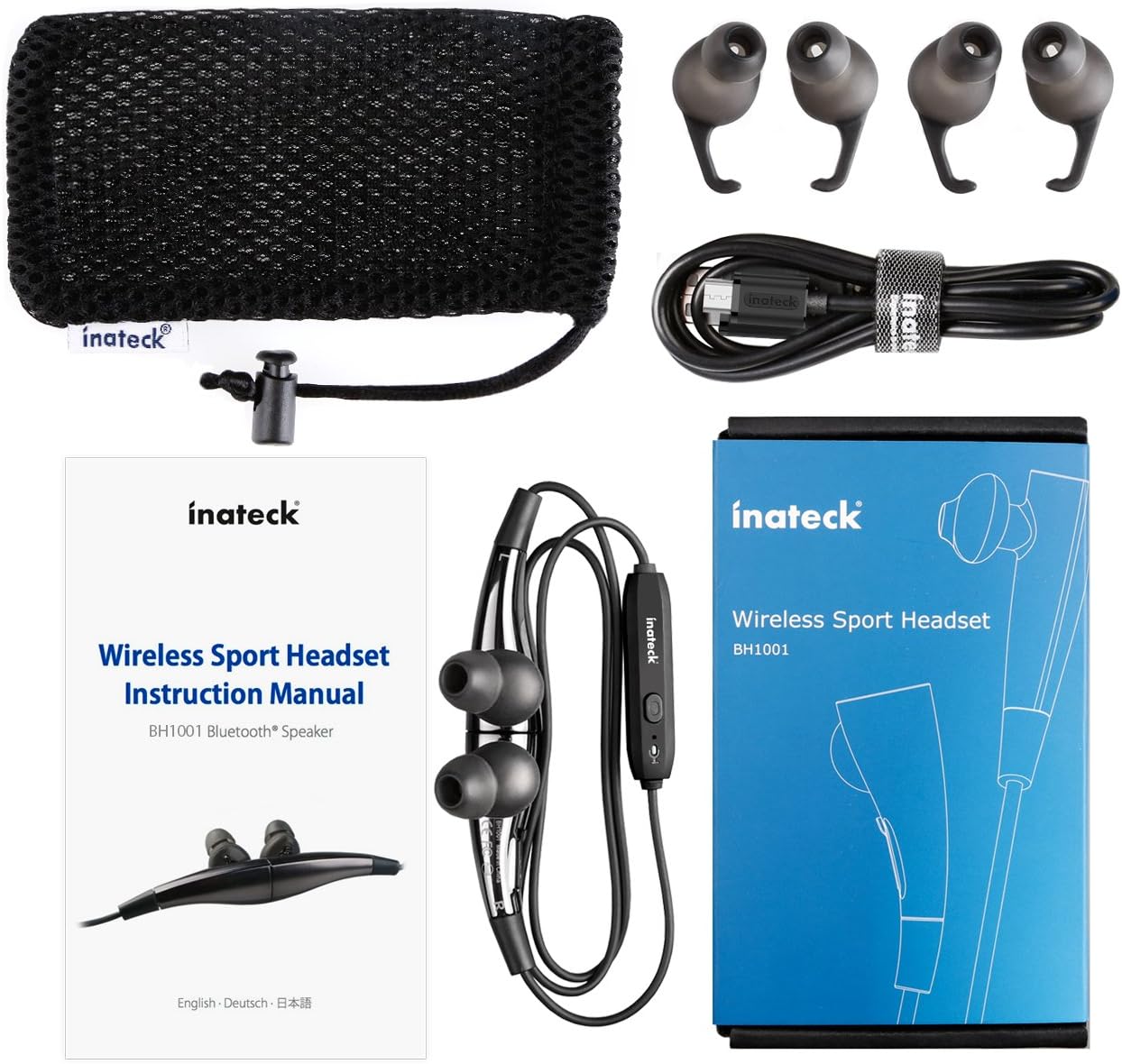
الشكل 1.1: Contents of the Inateck Bluetooth Sport Headset package.
1.2 شحن سماعة الرأس
Before first use, fully charge the headset. A full charge takes approximately 3 hours and provides at least 8 hours of music playback.
- Locate the Micro USB charging port on the headset.
- Connect the small end of the provided USB charging cable to the headset's Micro USB port.
- قم بتوصيل الطرف الأكبر من كابل USB بمصدر طاقة USB (مثل منفذ USB في الكمبيوتر، أو محول USB الجداري).
- The status indicator light will illuminate during charging. It will change color or turn off once charging is complete.

الشكل 1.2: Charging the Inateck Bluetooth Sport Headset via Micro USB.
1.3 الاقتران بجهاز بلوتوث
To connect your headset to a smartphone or other Bluetooth-enabled device:
- تأكد من إيقاف تشغيل سماعة الرأس.
- Press and hold the Multifunction Key (MFB) on the inline control unit for approximately 5-7 seconds until the status indicator light flashes red and blue alternately. This indicates pairing mode.
- On your Bluetooth device, enable Bluetooth and search for new devices.
- Select "Inateck BH1001" or "Inateck P20" from the list of available devices.
- Once paired, the status indicator light on the headset will flash blue slowly, and you may hear an audible confirmation.
- The headset will automatically attempt to reconnect to the last paired device when turned on.

الشكل 1.3: Inateck Headset paired with a mobile device for music playback.
2. تعليمات التشغيل
2.1 عناصر التحكم في سماعة الرأس
The inline control unit provides easy access to various functions:

الشكل 2.1: زيادةview of the Inateck Headset control unit.
- Multifunction Key (MFB):
- اضغط مع الاستمرار (5-7 ثوانٍ): تشغيل/إيقاف الطاقة، الدخول إلى وضع الاقتران
- ضغطة قصيرة: تشغيل/إيقاف الموسيقى مؤقتًا، الرد على المكالمة/إنهاؤها
- Long press (during incoming call): Reject call
- رفع مستوى الصوت (+) / المقطع التالي:
- ضغطة قصيرة: زيادة مستوى الصوت
- الضغط لفترة طويلة: انتقل إلى المسار التالي
- خفض مستوى الصوت (-) / المقطع السابق:
- ضغطة قصيرة: خفض مستوى الصوت
- Long press: Go to previous track
- منفذ مايكرو يو اس بي: لشحن سماعة الرأس.
- مؤشر الحالة: يعرض حالة الطاقة والإقران والشحن.
- ميكروفون: لإجراء مكالمات بدون استخدام اليدين.
2.2 ارتداء سماعة الرأس
Select the ear tips that provide the most comfortable and secure fit for your ears. The headset is designed to be worn with the cable behind your neck, ensuring stability during physical activity.

الشكل 2.2: Proper wearing of the Inateck Sport Headset for active use.
2.3 Magnetic Earbuds Feature
The earbuds feature integrated magnets. When not in use, you can connect the two earbuds together, forming a necklace around your neck. This action automatically pauses music playback and prevents the headset from falling off.

الشكل 2.3: Magnetic earbuds feature for secure wearing around the neck.

الشكل 2.4: Headset worn as a necklace using the magnetic feature.
3. الصيانة
- تنظيف: امسح سماعة الرأس بقطعة قماش ناعمة وجافة. لا تستخدم المنظفات الكاشطة أو المذيبات.
- نصائح الأذن: قم بإزالة أطراف الأذن المصنوعة من السيليكون وتنظيفها بانتظام باستخدام الصابون اللطيف والماء. تأكد من جفافها تمامًا قبل إعادة تركيبها.
- تخزين: When not in use, store the headset in the provided carrying pouch to protect it from dust and damage. Avoid extreme temperatures.
- مقاومة الماء: The headset is designed to be water-resistant for sports and exercise (e.g., sweat, light rain). Do not submerge it in water or expose it to heavy rain.
4. استكشاف الأخطاء وإصلاحها
4.1 لا يمكن تشغيله
Ensure the headset is fully charged. Connect it to a power source using the USB cable and allow it to charge for at least 30 minutes before attempting to power on again.
4.2 لا يمكن الاقتران بالجهاز
- Ensure the headset is in pairing mode (status indicator flashing red and blue alternately).
- Make sure Bluetooth is enabled on your device and it is within range (typically 10 meters or 33 feet).
- قم بإيقاف تشغيل وظيفة البلوتوث ثم أعد تشغيلها على جهازك.
- If previously paired, try "forgetting" or "unpairing" the headset from your device's Bluetooth settings and then re-pair.
- تأكد من عدم وجود أجهزة بلوتوث أخرى تتداخل مع الاتصال.
4.3 لا يوجد صوت أو جودة صوت رديئة
- تحقق من مستوى الصوت في كل من سماعة الرأس والجهاز المتصل.
- Ensure the headset is properly paired and connected to your device.
- Move closer to your device to reduce potential interference or range issues.
- Ensure the ear tips are correctly seated in your ears for optimal sound delivery.
- Reboot both the headset and your connected device.
4.4 الاتصال المتقطع
- Ensure there are no physical obstructions between the headset and your device.
- Avoid placing your device in areas where the signal might be blocked (e.g., deep pockets, behind thick walls).
- تقليل التداخل من الأجهزة اللاسلكية الأخرى (أجهزة توجيه Wi-Fi، وأجهزة Bluetooth الأخرى).
- Keep the headset and your device within the recommended Bluetooth range.
5. المواصفات
| ماركة | إيناتيك |
| اسم الموديل | ص20 |
| رقم الموديل | بي اتش 1001 |
| تكنولوجيا الاتصال | بلوتوث 4.1 |
| عامل الشكل | داخل الأذن |
| وضع الأذن | Intra-aural |
| مقبس سماعة الرأس | USB (للشحن) |
| مستوى مقاومة الماء | Waterproof (suitable for sweat/light rain) |
| المميزات الخاصة | Sports and exercise, integrated microphone, magnetic earbuds |
| وزن العنصر | 78 جرام |
| نوع التحكم | Volume Control, Multifunction Button |
| مادة | بلاستيك |
6. معلومات الضمان
Inateck products typically come with a limited warranty. For specific warranty terms and conditions applicable to your Inateck Bluetooth Sport Headset, please refer to the warranty card included in your product packaging or visit the official Inateck webالموقع. احتفظ بإثبات الشراء الخاص بك لتقديم مطالبات الضمان.
7. دعم العملاء
If you encounter any issues not covered in this manual or require further assistance, please contact Inateck customer support. You can usually find contact information, FAQs, and additional resources on the official Inateck webموقع:
Webموقع: www.inateck.com
Please have your product model (P20 / BH1001) and purchase details ready when contacting support.