
1. المقدمة
This manual provides detailed instructions for the setup, operation, and maintenance of your Zmodo Mini WiFi 720p HD Wireless Indoor Home Video Security Camera. Please read this manual thoroughly before using the device to ensure proper functionality and safety. This camera is designed for indoor surveillance, offering 720p HD video, two-way audio, and remote access capabilities.
2. انتهى المنتجview
Familiarize yourself with the components of your Zmodo Mini WiFi Camera.

الصورة 2.1: Zmodo Mini WiFi Camera mounted on a wall, showing its compact design and lens. This image illustrates the camera's appearance and typical indoor placement.

الصورة 2.2: Zmodo Mini WiFi Camera held in a person's hand, demonstrating its small and portable size. This helps visualize the camera's dimensions.
الصورة 2.3: Zmodo Mini WiFi Camera displayed with its power adapter and a quick guide. This shows the main items included in the product package.
2.1 محتويات العبوة
- Zmodo Mini WiFi Camera
- محول الطاقة
- دليل البدء السريع
3. تعليمات الإعداد
3.1 تنزيل التطبيق
للتحكم و view your camera, download the MeShare app. بحث عن "MeShare" in the Apple App Store (for iOS 6 and up) or Google Play Store (for Android 2.3 and up).
3.2 التشغيل
- قم بتوصيل محول الطاقة بمنفذ إدخال الطاقة الخاص بالكاميرا.
- قم بتوصيل محول الطاقة بمأخذ كهربائي قياسي.
- Wait for the camera's indicator light to show a specific status (refer to the app for light status meanings during setup).
3.3 Network Connection (SmartLink)
The camera uses 2.4GHz Wi-Fi for connectivity. It is not compatible with 5GHz networks.
- Open the MeShare app and create an account or log in.
- اتبع التعليمات الموجودة في التطبيق لإضافة جهاز جديد.
- Select the SmartLink setup option. The app will guide you through connecting the camera to your home Wi-Fi network.
- Ensure your mobile device is connected to the 2.4GHz Wi-Fi network you intend to connect the camera to during setup.
4. تعليمات التشغيل
4.1 مباشر View والوصول عن بعد
Access your camera's live 720p HD video feed from anywhere using the MeShare app on your Android, iPhone, or iPad device. You can also access it via a web متصفح في user.meshare.com/user/login.

الصورة 4.1: A laptop, tablet, and smartphone simultaneously displaying live video feeds from Zmodo cameras. This illustrates the multi-device remote access capability.
4.2 الصوت ثنائي الاتجاه
The camera features two-way audio, allowing you to listen to the environment around the camera and speak through its built-in speaker using the MeShare app.
4.3 اكتشاف الحركة
The camera is equipped with a motion sensor that can detect movement. You can configure motion alerts within the MeShare app to receive notifications when motion is detected.

الصورة 4.2: A smartphone screen showing a Zmodo alert for motion detected, with video clips available for review. This demonstrates the motion alert feature.
4.4 الرؤية الليلية
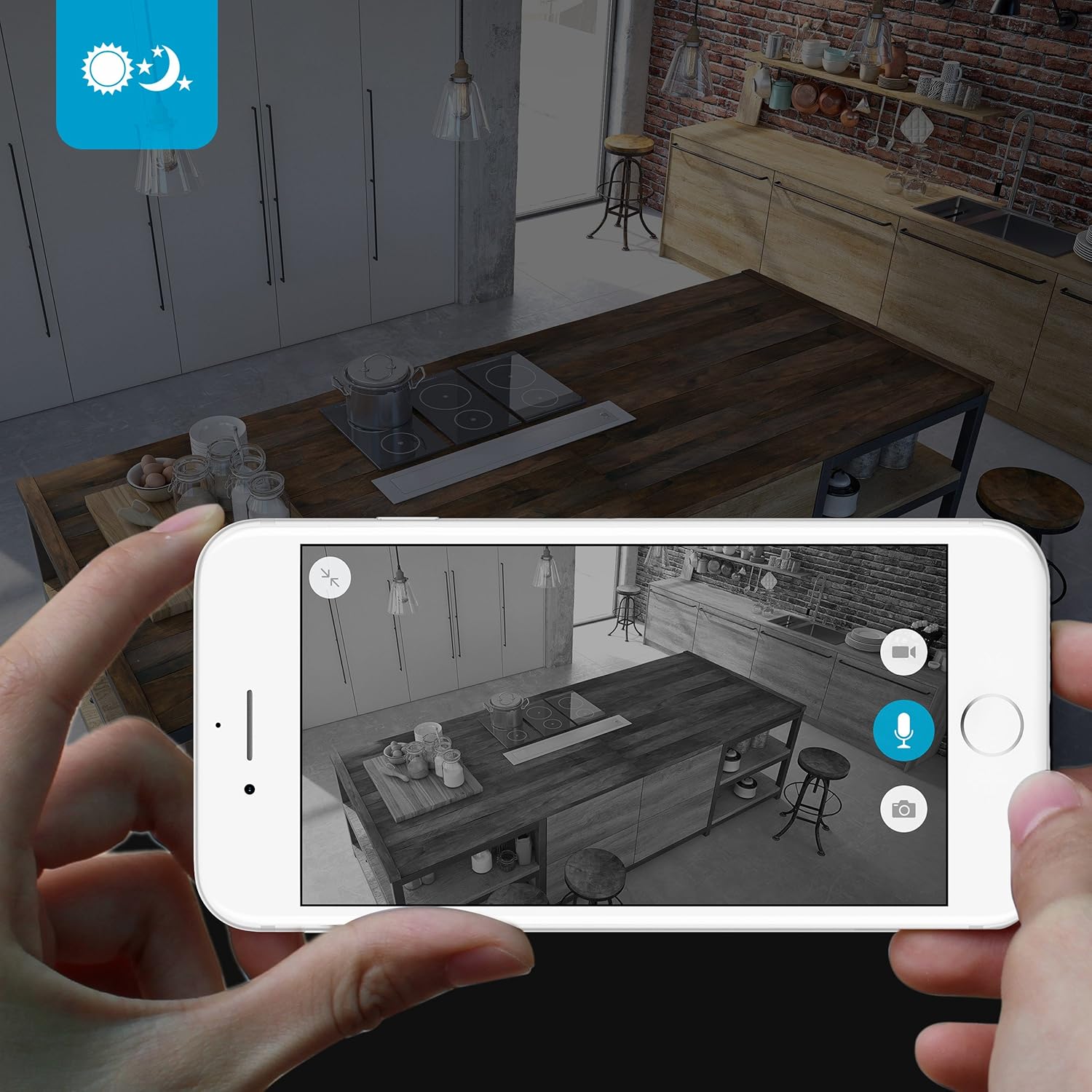
The camera provides clear surveillance even in low-light conditions with its night vision capabilities, offering a range of up to 30 feet. It automatically switches between color day mode and black & white night mode using infrared light.

الصورة 4.3: A smartphone screen showing a black and white night vision view from the Zmodo camera in a kitchen setting. This illustrates the camera's low-light performance.
4.5 زاوية واسعة View
The camera features a 115° wide-angle lens, allowing for a broad view of your indoor space.

الصورة 4.4: A smartphone screen showing a wide-angle view from the Zmodo camera in a bedroom, capturing a broad area. This highlights the 115-degree field of view.
5. الصيانة
5.1 تنظيف الكاميرا
- تأكد من إيقاف تشغيل الكاميرا قبل التنظيف.
- استخدم قطعة قماش ناعمة وجافة لمسح جسم الكاميرا برفق.
- For the lens, use a lens cleaning cloth specifically designed for optics to avoid scratches.
- Do not use liquid cleaners or aerosol sprays directly on the camera.
5.2 الاعتبارات البيئية
- تم تصميم هذه الكاميرا للاستخدام الداخلي فقط.
- تجنب وضع الكاميرا في ضوء الشمس المباشر أو بالقرب من مصادر الحرارة.
- Keep the camera away from moisture and extreme temperatures.
6. استكشاف الأخطاء وإصلاحها
6.1 المشكلات والحلول الشائعة
- الكاميرا غير متصلة بشبكة Wi-Fi: Ensure your Wi-Fi network is 2.4GHz. Verify your Wi-Fi password. Try restarting your router and the camera.
- جودة الفيديو رديئة: تحقق من سرعة اتصالك بالإنترنت. تأكد من أن عدسة الكاميرا نظيفة وخالية من أي عوائق.
- لا يوجد صوت أو صوت مشوّه: Verify microphone and speaker settings in the MeShare app. Ensure there are no physical obstructions blocking the microphone or speaker.
- Motion alerts not working: Check motion detection settings in the MeShare app. Ensure notifications are enabled for the app on your mobile device.
- الكاميرا غير متصلة بالإنترنت: Check if the camera is powered on. Verify your Wi-Fi network is active and stable. Try restarting the camera.
7. المواصفات
| ميزة | وصف |
|---|---|
| رقم الموديل | WAUBMAKGCUVDD |
| دقة التقاط الفيديو | 720 بكسل عالية الدقة |
| تكنولوجيا الاتصال | لاسلكي (واي فاي 2.4 جيجاهرتز) |
| صوت ثنائي الاتجاه | نعم |
| زاوية واسعة | 115° |
| نطاق الرؤية الليلية | يصل مداه إلى 30 قدم (الأشعة تحت الحمراء) |
| مستشعر الحركة | Yes (Motion Only Alert Type) |
| مصدر الطاقة | تيار متردد/تيار مستمر (5 فولت، 5 واط) |
| الاستخدام الداخلي والخارجي | داخلي |
| الأبعاد (الطول × العرض × الارتفاع) | 7 × 2.1 × 4.5 بوصة |
| وزن العنصر | 12 أونصات |
| الأجهزة المتوافقة | Video Monitor (Android, iPhone, iPad) |
8. الضمان والدعم
For warranty information or technical support, please refer to the official Zmodo website or contact Zmodo customer service directly. Keep your purchase receipt for warranty claims.
لمزيد من المساعدة، قم بزيارة Zmodo Store on Amazon.