
1. المقدمة
This manual provides essential information for the safe and efficient operation of your Philips 40PFL4609/F8 40-inch Full HD LED Smart TV. Please read these instructions carefully before using your television and retain them for future reference.
2. معلومات السلامة
اتبع دائمًا احتياطات السلامة الأساسية عند استخدام هذا التلفزيون لتقليل خطر الحريق والصدمة الكهربائية والإصابة.
- لا تعرض التلفاز للمطر أو الرطوبة.
- لا تفتح الخزانة؛ قم بإحالة جميع أعمال الصيانة إلى موظفين مؤهلين.
- تأكد من وجود تهوية مناسبة حول التلفزيون.
- حماية سلك الطاقة من أن يمشي عليه أحد أو يضغط عليه.
- افصل التلفزيون عن الكهرباء أثناء العواصف الرعدية أو عند عدم استخدامه لفترات طويلة.
3. محتويات العبوة
تأكد من وجود جميع العناصر في الصندوق:
- Philips 40PFL4609/F8 40-inch Full HD LED Smart TV
- جهاز التحكم عن بعد (يتطلب بطاريتين AAA، متضمنتين)
- سلك الطاقة
- Tabletop Stand and Screws
- دليل البدء السريع (غير متضمن في هذا الدليل الرقمي)
- دليل المستخدم (هذا المستند)
4. الإعداد
4.1 التفريغ والتنسيب
Carefully remove the television from its packaging. Inspect the TV for any physical damage. Place the television on a stable, flat surface or mount it on a wall using a compatible VESA 200x200mm wall mount (sold separately).
4.2 تجميع الحامل
If using the tabletop stand:
- ضع التلفزيون على سطح ناعم ونظيف بحيث يكون وجهه لأسفل لمنع تلف الشاشة.
- قم بمحاذاة الحامل مع فتحات التثبيت الموجودة في الجزء السفلي من التلفزيون.
- قم بتأمين الحامل باستخدام البراغي المرفقة.
4.3 توصيل الطاقة
Connect the power cord to the TV's power input, then plug the other end into a 110 VAC, 60 Hz electrical outlet.
4.4 توصيل الأجهزة الخارجية
Your Philips TV offers various connection options for external devices.
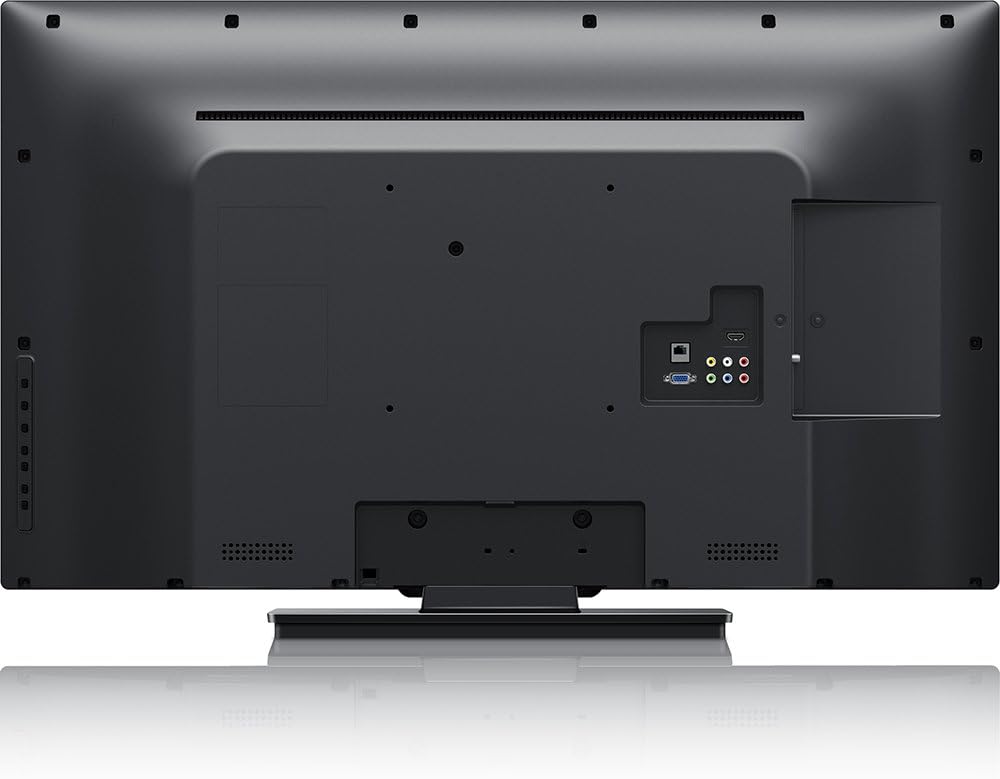
صورة: مؤخرة view of the Philips 40PFL4609/F8 television, highlighting the input ports including HDMI, DVI, and other audio/video connections.
- HDMI: Connect Blu-Ray players, game consoles, or other HDMI-enabled devices. This model has 1 HDMI port.
- دي في آي: Connect computers or other DVI-enabled devices.
- USB: Connect USB storage devices for media playback. This model has 1 USB 2.0 port.
- هوائي / كابل: قم بتوصيل هوائي أو إشارة تلفزيون الكابل لقنوات البث.
4.5 معالج الإعداد الأولي
عند تشغيل التلفزيون لأول مرة، سيرشدك خلال عملية الإعداد الأولية:
- اختيار اللغة: اختر لغتك المفضلة.
- إتصال شبكة: Connect to your home Wi-Fi network. The TV supports Wi-Fi connectivity.
- مسح القناة: Scan for available broadcast channels (if an antenna or cable is connected).
5. تشغيل التلفزيون
5.1 التحكم عن بعد أكثرview
The included remote control allows you to navigate menus, adjust settings, and control playback. Insert two AAA batteries into the remote control, ensuring correct polarity.
5.2 الوظائف الأساسية
- قوة: اضغط على زر الطاقة لتشغيل التلفزيون أو إيقاف تشغيله.
- مقدار: استخدم أزرار الصوت لضبط مستوى الصوت.
- قناة: استخدم أزرار القنوات لتغيير قنوات التلفزيون.
- مدخل: Press the input button to select connected devices (HDMI, DVI, etc.).
5.3 Smart TV Features (Net TV)
Your Philips TV features Net TV, providing access to online content and applications.
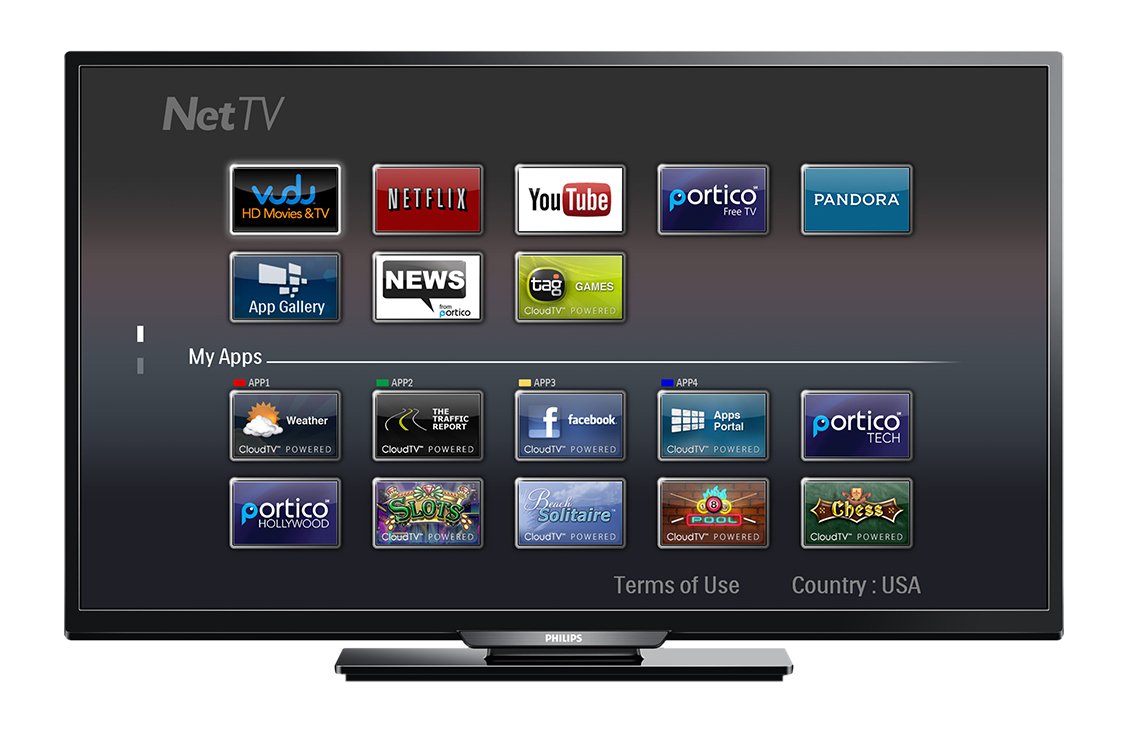
صورة: أمام view of the Philips 40PFL4609/F8 television, showing the Net TV interface with various application icons such as Netflix, YouTube, and other streaming services.
- الوصول إلى التطبيقات: Use the remote control to navigate to the Net TV menu and select applications like Netflix and YouTube.
- اتصال واي فاي: Ensure your TV is connected to a stable Wi-Fi network for optimal Smart TV performance.
5.4 إعدادات الصورة
Adjust picture settings to enhance your viewالخبرة:
- بكسل بلس HD: This video engine enhances detail, depth, and clarity.
- 120Hz PMR (Perfect Motion Rate): Provides sharp images in fast-moving scenes.
- Access the picture menu to adjust brightness, contrast, color, and sharpness.
5.5 إعدادات الصوت
تحسين إخراج الصوت:
- SRS TruSurround: Enjoy immersive sound with this integrated surround sound format.
- Access the audio menu to adjust bass, treble, and sound modes.
5.6 تشغيل الوسائط عبر USB
Connect a USB storage device to the TV's USB 2.0 port to view الصور، وتشغيل الموسيقى، أو مشاهدة مقاطع الفيديو.
6. الصيانة
6.1 تنظيف الشاشة
امسح الشاشة برفق بقطعة قماش ناعمة وخالية من الوبر. لإزالة البقع الصعبة، استخدمampen the cloth with a small amount of water or a specialized screen cleaner. Do not spray liquid directly onto the screen.
6.2 تنظيف Casing
امسح التلفازasinاستخدم قطعة قماش ناعمة وجافة. تجنب استخدام المنظفات أو المذيبات الكاشطة.
6.3 تحديثات البرامج
This model may not support automatic software updates via the internet. Check the Philips support website for information on manual firmware updates, if available, to ensure optimal performance and access to the latest features.
7. استكشاف الأخطاء وإصلاحها
إذا واجهت مشاكل مع جهاز التلفزيون الخاص بك، فراجع الحلول الشائعة التالية:
- لا يوجد طاقة: Ensure the power cord is securely plugged into both the TV and the electrical outlet. Check the power outlet with another device.
- لا صورة/صوت: Verify the correct input source is selected. Check all cable connections (HDMI, DVI, antenna).
- لا يوجد اتصال بالشبكة: Ensure your Wi-Fi router is working correctly. Re-enter your Wi-Fi password if necessary.
- Net TV Limitations: Some users have reported that the Net TV functionality on this model can be basic or limited in terms of additional app installation or software updates. If you find the built-in Smart TV features insufficient, consider connecting an external streaming device.
- الأضرار المادية: Upon unboxing, carefully inspect the screen and casing for any damage, especially along the edges, which could affect display quality. Contact your retailer immediately if damage is found.
- جهاز التحكم عن بعد لا يعمل: استبدل بطاريات AAA. تأكد من عدم وجود أي عوائق بين جهاز التحكم عن بعد ومستشعر الأشعة تحت الحمراء الخاص بالتلفزيون.
8. المواصفات

صورة: جانب view of the Philips 40PFL4609/F8 television, illustrating its slim profile and side-mounted connectivity options.
| ميزة | وصف |
|---|---|
| اسم الموديل | فيليبس 40PFL4609/F8 |
| حجم الشاشة | 40 بوصات (100.3 سنتيمترًا) |
| تكنولوجيا العرض | LED، LCD |
| دقة | 1080p Full HD |
| معدل التحديث | 120 Hz (120Hz PMR) |
| نسبة العرض إلى الارتفاع | 16:9 |
| تكنولوجيا الاتصال | واي فاي |
| خدمات الإنترنت المتوافقة | نتفليكس، يوتيوب |
| المميزات الخاصة | Blu-Ray compatible, DVI Input, HDMI Input, Full HD, HD Compatible, Internet, Surround Sound |
| منافذ HDMI | 1 |
| منافذ USB 2.0 | 1 |
| وضع إخراج الصوت | ستيريو، صوت محيطي |
| Integrated Surround Sound Format | نظام SRS TruSurround |
| وصف المتحدث | نظام SRS TruSurround |
| استهلاك الطاقة | 89 واط |
| المجلدtage | 110 VAC 60 هرتز |
| وزن العنصر | 8200 جرام |
| معيار التثبيت VESA | 200 × 200 ملم |
| لون | أسود |
| الأجهزة المتوافقة | Laptop, Tablet, Game Console, Headphones |
| سنة الموديل | 2016 |
9. معلومات الضمان
This Philips television comes with a ضمان محدود لمدة 12 شهرًا provided by the manufacturer. Please retain your proof of purchase for warranty claims. The warranty covers manufacturing defects under normal use conditions.
10. دعم العملاء
For further assistance, technical support, or warranty inquiries, please contact Philips customer service. Refer to the official Philips website or your product packaging for contact details specific to your region.