
1. المقدمة
This manual provides essential information for the setup, operation, and maintenance of your Proscan PLDED3280A 32-Inch 720p LED TV. Please read this manual thoroughly before operating your television and retain it for future reference.
المميزات الرئيسية:
- 32-Inch LED HD TV with Built-in ATSC Tuner
- Multiple Connectivity Options: HDMI, VGA, YPbPr, AV Audio/Video, PC Audio, Headphone, Coaxial Out, RF
- معدل تحديث 60 هرتز لحركة سلسة
- 16:9 Aspect Ratio for widescreen viewعمل
- Slim Bezel Design for a modern aesthetic
2. ماذا يوجد في الصندوق
عند فتح العبوة، تأكد من وجود جميع العناصر:
- Proscan PLDED3280A 32-Inch 720p LED TV
- جهاز التحكم عن بعد
- حامل تلفزيون (قطعتين)
- دليل المستخدم (هذا المستند)

Figure 2.1: Proscan PLDED3280A 32-Inch 720p LED TV.
3. الإعداد
3.1 تركيب الحامل
- قم بوضع شاشة التلفزيون بعناية على سطح ناعم ونظيف لمنع الخدوش.
- قم بمحاذاة قطع الحامل مع فتحات التثبيت الموجودة في الجزء السفلي من التلفزيون.
- ثبّت الحامل باستخدام البراغي المرفقة. لا تُشدّه أكثر من اللازم.
3.2 توصيل الطاقة
Plug the power cord into the AC IN port on the back of the TV, then plug the other end into a standard electrical outlet (AC 120V, 60Hz).
3.3 توصيل الأجهزة الخارجية
Your Proscan TV offers various input ports for connecting external devices such as cable boxes, DVD/Blu-ray players, gaming consoles, and computers.
- HDMI: For high-definition audio and video. Connect up to three HDMI devices.
- VGA: لتوصيل جهاز كمبيوتر.
- YPbPr (Component): للفيديو التناظري عالي الدقة.
- AV (مركب): For standard definition video and stereo audio.
- الترددات اللاسلكية (الهوائي/الكابل): لتوصيل هوائي أو كابل تلفزيوني.
- صوت الكمبيوتر: For audio input from a PC.
- سماعة الرأس: لتوصيل سماعات الرأس.
- مخرج محوري: لإخراج الصوت الرقمي.
Ensure all cables are securely connected to the correct ports on both the TV and the external device.
4. تشغيل التلفزيون
4.1 تشغيل/إيقاف التشغيل
اضغط على قوة button on the remote control or the power button on the side of the TV to turn the television on or off. A blue indicator light on the front of the TV signifies it is powered on.
4.2 اختيار مصدر الإدخال
للتبديل بين الأجهزة المتصلة، اضغط على مدخل button on the remote control or the side of the TV. A menu will appear on screen, allowing you to select from available inputs such as TV, AV, Component, HDMI1, HDMI2, HDMI3, PC, or USB Media Player.
4.3 التحكم في مستوى الصوت
استخدم المجلد+ و المجلد- buttons on the remote control or the side of the TV to adjust the volume level. A volume bar with a numerical indicator will appear on the screen.
4.4 اختيار القناة
If an antenna or cable is connected to the RF input, use the CH+ و CH- buttons on the remote control or the side of the TV to change channels.
4.5 تصفح القائمة
اضغط على قائمة طعام button on the remote control or the side of the TV to access the on-screen display (OSD) menu. Use the arrow buttons to navigate through options and the OK or يدخل زر لتأكيد التحديدات.
5. الصيانة
Proper care ensures the longevity of your Proscan TV:
- تنظيف الشاشة: امسح الشاشة برفق بقطعة قماش ناعمة وخالية من الوبر. لإزالة البقع الصعبة، امسحها برفق.ampامسح الشاشة بقطعة قماش مبللة بالماء أو بمنظف شاشات متخصص. تجنب المواد الكيميائية القاسية أو المواد الكاشطة.
- تنظيف الخزانة: استخدم قطعة قماش ناعمة وجافة لتنظيف خزانة التلفزيون.
- تهوية: تأكد من وجود تهوية كافية حول التلفزيون. لا تسد فتحات التهوية.
- سلك الطاقة: افحص سلك الطاقة بانتظام بحثًا عن أي تلف. في حال وجود أي تلف، استبدله فورًا.
- تخزين: إذا كنت ستخزن التلفزيون لفترة طويلة، فافصله عن مصدر الطاقة وخزنه في مكان بارد وجاف.
6. استكشاف الأخطاء وإصلاحها
قبل الاتصال بدعم العملاء، جرّب الحلول التالية للمشكلات الشائعة:
| مشكلة | السبب المحتمل / الحل |
|---|---|
| لا يوجد طاقة | Ensure the power cord is securely plugged into both the TV and the outlet. Check if the outlet is working. |
| لا توجد صورة / لا توجد إشارة | Verify the correct input source is selected (e.g., HDMI1, AV). Check all cable connections between the TV and external devices. |
| لا يوجد صوت | تحقق من مستوى الصوت وتأكد من أن التلفزيون ليس في وضع كتم الصوت. تحقق من توصيلات كابل الصوت. |
| جهاز التحكم عن بعد لا يعمل | استبدل بطاريات جهاز التحكم عن بُعد. تأكد من عدم وجود أي عوائق بين جهاز التحكم عن بُعد ومستشعر الأشعة تحت الحمراء الخاص بالتلفزيون. |
| جودة الصورة رديئة | Adjust picture settings (brightness, contrast, color). Ensure the input source is providing a high-quality signal. |
7. المواصفات
| ميزة | التفاصيل |
|---|---|
| ماركة | بروسكان |
| رقم الموديل | PLDED3280A |
| حجم الشاشة | 32 بوصة |
| تكنولوجيا العرض | قاد |
| دقة | 720 بكسل |
| معدل التحديث | 60 هرتز |
| نسبة العرض إلى الارتفاع | 16:9 |
| تكنولوجيا الاتصال | HDMI, VGA, YPbPr, AV, PC Audio, Headphone, Coaxial Out, RF |
| وزن العنصر | 13.7 رطل |
| أبعاد المنتج | 8 بوصة عمق × 28.8 بوصة عرض × 19.1 بوصة ارتفاع |
| لون | أسود |
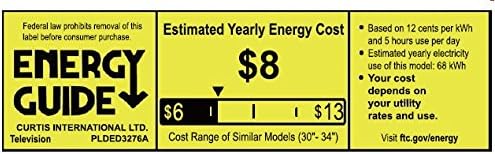
Figure 7.1: Estimated Yearly Energy Cost for similar models.
8. الضمان والدعم
For detailed warranty information and customer support, please refer to the official Proscan webالموقع الإلكتروني أو دليل المستخدم الكامل بصيغة PDF.
يمكنك تنزيل دليل المستخدم الكامل (PDF) هنا.
لمزيد من المساعدة، قم بزيارة PROSCAN Store on Amazon.