
1. المقدمة
This manual provides essential instructions for the safe and effective use of your T-Power AC Adapter. This adapter is designed to provide reliable power to compatible Brookstone Big Blue Party and Harman Kardon Onyx/Aura Studio Bluetooth wireless speakers. Please read this manual thoroughly before use and retain it for future reference.
2. معلومات السلامة
- المجلدtagالتوافق ه: تأكد من حجم مقبس الحائطtagيتطابق e مع مستوى صوت الإدخال الخاص بالمحولtage range (AC 100V - 240V).
- الاستخدام الداخلي: This adapter is intended for indoor use only. Avoid exposure to moisture or extreme temperatures.
- الاتصال الصحيح: Always connect the adapter to the device before plugging it into a power outlet. Disconnect from the outlet first before unplugging from the device.
- تجنب الضرر: لا تستخدم المحول إذا كان السلك أو القابس تالفًا. لا تحاول فتح المحول أو إصلاحه.
- تهوية: Ensure adequate ventilation around the adapter during use to prevent overheating.
- الأطفال والحيوانات الأليفة: Keep the adapter and cables out of reach of children and pets.
3. محتويات العبوة
تأكد من أن الحزمة الخاصة بك تحتوي على العناصر التالية:
- 1 x T-Power AC Adapter
- 1 × التيار المتردد الحبل

Image: The T-Power AC Adapter shown with its detachable AC power cord, ready for connection.
4. التوافق
This T-Power AC Adapter is designed for use with a wide range of Bluetooth wireless speakers. Please verify your speaker model number against the list below for compatibility:
Brookstone Speakers:
- Brookstone Big Blue Party Indoor-Outdoor Bluetooth Wireless Speaker (BIGBLUEPRTYV1.5, mp-849504)
- Brookstone Big Blue Studio Wireless Bluetooth Speaker (P/N: KSAS0451800200HU)
- Brookstone Big Blue Party X Indoor-Outdoor Bluetooth Speaker

Image: A grey Brookstone Big Blue Party speaker.

Image: A black Brookstone Big Blue Party speaker.
Harman Kardon Onyx Studio Series:
- Harman Kardon Onyx Studio 1 Wireless Speaker
- Harman Kardon Onyx Studio 2 Wireless Speaker (HKONYXSTUDIOG1, FBA_Onyx Studio, HKONYXSTUDIOJN, 6132A-ONYXST, TR00236_B, HarmanKardonOnyx2White, OW-XRDP-0NQU, ONYXSTUDIO2BLKUS, APIONYXST2)
- Harman Kardon Onyx Studio 3 Wireless Speaker (ONYXSTUDIO3R, HKONYXSTUDIO3BLKUS, ONYXSTUDIO3REDG1, ONYXSTUDIO3K, ONYXSTUDIO3BLUEG1, APIONYXST3)
- Harman Kardon Onyx Studio 4 Wireless Speaker (HKOS4BLKBSG, HKOS4BLKEU, HKOS4WHTBSG, HKOS4BLUBSG)
- Harman Kardon Onyx Studio 5 Wireless Speaker (Onyx5, HKONYXSTUDIO3BLKAM)
- Harman Kardon Onyx Studio Bluetooth Wireless Portable Speaker System (ESX2567Q, ESX-2567Q S,N FC0006 0534860, FC00060534860, FC005-0924799)
Harman Kardon Aura Studio Series:
- Harman Kardon Aura Studio Speaker
- Harman Kardon Aura 2 Studio Speaker
- Harman Kardon Aura 3 Studio Speaker
- Harman Kardon Aura 4 Studio Speaker
- Harman Kardon Aura 5 Studio Speaker

Image: A black, circular Harman Kardon Onyx Studio speaker.
ملحوظة: Always double-check your speaker's model number to ensure compatibility before connecting the adapter. If unsure, consult your speaker's original manual or contact T-Power support.
5. الإعداد
Follow these steps to set up your T-Power AC Adapter:
- أفرغ: Carefully remove the AC adapter and power cord from the packaging.
- توصيل سلك الطاقة: Insert the AC power cord into the adapter's input port. Ensure it is firmly seated.
- الاتصال بمكبر الصوت: Insert the adapter's output plug into the charging port of your compatible Brookstone or Harman Kardon speaker.
- الاتصال بمنفذ الطاقة: Plug the AC power cord into a standard wall power outlet (AC 100V - 240V).
- تحقق من الاتصال: The adapter may feature a small blue LED light to indicate it is receiving power and functioning correctly.
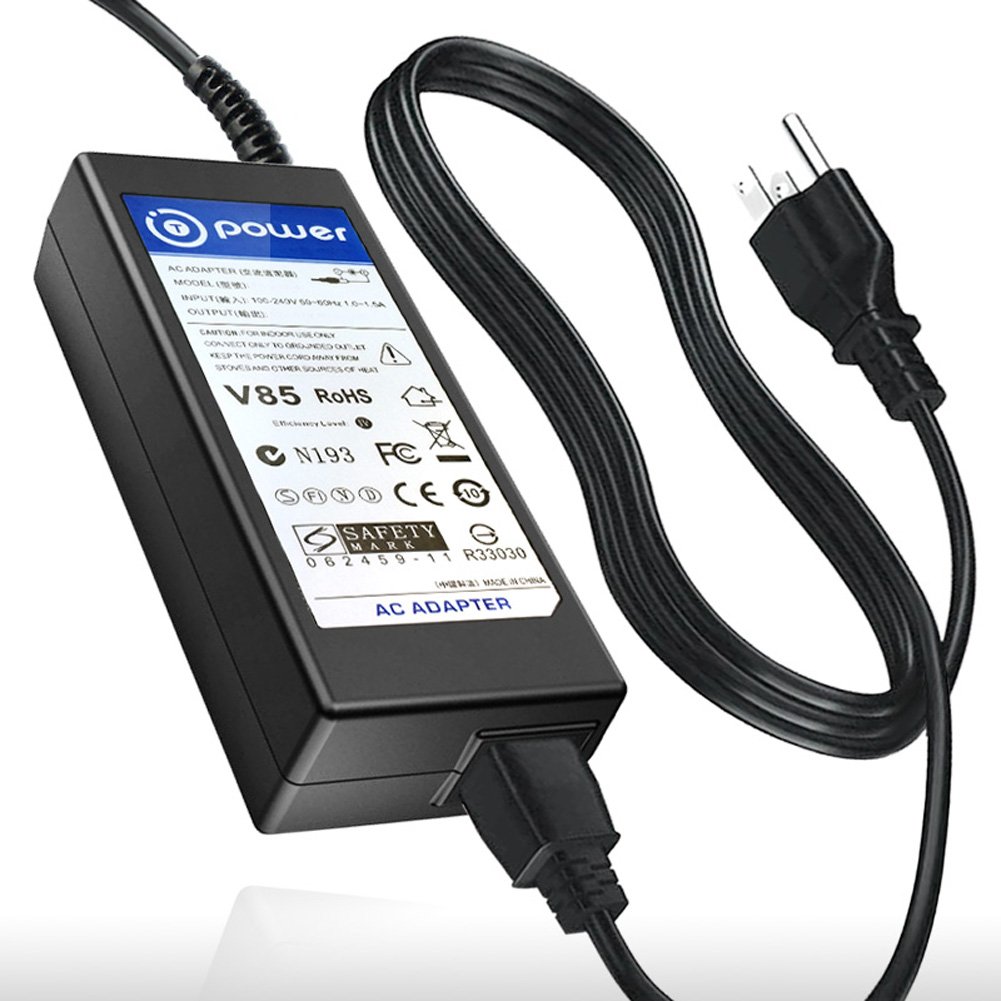
Image: The T-Power AC Adapter with its power cord connected and ready for use.
6. تعليمات التشغيل
Once properly connected, the T-Power AC Adapter will begin supplying power to your speaker. If your speaker has a charging indicator, observe it to confirm charging status.
- الشحن: The adapter provides a stable 19V DC output, suitable for charging and powering your compatible speaker.
- مؤشر LED: A small blue LED light on the adapter indicates that it is powered on and ready to deliver current.
- الإنقطاع: To disconnect, first unplug the adapter from the wall outlet, then carefully remove the plug from your speaker.
7. الصيانة
To ensure the longevity and optimal performance of your T-Power AC Adapter, follow these maintenance guidelines:
- تنظيف: Disconnect the adapter from all power sources before cleaning. Use a soft, dry cloth to wipe the surface. Do not use liquid cleaners or solvents.
- تخزين: عند عدم الاستخدام، يُحفظ المحول في مكان بارد وجاف، بعيدًا عن أشعة الشمس المباشرة والرطوبة. تجنب لف الكابل بإحكام لمنع تلفه.
- تقتيش: Periodically inspect the adapter and cables for any signs of wear, cuts, or damage. Discontinue use if any damage is observed.
8. استكشاف الأخطاء وإصلاحها
If you encounter issues with your T-Power AC Adapter, refer to the following common problems and solutions:
- لا يوجد طاقة/شحن:
- Ensure the adapter is securely plugged into both the wall outlet and the speaker.
- تحقق من عمل مقبس الحائط عن طريق توصيل جهاز آخر.
- Verify that the adapter's blue LED indicator is lit. If not, try a different outlet.
- Confirm that your speaker model is listed as compatible in Section 4.
- ارتفاع درجة حرارة المحول:
- Unplug the adapter immediately.
- Ensure it is not covered or placed in an enclosed space that restricts airflow.
- Allow it to cool down before attempting to use it again. If overheating persists, discontinue use.
- الأضرار المادية:
- If the adapter or cable shows signs of physical damage (e.g., frayed wires, bent connector), discontinue use to prevent electrical hazards.
If the problem persists after attempting these troubleshooting steps, please contact T-Power customer support.
9. المواصفات
| رقم الموديل | TP-BJ7-9ZI |
| حجم الإدخالtage المدى | تيار متردد 100 فولت - 240 فولت |
| حجم الإخراجtage | 19 فولت تيار مستمر |
| أبعاد المنتج | 4 × 4 × 2 بوصة |
| وزن العنصر | 4 أونصة |
| لون | أسود |
| الشهادات | حاصلة على شهادة CE/FCC/RoHS |
10. الضمان والدعم
T-Power products are manufactured with quality and reliability in mind. While specific warranty details are not provided in this manual, for any product inquiries, technical assistance, or warranty claims, please contact T-Power customer support directly.
You can often find support contact information on the product packaging or through the retailer where the product was purchased. For general information about T-Power, you may visit their store page: