
Supersonic IQ3710DJBT
Supersonic IQ Sound IQ-3710DJBT Portable DJ Speaker User Manual
الموديل: IQ-3710DJBT
تعليمات السلامة الهامة
Please read all instructions carefully before operating this device. Keep this manual for future reference.
- لا تعرض هذا الجهاز للمطر أو الرطوبة.
- لا تسد أي فتحات تهوية.
- لا تقم بالتثبيت بالقرب من أي مصادر للحرارة مثل المشعات أو فتحات التدفئة أو المواقد أو أي أجهزة أخرى (بما في ذلك ampالمُضخِّمات) التي تنتج الحرارة.
- احمِ سلك الطاقة من السير عليه أو الضغط عليه ، خاصةً عند القوابس ومآخذ التوصيل ونقطة خروجها من الجهاز.
- استخدم فقط المرفقات/الملحقات المحددة من قبل الشركة المصنعة.
- افصل هذا الجهاز أثناء العواصف الرعدية أو عند عدم استخدامه لفترات طويلة من الزمن.
- قم بإحالة جميع أعمال الصيانة إلى موظفي الخدمة المؤهلين. الصيانة مطلوبة في حالة تعرض الجهاز للتلف بأي شكل من الأشكال.
المنتج انتهىview
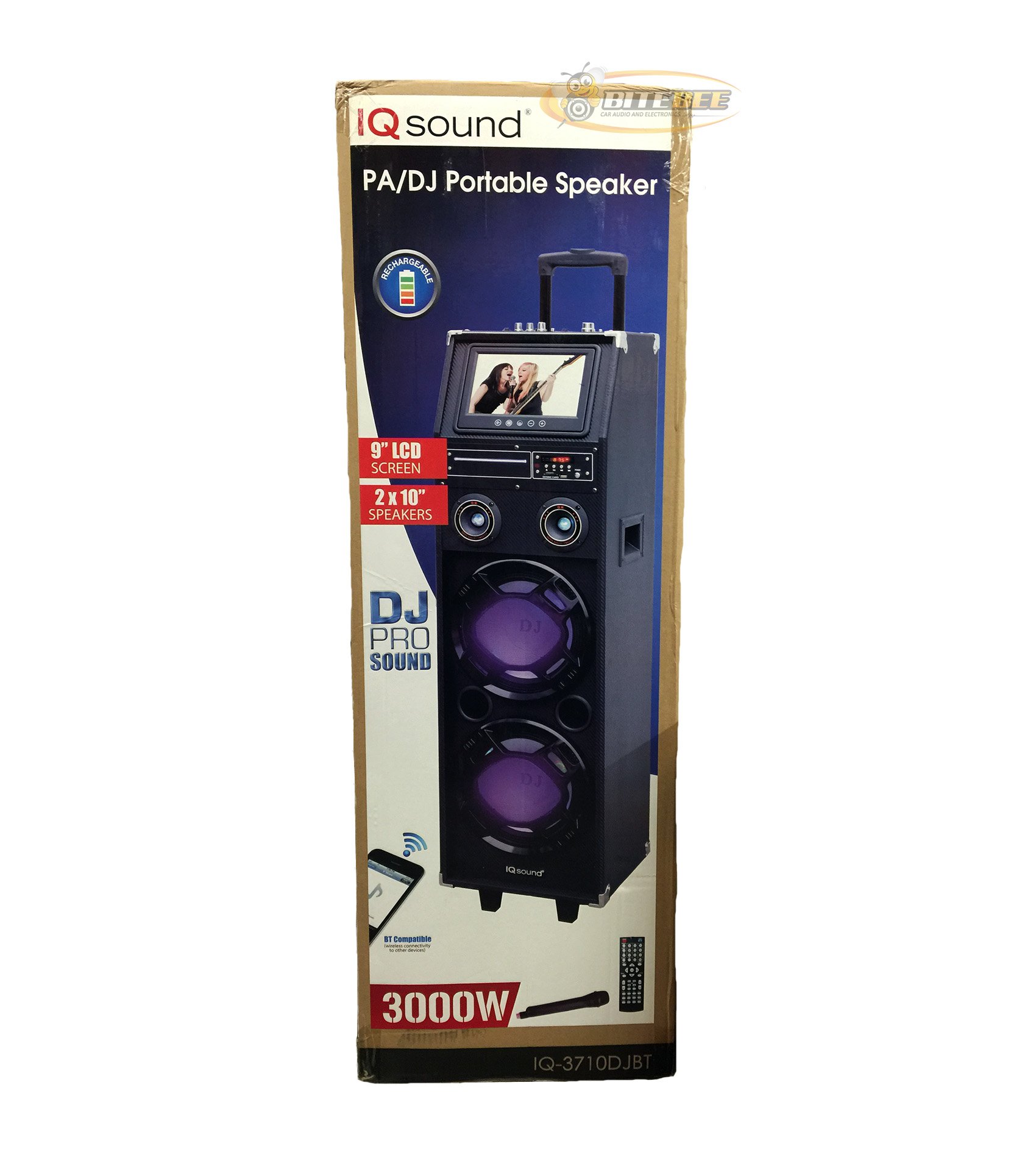
الصورة: الجبهة view of the Supersonic IQ Sound IQ-3710DJBT Portable DJ Speaker, showcasing its dual speakers, 9-inch LCD screen, and control panel.
سمات
- Dual 10-inch Full Range Speakers
- Built-in Bluetooth for wireless audio streaming
- FM Radio tuner
- 5-Band Equalizer for audio customization
- 9-inch LCD Display for video and menu navigation
- Built-in Rechargeable Battery for portability
- Integrated LED Lights for visual effects
- Multimedia Compatible (supports various video and music formats)
- USB Input for external audio devices
- فتحة بطاقة SD لتشغيل الوسائط
- مدخل جيتار 1
- 1 Microphone Jack (includes 1 microphone)
- جهاز التحكم عن بعد متضمن
- Built-in Handle and Wheels for easy transport
محتويات الحزمة
- IQ-3710DJBT Portable DJ Speaker
- محول الطاقة
- ميكروفون
- جهاز التحكم عن بعد
- دليل المستخدم (هذا المستند)
Controls and Connections (General)
The main control panel is located on the top or rear of the speaker, featuring buttons for power, mode selection, playback controls (play/pause, skip), volume adjustment, EQ settings, and light controls. Input ports for USB, SD card, microphone, and guitar are also present. The 9-inch LCD display provides visual feedback for media playback, FM radio tuning, and menu navigation.
يثبت
1. شحن البطارية
- Connect the included power adapter to the speaker's DC input port.
- Plug the power adapter into a standard wall outlet (AC 100-240V, 50/60Hz).
- The charging indicator light (if present) will illuminate. Allow approximately 6-8 hours for a full charge before first use.
- يمكن استخدام السماعة أثناء الشحن.
2. التشغيل الأولي
- تأكد من أن مكبر الصوت مشحون بالكامل أو متصل بمصدر طاقة.
- Locate the Power button (usually on the control panel) and press it to turn on the speaker.
- The LCD display will illuminate, and the speaker will enter the default mode.
3. توصيل الأجهزة الطرفية
ميكروفون: Insert the included microphone's cable into the Microphone Jack.
غيتار: Insert your guitar's cable into the Guitar Input.
تعليمات التشغيل
اختيار الوضع
اضغط على وضع button on the control panel or remote control to switch between available modes: Bluetooth, FM Radio, USB, SD, and AUX (if applicable). The current mode will be displayed on the LCD screen.
تشغيل البلوتوث
- قم بتشغيل مكبر الصوت وقم بالتبديل إلى وضع بلوتوث using the MODE button. The LCD will display "Bluetooth" or a similar indicator.
- على جهازك المزود بتقنية البلوتوث (مثل الهاتف الذكي أو الجهاز اللوحي)، قم بتمكين البلوتوث وابحث عن الأجهزة المتاحة.
- يختار "IQ-3710DJBT"من قائمة الأجهزة.
- Once paired, the speaker will emit a confirmation sound, and you can now play audio wirelessly from your device.
- Use your device or the speaker's controls for playback (play/pause, skip tracks, volume).
تشغيل راديو FM
- التبديل إلى وضع راديو FM باستخدام زر الوضع.
- اضغط على تشغيل/إيقاف مؤقت button (or a dedicated scan button) to automatically scan and save available FM stations.
- استخدم السابق التالي أزرار للتنقل بين المحطات المحفوظة.
- Adjust the volume using the main volume knob or remote control.
تشغيل بطاقة USB / SD
- أدخل محرك أقراص فلاش USB في منفذ يو اس بي أو بطاقة SD في فتحة بطاقة SD.
- The speaker should automatically switch to USB or SD mode and begin playing media. If not, press the وضع زر لاختيار الإدخال الصحيح.
- Use the playback controls (play/pause, previous/next) on the speaker or remote to manage your media.
- The 9-inch LCD display will show file information and video playback (if applicable).
تعديل المعادل (EQ)
The 5-band EQ allows you to fine-tune the audio output. Locate the EQ controls on the speaker's panel. Adjust the sliders or knobs for different frequency bands (e.g., bass, mid-range, treble) to achieve your desired sound profile.
Microphone and Guitar Use
Once connected, adjust the individual volume controls for the microphone and guitar (if available) on the speaker's control panel. The main volume knob controls the overall output.
التحكم في أضواء LED
اضغط على أضواء button (or similar) on the control panel or remote to cycle through different light modes or to turn the lights on/off.
شاشة LCD
The 9-inch LCD display shows current mode, track information, FM frequency, and can play video files from USB or SD card. Navigate menus using the dedicated navigation buttons or remote control.
صيانة
- تنظيف: Use a soft, dry cloth to clean the exterior of the speaker. Do not use abrasive cleaners or solvents. For the LCD screen, use a screen-specific cleaning solution and a microfiber cloth.
- العناية بالبطارية: To prolong battery life, fully charge the speaker before first use and recharge it regularly, even if not in frequent use. Avoid completely draining the battery. Store in a cool, dry place.
- تخزين: عند عدم استخدام السماعة لفترات طويلة، قم بتخزينها في بيئة باردة وجافة، بعيدًا عن أشعة الشمس المباشرة ودرجات الحرارة القصوى.
- ينقل: Utilize the built-in handle and wheels for easy and safe transport of the speaker.
استكشاف الأخطاء وإصلاحها
| مشكلة | السبب المحتمل | حل |
|---|---|---|
| لا يتم تشغيل مكبر الصوت. | Battery is drained or power adapter is not connected. | Connect the power adapter and charge the speaker. Ensure the power outlet is functional. |
| لا يوجد إخراج صوت. | Volume is too low, incorrect mode selected, or device not properly connected. | Increase volume. Verify correct mode (Bluetooth, USB, FM). Reconnect Bluetooth device or reinsert USB/SD card. Check microphone/guitar connections. |
| فشل اقتران البلوتوث. | Speaker not in Bluetooth mode, device too far, or interference. | Ensure speaker is in Bluetooth mode. Move device closer to speaker. Turn off and on Bluetooth on your device. Try pairing again. |
| استقبال الراديو FM ضعيف. | إشارة ضعيفة أو تداخل. | انقل السماعة إلى منطقة ذات استقبال أفضل. ثم أعد إجراء المسح التلقائي. |
| USB/SD media not playing. | غير مدعوم file format, corrupted media, or improper insertion. | Ensure media is inserted correctly. Check file formats (refer to specifications for supported types). Try a different USB drive or SD card. |
تحديد
- نموذج: IQ-3710DJBT
- ماركة: أسرع من الصوت
- نوع السماعة: مكبر صوت دي جي محمول
- المتحدثون: 2 x 10-inch Full Range
- عرض: شاشة LCD مقاس 9 بوصة
- الاتصال: بلوتوث، يو اس بي
- المدخلات: USB, SD Card, Microphone (1), Guitar (1)
- راديو: موالف FM
- التعادل: 5 نطاقات EQ
- مصدر الطاقة: Built-in Rechargeable Battery, AC Power Adapter
- الأبعاد (الطول × العرض × الارتفاع): 15 × 14 × 45 بوصة (تقريبًا)
- وزن: 54 رطل (تقريبًا)
- الملحقات المتضمنة: Microphone, Remote Control, Power Adapter
الضمان والدعم
This product comes with a standard manufacturer's warranty. For specific warranty terms and conditions, please refer to the warranty card included in your package or visit the official Supersonic webموقع.
For technical support, service inquiries, or to purchase replacement parts, please contact Supersonic customer service. Contact information can typically be found on the product packaging or the official brand webموقع.
الدعم عبر الإنترنت: www.supersonicinc.com (This is a placeholder link, please verify the actual support URL.)
Ask a question about this manual
Ask about setup, troubleshooting, compatibility, parts, safety, or missing instructions. Manuals+ will review the question and use this page’s manual context to help answer it.