
1. المقدمة
This manual provides instructions for the LaView LV-PB932F4 IP Bullet Camera. This camera is designed for surveillance applications, offering 1080P HD resolution for both indoor and outdoor use. It features day and night vision capabilities, with infrared (IR) night vision up to 100 feet. The camera is weatherproof with an IP66 rating and operates in temperatures from -13°F to 140°F (-25°C to 60°C).

الصورة 1.1: لاView LV-PB932F4 IP Bullet Camera features.
2. محتويات العبوة
تأكد من وجود جميع العناصر في الحزمة الخاصة بك:
- 1 × لاView LV-PB932F4 2MP 1080P IP Bullet Camera
- (Additional accessories such as mounting screws, anchors, and Ethernet cable may vary by package and are often sold separately.)
3. الإعداد والتثبيت
3.1 قبل التثبيت
Ensure your Network Video Recorder (NVR) system is compatible with IP 2MP cameras. Plan the camera's placement to maximize coverage and minimize obstructions.
3.2 التثبيت المادي
The camera is designed for wall mounting. Select a suitable location that provides the desired field of view and protection from direct impact.
خطوات التركيب:
- Mark drilling points using the camera's base as a template.
- Drill pilot holes appropriate for your mounting surface.
- Secure the camera to the mounting surface using appropriate screws and anchors (not included).
- اضبط زاوية الكاميرا للحصول على تغطية مثالية.
3.3 الاتصال
This camera utilizes Power over Ethernet (PoE) for simplified installation. A single network cable provides both power and data connection.
- Connect one end of an Ethernet cable (Cat 5e or Cat 6 recommended) to the camera's Ethernet port.
- Connect the other end of the Ethernet cable to a PoE-enabled port on your NVR or a PoE switch.
- The camera should automatically power on and attempt to connect to your NVR system.
ملحوظة: For systems that do not automatically configure, refer to your NVR's manual for adding IP cameras and network configuration.
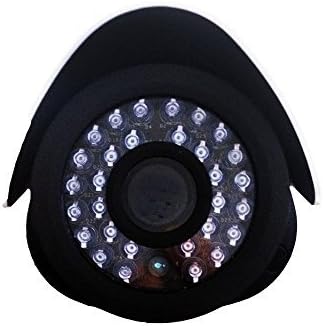
الصورة 3.1: الجبهة view of the camera lens and IR LEDs.
4. التشغيل
4.1 Day/Night Vision
The camera automatically switches between day (color) and night (black and white, infrared) modes based on ambient light conditions. In night mode, the camera's infrared LEDs activate to provide visibility up to 100 feet in darkness.
4.2 اكتشاف الحركة
The camera supports motion detection. Configuration of motion detection zones and sensitivity settings is typically done through your connected NVR system's interface. Refer to your NVR's manual for detailed instructions on setting up motion alerts and recording triggers.
4.3 تسجيل الفيديو وتشغيله
Video recording and playback functions are managed by your NVR system. Consult your NVR's user manual for instructions on accessing live view, configuring recording schedules, and reviewجي المسجلة فوtage.
5. الصيانة
لضمان الأداء الأمثل وطول عمر الكاميرا، اتبع إرشادات الصيانة التالية:
- تنظيف: قم بتنظيف عدسة الكاميرا بشكل دوري باستخدام قطعة قماش ناعمة.amp cloth. Avoid abrasive cleaners or solvents that could damage the lens coating.
- فحص الكابلات: Regularly inspect all cables for damage, wear, or loose connections.
- تحديثات البرامج الثابتة: Check the official LaView website for any available firmware updates for your camera model. Firmware updates can improve performance, enhance security, and add new features.
- حماية البيئة: While the camera is IP66 weatherproof, extreme environmental conditions (e.g., direct lightning strikes, prolonged submersion, or corrosive environments) should be avoided.
6. استكشاف الأخطاء وإصلاحها
6.1 No Image/Video Signal
- التحقق من الطاقة: Ensure the camera is receiving power via the PoE connection. Verify the Ethernet cable is securely connected to both the camera and the PoE source (NVR/switch).
- تحقق من اتصال الشبكة: Confirm the Ethernet cable is not damaged. Try a different port on your NVR/switch.
- التوافق مع مسجلات الفيديو الشبكية (NVR): Ensure your NVR system is compatible with 2MP IP cameras.
- تعارض عنوان IP: If manually configuring, check for IP address conflicts on your network.
6.2 جودة الصورة الرديئة
- عدسة نظيفة: Clean the camera lens for any dirt, dust, or smudges.
- ظروف الإضاءة: Ensure adequate lighting for optimal image quality. In low light, the camera will automatically switch to IR night vision.
- إعدادات الدقة: Verify the video resolution settings on your NVR are set to 1080P or higher, if supported by your NVR.
6.3 Night Vision Not Working
- المصابيح IR: In dark conditions, check if the infrared LEDs are illuminating. They may emit a faint red glow.
- العوائق: Ensure there are no obstructions directly in front of the camera that could block the IR light.
6.4 مشاكل كشف الحركة
- إعدادات الحساسية: Adjust the motion detection sensitivity on your NVR. High sensitivity can lead to false alarms (e.g., from insects, moving branches).
- مناطق الكشف: Verify that the motion detection zones are correctly configured to cover the desired areas.
7. المواصفات الفنية
| ميزة | مواصفة |
|---|---|
| رقم الموديل | LV-PB932F4 |
| دقة التقاط الفيديو | 1080 بكسل |
| دقة مستشعر الصورة | 2 ميجا بكسل |
| دقة ثابتة فعالة | 4 ميجا بكسل |
| تكنولوجيا الاتصال | سلكي (PoE) |
| الاستخدام الداخلي والخارجي | داخلي، خارجي |
| تصنيف مقاومة الماء | IP66 |
| نطاق الرؤية الليلية | 100 أقدام |
| المميزات الخاصة | مستشعر حركة، رؤية ليلية |
| درجة حرارة التشغيل | -13 درجة فهرنهايت إلى 140 درجة فهرنهايت (-25 درجة مئوية إلى 60 درجة مئوية) |
| مصدر الطاقة | الكهرباء السلكية (PoE) |
| أبعاد العنصر | 8.5 × 5 × 5 بوصة |
| وزن العنصر | 1.35 رطل |
| عامل الشكل | رصاصة |
| نوع التركيب | حامل الحائط |
8. الضمان والدعم
8.1 معلومات الضمان
This LaView product is covered by a 2-year manufacturer's warranty. Please retain your proof of purchase for warranty claims. The warranty covers defects in materials and workmanship under normal use.
8.2 الدعم الفني
For technical assistance or support, please visit the official LaView website or contact their customer service. Lifetime technical support is provided to assist with setup, operation, and troubleshooting.
LaView رسمي Webموقع: www.ruviewSecurity.com