
1. المقدمة
This manual provides detailed instructions for the installation, operation, and maintenance of your Aquatic AV AQ-MP-5UBT-H AM/FM Radio with Bluetooth and MP3 Media Player. This unit is specifically designed as a factory replacement for Harley-Davidson touring motorcycles manufactured between 1998 and 2013. It offers advanced audio features, including Bluetooth connectivity, MP3 playback, and a 3-inch color LCD display, while integrating seamlessly with existing factory handlebar controls and wiring.
2. معلومات السلامة
Please read all safety instructions carefully before installing and operating the AQ-MP-5UBT-H stereo. Failure to follow these instructions may result in injury or damage to the unit or motorcycle.
- Always disconnect the motorcycle's battery before beginning any electrical installation.
- تأكد من أن جميع توصيلات الأسلاك آمنة ومعزولة بشكل صحيح لمنع حدوث دوائر قصيرة.
- Do not operate the stereo in a manner that distracts you from safe motorcycle operation.
- This unit is designed to be waterproof; however, avoid direct high-pressure water jets on the display or connections.
- استشر فنيًا مؤهلًا إذا كنت غير متأكد من أي إجراءات تركيب أو توصيل أسلاك.
3. محتويات العبوة
تأكد من وجود جميع العناصر في العبوة قبل المتابعة بالتثبيت:
- Aquatic AV AQ-MP-5UBT-H Stereo Unit
- Wiring Harness (pre-attached or separate)
- Mounting Hardware (if applicable, typically uses existing Harley-Davidson bracket)
- دليل المستخدم (هذا المستند)
4. التثبيت
The AQ-MP-5UBT-H is designed for a direct factory replacement, utilizing the existing Harley-Davidson stereo mounting bracket and wiring connections for a plug-and-play installation. However, some modifications may be required for rear speaker wiring.
4.1. التحضير
- Park your motorcycle on a level surface and engage the parking brake.
- Disconnect the negative terminal of the motorcycle battery to prevent electrical shorts.
- Carefully remove the existing factory stereo unit from your Harley-Davidson touring motorcycle (1998-2013 model). Refer to your motorcycle's service manual for specific removal instructions.
4.2. Connecting the Stereo
- Connect the AQ-MP-5UBT-H wiring harness to the motorcycle's existing factory wiring harness. This is typically a direct plug-and-play connection.
- If your motorcycle has rear speakers, you may need to cut and wire the rear speaker wires from the new stereo's harness to the existing rear speaker wiring. Ensure proper polarity (+/-) for each speaker.
- Secure any loose wiring to prevent interference or damage.
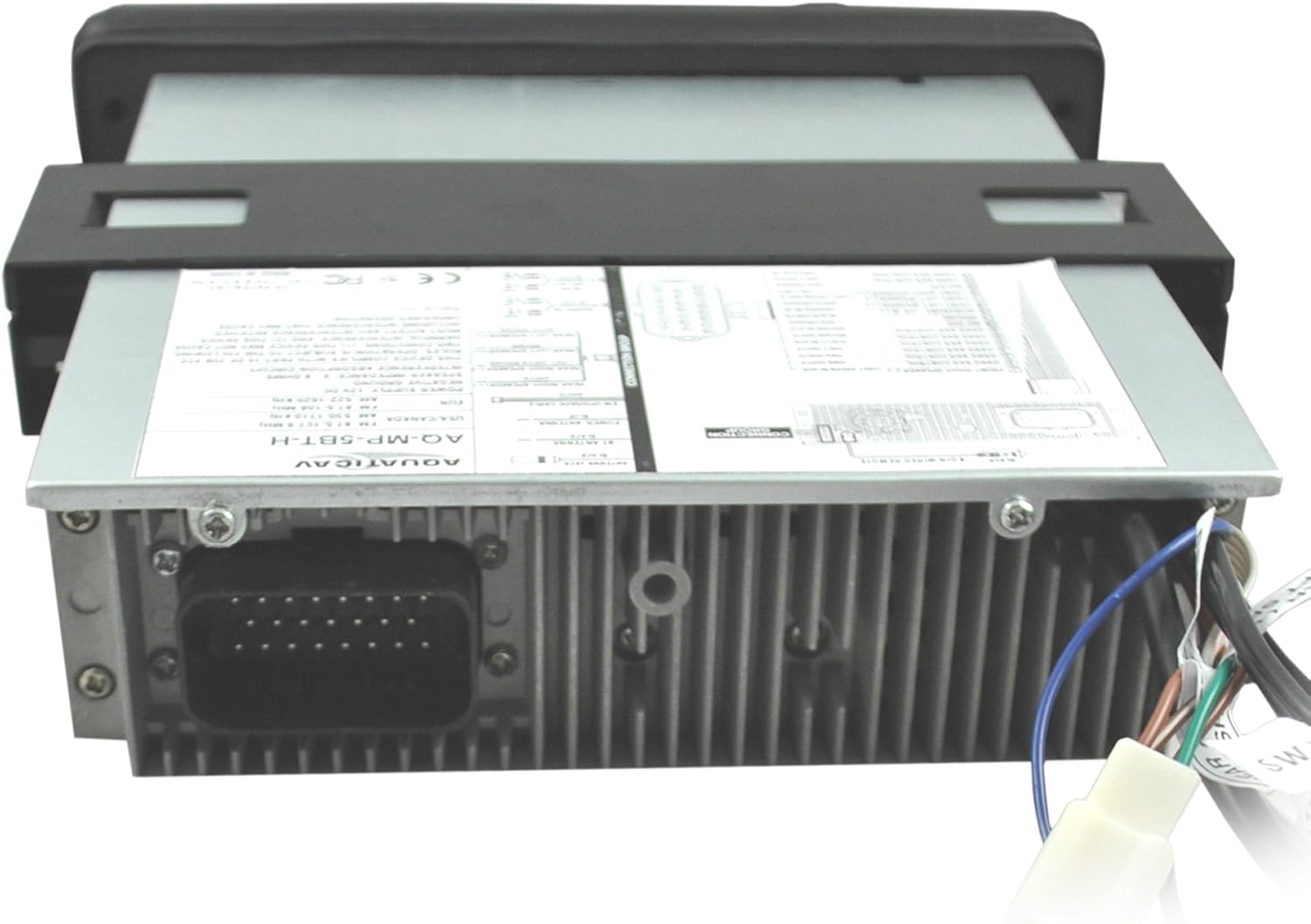
الصورة: الخلفية view of the AQ-MP-5UBT-H unit showing the main wiring harness connection.

الصورة: الجانب view of the AQ-MP-5UBT-H unit, illustrating the mounting bracket.
4.3. Mounting the Stereo
- Carefully slide the AQ-MP-5UBT-H unit into the dashboard opening, ensuring all wires are clear and not pinched.
- Secure the stereo using the existing factory mounting bracket and screws. Some users report difficulty with the inner left mounting screw; ensure proper alignment.
- أعد توصيل الطرف السالب لبطارية الدراجة النارية.
- Test the stereo's basic functions before fully reassembling the dashboard.
5. الإعداد الأولي
بعد التثبيت، قم بتنفيذ خطوات الإعداد الأولية التالية:
- تشغيل الطاقة: Turn the motorcycle ignition to the ACC or ON position. The stereo should power on.
- Language/Region: Follow any on-screen prompts to set the desired language and radio region (e.g., USA, Europe).
- إعدادات الصوت: Access the menu to adjust basic audio settings such as Bass, Treble, Balance, and Fader to your preference.
6. تعليمات التشغيل
The AQ-MP-5UBT-H stereo can be controlled via its front panel buttons, rotary knob, and your motorcycle's factory handlebar controls.
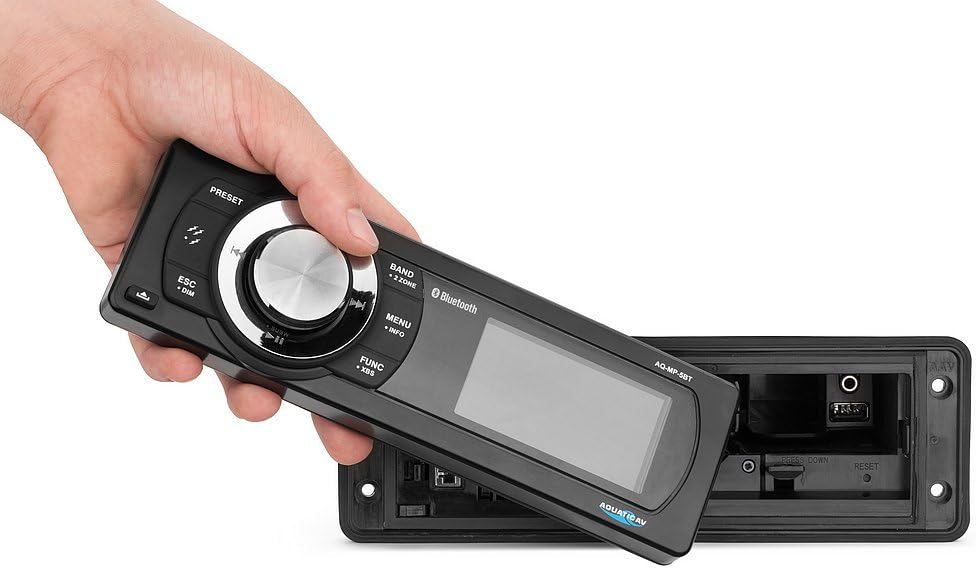
Image: The removable faceplate of the AQ-MP-5UBT-H, showing the main controls and display.
6.1. ضوابط اللوحة الأمامية
| يتحكم | وظيفة |
|---|---|
| مقبض الطاقة/الحجم | Press to turn unit ON/OFF. Rotate to adjust volume. |
| زر BAND | Switches between AM/FM radio bands or input sources. |
| زر القائمة/المعلومات | Accesses system settings and displays track/station information. |
| FUNC/XBS Button | Accesses various functions; long press for XBS (eXtreme Bass System). |
| ESC/DIM Button | Exits current menu; long press to adjust display dimmer. |
| أزرار الضبط المسبق (1-6) | Recall stored radio stations or perform other functions depending on mode. |
| Track/Tune Buttons | Skip tracks (Bluetooth/MP3) or tune radio stations. |
6.2. تشغيل الراديو (AM/FM)
- اضغط على فرقة button to select AM or FM.
- استخدم Track/Tune أزرار لضبط المحطات يدويًا أو البحث عنها.
- لحفظ محطة مُسبقة الضبط: اضبط على المحطة المطلوبة، ثم اضغط مع الاستمرار على أحد الأزرار أزرار الضبط المسبق (1-6) until you hear a confirmation beep.
6.3. MP3 Playback (USB/Auxiliary)
The unit supports MP3 playback via a USB connection or a 3.5mm auxiliary input.

Image: The internal compartment of the stereo, revealing the USB port and 3.5mm auxiliary input.

Image: A smartphone being placed into the internal storage compartment, which houses the USB and auxiliary connections.
- USB: أدخل محرك أقراص USB يحتوي على ملفات MP3 files into the USB port located within the internal compartment. The unit will automatically switch to USB mode and begin playback.
- مساعد: Connect an audio device (e.g., MP3 player, smartphone) to the 3.5mm auxiliary input jack. Press the فرقة button to select AUX input.
- استخدم Track/Tune buttons to navigate tracks (USB only) or the connected device's controls (Auxiliary).
7. اقتران بلوتوث
Pair your Bluetooth-enabled smartphone or MP3 device to the AQ-MP-5UBT-H for wireless audio streaming.
- تأكد من تمكين Bluetooth على جهازك المحمول.
- On the AQ-MP-5UBT-H, press the فرقة button until "Bluetooth" mode is selected. The display will show "Pairing" or similar.
- On your mobile device, search for available Bluetooth devices. Select "Aquatic AV" or "AQ-MP-5UBT-H" from the list.
- Once paired, the stereo will confirm the connection. You can now stream audio wirelessly.
- For Apple devices, the 3-inch color LCD screen can display album artwork when paired via Bluetooth using IAP (Information Apple Protocol).
8. الصيانة
- تنظيف: استخدمي قطعة قماش ناعمةamp cloth to clean the display and front panel. Avoid abrasive cleaners or solvents.
- الاتصالات: قم بفحص جميع توصيلات الأسلاك بشكل دوري للتأكد من أنها آمنة وخالية من التآكل.
- تحديثات البرامج: Check the Aquatic AV webابحث في الموقع عن أي تحديثات برامج ثابتة متاحة لطرازك.
9. استكشاف الأخطاء وإصلاحها
| مشكلة | السبب المحتمل / الحل |
|---|---|
| لا يوجد طاقة |
|
| لا يوجد صوت |
|
| بلوتوث لا يتصل |
|
| Stereo Reboots on Ignition Cycle | This unit may reboot when the motorcycle ignition is cycled (e.g., from ON to ACC and back). This is a characteristic of the unit's power management and not a fault. |
| No Clock Display | The AQ-MP-5UBT-H model does not feature a dedicated clock display. Time information is typically managed by connected devices or the motorcycle's own instrumentation. |
10. المواصفات
| ميزة | التفاصيل |
|---|---|
| رقم الموديل | AQ-MP-5UBT-H |
| أبعاد المنتج | 14 × 4 × 13 بوصة |
| وزن العنصر | 3.88 رطل |
| تقنيات الاتصال | بلوتوث |
| الاتصالات اللاسلكية | بلوتوث |
| مميزات العرض | شاشة LCD ملونة مقاس 3 بوصة |
| لون | أسود |
| نوع وحدة التحكم | Android, iOS (via Bluetooth) |
| الأجهزة المتوافقة | Speaker, Smartphone, MP3 Player |
| نوع الموصل | 3.5 ملم جاك ، RCA |
| ترميز الصوت | ستيريو |
| وضع إخراج الصوت | ستيريو |
| Surround Sound Channel Config | 4 قناة |
11. الضمان والدعم
The Aquatic AV AQ-MP-5UBT-H stereo comes with a ضمان محدود لمدة عامين from the date of purchase when purchased from an authorized dealer. This warranty covers defects in materials and workmanship under normal use.
For technical support, warranty claims, or further assistance, please contact Aquatic AV customer service or visit their official webالموقع. احتفظ بإثبات الشراء للتحقق من الضمان.