
مقدمة
شكرا لك على الشراءasing the STOGA Ubox STV040 Dual Lens Car DVR Camera. This manual provides detailed instructions for the proper installation, operation, and maintenance of your device. Please read this manual thoroughly before using the product to ensure optimal performance and safety.
محتويات الحزمة
يرجى التحقق من محتويات العبوة عند فتحها. في حال وجود أي نقص أو تلف في المنتجات، يرجى الاتصال بالبائع.
- 1 x STOGA Ubox STV040 Car DVR Camera
- 1 × شاحن سيارة
- 1 x Car Mount
- 1 x External GPS Module
- 1 × دليل المستخدم
المنتج انتهىview
Familiarize yourself with the components and features of your STOGA Ubox STV040 Car DVR Camera.

الشكل 1: أمام view of the DVR camera with the display screen active.

الشكل 2: أمام view detailing the dual wide-angle lenses and surrounding controls.
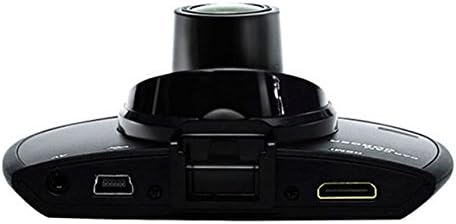
الشكل 3: قمة view illustrating the connectivity ports (HDMI, USB, AV).
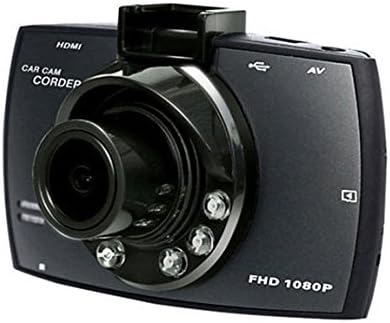
الشكل 4: Angled perspective of the DVR camera, showing its compact design.
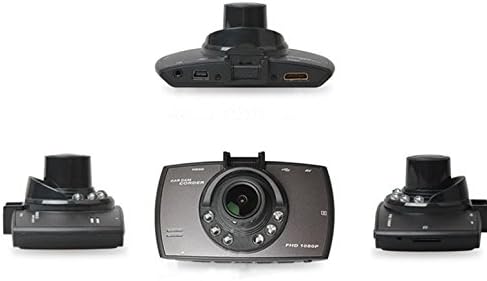
الشكل 5: شامل view of the DVR camera from various angles.
يثبت
1. تركيب بطاقة الذاكرة الصغيرة (Micro SD)
Insert a Micro SD card (Class 6 or higher, 4GB-32GB) into the designated slot on the DVR camera. Ensure the card is inserted correctly until it clicks into place. The device supports continuous loop recording and emergency event recording.
2. تركيب الكاميرا
- Attach the car mount to the windshield in a position that does not obstruct your view.
- Securely attach the DVR camera to the car mount.
- Adjust the camera angle to ensure both lenses capture the desired view (front and interior/side). The dual lenses are 180-degree rotatable.
3. توصيل الطاقة
Connect the car charger to the DVR camera's power input and plug the other end into your vehicle's 12V power outlet (cigarette lighter socket). The camera will typically power on automatically when the vehicle starts and power off when the vehicle is turned off.
4. GPS Module Connection (Optional)
Connect the external GPS module to the designated GPS port on the DVR camera. This enables GPS logging, recording location data along with video footage.
تعليمات التشغيل
تشغيل/إيقاف الطاقة
- تلقائي: The camera powers on and starts recording automatically when the car engine starts. It powers off automatically when the engine is turned off.
- دليل: اضغط مع الاستمرار على زر الطاقة لتشغيل الجهاز أو إيقاف تشغيله يدويًا.
وسائط التسجيل
- التسجيل المتكرر: The camera continuously records video in segments. When the memory card is full, it automatically overwrites the oldest unlocked footage.
- التسجيل في حالات الطوارئ (مستشعر G): The built-in G-Sensor detects sudden impacts or collisions. In such an event, the current video segment is automatically locked and protected from being overwritten.
التنقل في القائمة
Use the control buttons located on the device to navigate through the menu options on the 2.0" TFT LCD screen. Adjust settings such as video resolution, date/time stamp, language (English, Chinese, Japanese, Russian), and G-Sensor sensitivity.
التشغيل
- أوقف التسجيل إذا كان نشطًا حاليًا.
- Enter playback mode via the menu.
- حدد الفيديو المطلوب file for playback on the device screen.
- Alternatively, remove the Micro SD card and insert it into a computer to view files.
حماية كلمة المرور
The device supports password protection to prevent unauthorized access to recordings. Refer to the on-screen menu for setting up and managing this feature.
صيانة
- تنظيف: استخدم قطعة قماش ناعمة وجافة لتنظيف عدسات الكاميرا وشاشتها. تجنب استخدام المنظفات الكاشطة أو المذيبات.
- بطاقة مايكرو التنمية المستدامة: Format the Micro SD card regularly (e.g., once a month) to ensure optimal performance and prevent data corruption. Back up important fileقبل التنسيق.
- درجة حرارة: تجنب تعريض الجهاز لدرجات حرارة قصوى، أو لأشعة الشمس المباشرة لفترات طويلة، أو للرطوبة العالية.
- تحديثات البرامج الثابتة: تحقق من الشركة المصنعة webقم بتحديث الموقع بشكل دوري للحصول على أي تحديثات متاحة للبرامج الثابتة لتحسين الأداء وإضافة الميزات.
استكشاف الأخطاء وإصلاحها
| مشكلة | السبب المحتمل / الحل |
|---|---|
| الكاميرا لا تعمل. |
|
| توقف التسجيل بشكل غير متوقع. |
|
| جودة الفيديو سيئة. |
|
| نظام تحديد المواقع العالمي (GPS) لا يعمل. |
|
| البطارية لا تحتفظ بالشحن. |
|
تحديد
| ميزة | التفاصيل |
|---|---|
| رقم الموديل | Ubox STV040 |
| عرض | 2.0" TFT LCD (960 x 240 pixels) |
| العدسات | Dual 140-degree A+ wide-angle, 180-degree rotatable |
| المستشعر | سيموس |
| دقة الفيديو | 1280 x 480 @ 30 fps, 640 x 480 @ 30 fps |
| تنسيق الفيديو | أفي |
| تنسيق الصورة | م-جبغ |
| الرؤية الليلية | الأشعة تحت الحمراء للرؤية الليلية وظيفة |
| تخزين | Micro TF (SD HC) card, 4GB-32GB, Class 6 and above |
| نظام تحديد المواقع العالمي (جي بي اس) | Supports external GPS module |
| مستشعر الجاذبية | Integrated, supports emergency event recording lock |
| الميكروفون/مكبر الصوت | مدمج |
| الناتج | CVBS (Video Output) |
| بطارية | 3.7V 700mA Lithium-Polymer battery |
| توافق نظام التشغيل | ويندوز 2000/XP/Vista/ويندوز 7 |
| اللغات المدعومة | English, Chinese, Japanese, Russian |
الضمان والدعم
For warranty information and technical support, please refer to the documentation provided with your purchase or contact your retailer. Keep your purchase receipt as proof of purchase for warranty claims.
For further assistance, you may also visit the official STOGA website (if available) or contact their customer service department.