
1. الإعداد
1.1 فك العبوة والمحتويات
أخرج التلفاز وجميع ملحقاته من العبوة بحرص. تأكد من وجود جميع المكونات.
- Sharp LC-40LE653U 40-Inch Smart LED TV
- جهاز التحكم عن بعد
- 2 بطاريات AA
1.2 تركيب الحامل
If placing the TV on a table, attach the included stand. Refer to the diagram below for proper assembly. Ensure all screws are securely fastened.
1.3 توصيل الأجهزة الخارجية
Connect your external devices such as cable boxes, Blu-ray players, or gaming consoles to the TV's input ports. The TV features multiple connectivity options.


تشمل المنافذ المتاحة ما يلي:
- HDMI: 2 ports for high-definition audio and video. One HDMI port supports MHL (Mobile High-Definition Link).
- USB: 1 port for media playback or connecting a USB device.
- إيثرنت: للاتصال بالشبكة السلكية.
- Component/Video: For older video devices.
- DTV/TV (Antenna): لتوصيل هوائي أو كابل تلفزيوني.
- الصوت خارج: Optical for digital audio, and RCA for analog audio.
1.4 توصيل الطاقة
After connecting all necessary devices, plug the TV's power cord into a wall outlet.
1.5 الإعداد الأولي
Upon first power-on, the TV will guide you through an initial setup process. This includes language selection, time zone, and network configuration. For Wi-Fi setup, select your network and enter the password.
2. تعليمات التشغيل
2.1 وظائف التحكم عن بعد
يتيح لك جهاز التحكم عن بُعد الوصول إلى جميع وظائف التلفزيون. أدخل بطاريتي AA في جهاز التحكم، مع التأكد من صحة قطبية الجهاز.

- الطاقة (الزر الأحمر): تشغيل التلفزيون أو إيقاف تشغيله.
- مدخل: Selects the input source (HDMI, TV, USB, etc.).
- المجلد +/-: ضبط مستوى الصوت.
- CH +/-: تغيير القنوات التلفزيونية.
- Navigation Buttons (Up/Down/Left/Right/Enter): يتم استخدامه للتنقل بين القوائم وتحديد الخيارات.
- ذكي: Accesses the Smart Central Apps menu.
- MENU: Opens the main TV menu for settings adjustments.
- NETFLIX: Direct access button for the Netflix application.
2.2 Smart TV Features (Smart Central Apps)
The Sharp LC-40LE653U features Smart Central Apps, providing access to various online services and a web browser. Ensure your TV is connected to the internet via Wi-Fi or Ethernet.

- الوصول إلى التطبيقات: Press the 'SMART' button on your remote to open the Smart Central Apps menu.
- الخدمات المدعومة: Includes Hulu Plus, Netflix, Pandora, Vudu, and YouTube.
- Web المتصفح: استخدم المدمج web browser for general internet browsing. Navigation is done via the remote control.
2.3 Wallpaper Mode
When the TV is turned off, Wallpaper Mode can display virtually any image. To use this feature, connect a USB drive containing your desired images to the TV's USB port. Navigate to the Wallpaper Mode settings in the TV menu to select and configure your images.
3. الصيانة
3.1 تنظيف التلفزيون
لتنظيف الشاشة، امسحها برفق بقطعة قماش ناعمة وجافة وخالية من الوبر. لإزالة البقع الصعبة، امسحها برفق بقطعة قماش ناعمة وجافة وخالية من الوبر.ampen the cloth with water or a specialized screen cleaner. Avoid using harsh chemicals, abrasive cleaners, or direct spraying of liquids onto the screen or cabinet.
Clean the TV cabinet with a soft, dry cloth. Ensure the TV is unplugged before cleaning.
3.2 تحديثات البرامج
Periodically check for software updates through the TV's settings menu to ensure optimal performance and access to the latest features. Updates can be performed via the internet connection.
4. استكشاف الأخطاء وإصلاحها
If you encounter issues with your Sharp LC-40LE653U TV, refer to the following common solutions:
- لا يوجد طاقة: Ensure the power cord is securely plugged into both the TV and a working wall outlet. Check if the power indicator light on the TV is on.
- لا صورة/صوت: Verify the correct input source is selected using the 'Input' button on the remote. Check all cable connections (HDMI, component, etc.) are secure.
- جودة الصورة رديئة: اضبط إعدادات الصورة (السطوع، التباين، الحدة) في قائمة التلفزيون. تأكد من أن مصدر الإدخال يوفر إشارة عالية الجودة.
- لا يوجد اتصال بالإنترنت: Check your Wi-Fi router or Ethernet cable connection. Re-enter your Wi-Fi password in the TV's network settings. Restarting your router may resolve connectivity issues.
- جهاز التحكم عن بعد لا يعمل: استبدل بطاريات جهاز التحكم عن بُعد. تأكد من عدم وجود أي عوائق بين جهاز التحكم عن بُعد ومستشعر الأشعة تحت الحمراء الخاص بالتلفزيون.
For more detailed troubleshooting steps, consult the full online manual or contact customer support.
5. المواصفات
Key technical specifications for the Sharp LC-40LE653U 40-Inch Smart LED TV:
| ميزة | مواصفة |
|---|---|
| رقم الموديل | LC-40LE653U |
| حجم الشاشة | 39.5 بوصة (فئة 40 بوصة) |
| تكنولوجيا العرض | شاشة الكريستال السائل |
| دقة | 1080 بكسل (عالي الدقة بالكامل) |
| معدل التحديث | 60 هرتز |
| نسبة العرض إلى الارتفاع | 16:9 |
| تكنولوجيا الاتصال | واي فاي |
| واجهة الأجهزة | إيثرنت، HDMI، USB |
| Total Number of HDMI Ports | 2 (one with MHL support) |
| إجمالي منافذ USB | 1 |
| مدخل الصوت | HDMI, Optical, USB |
| الحد الأقصى لقوة خرج السماعة | 20 واط |
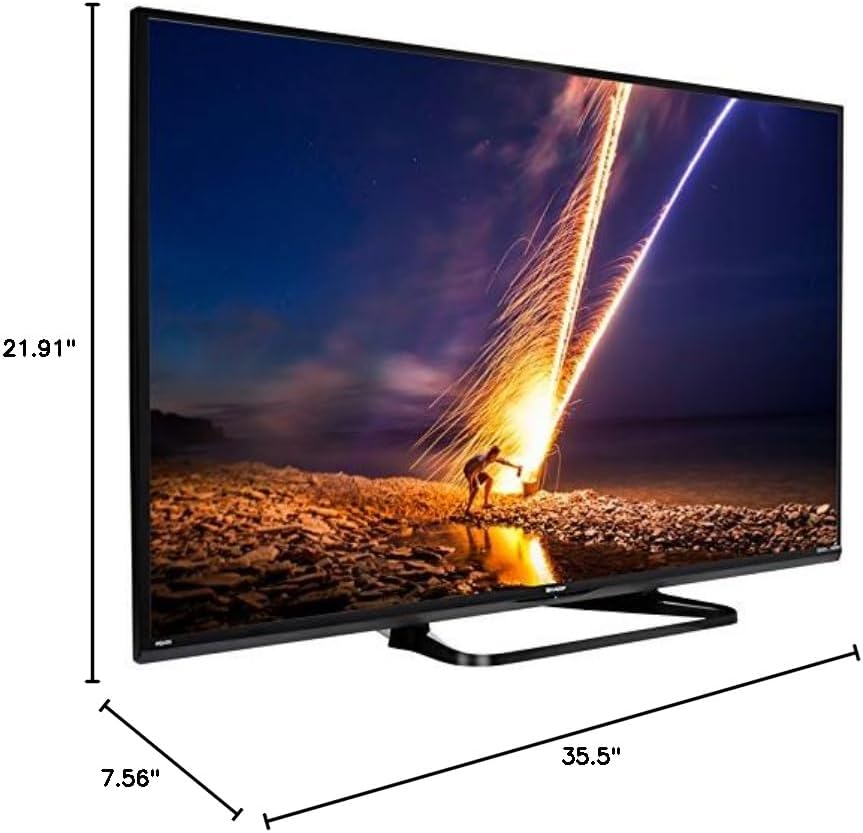
| أبعاد المنتج (العمق × العرض × الارتفاع) | 7.56 بوصة × 35.5 بوصة × 21.91 بوصة |
| وزن العنصر | 16.3 رطل |
| نوع التركيب | حامل الطاولة |
| خدمات الإنترنت المدعومة | Hulu Plus, Netflix, Pandora, Vudu, YouTube |
| معتمد من Energy Star | نعم |
6. الضمان والدعم
6.1 ضمان المنتج
This Sharp LC-40LE653U TV comes with a ضمان محدود لمدة سنة واحدةيرجى الاحتفاظ بإيصال الشراء للمطالبة بالضمان. يغطي الضمان عيوب التصنيع في ظروف الاستخدام العادية.
6.2 دعم العملاء
For technical assistance, troubleshooting beyond this manual, or warranty service, please contact Sharp customer support. Refer to the official Sharp webقم بزيارة الموقع أو بطاقة تسجيل المنتج الخاص بك للحصول على أحدث معلومات الاتصال.