
1. المقدمة
The Argox AS8520 is a high-performance cordless imager designed for efficient barcode scanning. It features advanced wireless communication technology, allowing for a data transmission range of up to 100 meters. Equipped with a long-lasting Li-ion battery and an IP42 sealing level, the AS8520 is built for durability and mobility across various environments, including offices, supermarkets, warehouses, and manufacturing facilities.
2. انتهى المنتجview
The AS8520 barcode scanner is designed for comfortable handling and robust performance. Key components include the scanning window, trigger button, and ergonomic grip.
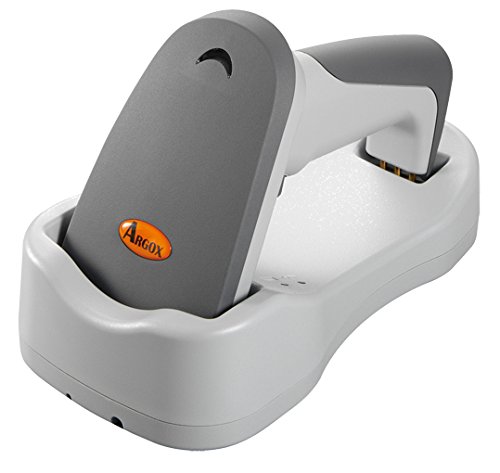
الشكل 2.1: جانب view of the Argox AS8520 Barcode Scanner, showing the ergonomic handle and trigger button.
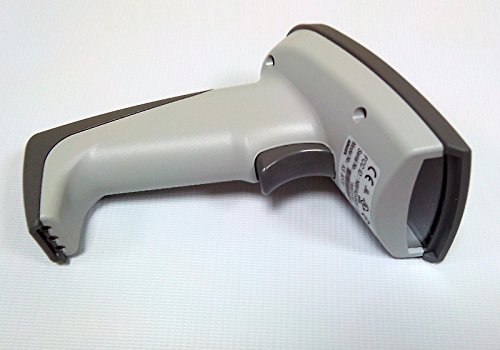
الشكل 2.2: أمام view of the Argox AS8520 Barcode Scanner, highlighting the scanning window and product labels.
3. دليل الإعداد
3.1. تركيب البطارية وشحنها
- Ensure the scanner is powered off before installing or removing the battery.
- حدد مكان حجرة البطارية على مقبض الماسح الضوئي.
- Insert the Li-ion battery pack, ensuring correct polarity.
- أغلق حجرة البطارية بشكل محكم.
- Connect the scanner to its charging base or power adapter using the provided cable. Allow the battery to fully charge before first use.
3.2. الاتصال بجهاز مضيف
The Argox AS8520 can connect wirelessly to various host devices, including desktops, laptops, and smartphones. Refer to the separate quick start guide for specific pairing instructions for your operating system or device type.
4. تعليمات التشغيل
4.1. المسح الأساسي
- Ensure the scanner is powered on and successfully paired with your host device.
- وجّه نافذة المسح الضوئي نحو الرمز الشريطي الذي ترغب في مسحه ضوئياً.
- Press and hold the trigger button. A red LED light source (630nm Visible Red LED) will illuminate the barcode.
- Position the scanner at an appropriate distance (the AS8520 offers superior depth of field up to 40 inches on 40-mil codes) until the barcode is successfully read. A successful scan is typically indicated by an audible beep and/or a visual indicator.
- حرر زر الزناد.
4.2. ميزات المسح الضوئي المتقدمة
- Rapid Scan Rate: The AS8520 provides a rapid scan rate of 450 scans/sec for efficient data capture.
- Barcode Symbology Support: Supports GS1 Databar (RSS) and CS (Composite Symbology) barcodes.
- Sunlight Readability: Designed to be readable under direct sunlight conditions.
5. الصيانة
5.1. تنظيف الماسح الضوئي
- تأكد من إيقاف تشغيل الماسح الضوئي قبل التنظيف.
- استخدم قطعة قماش ناعمة وخالية من الوبر برفق دampened with water or a mild cleaning solution to wipe the exterior of the scanner.
- بالنسبة لنافذة المسح الضوئي، استخدم قطعة قماش لتنظيف العدسات لتجنب الخدوش.
- Do not use abrasive cleaners, solvents, or immerse the scanner in liquid. The IP42 sealing level protects against dust and light water splashes, but not full immersion.
5.2. العناية بالبطارية
- To maximize battery life, avoid fully discharging the Li-ion battery frequently.
- قم بتخزين الماسح الضوئي في مكان بارد وجاف عندما لا يكون قيد الاستخدام لفترات طويلة.
- If the battery performance degrades significantly, consider replacing it with an authorized Argox replacement battery.
6. استكشاف الأخطاء وإصلاحها
| مشكلة | السبب المحتمل | حل |
|---|---|---|
| الماسح الضوئي لا يعمل. | البطارية فارغة أو غير مثبتة بشكل صحيح. | اشحن البطارية. تأكد من تثبيت البطارية بشكل صحيح في مكانها المخصص. |
| الماسح الضوئي لا يقرأ الباركود. | Barcode is damaged, scanner is too far/close, or incorrect symbology settings. | Ensure the barcode is clear. Adjust scanning distance. Check scanner programming for supported barcode types. |
| لم يتم إرسال أي بيانات إلى الجهاز المضيف. | Scanner not paired or out of range. | Re-pair the scanner with the host device. Ensure the scanner is within the 100-meter transmission range. |
| الماسح الضوئي لا يستجيب. | خلل مؤقت في البرنامج. | Perform a soft reset by powering off and then on the scanner. If issues persist, consult the manufacturer's support. |
7. المواصفات الفنية
| ميزة | مواصفة |
|---|---|
| نموذج | AS8520 |
| معدل المسح | 450 مسح/ثانية |
| مصدر الضوء | 630nm Visible Red LED |
| أداء المسح الضوئي | Starting at 0.1mm (4 mil) |
| عمق المجال | Up to 40 inches on 40-mil codes |
| نطاق نقل البيانات | 100 meters (wireless) |
| الأجهزة المتوافقة | جهاز كمبيوتر مكتبي، جهاز كمبيوتر محمول، هاتف ذكي |
| مصدر الطاقة | Battery Powered (Li-ion battery pack) |
| درجة حرارة التشغيل | 0 درجة مئوية إلى 50 درجة مئوية (32 درجة فهرنهايت إلى 122 درجة فهرنهايت) |
| درجة حرارة التخزين | -20 درجة مئوية إلى 70 درجة مئوية (-4 درجة فهرنهايت إلى 158 درجة فهرنهايت) |
| رطوبة | 10% إلى 90% رطوبة نسبية، غير متكثفة |
| مستوى الضوء | ما يصل إلى 70,000 لوكس |
| Current - Operating | 225 مللي أمبير @ 4.2 فولت تيار مستمر |
| Current - Standby | 32 مللي أمبير @ 4.2 فولت تيار مستمر |
| Power - Operating | 900 ميغاواط |
| Power - Standby | 150 ميغاواط |
| Reliability (Trigger) | 1,000,000 مرة |
| Reliability (Cable) | 320,000 times (90° bend) |
| مواصفات القطرة | 1.5 متر |
| مستوى الإحكام | IP42 |
| وزن العنصر | 1.3 كجم |
| رقم GTIN/الرمز العالمي للمنتج | 702563636336 |
8. الضمان والدعم
For detailed warranty information, please refer to the warranty card included with your product or visit the official Argox website. For technical support, service, or replacement parts, please contact your authorized Argox reseller or Argox customer service directly.