
IK Multimedia iRig 2
IK Multimedia iRig 2 User Manual
Model: iRig 2 | Brand: IK Multimedia
مقدمة
The IK Multimedia iRig 2 is a portable guitar audio interface designed for use with iPhone, iPad, iPod touch, and Mac devices. It allows musicians to connect their instrument directly to their mobile device or computer, enabling recording, practice, and live performance with various music applications. The iRig 2 features an adjustable gain dial, a 1/4" instrument input, 1/8" TRRS output for device connection, 1/8" headphone output, and a 1/4" amplifier output, along with an FX/Thru switch for signal routing flexibility.
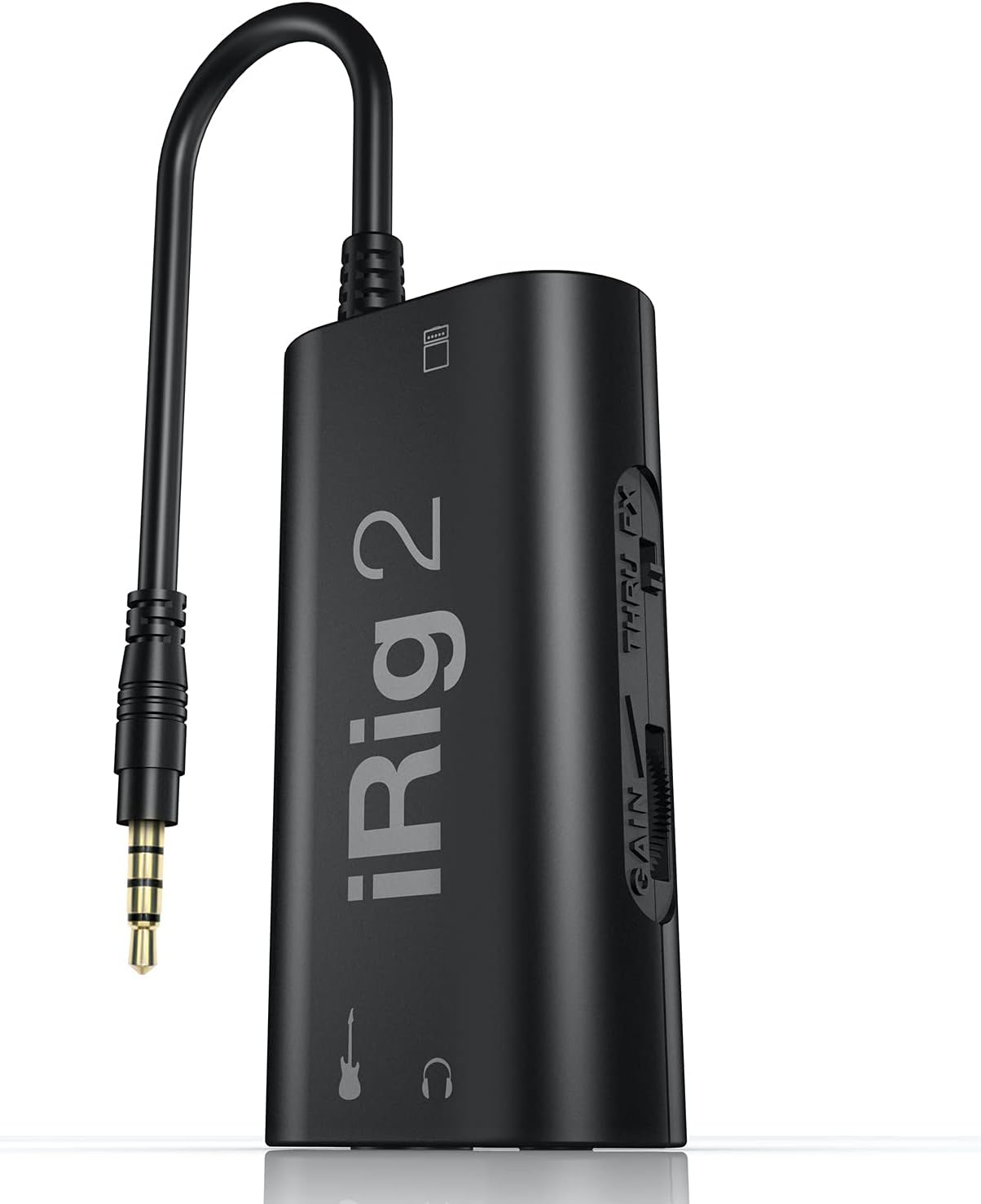
Figure 1: The iRig 2 portable guitar audio interface.
ماذا يوجد في الصندوق
Your iRig 2 package should contain the following items:
- Irig 2 Guitar Interface For Ipad/iphone/ipod & Android
ميزات المنتج والضوابط
The iRig 2 offers several features designed for ease of use and versatility:
- Adjustable Gain Dial: Allows precise control over the input signal level from your instrument.
- 1/8" TRRS Output Connector: For direct connection to compatible iPhone, iPad, iPod touch, or Mac devices.
- 1/4 بوصة Amplifier Output Jack: Enables connection to an external amplifier or mixer, allowing the iRig 2 to be integrated into a live setup.
- 1/8" Headphone Output: For private monitoring of your audio.
- FX / Thru Switch: Selects between a processed signal (FX) from your device or a clean, analog "thru" signal directly to the ampخرج مكبر الصوت.
- Microphone Stand Velcro Slot: For convenient attachment to a microphone stand.

Figure 2: Labeled components of the iRig 2, including inputs, outputs, and controls.
يثبت
Follow these steps to set up your iRig 2:
- الاتصال بجهازك: Plug the integrated 1/8" TRRS cable of the iRig 2 into the headphone/headset jack of your iPhone, iPad, iPod touch, or Mac.
- For newer iOS devices (iPhone 8 and later, recent iPads with USB-C): You will need an Apple-brand Lightning to 3.5mm Headphone Jack Adapter or a USB-C to 3.5mm Headphone Jack Adapter to ensure compatibility. Connect the iRig 2's TRRS cable to this adapter, then connect the adapter to your iOS device.
- قم بتوصيل جهازك الموسيقي: Plug your guitar, bass, or other instrument into the 1/4" instrument input jack on the iRig 2.
- Connect Headphones or Ampالليفي (اختياري):
- For private monitoring, connect your headphones to the 1/8" headphone output jack.
- للاتصال بملف خارجي amplifier or mixer, use a 1/4" instrument cable to connect the iRig 2's 1/4" amplifier output jack to your ampمدخلات المضخم.
- تحميل برنامج: تنزيل وتثبيت AmpliTube CS app (free version available) or other compatible music applications from the App Store.

Figure 3: iRig 2 connected to an iPhone and a guitar, ready for use.

الشكل 4: مفصل view of the iRig 2 connections, showing instrument and device inputs.
التشغيل
Once connected, you can begin using your iRig 2:
- ضبط الربح: استخدم يكسب control knob on the side of the iRig 2 to adjust the input level from your instrument. Start with the gain low and gradually increase it until you achieve a strong signal without clipping (distortion). Most music apps will have an input level meter to help you set this correctly.
- Select Signal Path: استخدم FX / THRU switch to choose your desired signal routing:
- العملات الأجنبية: The signal from your instrument will be sent through your mobile device, processed by the app (e.g., AmpliTube), and then sent to the headphone and amplifier outputs. This is the mode for using virtual ampالمؤثرات والآثار.
- من خلال: The signal from your instrument will bypass the mobile device's processing and be sent directly to the 1/4" amplifier output. This allows you to use your mobile device as a tuner, recorder, or other utility while maintaining a pure analog signal path to your ampمكبر.
- استخدم مع AmpliTube CS: إطلاق AmpliTube CS app on your device. Within the app, you can select various virtual amplifiers, stompbox effects, and other processing tools to shape your sound. Experiment with different settings to find your desired tone.

Figure 5: The iRig 2 in use with an iPad running the AmpliTube application, showcasing various virtual effects.
صيانة
To ensure the longevity and optimal performance of your iRig 2, follow these maintenance guidelines:
- تنظيف: Use a soft, dry cloth to wipe down the exterior of the iRig 2. Avoid using liquid cleaners or abrasive materials, as they may damage the device.
- تخزين: Store the iRig 2 in a cool, dry place away from direct sunlight and extreme temperatures. When not in use, it is recommended to disconnect all cables to prevent strain on the ports.
- العناية بالكابلات: Handle the integrated TRRS cable and other connected cables with care. Avoid sharp bends or excessive pulling, which can damage internal wiring.
استكشاف الأخطاء وإصلاحها
If you encounter issues with your iRig 2, refer to the following common problems and solutions:
| مشكلة | السبب المحتمل / الحل |
|---|---|
| لا يوجد صوت أو صوت منخفض جداً. |
|
| صوت مشوه أو صاخب. |
|
| App not recognizing iRig 2. |
|
تحديد
| ميزة | التفاصيل |
|---|---|
| رقم الموديل | ايريج 2 |
| وزن العنصر | 3.53 أونصات |
| أبعاد المنتج | 6.25 × 5.5 × 1.75 بوصة |
| بلد المنشأ | إيطاليا |
| واجهة الأجهزة | 1/4-inch Audio, 3.5mm Audio |
| تكنولوجيا الاتصال | 1/8 inch TRRS, 1/4 inch |
| عدد القنوات | 1 |
| نظام التشغيل | اي او اس |
| الأجهزة المتوافقة | iOS Devices Compatible with iPhone, iPad and iPod touch devices with 1/8" / 3.5mm jack standard headset input (onboard or via adaptor) compliant with the CTIA/AHJ wiring standard. Also compatible with the following devices using Lightning to 1/8" / 3.5 mm jack or USB-C to 1/8" / 3.5 mm jack adapters. Includes iPhone 8 through iPhone 16 series, iPod 7th gen, iPad 6th through 10th gen, iPad Mini 5th through 7th gen, iPad Air 3rd through 6th gen, iPad Pro 2nd through 7th gen. |
الضمان والدعم
For detailed warranty information and technical support, please visit the official IK Multimedia website. You can find FAQs, support resources, and contact information there.
رسمي Webموقع: www.ikmultimedia.com
Ask a question about this manual
Ask about setup, troubleshooting, compatibility, parts, safety, or missing instructions. Manuals+ will review the question and use this page’s manual context to help answer it.