
مقدمة
شكرا لك على الشراءasing the Soundmaster DAB500SI Portable Digital Radio. This manual provides essential information for the safe and efficient operation of your device. Please read it thoroughly before use and retain it for future reference.
المنتج انتهىview
The Soundmaster DAB500SI is a compact and versatile digital radio, offering both DAB/DAB+ and FM reception. It features a clear display, intuitive controls, and a headphone output for personal listening. Its portable design allows for use in various locations.
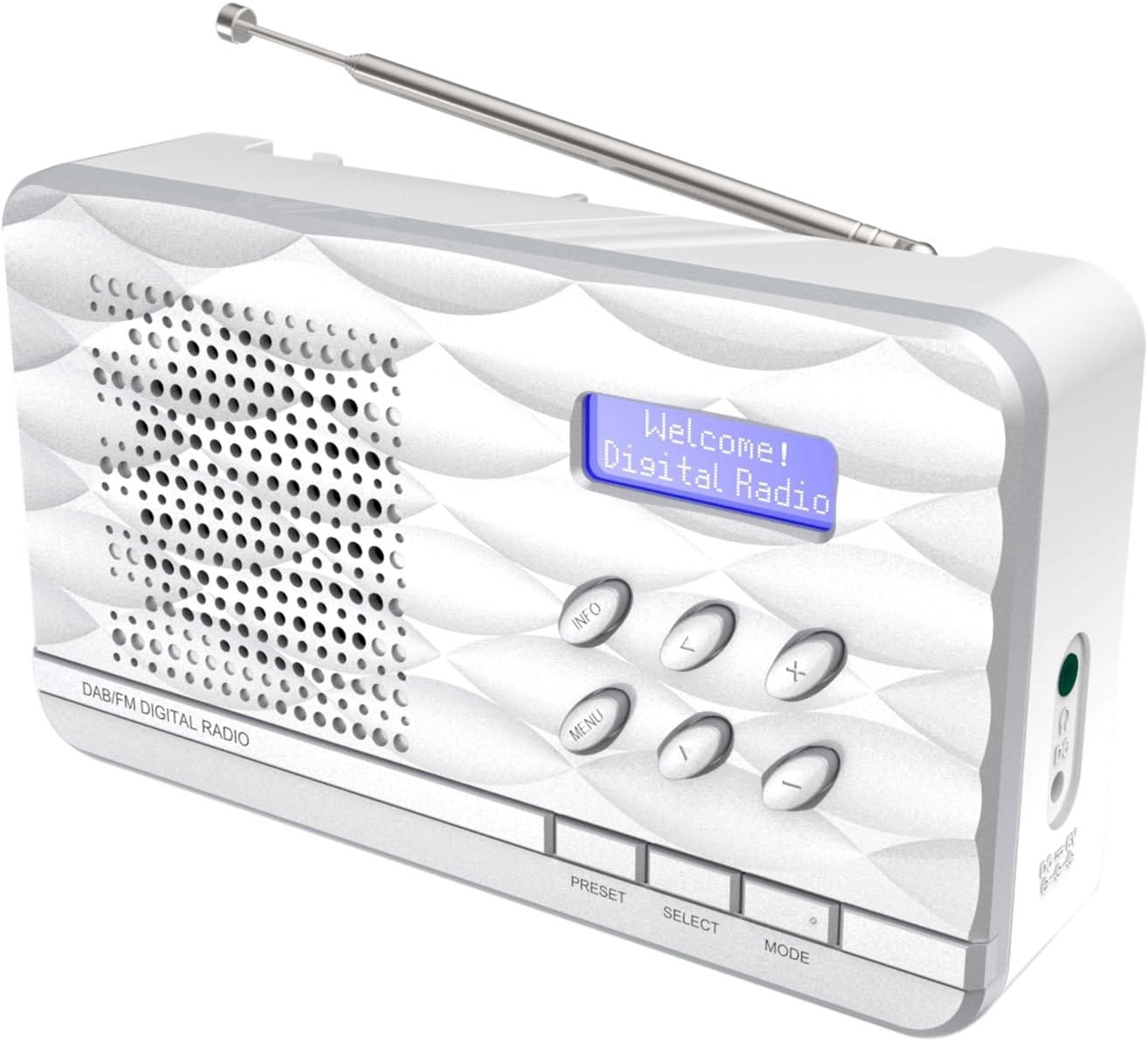
الشكل 1: Soundmaster DAB500SI Portable Digital Radio. The image shows the silver radio with its extendable antenna, front speaker grille, blue backlit display showing "Welcome! Digital Radio", and control buttons labeled INFO, MENU, PRESET, SELECT, MODE, and navigation arrows. Dimensions are indicated as 19cm (width), 11cm (height), and 7cm (depth).
يثبت
1. فك التعبئة
Carefully remove the radio from its packaging. Ensure all components are present: the DAB500SI radio unit and this user manual.
2. توصيل الطاقة
The DAB500SI is powered by mains electricity. Locate the DC IN port on the side of the unit. Connect the provided power adapter to this port and then plug it into a standard wall outlet.
Alternatively, the unit can be powered by 4x AA batteries (not included) for portable use. Open the battery compartment on the rear of the unit and insert the batteries, observing correct polarity.
3. ضبط الهوائي
Extend the telescopic antenna fully for optimal DAB/DAB+ and FM reception. Adjust its position to achieve the best signal quality.
تعليمات التشغيل
1. تشغيل/إيقاف التشغيل
اضغط على قوة button (usually combined with the MODE button or a dedicated button) to turn the radio on or off.
2. Mode Selection (DAB/FM)
اضغط على وضع زر للتبديل بين وضعيات راديو DAB/DAB+ وراديو FM.
3. تشغيل راديو DAB/DAB+
- الإعداد لأول مرة: When first powered on in DAB mode, the radio will automatically perform a full scan for available stations. This may take a few minutes.
- اختيار المحطة: استخدم يسار/يمين navigation buttons (labeled < and > on the device) to browse through the list of available DAB stations. Press يختار لتأكيد اختيارك.
- مسح يدوي: If you move the radio to a new location or wish to update the station list, press قائمة طعام, then navigate to "Full Scan" or "Auto Scan" and press يختار.
- عرض المعلومات: اضغط على معلومات button repeatedly to cycle through various information displays such as program type, signal strength, time, date, and DLS (Dynamic Label Segment) text.
4. تشغيل راديو FM
- التأكد الذاتي: في وضع FM، اضغط مع الاستمرار على يختار button to perform an auto scan. The radio will scan and store available stations.
- ضبط يدوي: استخدم يسار/يمين navigation buttons (labeled < and > on the device) to manually tune the frequency in small increments.
- RDS Information: If available, RDS (Radio Data System) information such as station name and program type will be displayed. Press معلومات للتنقل بين بيانات RDS المتاحة.
5. الإعدادات المسبقة
The radio supports up to 20 preset stations for both DAB and FM modes.
- تخزين الإعدادات المسبقة: اضبط الراديو على المحطة المطلوبة. اضغط مع الاستمرار على الإعداد المسبق button until "Preset Store" appears on the display. Use the navigation buttons to select a preset number (1-20) and press يختار للتأكيد.
- استدعاء الإعداد المسبق: اضغط على الإعداد المسبق button briefly. Use the navigation buttons to select the desired preset number and press يختار لضبطه.
6. التحكم في مستوى الصوت
استخدم +/- buttons (labeled + and - on the device) to adjust the volume level.
7. استخدام سماعات الرأس
Connect standard 3.5mm headphones to the headphone jack on the side of the unit for private listening. The internal speaker will be muted automatically.
صيانة
1. التنظيف
Wipe the radio with a soft, dry cloth. Do not use abrasive cleaners, waxes, or solvents as they may damage the finish. Ensure the unit is unplugged before cleaning.
2. التخزين
في حال تخزين الراديو لفترة طويلة، قم بإزالة البطاريات لمنع التسرب. خزّنه في مكان بارد وجاف بعيداً عن أشعة الشمس المباشرة ودرجات الحرارة القصوى.
3. استبدال البطارية
When using batteries, replace all four AA batteries simultaneously when the low battery indicator appears or audio quality degrades. Ensure correct polarity when inserting new batteries.
استكشاف الأخطاء وإصلاحها
| مشكلة | السبب المحتمل | حل |
|---|---|---|
| لا يوجد طاقة | Power adapter not connected or faulty; batteries depleted or incorrectly inserted. | Check power adapter connection and wall outlet. Replace batteries, ensuring correct polarity. |
| ضعف استقبال البث الإذاعي الرقمي/الإذاعي FM | الهوائي غير ممتد أو في وضع سيئ؛ منطقة إشارة ضعيفة. | Fully extend and adjust the telescopic antenna. Try repositioning the radio. Perform a full scan in DAB mode. |
| لا يوجد صوت من السماعة | Volume too low; headphones connected. | ارفع مستوى الصوت. افصل سماعات الرأس إذا لم ترغب في ذلك. |
| Radio freezes or becomes unresponsive | خلل مؤقت في البرنامج. | Disconnect power for a few seconds, then reconnect. If using batteries, remove and reinsert them. |
تحديد
- رقم الموديل: DAB500SI
- ماركة: مدير الصوت
- نطاقات الراديو المدعومة: AM, DAB, DAB+, FM
- المحطات مسبقة الضبط: 20 (DAB/FM)
- الحد الأقصى لقوة خرج السماعة: 1 واط
- تقنية الاتصال: Auxiliary (3.5mm headphone jack)
- مصدر الطاقة: Mains (AC adapter) or 4x AA Batteries (not included)
- عرض: شاشة LCD ذات إضاءة خلفية
- وزن السلعة: 400 جرام
- الأبعاد (تقريبًا): 19 سم (العرض) × 11 سم (الارتفاع) × 7 سم (العمق)
- لون: فضي
- المكونات المتضمنة: Radio unit, User Manual
الضمان والدعم
معلومات الضمان
يرجى مراجعة بطاقة الضمان المرفقة مع المنتج للاطلاع على شروط وأحكام الضمان بالتفصيل. احتفظ بإيصال الشراء كإثبات للشراء لتقديم أي مطالبات ضمان.
دعم العملاء
For technical assistance, troubleshooting, or spare parts inquiries, please contact your retailer or the Soundmaster customer service department. Contact details can typically be found on the manufacturer's official webالموقع أو على عبوة المنتج.
Note: Spare parts availability information is not provided by the manufacturer. Software updates are not guaranteed.