
مقدمة
شكرا لك على الشراءasing the GPX 9-inch Portable DVD Player, Model PD901BDLP. This manual provides essential information for the safe and efficient operation of your device. Please read it thoroughly before use and retain it for future reference.
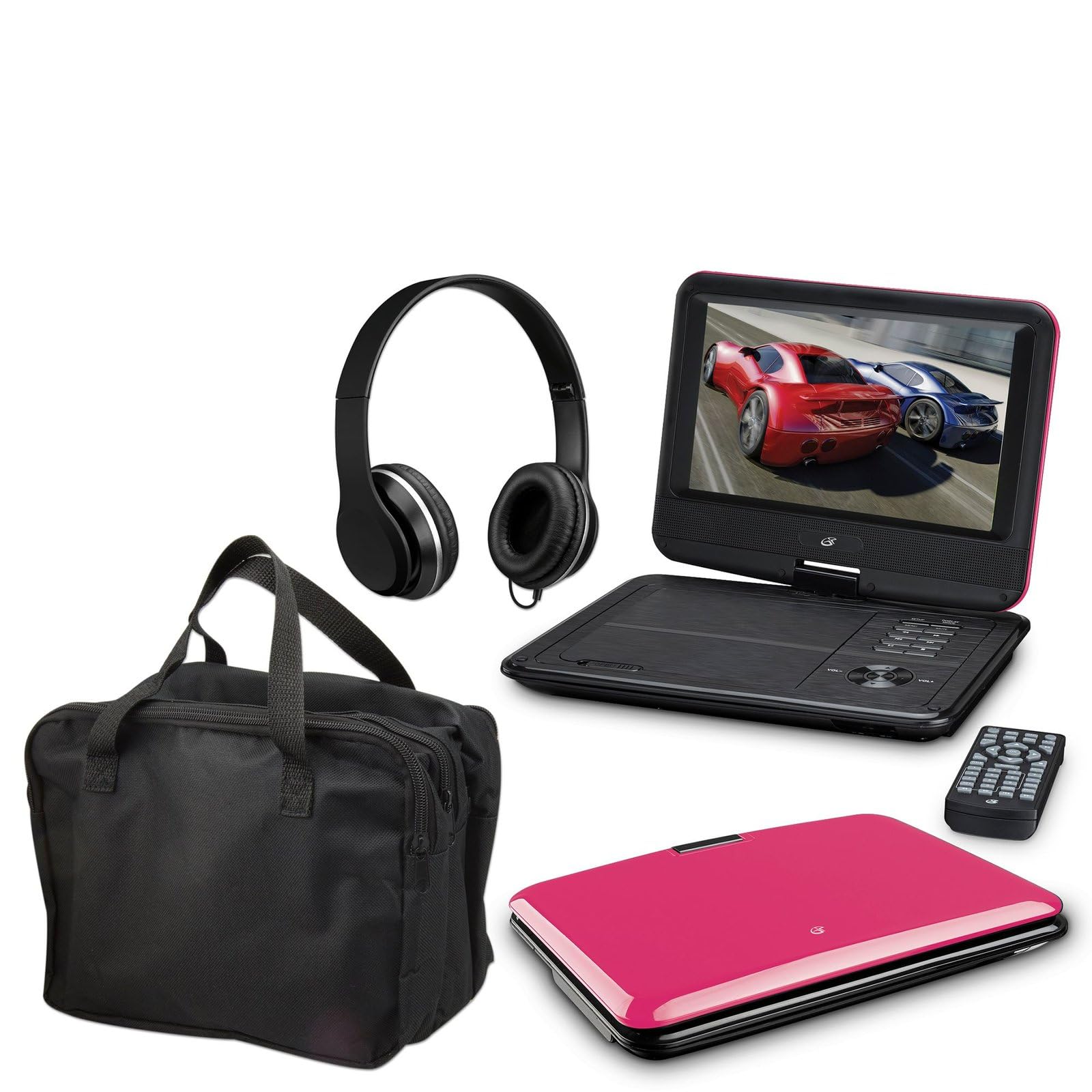
Image: The GPX 9-inch Portable DVD Player in its closed position, showcasing its vibrant pink top casing and sleek design.
محتويات الحزمة
تأكد من تضمين جميع العناصر المدرجة أدناه في الحزمة الخاصة بك:
- GPX 9-inch Portable DVD Player (Model PD901BDLP)
- جهاز التحكم عن بعد (يتطلب بطاريتين AAA، متضمنتين)
- محول الطاقة التيار المتردد/المستمر
- محول سيارة 12 فولت
- كابل صوت/فيديو من 3.5 ملم إلى RCA
- حقيبة الحمل
- سماعات الرأس
- دليل التعليمات (هذا المستند)
مميزات المنتج
- 9-inch 800x480 LCD screen
- Screen tilts and swivels for versatile viewزوايا
- Rechargeable lithium polymer battery with up to 2 hours of battery life
- مكبرات صوت ستيريو مدمجة
- مقبس سماعة الرأس للاستماع الخاص
- RCA output for connection to external displays
- Supports DVD, DVD-R/RW, DVD+R/RW, CD, CD-R/RW, JPEG, MP3 formats
يثبت
1. شحن البطارية
Before first use, fully charge the internal lithium polymer battery. Connect the AC/DC power adapter to the DC IN port on the DVD player and plug the other end into a standard wall outlet. The charging indicator light will illuminate. Charging typically takes approximately 3-4 hours for a full charge, providing up to 2 hours of playback.
2. تركيب بطاريات جهاز التحكم عن بعد
Open the battery compartment on the back of the remote control. Insert two (2) AAA batteries, ensuring correct polarity (+/-). Close the compartment securely.
3. Connecting to a Television (Optional)
ل view content on a larger screen, use the included 3.5mm-to-RCA audio/video cable. Connect the 3.5mm end to the AV OUT port on the DVD player. Connect the RCA (red, white, yellow) ends to the corresponding AV INPUT ports on your television. Select the correct AV input source on your TV.
4. Using the Car Adapter (Optional)
For in-car use, connect the 12V car adapter to the DC IN port on the DVD player and plug the other end into your vehicle's cigarette lighter socket.
تعليمات التشغيل
1. تشغيل / إيقاف التشغيل
اضغط مع الاستمرار على قوة button on the player or remote control to turn the device on or off.
2. إدخال قرص DVD
- Gently open the DVD player lid.
- Place a DVD disc onto the spindle with the label side facing up.
- اضغط برفق على منتصف القرص حتى يستقر في مكانه.
- Close the lid. The player will automatically begin reading the disc.
3. ضبط الشاشة
The LCD screen can be tilted and swiveled to achieve the optimal viewing angle. Carefully adjust the screen to your preferred position.
4. عناصر التحكم الأساسية في التشغيل
- تشغيل/إيقاف مؤقتاضغط لبدء التشغيل أو إيقافه مؤقتًا.
- قف: اضغط لإيقاف التشغيل.
- SKIP (<< / >>): Press to skip to the previous or next chapter/track.
- FF / REW: Press and hold to fast forward or rewind.
- الحجم (+/-): Adjust the audio volume.
5. استخدام سماعات الرأس
Plug the included headphones into the سماعة الرأس jack for private listening. The built-in speakers will automatically mute when headphones are connected.
صيانة
- تنظيف الشاشة: Use a soft, lint-free cloth to gently wipe the LCD screen. Do not use liquid cleaners or abrasive materials.
- Cleaning the Disc Tray: Keep the disc tray free of dust and debris. Use a soft brush or compressed air if necessary.
- العناية بالبطارية: To prolong battery life, avoid fully discharging the battery frequently. If storing the player for an extended period, charge it periodically.
- تخزين: Store the DVD player in a cool, dry place away from direct sunlight and extreme temperatures. Use the included carrying case for protection during transport.
استكشاف الأخطاء وإصلاحها
| مشكلة | حل |
|---|---|
| المشغل لا يعمل. | Ensure the battery is charged or the AC/DC adapter is securely connected to a working power outlet. Check the power switch. |
| لم يتم الكشف عن قرص. | Verify the disc is inserted correctly with the label side up and seated properly on the spindle. Ensure the disc is clean and free of scratches. Try a different disc. |
| لا يوجد صوت. | Check the volume level. Ensure headphones are not plugged in if you intend to use the built-in speakers. If connected to a TV, check the TV's volume and input settings. |
| جهاز التحكم عن بعد لا يعمل. | Check and replace the AAA batteries in the remote. Ensure there are no obstructions between the remote and the player's IR sensor. |
| الصورة مشوهة أو ضبابية. | Clean the disc. Adjust the screen angle. If connected to a TV, check the AV cable connections. |
تحديد
- نموذج: PD901BDLP
- حجم الشاشة: 9 بوصة
- نوع العرض: شاشة الكريستال السائل
- الدقة الأصلية: 800 × 480
- نوع الوسائط: DVD, DVD-R/RW, DVD+R/RW, CD, CD-R/RW, JPEG, MP3
- بطارية: قابلة للشحن ليثيوم بوليمر
- عمر البطارية: تصل إلى 2 ساعة
- الاتصال: 3.5mm AV Out, Headphone Jack, DC In
- مدخلات الطاقة: AC/DC Adapter, 12V Car Adapter
- وزن: حوالي 1.9 رطلاً (0.86 كجم)
- لون: لون القرنفل
- رمز المنتج العالمي: 047323179044
الضمان والدعم
This GPX Portable DVD Player is covered by a ضمان محدود من الشركة المصنعة لمدة 90 يومًا يسري هذا الضمان من تاريخ الشراء الأصلي. ويغطي عيوب المواد والتصنيع في ظل الاستخدام العادي.
For warranty service or technical support, please refer to the contact information provided with your product packaging or visit the official GPX webالموقع. احتفظ بإيصال الشراء كإثبات للشراء.
لمزيد من المعلومات، يمكنك زيارة GPX Store on Amazon.