
1. المقدمة
This manual provides comprehensive instructions for the installation, operation, and maintenance of the Came RE862 Dual-Channel Surface-Mount Receiver. The RE862 is a versatile radio receiver designed for various applications, including gate and garage door automation systems. It operates at a frequency of 868.35 MHz and features two independent channels, offering flexible control options. Its robust design with IP54 protection allows for outdoor installation.
Please read this manual carefully before proceeding with installation or operation to ensure safe and correct use of the device.
2. معلومات السلامة
- السلامة الكهربائية: Installation and wiring must be performed by qualified personnel in accordance with local electrical codes and regulations. Disconnect power before performing any work on the receiver.
- مزود الطاقة: Ensure the power supply (12-24V AC/DC) matches the receiver's requirements. Incorrect voltagه يمكن أن تلحق الضرر بالجهاز.
- الظروف البيئية: While the RE862 has an IP54 rating for outdoor use, avoid installing it in locations subject to extreme temperatures, direct water jets, or corrosive substances.
- تدخل: Keep the receiver away from strong electromagnetic fields or other radio frequency devices that could cause interference.
- الاستخدام المقصود: Use the receiver only for its intended purpose as a radio control device for automation systems.
3. محتويات العبوة
تأكد من أن جميع المكونات موجودة وغير تالفة عند فك العبوة:
- Came RE862 Dual-Channel Receiver Unit
- تعليمات التركيب والأسلاك
- دليل البرمجة
- أدوات التثبيت (البراغي، المقابس الجدارية)
- "Rolling Code Memory" Module (if included, refer to programming guide for use)
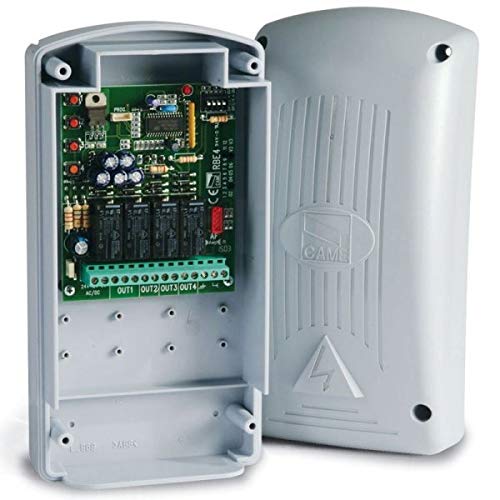
Figure 1: Came RE862 Dual-Channel Surface-Mount Receiver. This image shows the compact, black receiver unit, designed for surface mounting.
4. الإعداد والتثبيت
4.1 تركيب جهاز الاستقبال
- Choose a suitable location for mounting. Due to its IP54 rating, the RE862 can be installed outdoors, but ensure it is protected from direct mechanical impact.
- Mark the drilling points on the wall or surface using the receiver's mounting holes as a template.
- قم بحفر الثقوب وإدخال المقابس الجدارية المناسبة.
- Secure the receiver to the surface using the provided screws.
4.2 توصيلات الأسلاك
The RE862 receiver requires a 12-24V AC or DC power supply. It provides two Normally Open (NO) contact outputs, one for each channel.
- مزود الطاقة: Connect the 12-24V AC/DC power supply to the designated terminals on the receiver. Observe polarity if using DC power.
- إخراج القناة 1: Connect the output terminals for Channel 1 to the control input of your automation system (e.g., gate opener, garage door opener). This is a Normally Open (NO) contact.
- إخراج القناة 2: Connect the output terminals for Channel 2 to the control input of your second automation system or function. This is also a Normally Open (NO) contact.
Refer to the detailed wiring diagram included with your product for specific terminal assignments. Ensure all connections are secure and insulated.
5. تعليمات التشغيل
5.1 برمجة أجهزة التحكم عن بعد
The RE862 receiver is designed to work with Came 868.35 MHz remote controls. The programming process typically involves placing the receiver into a learning mode and then transmitting a signal from the remote control.
- ادخل إلى وضع التعلم: Locate the programming button (often labeled "PROG" or "MEM") on the RE862 receiver. Press and hold this button until an indicator LED (usually red or green) illuminates or flashes, indicating the receiver is in learning mode.
- الإرسال من جهاز التحكم عن بعد: While the receiver is in learning mode, press the desired button on your Came remote control that you wish to associate with Channel 1. The receiver's LED should change its behavior (e.g., flash rapidly, turn solid, or turn off) to confirm successful learning.
- Repeat for Channel 2 (if applicable): If you wish to program a second button on the remote for Channel 2, repeat the process. Some receivers may require re-entering learning mode for each channel or have a specific sequence for multi-channel programming.
- الخروج من وضع التعلم: The receiver will typically exit learning mode automatically after a short period of inactivity or after a successful programming sequence. Some models may require a short press of the programming button to exit.
For detailed programming steps, including instructions for the "Rolling Code Memory" module if present, refer to the specific programming guide provided with your receiver. The exact procedure may vary slightly depending on the firmware version.
5.2 عملية الاختبار
After programming, test the remote control's functionality. Press the programmed button on the remote. The receiver's output relay for the corresponding channel should activate, and your connected automation system should respond.
6. الصيانة
- تنظيف: Periodically clean the exterior of the receiver with a soft, dry cloth. Do not use abrasive cleaners or solvents.
- تقتيش: Regularly inspect wiring connections for signs of wear, corrosion, or damage. Ensure the housing remains securely mounted and free from cracks.
- الهوائي: Ensure the antenna (if external) is unobstructed and in good condition for optimal range.
- تحديثات البرامج الثابتة: Check the Came official website for any available firmware updates, though these typically require specialized tools.
7. استكشاف الأخطاء وإصلاحها
| مشكلة | السبب المحتمل | حل |
|---|---|---|
| جهاز الاستقبال لا يعمل. | لا يوجد مصدر طاقة أو مستوى صوت غير صحيحtage. | Check power connections and ensure 12-24V AC/DC is supplied. Verify polarity for DC. |
| Remote control does not activate the system. | Remote not programmed, incorrect frequency, or out of range. | Re-program the remote control (Section 5.1). Ensure the remote operates at 868.35 MHz. Check for obstructions and ensure you are within operating range. |
| System activates intermittently. | Interference, weak signal, or loose wiring. | Check for sources of interference. Ensure antenna is clear. Inspect all wiring connections for tightness. |
| "Rolling Code Memory" module not understood. | Lack of specific instructions. | This module typically enhances security by managing rolling codes. Refer to the detailed programming guide for its specific integration and benefits. If no guide is available, contact Came support. |
8. المواصفات
| ميزة | التفاصيل |
|---|---|
| رقم الموديل | RE862 |
| ماركة | أتى |
| القنوات | 2 |
| تكرار | 868.35 ميجا هرتز |
| مزود الطاقة | 12 - 24V AC/DC |
| نوع الإخراج | Normally Open (NO) contact per channel |
| تصنيف الحماية | IP54 (مناسب للتركيب الخارجي) |
| تكنولوجيا الاتصال | موجة تردد الراديو |
| لون | أسود |
9. الضمان والدعم
Came products are manufactured to high-quality standards. For warranty information, please refer to the warranty card included with your purchase or visit the official Came webالموقع. احتفظ بإثبات الشراء الخاص بك لتقديم مطالبات الضمان.
For technical support, troubleshooting assistance beyond this manual, or to inquire about spare parts, please contact your authorized Came dealer or the official Came customer service department. Contact details can typically be found on the Came webالموقع أو في وثائق المنتج الخاص بك.