
مقدمة
This manual provides comprehensive instructions for the setup, operation, maintenance, and troubleshooting of your Proscan CRK83X PSVR82 TV Remote Control. This remote is designed to work seamlessly with various Proscan TV and VCR models, offering a direct replacement or compatible control solution.
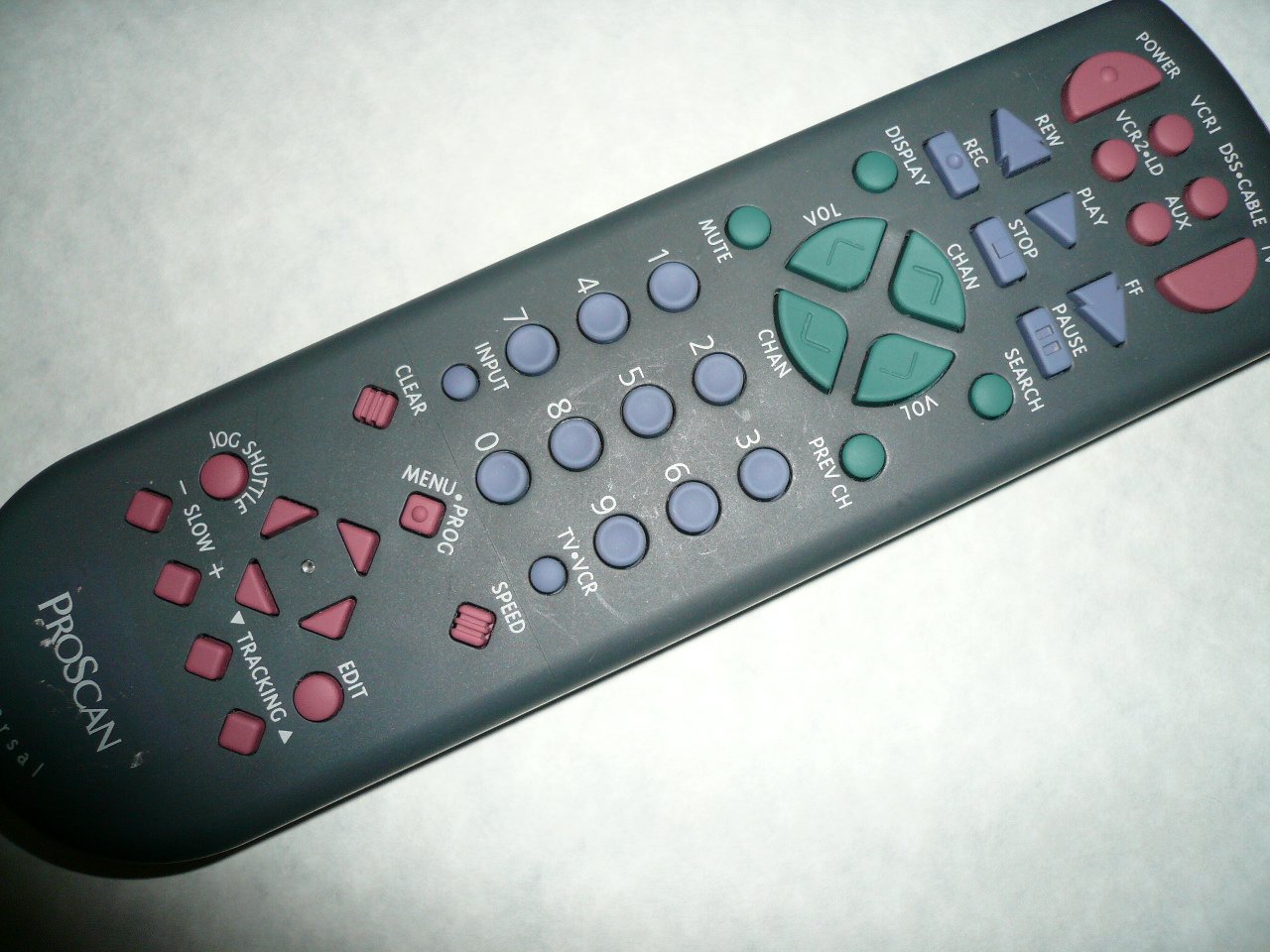
An image showing the Proscan CRK83X PSVR82 TV Remote Control, highlighting its ergonomic design and button layout. The remote is dark gray with purple and teal buttons, clearly labeled for various functions.
يثبت
1. تركيب البطارية
- حدد موقع غطاء حجرة البطارية في الجزء الخلفي من جهاز التحكم عن بعد.
- قم بتحريك الغطاء للأسفل أو اضغط على المزلاج لفتحه.
- أدخل بطاريتين (2) من نوع AAA (غير مرفقة)، مع التأكد من محاذاة الأطراف الموجبة (+) والسالبة (-) بشكل صحيح مع العلامات الموجودة داخل الحجرة.
- قم باستبدال غطاء حجرة البطارية عن طريق تحريكه مرة أخرى إلى مكانه حتى يصدر صوت نقرة آمنة.
2. الاستخدام الأولي
The Proscan CRK83X PSVR82 remote control is typically pre-programmed for compatible Proscan TV and VCR models. No complex programming steps are usually required for initial use with supported devices. Simply point the remote at your device and press the desired function button.
This remote is compatible with a wide range of models, including but not limited to: P5VR74, PAVR57, PCVR72, PRVR71, PSDR72, PSDR73, PSNKVSR72, PSNPSVR57, PSNPSVR65, PSNPSVR70, PSNPSVR71, PSNPSVR72, PSNPSVR73, PSNPSVR74, PSNPSVRR73, PSNR65, PSNVR74, PSRV65, PSRV71, PSRV72, PSRV74, PSRVR65, PSRVR71, PSUR70, PSUR72, PSV174, PSV65, PSV71, PSV72, PSVDR73, PSVER72, PSVH57, PSVP71, PSVR22, PSVR27, PSVR57, PSVR61, PSVR62, PSVR65, PSVR72L, PSVR72VCR, PSVR75, PSVR79, PSVR83, PSVT73, PSVV73, PSZR65, PSZR71, PSZR73, PVSR73, R65, RCU800, RSVR73, SPVR65, SSVR62, VR653HF, VR730, VR730HF.
تعليمات التشغيل
Familiarize yourself with the buttons and their functions for optimal control of your television and VCR.
| اسم الزر | وظيفة |
|---|---|
| قوة | Turns the connected device (TV/VCR) on or off. |
| VCR1, DSS/CABLE, VCR2/LD, AUX | Selects the input source for the television or VCR. |
| كتم الصوت | كتم أو إلغاء كتم صوت إخراج الصوت. |
| المجلد +/- | يضبط مستوى الصوت بالزيادة أو النقصان. |
| تشان +/- | يغير القناة لأعلى أو لأسفل. |
| السابق CH | Switches to the previously viewقناة إد. |
| عرض | Displays on-screen information such as channel number or time. |
| ريك | Initiates recording on the VCR. |
| ريو | Rewinds the tape during VCR playback. |
| يلعب | Starts playback of a tape or disc. |
| FF | Fast forwards the tape during VCR playback. |
| قف | يوقف التشغيل أو التسجيل. |
| يوقف | يوقف التشغيل أو التسجيل مؤقتًا. |
| يبحث | Activates search function, typically for VCR content. |
| لوحة الأرقام (0-9) | Directly enters channel numbers or menu selections. |
| مدخل | يتنقل بين مصادر الإدخال المتاحة. |
| واضح | Clears entered numbers or menu selections. |
| MENU / PROG | Accesses the on-screen menu or programming functions. |
| تلفزيون-فيديو | Toggles control between TV and VCR modes. |
| مكوك الركض | Provides frame-by-frame or variable speed control for VCR playback. |
| بطيء +/- | Adjusts slow-motion speed during VCR playback. |
| سرعة | Adjusts playback speed, typically for VCR. |
| TRACKING ▲/▼ | Adjusts the VCR tracking for optimal picture quality. |
| يحرر | Activates editing functions, typically for VCR. |
صيانة
تنظيف جهاز التحكم عن بعد
- امسح جهاز التحكم عن بعد بقطعة قماش ناعمة وجافة.
- بالنسبة للأوساخ العنيدة، قم بإزالة الأوساخ برفق.ampبلّل قطعة القماش بالماء أو بمنظف خفيف غير كاشط. لا ترش المنظف مباشرة على جهاز التحكم عن بعد.
- تجنب استخدام المواد الكيميائية القاسية أو المذيبات أو وسادات التنظيف الكاشطة، لأنها قد تتلف سطح جهاز التحكم عن بعد أو مكوناته الداخلية.
استبدال البطارية
Replace batteries when the remote's response becomes sluggish or it stops functioning. Refer to the "Battery Installation" section under Setup for detailed instructions.
تخلص دائمًا من البطاريات المستعملة بطريقة مسؤولة وفقًا للوائح المحلية.
استكشاف الأخطاء وإصلاحها
| مشكلة | السبب المحتمل / الحل |
|---|---|
| جهاز التحكم عن بعد لا يعمل. |
|
| يعمل عن بعد بشكل متقطع. |
|
| Certain buttons do not respond. |
|
تحديد
- ماركة: بروسكان
- نموذج: CRK83X PSVR82
- الشركة المصنعة: بروكان
- الأجهزة المتوافقة: Television (and various Proscan VCR models as listed in Setup section)
- تقنية الاتصال: الأشعة تحت الحمراء
- نوع تحكم: التحكم بالأزرار
- ميزة خاصة: تصميم مريح
- ASIN: B00P82T2LS
- تاريخ التوفر الأول: 4 نوفمبر 2014
الضمان والدعم
Specific warranty information for the Proscan CRK83X PSVR82 TV Remote Control is not provided in this manual. Please refer to the product packaging or contact your retailer for details regarding warranty coverage.
For further assistance or technical support, please contact the manufacturer or your point of purchase. No specific support contact details are available in this document.