
1. المقدمة
This manual provides essential information for the proper setup, operation, and maintenance of your Sony SLV-FT5 VHS Video Cassette Recorder (VCR). Please read these instructions thoroughly before using the unit to ensure optimal performance and safety.
2. معلومات السلامة
اتبع دائمًا احتياطات السلامة الأساسية عند استخدام هذا المنتج لتقليل خطر الحريق والصدمة الكهربائية والإصابة.
- لا تعرض الوحدة للمطر أو الرطوبة.
- لا تقم أبدا بفتح مجلس الوزراء. قم بإحالة الخدمة إلى الموظفين المؤهلين فقط.
- تأكد من التهوية المناسبة؛ ولا تسد فتحات التهوية.
- استخدم فقط مصدر الطاقة المحدد لهذه الوحدة.
- احتفظ بالوحدة بعيدًا عن مصادر الحرارة وأشعة الشمس المباشرة.
3. الإعداد
3.1 فك التعبئة
Carefully remove the VCR and all accessories from the packaging. Verify that all components are present: the SLV-FT5 VCR unit, remote control, and necessary connection cables (e.g., RCA audio/video cables).
3.2 الاتصال بالتلفزيون
To connect the VCR to your television, use the provided RCA audio/video cables. Match the colored plugs to the corresponding colored jacks on both the VCR and your TV (Yellow for Video, White for Left Audio, Red for Right Audio).

الشكل 1: Rear panel of the Sony SLV-FT5 VCR. This image displays the various input and output ports, including RCA jacks for audio and video, and the power input. The product label with model number SLV-FT5 and power specifications (100V 18W 50/60Hz) is also visible.
3.3 توصيل الطاقة
Plug the VCR's power cord into a standard electrical outlet (AC 100V, 50/60Hz). Ensure the power outlet is easily accessible.
3.4 إعداد جهاز التحكم عن بعد
Open the battery compartment on the back of the remote control and insert two AA batteries, observing the correct polarity (+/-). Close the compartment securely.

الشكل 2: The Sony RMT-V219 remote control, designed for the SLV-FT5 VCR. This image also shows the included RCA audio/video cables, which are typically used for connecting the VCR to a television.
4. تشغيل مسجل الفيديو
4.1 تشغيل/إيقاف التشغيل
اضغط على قوة button on the VCR's front panel or the remote control to turn the unit on or off.
4.2 Loading and Unloading a VHS Tape
- تحميل: Insert a VHS cassette into the tape slot on the front of the VCR with the tape window facing forward. The VCR will automatically pull the tape in.
- التفريغ: اضغط على إخراج button on the VCR or remote control. The tape will be ejected.
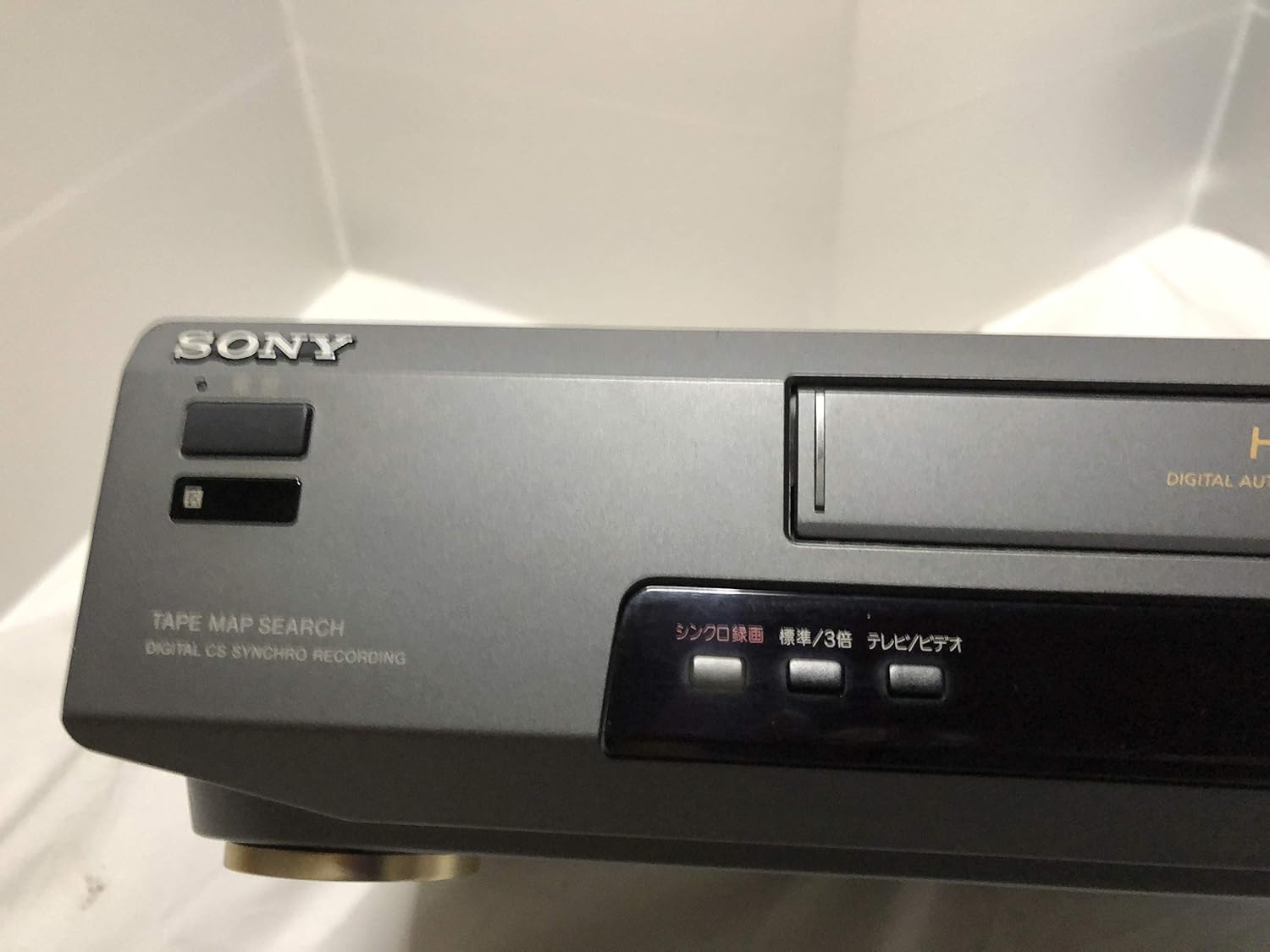
الشكل 3: Front left section of the Sony SLV-FT5 VCR. This view highlights the tape loading slot and the 'TAPE MAP SEARCH' feature, which assists in navigating recorded content on a tape.
4.3 التشغيل
After loading a tape, press the يلعب button (►) on the VCR or remote control to begin playback. Use the يوقف (∥), قف (■), إعادة (◀◀), and التقديم السريع (►►) buttons to control playback.

الشكل 4: Front right section of the Sony SLV-FT5 VCR. This image displays the main playback controls (Play, Stop, Rewind, Fast Forward, Pause) and additional buttons for 'Quick Timer' and 'Tracking' adjustments.
4.4 التسجيل
To record, ensure a blank or recordable tape is inserted. Select the desired input source (e.g., TV channel). Press the ريك (●) button on the VCR or remote control. Press قف (■) لإنهاء التسجيل.
4.5 Tracking Adjustment
If the picture quality during playback is poor (e.g., horizontal lines or noise), use the التتبع buttons on the front panel or remote control to fine-tune the tape's alignment with the VCR's heads.
5. الصيانة
5.1 تنظيف الوحدة
Wipe the exterior of the VCR with a soft, dry cloth. For stubborn stains, use a cloth lightly dampاغسلها بمحلول منظف خفيف، ثم جففها. لا تستخدم منظفات أو مذيبات كاشطة.
تنظيف 5.2 رؤوس
Over time, VCR heads can accumulate dirt, leading to poor picture and sound quality. Use a commercially available dry-type VHS head cleaning cassette according to its instructions. Avoid wet-type cleaners as they can damage the heads.
5.3 التخزين
When not in use for extended periods, disconnect the VCR from the power outlet. Store the unit in a cool, dry place, away from dust and direct sunlight.
6. استكشاف الأخطاء وإصلاحها
If you encounter issues with your VCR, refer to the following common problems and solutions before seeking professional service.
| مشكلة | السبب المحتمل | حل |
|---|---|---|
| لا يوجد طاقة | تم فصل سلك الطاقة؛ مشكلة في منفذ الطاقة | تحقق من توصيل سلك الطاقة؛ حاول استخدام منفذ مختلف. |
| لا توجد صورة/صوت | Incorrect TV input; loose A/V cables | Select correct TV input (e.g., Video 1, AV); ensure A/V cables are securely connected. |
| جودة الصورة رديئة (ثلجية، خطوط) | Dirty VCR heads; tracking issue; old/damaged tape | Clean VCR heads; adjust tracking; try a different tape. |
| Tape won't eject | Power issue; mechanical malfunction | Ensure power is on; try pressing EJECT multiple times. If issue persists, seek service. |
| جهاز التحكم عن بعد لا يعمل | Dead batteries; obstructed sensor | Replace batteries; ensure no obstacles between remote and VCR sensor. |
7. المواصفات
| ميزة | مواصفة |
|---|---|
| ماركة | سوني |
| رقم الموديل | SLV-FT5 |
| نوع الوسائط | شريط فيديو |
| دقة | 720 × 480 بكسل |
| وزن المنتج | 4160 جرام |
| وضع إخراج الصوت | ستيريو |
| تنسيقات الصوت المدعومة | Monaural, Stereo |
| ترميز الفيديو | التناظرية |
| الأجهزة المتوافقة | تلفزيون |
| توافق إدخال الفيديو | ان تي اس سي |
| متطلبات الطاقة | 100V, 18W, 50/60Hz |
8. الضمان والدعم
For warranty information and customer support, please refer to the documentation included with your purchase or visit the official Sony webالموقع. احتفظ بإثبات الشراء الخاص بك لتقديم مطالبات الضمان.