
1. المقدمة
This manual provides detailed instructions for the proper use, setup, and maintenance of your Genius HS-920BT Bluetooth Headset. Please read this manual thoroughly before using the device to ensure optimal performance and longevity.
The Genius HS-920BT is a versatile Bluetooth headset designed for wireless audio streaming and hands-free communication with compatible devices such as smartphones, tablets, and PCs.
2. محتويات العبوة
تأكد من وجود جميع العناصر في الحزمة الخاصة بك:
- Genius HS-920BT Bluetooth Headset
- كابل شحن USB
- Multi-language User Manual (this document)
3. انتهى المنتجview
The HS-920BT headset features an adjustable headband and comfortable earcups, integrating controls for audio playback and call management.
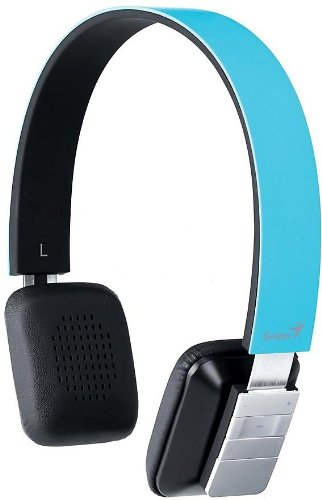
Figure 1: Genius HS-920BT Bluetooth Headset (Blue)
This image displays the Genius HS-920BT Bluetooth Headset in blue, viewed from an angle, highlighting its adjustable headband and earcup design.
المميزات الرئيسية:
- Wireless Bluetooth connectivity for audio and calls (A2DP support)
- Integrated rechargeable Lithium-Ion battery
- ميكروفون مدمج للتواصل بدون استخدام اليدين
- On-ear controls for volume adjustment, track skipping (AVRCP support)
- عصابة رأس قابلة للتعديل لملاءمة مريحة
- 40 mm driver units for clear sound
4. الإعداد
4.1 شحن سماعة الرأس
Before initial use, fully charge the headset. Use the provided USB charging cable.
- قم بتوصيل الطرف الصغير من كابل شحن USB بمنفذ الشحن الموجود على سماعة الرأس.
- قم بتوصيل الطرف الأكبر من كابل USB بمنفذ USB مزود بالطاقة (مثل الكمبيوتر أو محول USB الجداري).
- The LED indicator on the headset will illuminate during charging and change color or turn off when fully charged. Refer to the headset's LED behavior for specific indications.
تستغرق عملية الشحن الكامل عادةً ما يقرب من 2 إلى 3 ساعات.
4.2 الاقتران بجهاز بلوتوث
To use the HS-920BT wirelessly, you must pair it with your Bluetooth-enabled device.
- تشغيل الطاقة: Press and hold the Power button on the headset until the LED indicator flashes, usually alternating blue and red, indicating pairing mode.
- تفعيل البلوتوث: On your smartphone, tablet, or PC, enable Bluetooth functionality.
- بحث عن الأجهزة: In your device's Bluetooth settings, search for available devices. The headset should appear as "HS-920BT".
- اختر وقم بالاقتران: Select "HS-920BT" from the list. If prompted for a passcode, enter "0000" (four zeros).
- تأكيد: Once paired, the headset's LED indicator will typically flash blue slowly, and your device will confirm the connection.
The headset will automatically attempt to reconnect to the last paired device when powered on, if that device's Bluetooth is active and within range.
5. تعليمات التشغيل
The HS-920BT features intuitive controls located on the earcup.

Figure 2: Earcup Controls of HS-920BT
This image shows a close-up of the right earcup of the Genius HS-920BT Bluetooth Headset, detailing the control buttons for power, volume, and track navigation.
5.1 تشغيل/إيقاف التشغيل
- تشغيل الطاقة: اضغط مع الاستمرار على زر التشغيل لمدة 3 ثوانٍ تقريبًا حتى يومض مؤشر LED باللون الأزرق.
- إيقاف التشغيل: اضغط مع الاستمرار على زر الطاقة لمدة 3 ثوانٍ تقريبًا حتى ينطفئ مؤشر LED.
5.2 تشغيل الموسيقى
- تشغيل/إيقاف مؤقت: اضغط على زر التشغيل/الإيقاف المؤقت مرة واحدة.
- المسار التالي: Press the "Next Track" button (usually marked with a forward arrow).
- المسار السابق: Press the "Previous Track" button (usually marked with a backward arrow).
5.3 إدارة المكالمات
- الرد/إنهاء المكالمة: Press the Multi-function button (often the same as Play/Pause) once during an incoming call to answer, or once during a call to end it.
- رفض المكالمة: اضغط مع الاستمرار على زر الوظائف المتعددة لمدة ثانيتين تقريبًا أثناء المكالمة الواردة.
- إعادة الاتصال بالرقم الأخير: اضغط مرتين على زر الوظائف المتعددة عندما لا تكون في مكالمة.
5.4 التحكم في مستوى الصوت
- ارفع على الصوت: اضغط على زر رفع الصوت (+).
- تقليل الحجم: اضغط على زر خفض الصوت (-).
6. الصيانة
تضمن العناية المناسبة طول عمر سماعة الرأس الخاصة بك.
- تنظيف: استخدم قطعة قماش ناعمة وجافة لتنظيف سماعة الرأس. لا تستخدم المنظفات الكاشطة أو المذيبات.
- تخزين: قم بتخزين سماعة الرأس في مكان بارد وجاف بعيدًا عن أشعة الشمس المباشرة ودرجات الحرارة القصوى.
- العناية بالبطارية: To preserve battery life, avoid fully discharging the battery frequently. Charge the headset regularly, even if not in use for extended periods.
- التعرض للماء: سماعة الرأس ليست مقاومة للماء. تجنب تعريضها للماء أو الرطوبة الزائدة.
7. استكشاف الأخطاء وإصلاحها
If you encounter issues with your HS-920BT headset, refer to the following common solutions:
| مشكلة | الحل المحتمل |
|---|---|
| سماعة الرأس لا تعمل. | Ensure the battery is charged. Connect the headset to a power source using the USB cable. |
| لا يمكن إقران سماعة الرأس بجهاز. |
|
| لا يوجد صوت أو مستوى الصوت منخفض. |
|
| جودة المكالمة سيئة. |
|
8. المواصفات
| اسم الموديل: | HS-920BT |
| التكنولوجيا اللاسلكية: | بلوتوث |
| وحدات السائق: | 40 ملم |
| بطارية: | بطارية ليثيوم أيون قابلة لإعادة الشحن مدمجة |
| نوع التحكم: | Volume Control, Track Navigation, Call Management |
| ميكروفون: | مدمج |
| دعم Profiles: | A2DP ، AVRCP |
| منصة الأجهزة: | جهاز كمبيوتر شخصي، هاتف ذكي، جهاز لوحي |
| وزن السلعة: | 110 جرام |
| الأبعاد (الطول × العرض × الارتفاع): | 13.6 × 17.3 × 2.9 سم |
9. الضمان والدعم
For warranty information and technical support, please refer to the warranty card included with your product or visit the official Genius webالموقع. احتفظ بإيصال الشراء كإثبات للشراء.
For further assistance, you may contact Genius customer service through their official channels.