
1. تعليمات السلامة الهامة
Please read these instructions carefully before using the LAFAYETTE Old Disco Turntable. Keep this manual for future reference.
- مصدر الطاقة: Only use the turntable with the specified power supply. Ensure the voltage matches your local power grid.
- الماء والرطوبة: لا تعرض الجهاز للمطر أو الرطوبة أو السوائل المتساقطة أو المتناثرة. لا تضع أشياء مملوءة بالسوائل، مثل المزهريات، على الجهاز.
- تهوية: تأكد من التهوية الجيدة. لا تسد أي فتحات تهوية.
- حرارة: لا تضعه بالقرب من مصادر الحرارة مثل المشعات أو فتحات التدفئة أو المواقد أو الأجهزة الأخرى (بما في ذلك ampالمُضخِّمات) التي تنتج الحرارة.
- تنظيف: نظف فقط بقطعة قماش جافة.
- الخدمة: لا تحاول خدمة هذا المنتج بنفسك. قم بإحالة جميع أعمال الصيانة إلى أفراد الخدمة المؤهلين.
- الموقع: Place the unit on a stable, flat surface to prevent damage from falling.
2. انتهى المنتجview
The LAFAYETTE Old Disco Turntable is a versatile audio system designed for playing vinyl records, digital audio playback via USB and SD card, and wireless streaming via integrated Bluetooth. It also features a recording function to convert vinyl to digital formats.
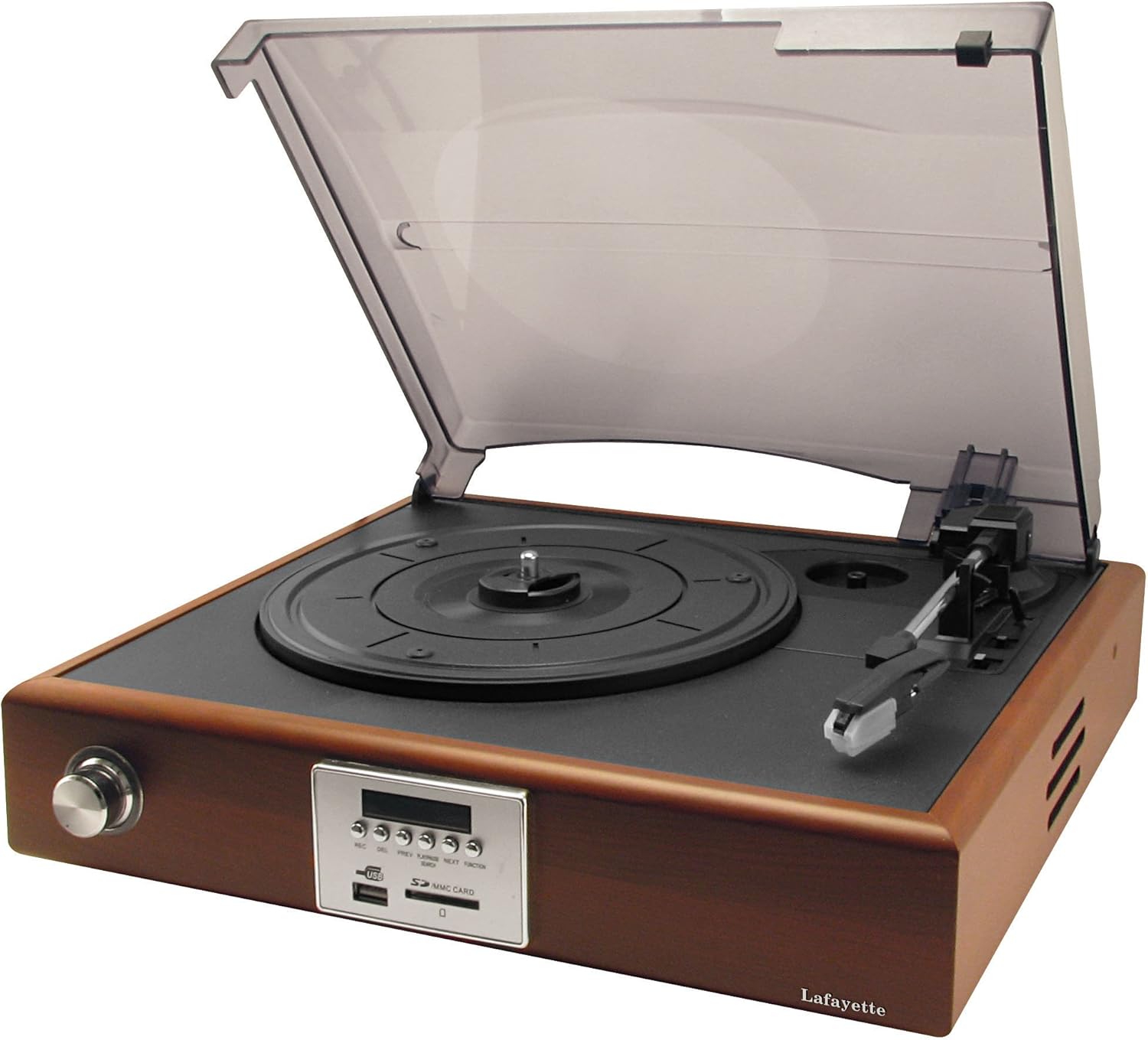
الشكل 2.1: أمام view of the LAFAYETTE Old Disco Turntable with the dust cover open, revealing the record platter, tonearm, and the main control panel on the front.
2.1. الميزات الرئيسية
- 3-speed Turntable (33 1/3, 45, 78 RPM)
- Integrated Bluetooth Receiver for wireless audio streaming
- USB Port for MP3 playback and recording
- SD/MMC Card Slot for MP3 playback and recording
- Direct recording from vinyl to USB or SD card
- مكبرات صوت مدمجة
2.2. محتويات العبوة
- LAFAYETTE Old Disco Turntable Unit
- محول الطاقة
- دليل المستخدم
- Integrated Bluetooth Receiver (part of the unit)
3. الضوابط والتوصيلات
Familiarize yourself with the various controls and connection points on your turntable.

الشكل 3.1: مفصل view of the control panel, showing buttons and media slots.
3.1. ضوابط اللوحة الأمامية
- زر REC: Initiates recording from vinyl to USB/SD.
- زر الحذف: Deletes the currently playing track from USB/SD.
- زر PREV: Skips to the previous track (USB/SD/Bluetooth).
- زر التشغيل / الإيقاف المؤقت: Plays or pauses audio playback (USB/SD/Bluetooth).
- زر' التالي: Skips to the next track (USB/SD/Bluetooth).
- FUNCTION/SEARCH Button: Switches between input modes (Phono, USB, SD, Bluetooth) and initiates search function in digital modes.
- منفذ USB: Connect USB flash drives for playback and recording.
- فتحة بطاقة SD/MMC: Insert SD or MMC cards for playback and recording.
- عرض: Shows current mode, track number, and other relevant information.
3.2. Turntable Components
- غطاء الغبار: يحمي القرص الدوار من الغبار.
- طبق: مكان وضع السجل.
- مغزل: يحافظ على الرقم القياسي في مكانه.
- تونيرم: يحمل القلم ويتتبع أخاديد التسجيل.
- قلم اللمس (الإبرة): Reads the audio information from the record.
- محدد السرعة: قم بالتبديل لاختيار 33 1/3 أو 45 أو 78 دورة في الدقيقة.
- مفتاح الإيقاف التلقائي: Enables or disables automatic stopping of the platter at the end of a record.
4. الإعداد
Follow these steps to set up your LAFAYETTE Old Disco Turntable.
- فك التعبئة: أزل جميع المكونات من العبوة بعناية. احتفظ بالعبوة للنقل أو التخزين مستقبلًا.
- الموقع: Place the turntable on a stable, level surface away from direct sunlight, heat sources, and excessive dust.
- توصيل الطاقة: Connect the power adapter to the DC input on the back of the turntable, then plug the adapter into a wall outlet.
- غطاء الغبار: Attach the dust cover to the hinges on the back of the unit.
- حماية القلم: Remove the stylus protector from the needle before use.
5. تعليمات التشغيل
5.1. تشغيل الأسطوانات
- افتح غطاء الغبار.
- ضع سجلاً على الطبق.
- Select the correct speed (33 1/3, 45, or 78 RPM) using the speed selector switch. For 45 RPM records, place the included adapter on the spindle.
- Push the FUNCTION/SEARCH button until 'PH' (Phono) appears on the display.
- ارفع ذراع التشغيل برفق باستخدام ذراع التوجيه وضع القلم فوق المسار المطلوب على الأسطوانة.
- أنزل ذراع التشغيل ببطء باستخدام ذراع التوجيه. سيبدأ تشغيل الأسطوانة.
- اضبط مستوى الصوت باستخدام مقبض الصوت.
- At the end of the record, if the auto-stop function is enabled, the platter will stop spinning. Otherwise, manually lift the tonearm and return it to its rest.
5.2. تشغيل بلوتوث
- Push the FUNCTION/SEARCH button until 'BT' (Bluetooth) appears on the display. The unit will enter pairing mode, indicated by a flashing 'BT'.
- قم بتفعيل البلوتوث على هاتفك الذكي أو جهازك اللوحي أو أي جهاز صوتي آخر.
- بحث عن 'OLD DISCO' in your device's Bluetooth list and select it to pair.
- Once paired, 'BT' will stop flashing. You can now stream audio from your device to the turntable.
- Use the PLAY/PAUSE, PREV, and NEXT buttons on the turntable or your connected device to control playback.
5.3. تشغيل USB/بطاقة SD
- أدخل ذاكرة فلاش USB في منفذ USB أو بطاقة SD/MMC في فتحة بطاقة SD.
- Push the FUNCTION/SEARCH button until 'USB' or 'SD' appears on the display. The unit will automatically begin playing MP3 files.
- Use the PLAY/PAUSE, PREV, and NEXT buttons to control playback.
- To delete a track, press the DEL button during playback. Confirm deletion if prompted.
5.4. Recording from Vinyl to USB/SD Card
- Insert a USB flash drive or SD/MMC card into the respective slot. Ensure it has sufficient free space.
- Push the FUNCTION/SEARCH button until 'PH' (Phono) appears on the display.
- ابدأ بتشغيل أسطوانة الفينيل التي ترغب في تسجيلها.
- Press the REC button. The display will show 'REC' and recording will begin.
- To stop recording, press the REC button again. The recorded file will be saved as an MP3 on your USB drive or SD card.
6. الصيانة
6.1. تنظيف الوحدة
- امسح الجزء الخارجي من الوحدة بقطعة قماش ناعمة وجافة.
- لا تستخدم المنظفات الكاشطة أو الشمع أو المذيبات.
- أبقِ غطاء الغبار مغلقًا عند عدم الاستخدام لمنع تراكم الغبار.
6.2. العناية بالقلم
- Gently clean the stylus periodically with a soft brush, brushing from back to front.
- استبدل قلم التسجيل عندما تلاحظ انخفاضًا في جودة الصوت أو تآكلًا واضحًا.
6.3. العناية بالسجلات
- أمسك الأسطوانات من حوافها لتجنب لمس الأخاديد.
- Store records vertically in their sleeves in a cool, dry place.
- نظف الأسطوانات بانتظام باستخدام فرشاة أو محلول مخصص لتنظيف الأسطوانات.
7. استكشاف الأخطاء وإصلاحها
If you encounter any issues, refer to the following troubleshooting guide before contacting support.
- لا يوجد طاقة:
- تأكد من توصيل محول الطاقة بشكل آمن بالجهاز وبمأخذ الحائط.
- تحقق من عمل مقبس الحائط بشكل صحيح عن طريق توصيل جهاز آخر.
- لا يوجد صوت:
- Increase the volume using the volume knob.
- Ensure the correct input mode (Phono, Bluetooth, USB, SD) is selected.
- For vinyl playback, ensure the stylus protector is removed and the tonearm is properly lowered onto the record.
- If using Bluetooth, ensure the device is properly paired and volume is up on both the turntable and the connected device.
- ضعف جودة الصوت:
- نظف قلم التسجيل ثم سجل.
- Ensure the record is clean and free of scratches.
- تحقق مما إذا كان قلم اللمس مهترئًا ويحتاج إلى استبدال.
- تأكد من وضع القرص الدوار على سطح مستوٍ وثابت لمنع الاهتزازات.
- مشاكل التسجيل:
- Ensure the USB drive or SD card has sufficient free space and is formatted correctly (FAT32).
- Check that the recording process was initiated correctly by pressing the REC button.
8. المواصفات
| ميزة | مواصفة |
|---|---|
| اسم الموديل | Old Disco |
| رقم موديل العنصر | Old Disco |
| رقم العنصر | 33210500 |
| سرعات القرص الدوار | 33 1/3، 45، 78 دورة في الدقيقة |
| الاتصال | USB, SD/MMC Card, Bluetooth |
| جهاز إستقبال البلوتوث | مدمج |
| وظيفة التسجيل | Direct from Vinyl to USB/SD (MP3) |
| مصدر الطاقة | كهرباء سلكية |
| تنسيق الإشارة | رقمي |
| لون | بني |
| ASIN | B00MYAATH8 |
9. الضمان والدعم
This product comes with a standard manufacturer's warranty. For specific warranty details, please refer to the warranty card included with your purchase or contact your retailer.
For technical support, troubleshooting assistance beyond this manual, or service inquiries, please contact LAFAYETTE customer service through their official webالموقع الإلكتروني أو معلومات الاتصال المرفقة مع وثائق المنتج.