
مقدمة
This manual provides instructions for the setup, operation, and maintenance of your DIRECTV Universal Remote Control, model RC65. This remote is designed to operate your DIRECTV receiver and can be programmed to control other audio/video devices such as televisions and sound systems.
Please read this manual thoroughly before using your remote control to ensure proper functionality and to maximize your viewتجربة رائعة.
المنتج انتهىview
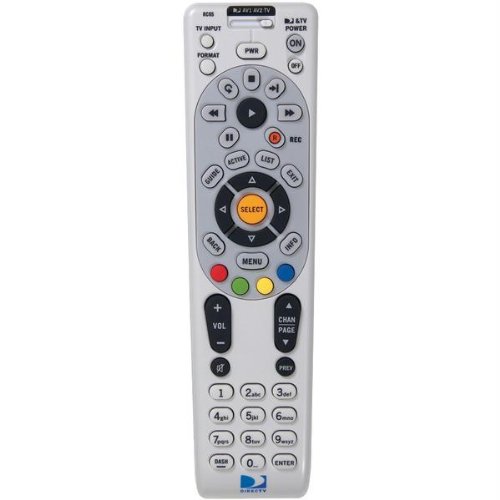
الصورة: الجبهة view of the DIRECTV Universal Remote Control RC65. This image displays the remote's ergonomic design and the layout of its primary control buttons, including the directional pad, channel and volume controls, and various function keys. The remote is black with white button labels.
The DIRECTV RC65 remote control is a universal remote capable of controlling multiple devices. Its design focuses on ease of use and compatibility with a wide range of audio/video equipment.
يثبت
1. تركيب البطارية
- حدد موقع حجرة البطارية في الجزء الخلفي من جهاز التحكم عن بعد.
- اضغط لأسفل على علامة التبويب ثم قم بإزالة غطاء البطارية.
- أدخل بطاريتين (2) من نوع AA، مع التأكد من محاذاة الأطراف الموجبة (+) والسالبة (-) مع العلامات الموجودة داخل الحجرة.
- قم بتحريك غطاء البطارية مرة أخرى إلى مكانه حتى يستقر بشكل آمن.
ملاحظة: البطاريات غير مرفقة مع جهاز التحكم عن بعد.
2. Programming for DIRECTV Receiver
The remote is typically pre-programmed to operate your DIRECTV receiver. If it does not work, or if you are setting up a new remote, follow these steps:
- وجّه جهاز التحكم عن بعد نحو جهاز استقبال DIRECTV الخاص بك.
- اضغط مع الاستمرار على كتم الصوت و يختار buttons simultaneously until the green light at the top of the remote flashes twice.
- أدخل الرمز 961. The green light will flash twice.
- اضغط على قناة لأعلى button. The green light will flash twice.
- اضغط على يختار button. The green light will flash twice.
- Test the remote by changing channels or adjusting volume.
3. Programming for Other Devices (TV, Audio)
To program the remote to control your television or other audio/video devices, you will need the device's brand code. Refer to the code list provided with your DIRECTV system or search online for "DIRECTV remote codes [your device brand]".
- قم بتشغيل الجهاز الذي ترغب في برمجته (مثل جهاز التلفزيون الخاص بك).
- اضغط مع الاستمرار على كتم الصوت و يختار buttons simultaneously until the green light at the top of the remote flashes twice.
- Press the mode button for the device you are programming (e.g., TV للتلفزيون، AV1 or AV2 for audio/video devices). The green light will flash once.
- Enter the 5-digit code for your device's brand. The green light will flash twice if the code is accepted.
- وجّه جهاز التحكم عن بُعد نحو الجهاز واضغط على زر التشغيل. قوة زر. إذا انطفأ الجهاز، فهذا يعني أن البرمجة قد تمت بنجاح.
- If the device does not turn off, repeat steps 1-5 with another code for your device's brand.
Tip: If you cannot find a code, try the "Code Search" method: After step 3, instead of entering a code, press قناة لأعلى repeatedly until the device turns off, then press يختار.
تعليمات التشغيل
The DIRECTV RC65 remote control features a standard layout for easy navigation and control of your entertainment system.
- MODE Buttons (DIRECTV, TV, AV1, AV2): Select the device you want to control. Press the corresponding button before issuing commands for that device.
- قوة: يقوم بتشغيل الجهاز المحدد أو إيقاف تشغيله.
- زيادة حجم / لأسفل: Adjusts the volume of the selected audio device (usually TV or AV receiver).
- CHANNEL UP/DOWN: Changes channels on the DIRECTV receiver.
- كتم الصوت: كتم الصوت أو إلغاء كتمه.
- مرشد: Displays the DIRECTV program guide.
- MENU: Accesses the DIRECTV system menu.
- SELECT/OK: تأكيد الاختيارات أو الدخول إلى القوائم.
- ARROW Buttons (UP, DOWN, LEFT, RIGHT): Navigate through menus and guides.
- سجل: Records the current program on your DIRECTV DVR.
- PLAY, PAUSE, STOP, REW, FF, SKIP: Control playback of recorded content or live TV (with DVR).
- معلومات: يعرض معلومات حول البرنامج الحالي.
- EXIT: قوائم الخروج أو الأدلة.
Note: Specific button functions may vary slightly depending on your DIRECTV receiver model and programmed devices.
صيانة
تنظيف جهاز التحكم عن بعد
- استخدم قطعة قماش ناعمة وجافة لمسح سطح جهاز التحكم عن بعد.
- بالنسبة للأوساخ العنيدة، قم بإزالة الأوساخ برفق.ampبلّل قطعة القماش بالماء أو بمنظف خفيف غير كاشط. لا ترش المنظف مباشرة على جهاز التحكم عن بعد.
- تجنب استخدام المواد الكيميائية القاسية أو المذيبات أو وسادات التنظيف الكاشطة، لأنها قد تتلف طلاء جهاز التحكم عن بعد أو مكوناته الداخلية.
استبدال البطارية
Replace batteries when the remote's response becomes sluggish or if the green light at the top does not flash when a button is pressed. Refer to the "Battery Installation" section under Setup for detailed instructions.
- استبدل البطاريتين دائمًا في نفس الوقت.
- Use new AA alkaline batteries for optimal performance.
- تخلص من البطاريات القديمة وفقًا للوائح المحلية.
استكشاف الأخطاء وإصلاحها
جهاز التحكم عن بعد لا يستجيب
- التحقق من البطاريات: تأكد من إدخال البطاريات بشكل صحيح وأنها ليست فارغة. استبدلها إذا لزم الأمر.
- خط البصر: Make sure there are no obstructions between the remote and the device you are trying to control. The remote uses infrared (IR) signals, which require a clear line of sight.
- الوضع الصحيح: Verify that the correct mode button (DIRECTV, TV, AV1, AV2) is pressed for the device you intend to control.
- إعادة ضبط جهاز التحكم عن بعد: Remove batteries, press all buttons a few times to discharge any residual power, then reinsert batteries.
Device Not Responding After Programming
- التحقق من الرمز: Double-check that you entered the correct 5-digit code for your device's brand. Try other codes listed for your brand.
- البحث عن الكود: Attempt the "Code Search" method described in the "Programming for Other Devices" section.
- توافق الجهاز: While the remote has an extensive code library, some older or very new devices may not be fully compatible.
Volume/Channel Control Issues
- قفل الصوت: Ensure the volume is not locked to the DIRECTV receiver if you want to control the TV volume. To unlock, press and hold كتم الصوت و يختار until the green light flashes twice, then enter 993. يضعط يختار.
- التحكم في القناة: Ensure the remote is in DIRECTV mode to change channels on the receiver.
تحديد
| ميزة | التفاصيل |
|---|---|
| ماركة | دايركت تي في |
| اسم النموذج/الرقم | ار سي 65 |
| ميزة خاصة | عالمي |
| لون | أسود |
| الأجهزة المتوافقة | Television, DIRECTV Receiver, Audio/Video Devices |
| تكنولوجيا الاتصال | الأشعة تحت الحمراء (IR) |
| نوع وحدة التحكم | التحكم بالأزرار |
| نوع البطارية | 2 بطاريات AA (غير متضمنة) |
| وزن العنصر | حوالي 0.52 رطل |
معلومات الضمان
This DIRECTV Universal Remote Control (Model RC65) comes with a limited warranty against defects in materials and workmanship under normal use. The warranty period typically covers 90 days from the date of purchase. Please retain your proof of purchase for warranty claims.
This warranty does not cover damage caused by misuse, accident, unauthorized modification, or use with non-DIRECTV approved accessories. For specific warranty terms and conditions, please refer to the documentation included with your DIRECTV system or visit the official DIRECTV support webموقع.
دعم العملاء
If you require further assistance with your DIRECTV Universal Remote Control, please contact DIRECTV customer support:
- الدعم عبر الإنترنت: قم بزيارة صفحة دعم DIRECTV الرسمية website for FAQs, troubleshooting guides, and programming code lists.
- دعم الهاتف: Refer to your DIRECTV service agreement or bill for the most current customer service phone number.
When contacting support, please have your DIRECTV account information and the remote control model number (RC65) ready.