
PROSCAN PKCR2713_AMZ
PROSCAN ELITE PKCR2713AMZ Under Counter CD Player with Clock Radio and Bluetooth
Model: PKCR2713_AMZ
مقدمة
The PROSCAN ELITE PKCR2713AMZ is a versatile under-counter audio system designed to provide entertainment and convenience in your kitchen or workspace. Featuring a CD player, FM radio, and Bluetooth connectivity, this unit allows you to enjoy your favorite music from various sources. Its space-saving design and intuitive controls make it a practical addition to any home.
ماذا يوجد في الصندوق
تأكد من وجود جميع العناصر قبل البدء في التثبيت:
- PROSCAN ELITE PKCR2713AMZ Under Counter CD Player
- Mounting Kit (includes template and hardware)
- جهاز تحكم عن بعد كامل الوظائف
- محول التيار المتردد
الإعداد والتثبيت
Follow these steps to properly install your under-counter CD player:
- اختر الموقع: Select a flat, sturdy surface under a kitchen cabinet. Ensure there is adequate space for the unit and access to a power outlet.
- الاستعداد للتركيب: Use the provided mounting template to mark the drilling locations under your cabinet. Note: Some users have reported the template may not be perfectly accurate; verify measurements before drilling.
- حفر ثقوب تجريبية: قم بحفر ثقوب تجريبية بعناية في المواقع المحددة.
- قم بتثبيت لوحة التثبيت: Secure the mounting plate to the underside of the cabinet using the provided screws.
- تركيب الوحدة: Slide the PROSCAN ELITE unit onto the mounting plate until it clicks securely into place.
- توصيل الطاقة: Plug the AC power adapter into the unit and then into a wall outlet.
- تثبيت البطاريات الاحتياطية: For clock and preset memory retention during power outages, install 2 x AA batteries (not included) into the battery compartment.
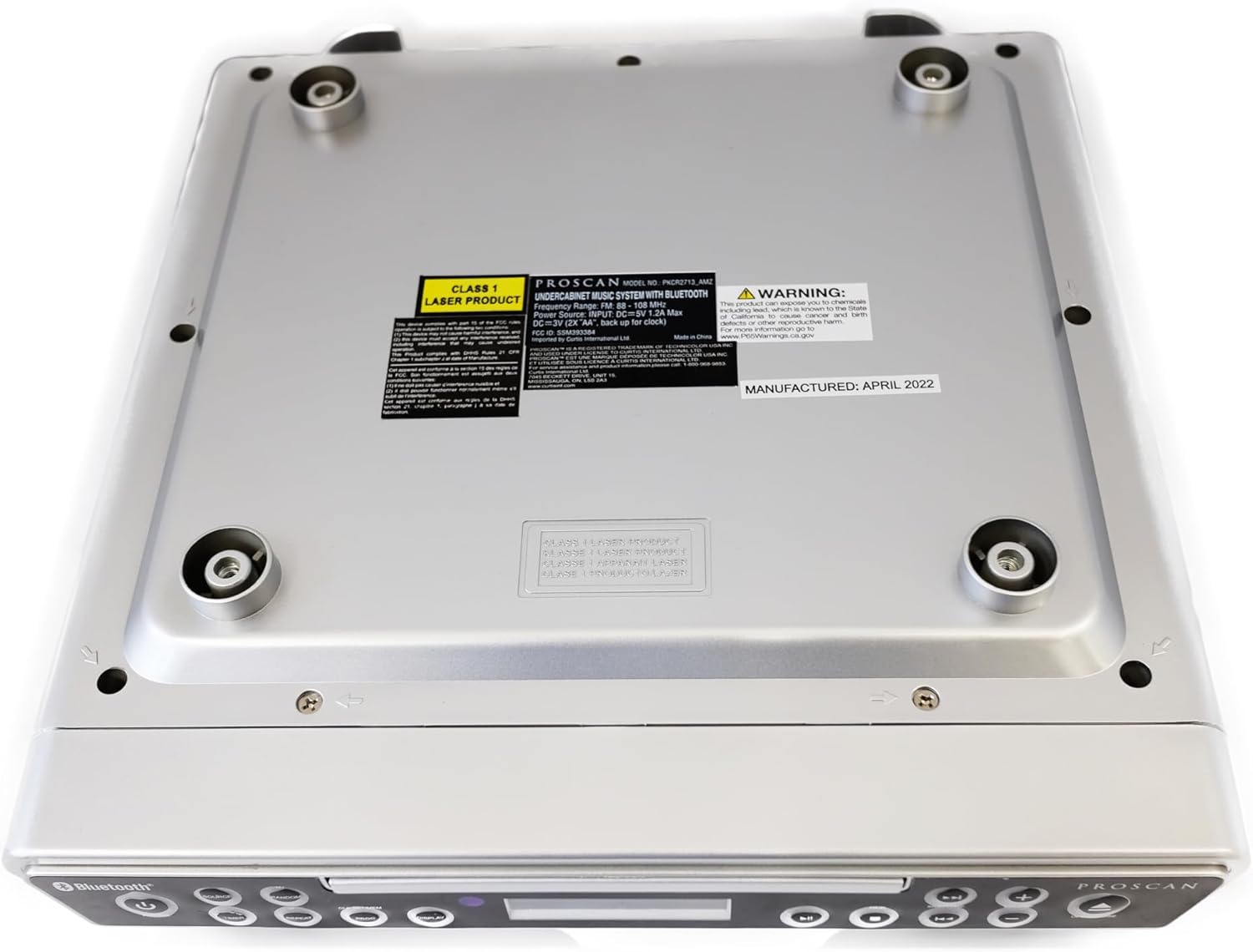
الصورة: أسفل view of the unit, illustrating the mounting points and product information label.
تعليمات التشغيل
عناصر التحكم في اللوحة الأمامية

Image: Front panel of the unit, showing the display, CD tray, and various control buttons.
- زر الطاقة: اضغط لتشغيل الوحدة أو إيقاف تشغيلها.
- زر المصدر: Cycle through available modes: CD, FM Radio, Bluetooth.
- أزرار رفع وخفض مستوى الصوت: ضبط مستوى إخراج الصوت.
- زر الفتح/الإغلاق: Eject or retract the CD tray.
- SKIP/TUNE Buttons:
- In CD mode: Skip to the next/previous track.
- In FM mode: Tune to the next/previous radio station.
- زر التشغيل / الإيقاف المؤقت: تشغيل أو إيقاف تشغيل القرص المضغوط مؤقتًا.
- زر إقران: قم بتفعيل وضع الاقتران عبر البلوتوث.
- زر العرض: Adjust display brightness or cycle through display information.
- CLK SET/MEM Button: Set the clock or save/recall radio presets.
- زر TIMER: Set sleep timer or alarm functions.
- زر التكرار: Repeat current track or entire CD.
- زر PROG: Program CD playback order.
- RANDOM Button: قم بتشغيل مقاطع القرص المضغوط بترتيب عشوائي.
تشغيل مشغل الأقراص المضغوطة
- اضغط على فتح/إغلاق زر لفتح علبة الأقراص المضغوطة.
- ضع القرص المضغوط على الدرج مع توجيه جانب الملصق لأعلى.
- اضغط على فتح/إغلاق button again to close the tray. The unit will automatically begin playing the CD.
- استخدم تشغيل/إيقاف مؤقت, تخطي/ضبط, يكرر, بروغ، و عشوائي أزرار للتحكم في التشغيل.
تشغيل راديو FM
- اضغط على مصدر اضغط على الزر حتى تظهر كلمة "FM" على الشاشة.
- استخدم تخطي/ضبط buttons to manually tune to a desired frequency or press and hold to auto-scan for the next available station.
- To save a preset: Tune to the desired station, then press and hold the CLK SET/MEM button until the preset number flashes. Use the تخطي/ضبط الأزرار لتحديد رقم محدد مسبقًا، ثم اضغط على CLK SET/MEM مرة أخرى للتأكيد.
- لاستدعاء إعداد مسبق: اضغط لفترة وجيزة على CLK SET/MEM اضغط على الزر واستخدم تخطي/ضبط أزرار لاختيار الإعداد المسبق المطلوب.
تشغيل البلوتوث
- اضغط على مصدر button until "BT" or "Bluetooth" appears on the display. The unit will enter pairing mode, indicated by a flashing Bluetooth icon.
- على جهازك الممكّن بتقنية Bluetooth (الهاتف الذكي، والكمبيوتر اللوحي، وما إلى ذلك)، قم بتمكين Bluetooth وابحث عن الأجهزة المتوفرة.
- Select "PROSCAN ELITE" or similar from the list of devices.
- Once paired, the Bluetooth icon on the unit's display will stop flashing, and you can stream audio from your device to the unit.
- To disconnect, either turn off Bluetooth on your device or press and hold the زوج زر على الوحدة.

الصورة: الجانب view of the unit, highlighting the 'LINE IN' auxiliary input port.
صيانة
- تنظيف: امسح الوحدة بقطعة قماش ناعمة وجافة. لا تستخدم منظفات أو مذيبات كاشطة.
- العناية بالقرص المضغوط: Handle CDs by the edges. Keep them clean and free of scratches to ensure optimal playback.
- استبدال البطارية: Replace backup batteries (AA) annually or when the clock/presets are not retained during power outagإِسْ
استكشاف الأخطاء وإصلاحها
| مشكلة | السبب المحتمل | حل |
|---|---|---|
| الوحدة لا تعمل بالطاقة. | No power, AC adapter not connected. | تأكد من توصيل محول التيار المتردد بشكل آمن بالجهاز وبمأخذ حائط يعمل. |
| لا يوجد صوت من مكبرات الصوت. | Volume too low, incorrect source selected, muted. | Increase volume. Press SOURCE to select correct mode (CD, FM, BT). Check if unit is muted. |
| يتخطى القرص المضغوط أو لا يتم تشغيله. | Dirty or scratched CD, CD inserted incorrectly. | Clean the CD with a soft cloth. Ensure CD is inserted label-side up. Try a different CD. |
| استقبال راديو FM ضعيف. | Weak signal, internal antenna position. | Reposition the unit for better reception. Note: This unit does not have an AM feature. |
| مشاكل اقتران البلوتوث. | Device too far, Bluetooth not enabled on device, unit not in pairing mode. | Ensure device is within range. Enable Bluetooth on your device. Press PAIR button on unit. |
تحديد
- أبعاد المنتج: 14 × 4 × 12.5 بوصة (الطول × العرض × الارتفاع)
- وزن السلعة: 0.035 أونصات
- ماركة: بروسكان
- رقم الموديل: PKCR2713_AMZ
- تقنية الاتصال: بلوتوث
- لون: فضي
- نوع السماعة: ستيريو
- انتاج الطاقة: 2 × 1.2 واط
- مصدر الطاقة: AC Adapter with Battery Backup (2 x AA, not included)
- سمات: Under-cabinet mounting, CD player, FM radio, Bluetooth 3.0, LED display, remote control.
الضمان والدعم
For warranty information and technical support, please refer to the documentation included with your purchase or visit the official PROSCAN webالموقع. احتفظ بإثبات الشراء الخاص بك لتقديم مطالبات الضمان.
الموارد المتاحة على الإنترنت:
- Official PROSCAN Store: PROSCAN ELITE Store
- دليل المستخدم (PDF): تنزيل دليل PDF
Ask a question about this manual
Ask about setup, troubleshooting, compatibility, parts, safety, or missing instructions. Manuals+ will review the question and use this page’s manual context to help answer it.