
مقدمة
This manual provides comprehensive instructions for the installation, operation, and maintenance of your Azza XT1 Full Tower Gaming Case (Model: CSAZ-XT1 W). Please read this manual thoroughly before beginning installation to ensure proper setup and to maximize the performance and longevity of your product.
معلومات السلامة
Observe the following safety precautions to prevent damage to the case or injury to yourself:
- افصل دائمًا مصدر الطاقة من مقبس الحائط قبل إجراء أي عملية تركيب أو صيانة.
- Handle internal components with care to avoid electrostatic discharge (ESD) damage. Consider using an anti-static wrist strap.
- Ensure all cables are routed properly to prevent interference with fans or other moving parts.
- Do not block ventilation openings. Maintain adequate airflow around the case.
- أبقِ العلبة بعيدة عن مصادر الحرارة وأشعة الشمس المباشرة والرطوبة.
مميزات المنتج
The Azza XT1 Full Tower Gaming Case is designed with several features to enhance your computing experience:
- VGA Card Support: Accommodates VGA cards up to 340 mm in length.
- Easy Swap Slot: Features a bottom-mounted easy swap slot for tool-less hard drive installation.
- أداء التبريد: Equipped with four pre-installed fans for optimal airflow and supports up to two 120mm water cooling radiators.
- Customizable Grilles: Front and top decorative grilles are removable and exchangeable for aesthetic customization.
- Tool-less Installation: Designed for easy installation of 5.25" devices and HDDs with a tool-less mechanism and a 90-degree rotating HDD holder.
- إدارة الكابلات: Includes a dedicated compartment for efficient cable routing, improving internal airflow and aesthetics.
الإعداد والتثبيت
Follow these steps to set up your Azza XT1 case and install components:
1. إعداد القضية
Place the case on a stable, flat surface. Remove the side panels by unscrewing the thumb screws at the rear and sliding the panels backward.
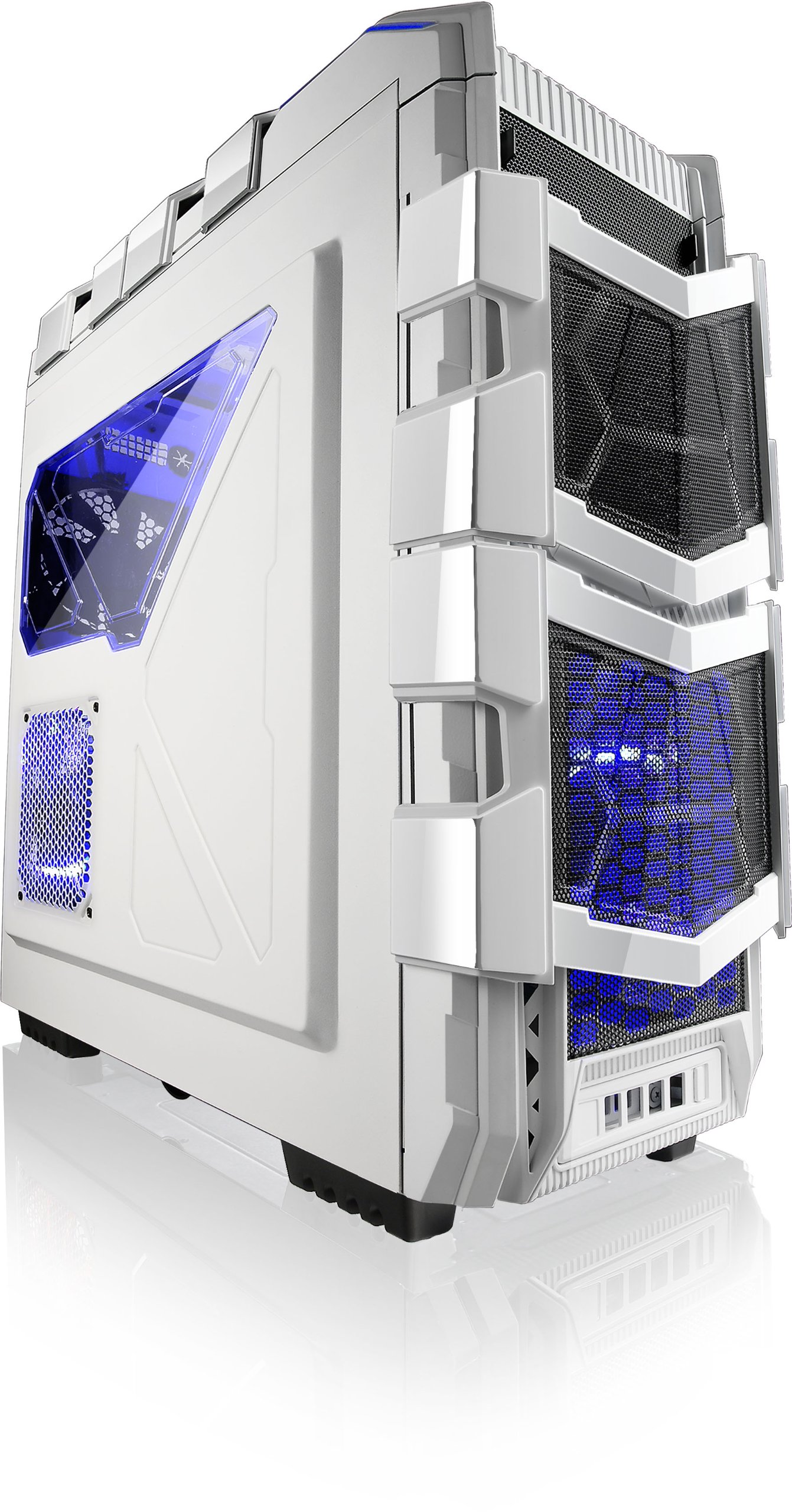
الشكل 1: بزاوية view of the Azza XT1 case, showing its overall design and front mesh panels.
2. تركيب اللوحة الأم
Install the I/O shield into the rear opening of the case. Align your ATX motherboard with the standoffs inside the case. Secure the motherboard using the provided screws.

Figure 2: Internal layout of the Azza XT1 case, highlighting the motherboard tray and drive bay areas.
3. تركيب التيار الكهربائي
Mount your power supply unit (PSU) into the designated area at the bottom rear of the case. Secure it with screws from the outside.
4. Drive Installation (HDD/SSD)
Utilize the tool-less HDD holders. For the easy swap slot, simply slide the hard drive into the bottom slot until it clicks into place. For other bays, secure drives using the provided trays or mounting mechanisms. The HDD holder can rotate 90 degrees for easier access.

الشكل 3: الجزء الداخلي الخلفي view of the Azza XT1 case, illustrating the drive bays and the space behind the motherboard for cable management.
5. Expansion Card Installation (VGA, etc.)
Remove the necessary expansion slot covers at the rear of the case. Insert your VGA card or other expansion cards into the motherboard's PCIe slots and secure them with screws or the tool-less retention clips.
6. إدارة الكابلات
Route all power and data cables through the designated cutouts and tie-down points behind the motherboard tray. This improves airflow and maintains a clean internal appearance.
7 أغلق ملف القضية
Once all components are installed and cables are managed, reattach the side panels and secure them with the thumb screws.
تشغيل القضية
The Azza XT1 case provides the housing and cooling for your PC components. Operation primarily involves using the front panel controls:
- زر الطاقة: Located on the top panel, press to power on or off your system.
- زر إعادة الضبط: Located on the top panel, press to restart your system.
- منافذ USB: Connect USB devices to the front panel USB 2.0 and USB 3.0 ports.
- مقابس الصوت: Connect headphones and microphones to the front panel audio jacks.

الشكل 4: الجزء العلوي view of the Azza XT1 case, detailing the power button, USB ports, and audio jacks.
صيانة
Regular maintenance helps ensure optimal performance and longevity of your Azza XT1 case and its components.
- تنظيف الغبار: نظّف فلاتر الغبار والمكونات الداخلية دوريًا باستخدام الهواء المضغوط. تأكد من إيقاف تشغيل النظام وفصله عن الكهرباء قبل التنظيف.
- فحص المروحة: Check fans for dust buildup and ensure they are spinning freely. Clean as necessary.
- فحص الكابل: Verify that all internal cables remain securely connected and are not obstructing airflow.
- التنظيف الخارجي: امسحي الأسطح الخارجية بقطعة ناعمة ، دamp قماش. تجنب المنظفات الكاشطة.
استكشاف الأخطاء وإصلاحها
يتناول هذا القسم المشكلات الشائعة التي قد تواجهها مع علبة جهاز الكمبيوتر الخاص بك.
| مشكلة | السبب المحتمل | حل |
|---|---|---|
| لا يتم تشغيل النظام. | Power button not connected correctly; PSU issue; motherboard issue. | Verify front panel power button cable is securely connected to the motherboard. Check PSU connections. |
| المراوح لا تدور. | Fan cables disconnected; fan failure; insufficient power. | Ensure all fan power cables are properly connected to the motherboard or fan controller. |
| منافذ USB في اللوحة الأمامية لا تعمل. | USB header cable disconnected or incorrectly connected. | Check that the USB 2.0 and USB 3.0 header cables from the front panel are correctly plugged into the motherboard. |
| ضعف تدفق الهواء أو ارتفاع درجة الحرارة. | Dust buildup; blocked vents; improper fan configuration. | Clean dust filters and internal components. Ensure case fans are oriented correctly for optimal airflow. |
تحديد
Detailed specifications for the Azza XT1 Full Tower Gaming Case (CSAZ-XT1 W):
| ميزة | التفاصيل |
|---|---|
| ماركة | عزة |
| رقم الموديل | CSAZ-XT1 W |
| نوع الحالة | برج كامل |
| لون | أبيض |
| مادة | SECC Steel |
| التوافق مع اللوحة الأم | ايه تي اكس |
| أبعاد المنتج (الطول × العرض × الارتفاع) | 51.56 × 20.57 × 56.64 سم |
| وزن العنصر | 9.98 كجم |
| منافذ USB 2.0 | 2 |
| منافذ USB 3.0 | 1 |
| VGA Card Length Support | حتى 340 ملم |
| دعم تبريد المياه | Up to 2x120mm radiators |
الضمان والدعم
For warranty information and technical support, please refer to the official Azza webالموقع الإلكتروني أو تواصل مع قسم خدمة العملاء. احتفظ بإيصال الشراء كإثبات للشراء في حال وجود أي مطالبات بالضمان.
الشركة المصنعة: AZZA (USA) Technology Inc