
مقدمة
This manual provides comprehensive instructions for the setup, operation, maintenance, and troubleshooting of your Kanto YU2 Desktop Speakers. Please read this manual thoroughly before using your speakers to ensure optimal performance and longevity.
ماذا يوجد في الصندوق
Your Kanto YU2 speakers come with all necessary accessories for immediate setup.
- Kanto YU2 Powered Desktop Speakers (Pair)
- سلك الطاقة
- سلك مكبر الصوت
- USB DAC Cable
- 3.5 ملم كابل إضافي
- أقدام مطاطية (قطعتان)
- دليل المستخدم
- Kanto USA Warranty Information

Image: All items included in the Kanto YU2 speaker package.
Video: An unboxing video for the Kanto YU2 Powered Desktop Speakers, showing the contents of the box.
يثبت
1. وضع مكبر الصوت
Place the speakers on a flat, stable surface. For optimal sound, position them at ear level and equidistant from your listening position. The included rubber feet can be applied to the bottom of the speakers to reduce vibrations and improve stability.
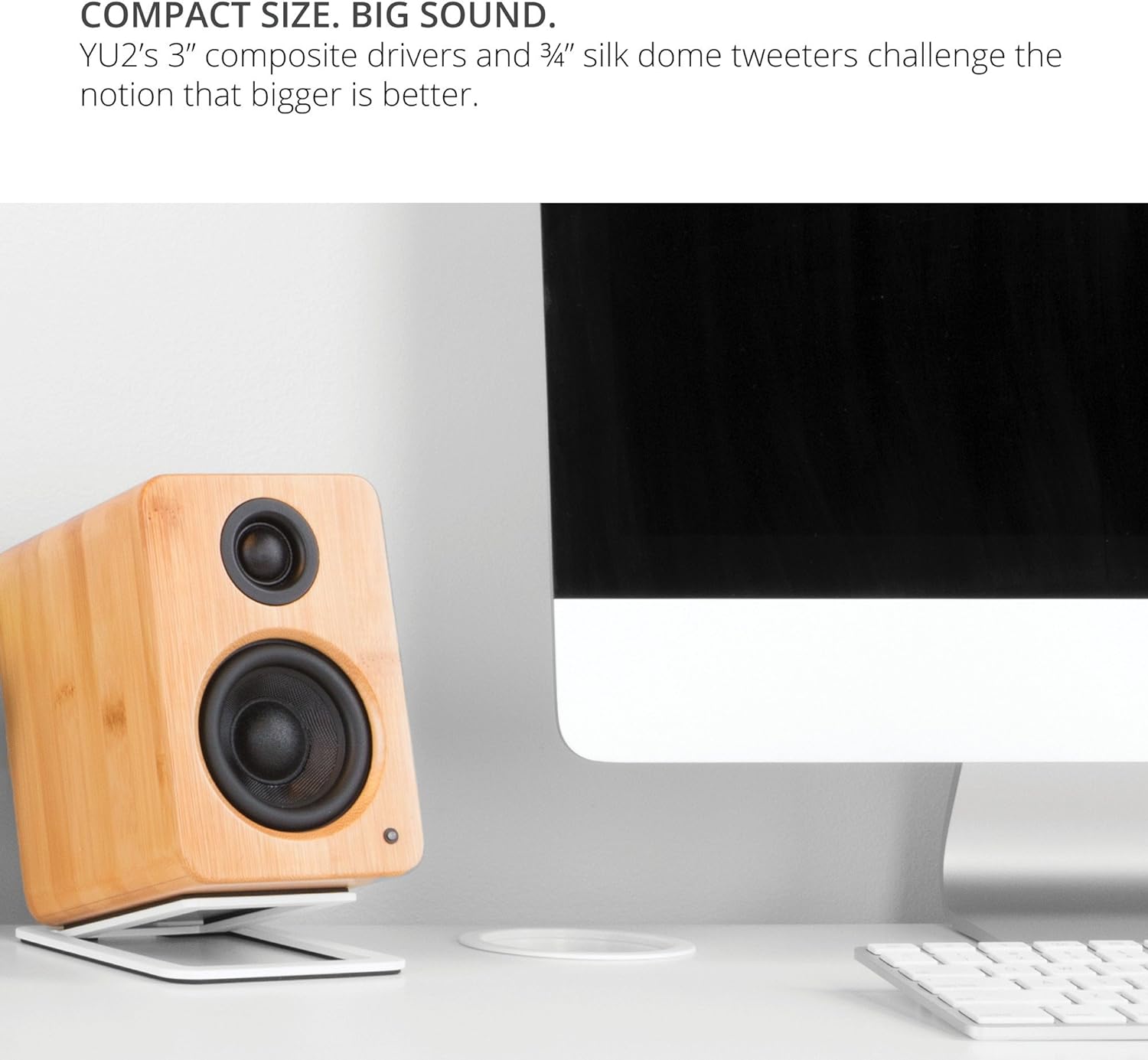
Image: Kanto YU2 speakers positioned on a desktop for optimal listening.
2. توصيل مكبرات الصوت
The Kanto YU2 system consists of one active (left) speaker and one passive (right) speaker. Connect the active speaker to the passive speaker using the provided speaker wire. Ensure that the positive (+) terminal on the active speaker connects to the positive (+) terminal on the passive speaker, and similarly for the negative (-) terminals.
Video: Instructions on how to connect speaker wire to Kanto speakers.
3. توصيل الطاقة
Connect the power cord to the active speaker and then to a wall outlet. The LED indicator on the front of the active speaker will illuminate when power is supplied.
تعليمات التشغيل
1. اتصالات إدخال الصوت
The Kanto YU2 speakers offer multiple input options:
- USB DAC: Connect your computer directly to the USB port on the active speaker using the provided USB DAC cable for high-quality digital audio streaming.
- 3.5 ملم ايه يو اكس: Use the 3.5mm auxiliary cable to connect to any device with a headphone jack, such as smartphones, tablets, or other media players.
- خرج مضخم الصوت: For enhanced bass, connect an external powered subwoofer to the "Sub Out" port on the active speaker.

الصورة: الخلفية view of the active Kanto YU2 speaker with various input and output ports labeled.
2. التحكم في مستوى الصوت
Adjust the master volume using the knob located on the rear of the active speaker. Turn clockwise to increase volume and counter-clockwise to decrease it. Ensure the volume is set to a low level before playing audio to prevent sudden loud sounds.
3. تشغيل/إيقاف التشغيل
The speakers will power on automatically when connected to power and an audio source is detected. To turn off, simply disconnect the power or turn the volume knob to the "OFF" position.
فيديو: أكثر منview of the Kanto YU2 Powered Desktop Speakers, highlighting features and connectivity.
صيانة
To maintain the appearance and performance of your Kanto YU2 speakers, follow these guidelines:
- تنظيف: Use a soft, dry cloth to wipe the speaker cabinets. Avoid using abrasive cleaners, waxes, or solvents as they may damage the finish.
- الغبار: Regularly dust the speaker grilles and drivers with a soft brush or a microfiber cloth.
- الموقع: تجنب وضع مكبرات الصوت في ضوء الشمس المباشر، أو بالقرب من مصادر الحرارة، أو في المناطق ذات الرطوبة العالية.
- التعامل: Handle speakers with care. Avoid touching the drivers directly.
استكشاف الأخطاء وإصلاحها
If you encounter issues with your Kanto YU2 speakers, refer to the following common solutions:
- لا يوجد صوت:
- Ensure the power cord is securely connected and the speakers are powered on.
- Check all audio cables (USB, AUX, speaker wire) for secure connections.
- Verify the volume knob on the active speaker is turned up.
- Confirm the audio source (computer, phone) is playing and its volume is not muted or too low.
- If using USB, ensure the Kanto YU2 is selected as the audio output device in your computer's sound settings.
- الصوت المشوه:
- قم بخفض مستوى الصوت في كل من مكبرات الصوت ومصدر الصوت.
- Check for damaged audio cables and replace if necessary.
- Ensure speaker wires are correctly connected (positive to positive, negative to negative).
- صوت طنين أو أزيز:
- تأكد من أن جميع توصيلات الكابلات آمنة.
- جرب توصيل السماعات بمأخذ كهربائي مختلف.
- Move the speakers away from other electronic devices that might cause interference.
If these steps do not resolve the issue, please contact Kanto support for further assistance.
تحديد
| ميزة | التفاصيل |
|---|---|
| ماركة | كانتو |
| رقم الموديل | YU2MB |
| نوع السماعة | سماعات الكمبيوتر |
| طاقة خرج السماعة | 100 Watts Peak (50 Watts Total RMS) |
| استجابة التردد | 80 هرتز - 20 كيلو هرتز |
| تكنولوجيا الاتصال | Wired (USB, 3.5mm AUX) |
| وضع إخراج الصوت | ستيريو |
| مواد التغليف | Acoustic grade MDF cabinets |
| السائقين | 3-inch Composite Woofers, 0.75-inch Silk Dome Tweeters |
| منافذ USB | 1 (Built-in USB DAC) |
| قنوات الصوت | 2.0, 2.1 (with Sub Out) |
| مقاومة | 4 أوم |
| إشارة إلى نسبة الضوضاء | 70 ديسيبل |
| الأبعاد (D x W x H) | 5.3 بوصة عمق × 3.9 بوصة عرض × 5.9 بوصة ارتفاع |
| وزن | 6 رطل |
| مصدر الطاقة | AC |
| حجم الإدخالtage | 240 فولت |
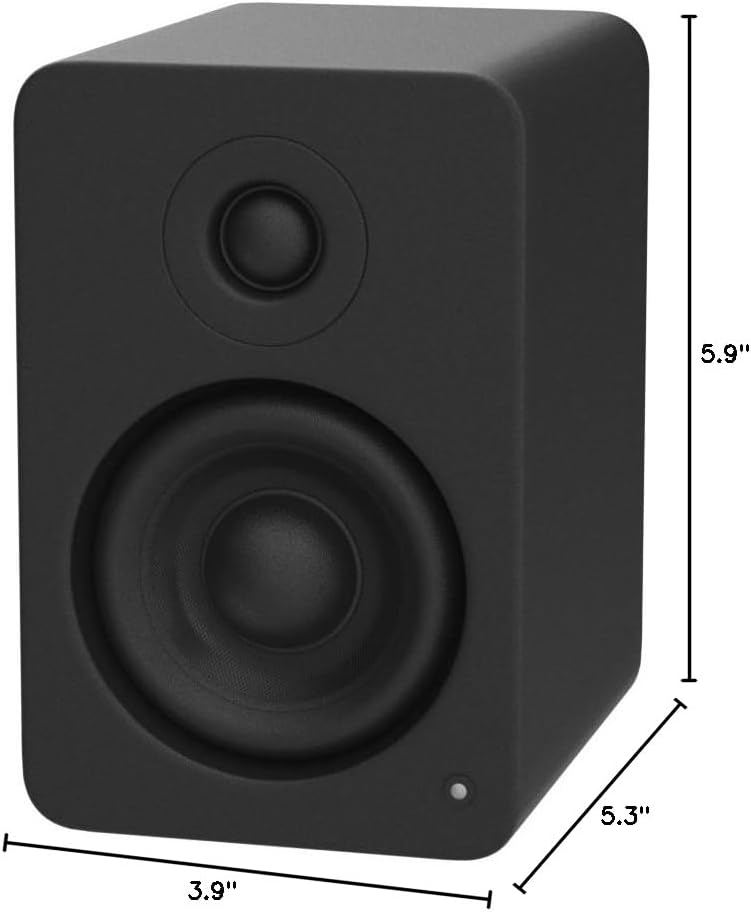
Image: Kanto YU2 speaker dimensions.
معلومات الضمان
The Kanto YU2 Desktop Speakers come with a ضمان الشركة المصنعة لمدة سنة واحدةيغطي هذا الضمان عيوب المواد والتصنيع في ظل الاستخدام العادي. يُرجى الاحتفاظ بإيصال الشراء للمطالبة بالضمان.
For detailed warranty terms and conditions, please refer to the Kanto USA Warranty information included in your product package or visit the official Kanto webموقع.
يدعم
For technical support, product inquiries, or assistance with troubleshooting beyond what is covered in this manual, please contact Kanto customer service.
You can find contact information and additional resources on the official Kanto webموقع: www.kantoaudio.com