
1. المقدمة
The Brother DCP-J132W is a compact and versatile multifunction inkjet printer designed for home and small office use. It offers printing, scanning, and copying functionalities, along with wireless connectivity for convenient use from various devices. This manual provides essential information to help you get the most out of your printer.
2. معلومات السلامة
Please read these safety instructions carefully before using the printer to prevent injury and damage to the machine.
- Always place the printer on a flat, stable surface.
- لا تقم بسد أو تغطية فتحات التهوية.
- استخدم فقط سلك الطاقة المرفق مع الطابعة.
- لا تعرض الطابعة للماء أو الرطوبة الزائدة.
- Keep ink cartridges out of reach of children.
- افصل الطابعة عن مأخذ الطاقة قبل التنظيف أو إجراء الصيانة.
3. ماذا يوجد في الصندوق
تأكد من وجود جميع المكونات في العبوة:
- Brother DCP-J132W Multifunction Printer
- Ink Cartridges (Starter Set)
- سلك الطاقة
- قرص التثبيت المضغوط
- إعداد دليل سريع
Note: A USB cable is not typically included and may need to be purchased separately if you prefer a wired connection.
4. الإعداد
4.1 فك العبوة والوضع الأولي
- قم بإزالة الطابعة من عبوتها وإزالة جميع الأشرطة الواقية ومواد التغليف.
- Place the printer on a stable, level surface near a power outlet.
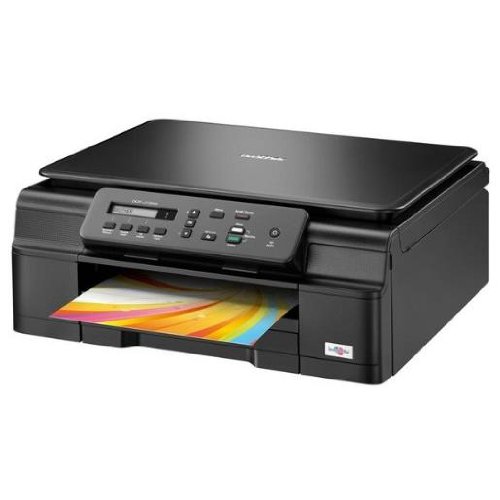
الشكل 4.1: الجبهة view of the Brother DCP-J132W printer, showing the paper output tray with a colorful document.
4.2 تركيب خراطيش الحبر
- افتح غطاء خرطوشة الحبر الموجود في مقدمة الطابعة.
- Unpack each ink cartridge (Black, Cyan, Magenta, Yellow).
- Insert each cartridge into its corresponding slot, pressing down until it clicks into place.
- أغلق غطاء خرطوشة الحبر. ستبدأ الطابعة عملية شحن الحبر.
4.3 تحميل الورق
- Pull out the paper tray completely from the printer.
- Adjust the paper guides to fit the paper size you are loading (e.g., A4).
- Load paper into the tray, print side down. Do not overfill.
- ادفع درج الورق برفق إلى داخل الطابعة حتى يتم قفله.
4.4 توصيل الطاقة
- قم بتوصيل سلك الطاقة بمدخل الطاقة الخاص بالطابعة.
- قم بتوصيل الطرف الآخر من سلك الطاقة بمأخذ التيار الموجود على الحائط.
- اضغط على زر الطاقة لتشغيل الطابعة.
4.5 تثبيت البرامج والاتصال بالشبكة
Install the printer drivers and software from the included CD-ROM or download the latest versions from the official Brother support webالموقع. اتبع التعليمات التي تظهر على الشاشة للتثبيت.
- الإعداد اللاسلكي: During software installation, select the wireless connection option and follow the prompts to connect your printer to your Wi-Fi network. You may need your network SSID and password.
- اتصال USB: If using a USB cable (not included), connect it to the printer and your computer when prompted by the installation software.

الشكل 4.2: بزاوية view of the Brother DCP-J132W printer, highlighting its compact design and control panel.
5. تشغيل الطابعة
5.1 طباعة المستندات
- افتح المستند أو الصورة التي ترغب في طباعتها على جهاز الكمبيوتر أو الجهاز المحمول الخاص بك.
- حدد "طباعة" من قائمة التطبيق.
- Choose "Brother DCP-J132W" as your printer.
- Adjust print settings (e.g., paper size, color/grayscale, number of copies) as needed.
- انقر فوق "طباعة".
5.2 مسح المستندات ضوئيًا
- Place the document face down on the scanner glass, aligning it with the guide marks.
- أغلق غطاء الماسح الضوئي.
- On your computer, open the Brother ControlCenter software or a scanning application.
- Select "Scan" and choose your desired scan settings (e.g., resolution, color mode, destination).
- انقر على "مسح ضوئي" لبدء العملية.
5.3 نسخ المستندات
- ضع المستند على زجاج الماسحة الضوئية بحيث يكون وجهه لأسفل.
- اضغط على زر "نسخ" في لوحة تحكم الطابعة.
- Use the arrow keys to select the number of copies or other settings (e.g., quality).
- Press "Start" (Color or Black & White) to begin copying.
6. الصيانة
6.1 استبدال خراطيش الحبر
When an ink cartridge is low or empty, a message will appear on the printer's display or your computer. Use genuine Brother LC121 or LC123 series ink cartridges for optimal performance.
- افتح غطاء خرطوشة الحبر.
- اضغط على ذراع تحرير الخرطوشة الفارغة وقم بإزالتها.
- Unpack a new cartridge and insert it firmly into the correct slot until it clicks.
- أغلق غطاء خرطوشة الحبر.
6.2 تنظيف رأس الطباعة
If print quality declines (e.g., missing lines, streaking), perform a print head cleaning from the printer's control panel or through the printer driver software on your computer. Refer to the on-screen instructions for the cleaning procedure.
6.3 تنظيف زجاج الماسح الضوئي
To ensure clear scans and copies, regularly clean the scanner glass with a soft, lint-free cloth moistened with a non-abrasive glass cleaner. Avoid spraying cleaner directly onto the glass.
7. استكشاف الأخطاء وإصلاحها
This section addresses common issues you might encounter with your Brother DCP-J132W printer.
- الطابعة لا تعمل:
- تأكد من توصيل سلك الطاقة بشكل آمن بالطابعة والمأخذ الكهربائي العامل.
- جرب توصيل جهاز آخر بالمأخذ للتأكد من وجود طاقة فيه.
- انحشار الورق:
- Carefully open all covers and remove any jammed paper following the instructions on the printer's display or in the full user guide.
- تأكد من تحميل الورق بشكل صحيح وعدم ملء درج الورق بشكل زائد.
- جودة الطباعة رديئة:
- تحقق من مستويات الحبر واستبدل أي خراطيش منخفضة أو فارغة.
- قم بتنظيف رأس الطباعة ومحاذاته من قائمة الصيانة الخاصة بالطابعة.
- تأكد من استخدامك للورق المناسب لإعدادات الطباعة لديك.
- مشاكل الاتصال اللاسلكي:
- تأكد من أن الطابعة موجودة ضمن نطاق جهاز توجيه Wi-Fi الخاص بك.
- أعد تشغيل جهاز التوجيه والكمبيوتر والطابعة.
- Re-run the wireless setup utility from the printer's control panel or the Brother software.
- Ensure your Wi-Fi password is entered correctly.
For more detailed troubleshooting, refer to the comprehensive user manual available on the Brother support webموقع.
8. المواصفات
| ميزة | التفاصيل |
|---|---|
| ماركة | أخ |
| اسم الموديل | DCPJ132W |
| تكنولوجيا الاتصال | واي فاي، يو اس بي |
| مخرجات الطابعة | لون |
| أقصى سرعة للطباعة (ملونة) | 27 صفحة في الدقيقة |
| أقصى سرعة للطباعة (أبيض وأسود) | 27 صفحة في الدقيقة |
| أقصى دقة طباعة (ملونة) | 1200 × 1200 نقطة في البوصة |
| أقصى دقة طباعة (أبيض وأسود) | 1200 × 1200 نقطة في البوصة |
| أبعاد المنتج (عمق×عرض×ارتفاع) | 16.1P x 41lx 16.1H سم |
| Max Supported Paper Size | A4 |
| Printing Media Support | Plain paper, Glossy photo paper, Transparencies |
| نوع الماسح الضوئي | شاحنة مسطحة |
| دقة الماسح الضوئي | 2400 نقطة في البوصة |
| الطباعة على الوجهين | اوتوماتيكي |
| خراطيش متوافقة | LC121BK/C/M/Y & LC123BK/C/M/Y |
| الحد الأقصى لسعة ورقة الإدخال | 250 |
9. الضمان والدعم
9.1 معلومات الضمان
The Brother DCP-J132W typically comes with a manufacturer's warranty. Please refer to the warranty card included with your product or visit the official Brother website for specific terms and conditions applicable in your region. The availability of spare parts in the EU is guaranteed for 1 year.
9.2 دعم العملاء
For technical assistance, driver downloads, or further information, please visit the official Brother support webيمكنك العثور على الأسئلة الشائعة، وأدلة استكشاف الأخطاء وإصلاحها، ومعلومات الاتصال بخدمة العملاء على الموقع.
دعم الأخ Webموقع: www.brother.eu/support