
الأسرع من الصوت SC-25
SuperSonic SC-25 2.0 Channel DVD Player with USB Input User Manual
الموديل: SC-25
مقدمة
شكرا لك على الشراءasing the SuperSonic SC-25 2.0 Channel DVD Player with USB Input. This manual provides essential information for the safe and efficient operation of your new device. Please read it thoroughly before use and retain it for future reference.
احتياطات السلامة
- لا تعرض الجهاز للمطر أو الرطوبة لتجنب نشوب حريق أو التعرض لصدمة كهربائية.
- لا تفتح الصندوقasinز. إحالة جميع أعمال الصيانة إلى موظفين مؤهلين.
- تأكد من التهوية المناسبة حول الوحدة.
- تجنب وضع الوحدة على الأسطح غير المستقرة.
- افصل سلك الطاقة أثناء العواصف الرعدية أو عند عدم الاستخدام لفترات طويلة.
محتويات الحزمة
Before setup, please verify that all items are present:
- 1 SuperSonic SC-25 DVD Player Unit
- 1 التحكم عن بعد
- 1 دليل المستخدم (هذه الوثيقة)
- كابل الطاقة
- Audio/Video (AV) Cable
تعليمات الإعداد
1. الاتصال بالتلفزيون
- Ensure both the DVD player and your television are powered off.
- Connect one end of the AV cable (red, white, yellow connectors) to the corresponding output jacks on the back of the DVD player.
- Connect the other end of the AV cable to the corresponding input jacks on your television.
- For optimal video quality, ensure the television input is set to the correct AV channel (e.g., Video 1, AV1). The player supports NTSC video format.
2. توصيل الطاقة
- Plug the power cable into the AC IN port on the back of the DVD player.
- قم بتوصيل الطرف الآخر من كابل الطاقة بمأخذ كهربائي قياسي.
3. التشغيل الأولي
- Press the Power button on the front panel of the DVD player or on the remote control.
- Turn on your television and select the correct input source (e.g., AV1, Video 1) to see the DVD player's display.
تعليمات التشغيل
1. تشغيل القرص
- اضغط على زر الفتح/الإغلاق الموجود على اللوحة الأمامية أو جهاز التحكم عن بعد لفتح درج القرص.
- Place a compatible disc (DVD, CD, VCD, SVCD, MP3, Picture CD, CD-R, CD-RW) onto the disc tray with the label side facing up.
- Press the OPEN/CLOSE button again to close the disc tray. The player will automatically begin reading the disc.
- استخدم أزرار التشغيل، والإيقاف المؤقت، والإيقاف، والتقديم السريع، والإرجاع الموجودة على جهاز التحكم عن بعد لإدارة التشغيل.
- The player supports multi-level fast forward and backward scan functionalities.
2. تشغيل USB
- Insert a USB flash drive into the USB input port on the front of the DVD player.
- The player should automatically detect the USB device and display its contents. If not, use the SOURCE or USB button on the remote to switch to USB mode.
- التنقل عبر files using the arrow keys and SELECT/ENTER button on the remote.
- يدعم المشغل ملفات MP3 file format for audio playback.
3. Language and Subtitle Settings
- During DVD playback, press the AUDIO button on the remote to cycle through available audio languages (up to 8 languages supported).
- Press the SUBTITLE button on the remote to cycle through available subtitle languages (up to 32 subtitles supported).
صيانة
1. تنظيف الوحدة
- Wipe the exterior of the DVD player with a soft, dry cloth.
- لا تستخدم المنظفات السائلة أو البخاخات الهوائية، لأنها قد تؤدي إلى إتلاف الطبقة النهائية أو المكونات الداخلية.
2. تنظيف الأقراص
- قم بمعالجة الأقراص من حوافها لتجنب ترك بصمات الأصابع.
- If a disc is dirty, wipe it gently from the center outwards with a soft, lint-free cloth.
- Do not use abrasive cleaners or solvents on discs.
3. التخزين
- قم بتخزين مشغل أقراص DVD في مكان بارد وجاف بعيدًا عن أشعة الشمس المباشرة ودرجات الحرارة القصوى.
- When not in use, store discs in their cases to protect them from dust and scratches.
استكشاف الأخطاء وإصلاحها
| مشكلة | السبب المحتمل | حل |
|---|---|---|
| لا يوجد طاقة | سلك الطاقة غير متصل؛ منفذ الطاقة غير نشط. | تأكد من توصيل سلك الطاقة بشكل آمن. اختبر المنفذ باستخدام جهاز آخر. |
| لا يوجد صورة أو صوت | AV cables incorrectly connected; Incorrect TV input selected. | Check AV cable connections. Select the correct input source on your TV. |
| القرص لا يعمل | Disc is dirty or scratched; Disc is incompatible; Disc inserted incorrectly. | Clean the disc. Ensure the disc type is supported. Insert disc with label side up. |
| لم يتم التعرف على جهاز USB | USB device not properly inserted; Unsupported file قم بتهيئة القرص الصلب USB. | Re-insert the USB device. Ensure files بتنسيق MP3. |
تحديد
- ماركة: أسرع من الصوت
- رقم الموديل: اس سي-25
- نوع الوسائط: CD, DVD (Compatible with DVD/CD/VCD/SVCD/MP3/Picture/CD-R/CD-RW)
- تقنية الاتصال: Powerline (Implies standard AC power connection)
- لون: أسود
- وزن السلعة: 1.9 رطل
- الأجهزة المتوافقة: تلفزيون
- Input Video Compatibility: ان تي اس سي
- عدد القنوات: 2
- تنسيق الفيديو التناظري: ان تي اس سي
- نوع تحكم: جهاز التحكم عن بعد
- File Format (USB): إم بي 3
- رمز المنتج العالمي: 639131000254
- الشركة المصنعة: شركة سوبرسونيك
- أبعاد الحزمة: 7.874 ارتفاع × 24.13 طول × 24.13 عرض (سم)
- وزن الحزمة: 2.160 رطل
- بلد المنشأ: الصين
الضمان والدعم
This SuperSonic SC-25 DVD Player is covered by a ضمان الشركة المصنعة. For specific details regarding warranty terms and conditions, please refer to the documentation included with your purchase or contact SuperSonic customer support.
For technical assistance or customer service inquiries, please visit the official SuperSonic website or contact their support channels. Keep your purchase receipt for warranty claims.
المنتج انتهىview
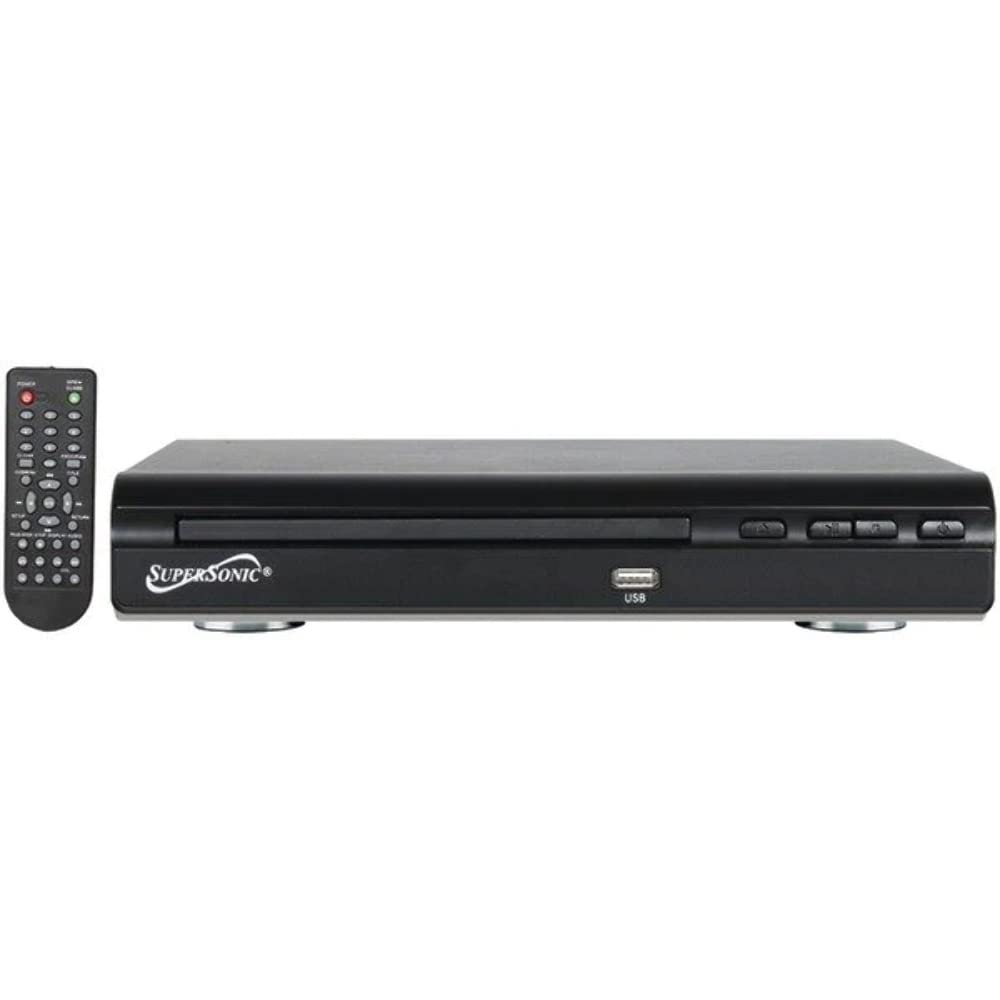
أمام view of the SuperSonic SC-25 DVD player, showing the disc tray, USB port, and control buttons.
Ask a question about this manual
Ask about setup, troubleshooting, compatibility, parts, safety, or missing instructions. Manuals+ will review the question and use this page’s manual context to help answer it.