
1. المقدمة
This manual provides detailed instructions for the installation, operation, and maintenance of your BRITA A1000 filter cartridge, designed for use with the BRITA MyPure A1C water filtration system. The A1000 cartridge is engineered to reduce chlorine, limescale, and other impurities that can affect the taste and odor of tap water, providing cleaner, better-tasting water directly from your tap.
2. انتهى المنتجview
The BRITA A1000 filter cartridge is a key component of the MyPure A1C system, ensuring high-quality filtered water. It features a multi-stage filtration process to effectively reduce unwanted substances.

الشكل 1: BRITA A1000 Filter Cartridge and its retail packaging. The cartridge is white and blue with an orange cap, designed for easy replacement.
المميزات الرئيسية:
- تقليل الكلور: Significantly reduces chlorine for improved water taste.
- Limescale Reduction: Helps prevent limescale buildup in appliances.
- ترشيح الشوائب: Filters out other taste-altering impurities.
- Instantaneous Filtration: Provides filtered water on demand.
- خالٍ من مادة BPA: Constructed from BPA-free materials.
3. تعليمات التثبيت
The BRITA A1000 filter cartridge is designed for straightforward installation within the MyPure A1C system, typically located under the sink.
قبل أن تبدأ:
- Ensure the main water supply to your tap is turned off.
- احصل على منشفة أو كيس صغيرasin مستعدة لالتقاط أي مياه متبقية.
- Refer to your MyPure A1C system manual for specific housing details.
Steps for Cartridge Installation:
- تحديد مكان غطاء الفلتر: Identify the BRITA MyPure A1C filter housing unit, usually mounted under your kitchen sink.
- إزالة الخرطوشة القديمة (إن وجدت): If replacing an old cartridge, twist the old cartridge counter-clockwise to unlock it from the housing. Pull it downwards to remove. Dispose of the old cartridge responsibly.
- تحضير خرطوشة جديدة: Remove the new BRITA A1000 cartridge from its packaging. Ensure the protective cap is removed from the top of the cartridge.
- أدخل خرطوشة جديدة: Align the top of the new A1000 cartridge with the filter housing. Push it upwards into the housing and then twist clockwise until it locks securely into place. You should feel a click or resistance indicating it is properly seated.
- التحقق من التسريبات: Slowly turn the main water supply back on. Check for any leaks around the filter housing and connections. If leaks occur, turn off the water, re-seat the cartridge, and re-check.
- تنظيف النظام: Run filtered water from your tap for approximately 5-10 minutes to flush out any air bubbles and carbon fines from the new cartridge. The water may appear cloudy initially; this is normal and will clear.

الشكل 2: على سبيل المثالample of the BRITA A1000 filter cartridge installed under a kitchen sink, connected to the water supply lines and tap.
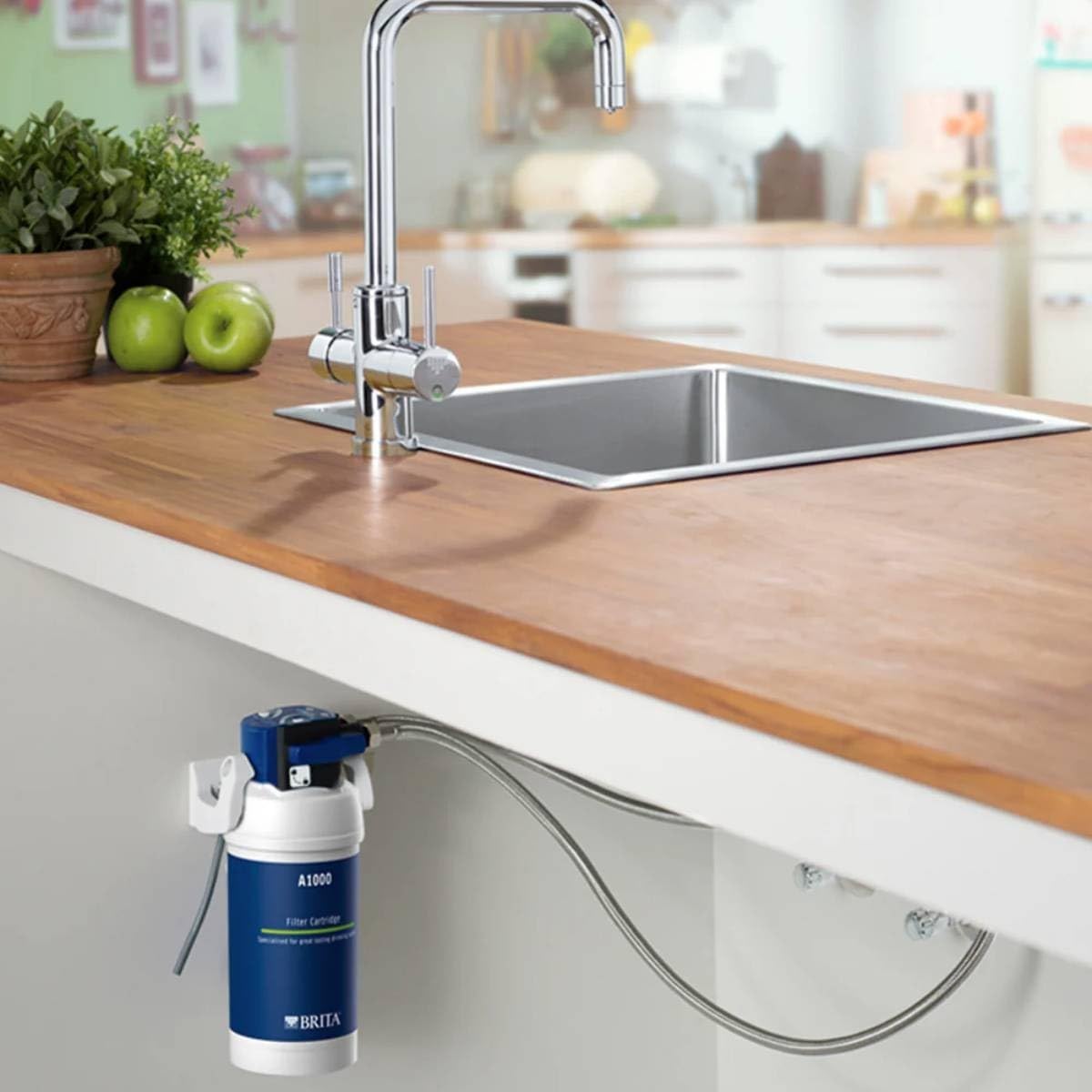
الشكل 3: آخر view of the BRITA A1000 filter system installed, showing the cartridge and associated plumbing beneath a countertop.
4. تعليمات التشغيل
Once installed and flushed, the BRITA A1000 filter cartridge operates automatically with your MyPure A1C system.
- المياه المفلترة: To dispense filtered water, simply activate the dedicated filtered water tap or lever on your MyPure A1C system.
- Unfiltered Water: Your system may also provide unfiltered water through a separate tap or lever. Refer to your MyPure A1C system manual for specific operation details.
- معدل التدفق: The filter provides instantaneous filtration, meaning water is filtered as it passes through the cartridge to your tap.
5. الصيانة
Regular maintenance, primarily cartridge replacement, is essential to ensure optimal performance and water quality.
استبدال الخرطوشة:
- The BRITA A1000 cartridge typically requires replacement every 6 to 12 months, depending on water hardness and usage.
- Your MyPure A1C system may include an indicator to signal when a cartridge change is due.
- Follow the "Installation Instructions" (Section 3) in reverse to remove the old cartridge, and then proceed with installing a new one.
تنظيف:
- Periodically check the exterior of the filter housing and connections for any dirt or buildup. Wipe clean with a damp قطعة قماش.
- Do not use harsh chemicals or abrasive cleaners on any part of the system.
6. استكشاف الأخطاء وإصلاحها
If you experience issues with your BRITA A1000 filter cartridge or MyPure A1C system, refer to the following common problems and solutions.
| مشكلة | السبب المحتمل | حل |
|---|---|---|
| انخفاض تدفق المياه | Clogged filter cartridge; air in the system. | Replace the filter cartridge. Flush the system by running water for several minutes. |
| طعم/رائحة كريهة | Expired filter cartridge; improper flushing after installation. | Replace the filter cartridge. Ensure proper flushing of the new cartridge. |
| تسربات المياه | Cartridge not properly seated; loose connections. | Turn off water supply, re-seat the cartridge, and tighten connections. |
| Cloudy Water (initial) | Air bubbles or carbon fines from new cartridge. | This is normal. Continue flushing the system until water runs clear. |
If problems persist, please contact BRITA customer support.
7. المواصفات
| ماركة | بريتا |
| رقم الموديل | س1424 |
| أبعاد المنتج (الطول × العرض × الارتفاع) | 10 × 9.5 × 23 سم |
| وزن العنصر | 470 جرام |
| مادة | الكربون |
| شهادة اختبار خارجية | مؤسسة العلوم الوطنية |
| رمز المنتج الموحد | 798256201790 |
| رمز المادة الدولي | 04006387051709 |
8. الضمان والدعم
BRITA provides a 1-year availability for spare parts for this product. For specific warranty terms and conditions, please refer to the documentation provided with your complete MyPure A1C system or visit the official BRITA webموقع.
دعم العملاء:
For technical assistance, troubleshooting beyond this manual, or to inquire about replacement parts, please contact BRITA customer support through their official channels.