
COXO B00C9ED06Q
دليل مستخدم جهاز كوكسو سي-روت 6 2 في 1 لتحديد قمة الجذر واختبار لب الأسنان
Model: B00C9ED06Q
1. المقدمة
The Coxo C-root VI is a versatile 2-in-1 dental instrument designed for precise endodontic measurements. It combines the functionalities of an Apex Locator and a Pulp Tester, providing dental professionals with an efficient tool for root canal procedures and pulp vitality assessment. This manual provides essential information for the proper setup, operation, maintenance, and troubleshooting of the device.
2. انتهى المنتجview
The C-root VI features a compact design with a clear color LCD display for easy reading of measurements. Its intuitive interface allows for seamless switching between Apex Locator and Pulp Tester modes.

الشكل 2.1: الجبهة view of the Coxo C-root VI displaying the Pulp Tester mode.
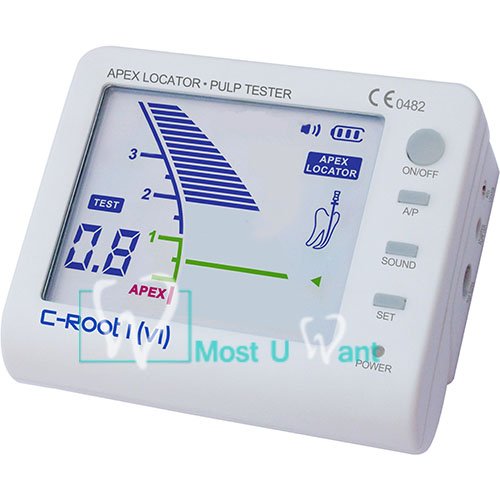
الشكل 2.2: الجبهة view of the Coxo C-root VI displaying the Apex Locator mode.
3. الميزات الرئيسية
- وظيفة 2 في 1: Combines Apex Locator and Pulp Tester in a single device.
- عرض الأرقام: Provides clear digital display of distance measurements.
- شاشة عرض LCD ملونة: Enhanced visibility and readability of measurement data.
- Accurate Current-Stabilized Technology: Ensures reliable and precise measurements.
- Rechargeable Li-Battery: Offers convenience and portability for clinical use.
4. المكونات والملحقات
The Coxo C-root VI package typically includes the main unit and various accessories necessary for its operation.
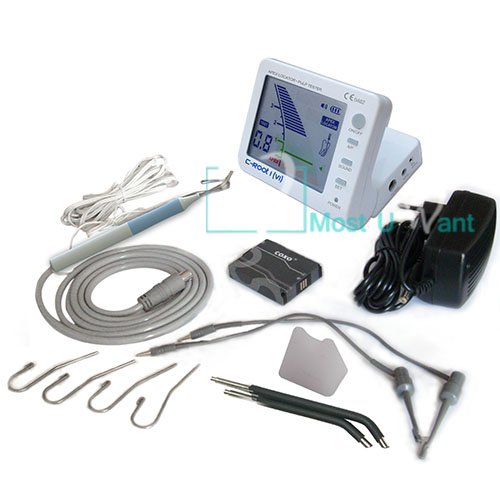
Figure 4.1: Complete kit contents of the Coxo C-root VI.
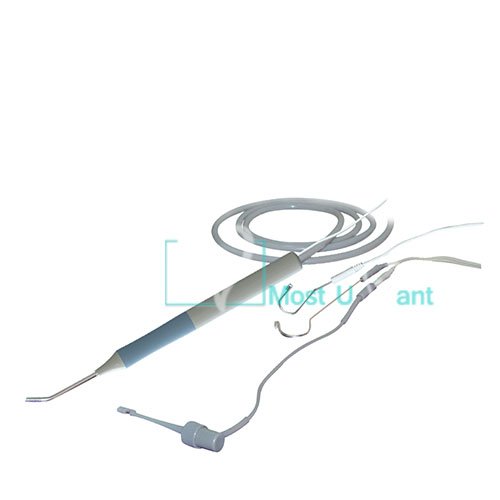
الشكل 4.2: مفصل view من الملحقات المرفقة.
محتويات العبوة القياسية:
- Coxo C-root VI Main Unit
- Measuring Cable
- File مقطع (x2)
- Lip Hook (x4)
- Pulp Tester Probe
- محول/شاحن
- دليل المستخدم (هذا المستند)
5. الإعداد
5.1 الشحن الأولي
- Connect the provided adapter to the 'CHARGE' port on the side of the C-root VI unit.
- قم بتوصيل المحول بمنفذ طاقة مناسب.
- The 'CHARGE' indicator light will illuminate, indicating that the device is charging. Allow the device to fully charge before first use (typically 2-3 hours).
5.2 ملحقات التوصيل
- For Apex Locator Function: Connect the measuring cable to the 'APEX LOCATOR' port. Attach a file clip to one end of the measuring cable and a lip hook to the other end.
- For Pulp Tester Function: Connect the pulp tester probe to the 'PULP TESTER' port.
6. تعليمات التشغيل
6.1 التشغيل العام
- زر التشغيل/الإيقاف: اضغط لتشغيل الجهاز أو إيقاف تشغيله.
- A/P Button: Press to switch between Apex Locator mode and Pulp Tester mode.
- زر الصوت: Toggles the audible alert on or off.
- زر SET: Used for calibration or setting specific parameters within each mode (refer to specific mode instructions).
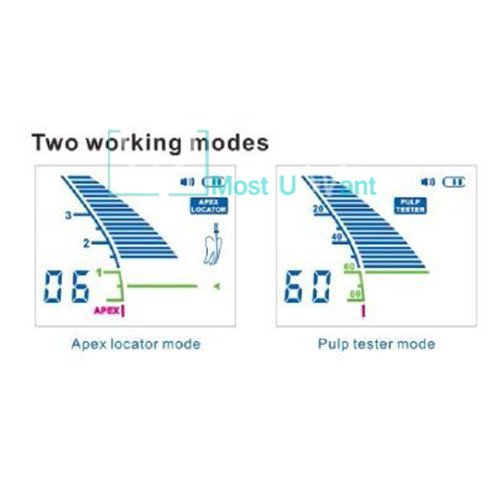
Figure 6.1: Comparison of Apex Locator and Pulp Tester display modes.
6.2 Apex Locator Mode
This mode is used to accurately determine the working length of the root canal.
- Ensure the device is powered on and in Apex Locator mode (indicated on the display).
- قم بإرفاق file clip to the endodontic file and the lip hook to the patient's lip.
- Carefully insert the endodontic file into the root canal.
- Observe the color LCD display. The numerical value and graphical representation will indicate the file's position relative to the apex.
- The 'APEX' indicator and an audible alert (if enabled) will signal when the file reaches the apical foramen.
6.3 Pulp Tester Mode
This mode assesses the vitality of the dental pulp by delivering a controlled electrical stimulus.
- Ensure the device is powered on and in Pulp Tester mode (indicated on the display).
- Apply a conductive medium (e.g., toothpaste) to the tip of the pulp tester probe.
- Place the probe tip on the tooth surface to be tested, avoiding contact with gingival tissue or metallic restorations.
- Gradually increase the stimulus intensity using the 'SET' button or designated controls until a patient response is observed or the maximum level is reached.
- Note the numerical reading on the display at which the patient responds. This reading indicates the pulp's vitality level.
7. الصيانة والعناية
Proper maintenance ensures the longevity and accuracy of your Coxo C-root VI device.
- تنظيف: After each use, wipe the main unit with a soft cloth dampened with a mild disinfectant. Do not immerse the unit in liquid.
- Accessory Sterilization: ال file clips, lip hooks, and pulp tester probe should be sterilized according to standard dental practice guidelines (e.g., autoclaving for reusable components). Refer to the specific instructions for each accessory.
- تخزين: قم بتخزين الجهاز في بيئة نظيفة وجافة، بعيدًا عن أشعة الشمس المباشرة ودرجات الحرارة القصوى.
- العناية بالبطارية: اشحن البطارية بانتظام، حتى لو لم يكن الجهاز قيد الاستخدام المتكرر، للحفاظ على صحة البطارية. تجنب تفريغ البطارية بالكامل لفترات طويلة.
8. استكشاف الأخطاء وإصلاحها
This section addresses common issues you might encounter with the Coxo C-root VI.
| مشكلة | السبب المحتمل | حل |
|---|---|---|
| الجهاز لا يعمل. | بطارية منخفضة؛ لم يتم الضغط على زر الطاقة بشكل صحيح. | Charge the device fully. Press and hold the ON/OFF button firmly. |
| Inaccurate Apex Locator readings. | Poor contact; Dry canal; Damaged cable/clip. | Ensure good contact between file clip/lip hook and patient. Ensure canal is moist. Check cables and clips for damage. |
| Pulp Tester not eliciting response. | No conductive medium; Probe not making contact; Pulp non-vital. | Apply conductive medium to probe tip. Ensure firm contact with tooth. Consider pulp vitality status. |
| العرض خافت أو وميض. | بطارية منخفضة. | اشحن الجهاز. |
9. المواصفات الفنية
| رقم الموديل | B00C9ED06Q |
| الشركة المصنعة | كوكسو |
| بلد المنشأ | الهند |
| وزن العنصر | 839 جرام |
| أبعاد الحزمة | 20.07 × 16.26 × 8.38 سم |
| مصدر الطاقة | Rechargeable Li-Battery |
| عرض | شاشة LCD ملونة |
10. الضمان والدعم
For detailed warranty information and technical support, please refer to the warranty card included with your product or contact the manufacturer, COXO, directly. Keep your purchase receipt as proof of purchase for any warranty claims.
Manufacturer Contact Information: Please refer to the packaging or the official COXO webالموقع للحصول على تفاصيل الاتصال الحالية.
Ask a question about this manual
Ask about setup, troubleshooting, compatibility, parts, safety, or missing instructions. Manuals+ will review the question and use this page’s manual context to help answer it.