
1. المقدمة
This manual provides instructions for the OEM RMT-B119A remote control, designed as a replacement or secondary remote for various Sony Blu-ray player models. This remote offers full functionality for controlling your Blu-ray player's features.
Compatible Sony Blu-ray Player Models:
- BDP-BX59
- BDP-S390
- BDP-S590
- BDP-BX110
- BDP-S1100
- BDP-S3100
- BDP-BX310
2. الإعداد
2.1 تركيب البطارية
يتطلب جهاز التحكم عن بُعد بطاريتين AAA (غير مرفقتين). اتبع الخطوات التالية لتركيب البطاريات:
- حدد موقع غطاء حجرة البطارية في الجزء الخلفي من جهاز التحكم عن بعد.
- اضغط على اللسان واسحب الغطاء للأسفل لفتح الحجرة.
- قم بإدخال بطاريتين AAA، مع التأكد من محاذاة الأطراف الموجبة (+) والسالبة (-) بشكل صحيح مع العلامات الموجودة داخل الحجرة.
- قم بإدخال غطاء حجرة البطارية في مكانه مرة أخرى حتى يصدر صوت نقرة آمنة.
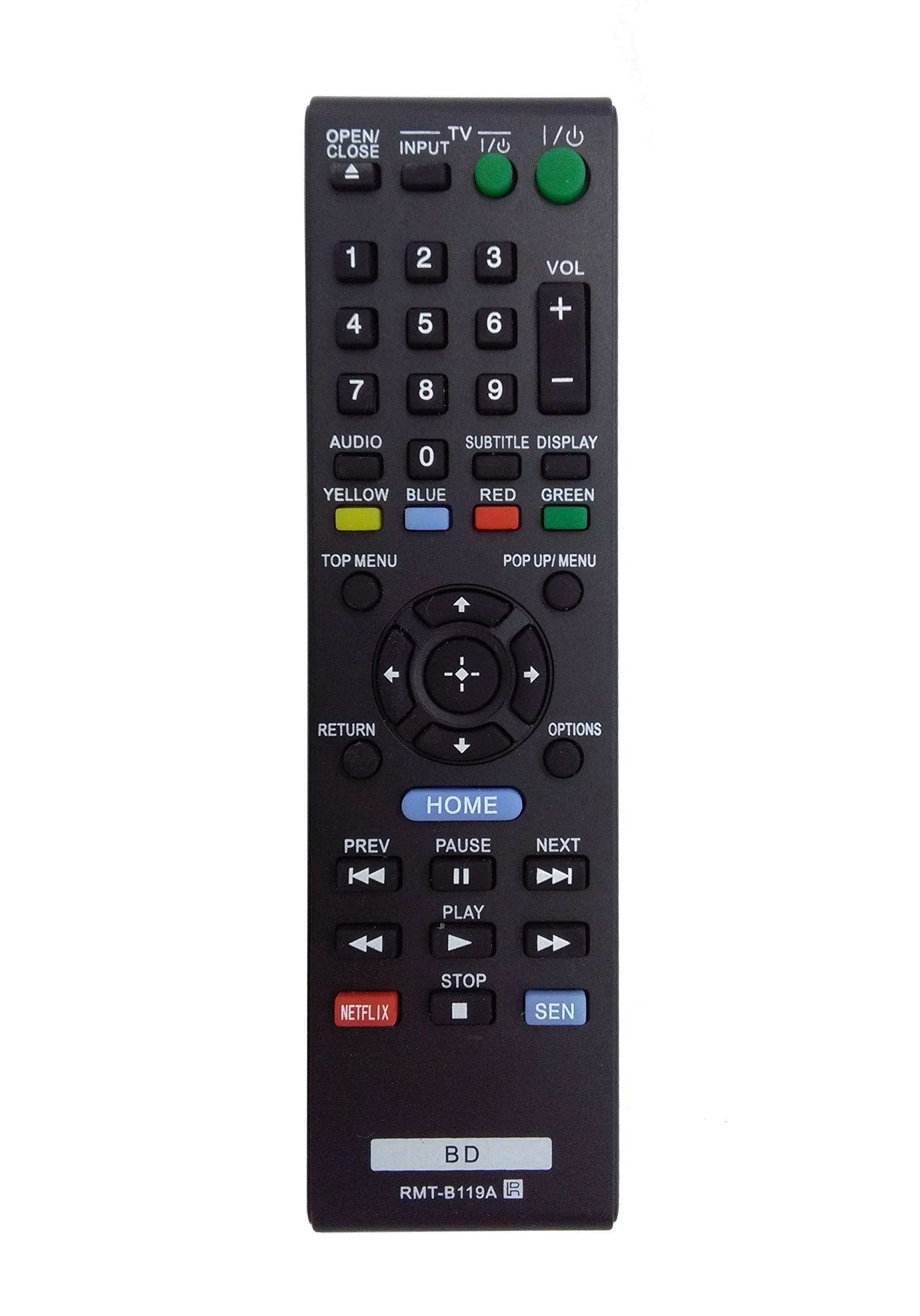
Image: The OEM RMT-B119A remote control, showing the full button layout on the front and a partial view of the open battery compartment on the back, revealing the battery terminals.
3. تعليمات التشغيل
3.1 Remote Control Layout and Button Functions
Familiarize yourself with the buttons on your RMT-B119A remote control. Below is a description of each button's primary function.
Image: The OEM RMT-B119A remote control, displaying all buttons and their labels.
- الطاقة (إدخال/إخراج): Turns the Blu-ray player on or off.
- OPEN/CLOSE (▲): يفتح أو يغلق درج الأقراص.
- إدخال: Switches the input source on the connected TV (if programmed).
- تلفزيون: Switches the remote to TV control mode (if programmed).
- لوحة الأرقام (0-9): Used for direct track selection, chapter selection, or entering numerical data.
- المجلد (+/-): Adjusts the volume level (typically for the connected TV, if programmed).
- صوتي: Changes the audio track or language during playback.
- SUBTITLE DISPLAY: Toggles subtitle display on or off, or cycles through available subtitle languages.
- YELLOW, BLUE, RED, GREEN: Color-coded function buttons, typically used for specific features within menus or interactive content. Their function varies depending on the disc or menu.
- القائمة العلوية: Accesses the main menu of the Blu-ray disc.
- POP UP/MENU: Displays the pop-up menu during disc playback.
- Directional Pad (↑↓←→): التنقل عبر القوائم والخيارات.
- Center Button (Enter/Select): يؤكد الاختيار أو يدخل عنصرًا من القائمة.
- يعود: العودة إلى الشاشة أو القائمة السابقة.
- خيارات: Displays context-sensitive options or settings.
- الصفحة الرئيسية: Accesses the Blu-ray player's home menu.
- PREV (◀◀): Skips to the beginning of the current track/chapter or the previous track/chapter.
- PAUSE (▌▌): يوقف التشغيل مؤقتًا.
- NEXT (▶▶): Skips to the next track or chapter.
- اللعب (▶): يبدأ التشغيل أو يستأنفه.
- توقف (■): يوقف التشغيل.
- NETFLIX: Direct access button for the Netflix streaming service.
- سين: Direct access button for the Sony Entertainment Network (now PlayStation Video/Music).
- ب.د: Likely a dedicated button for Blu-ray Disc functions or to switch to Blu-ray mode.
4. الصيانة
لضمان طول عمر جهاز التحكم عن بعد الخاص بك وعمله بشكل صحيح، اتبع إرشادات الصيانة التالية:
- تنظيف: امسح جهاز التحكم عن بُعد بقطعة قماش ناعمة وجافة. لإزالة الأوساخ العنيدة، امسحه برفق.ampاغسل قطعة القماش بالماء أو بمنظف لطيف غير كاشط. تجنب استخدام المواد الكيميائية القاسية أو المذيبات.
- استبدال البطارية: Replace batteries when the remote's response becomes sluggish or it stops functioning. Always replace both batteries at the same time with new ones of the same type.
- تخزين: احفظ جهاز التحكم عن بُعد في مكان بارد وجاف بعيدًا عن أشعة الشمس المباشرة ودرجات الحرارة العالية والرطوبة العالية. في حال عدم استخدامه لفترة طويلة، انزع البطاريات لمنع التسريب.
- تجنب القطرات: قم بحماية جهاز التحكم عن بعد من الصدمات المادية، حيث أن السقوط قد يؤدي إلى إتلاف المكونات الداخلية.
5. استكشاف الأخطاء وإصلاحها
If you experience issues with your remote control, refer to the following table for common problems and solutions:
| مشكلة | السبب المحتمل | حل |
|---|---|---|
| البعيد لا يعمل. | البطاريات الميتة أو المدخلة بشكل غير صحيح. | استبدل البطاريات بأخرى جديدة، مع التأكد من صحة القطبية (+/-). |
| يعمل عن بعد بشكل متقطع. | انخفاض طاقة البطارية أو وجود عائق. | Replace batteries. Ensure no objects are blocking the remote's signal path to the Blu-ray player. |
| لا يتحكم جهاز التحكم عن بعد بالتلفزيون. | Remote not programmed for TV or TV mode not selected. | This remote is primarily for Blu-ray players. TV control functionality may require specific programming not covered by this manual, or may not be supported by this OEM model. |
| الأزرار لا تستجيب أو عالقة. | الأوساخ أو الحطام تحت الأزرار. | Clean the remote control surface. Avoid spilling liquids on the remote. |
6. المواصفات
- ماركة: الشركة المصنعة للمعدات الأصلية
- رقم الموديل: RMT-B119A
- تقنية الاتصال: الأشعة تحت الحمراء (IR)
- الأجهزة المتوافقة: Sony Blu-ray Players (specific models listed in Introduction)
- مصدر الطاقة: 2 بطاريات AAA (غير مدرجة)
- الحد الأقصى للمدى: حوالي 10 أمتار (33 قدمًا)
- ميزة خاصة: تصميم مريح
7. الضمان والدعم
This OEM RMT-B119A remote control comes with a ضمان لمدة 30 يومًا من تاريخ الشراء، مع تغطية عيوب التصنيع. يُرجى الاحتفاظ بإيصال الشراء للمطالبة بالضمان.
For technical support or warranty inquiries, please contact the retailer or manufacturer directly. Refer to your purchase documentation for specific contact information.