
1. المقدمة
The D-Link GO-SW-5G is a 5-Port Unmanaged Gigabit Desktop Switch designed for home and small office environments. This device provides a simple and cost-effective solution to expand your network connectivity, offering high-speed Gigabit Ethernet ports for reliable data transfer. It incorporates D-Link's Green Technology for energy efficiency, reduced heat generation, and extended product lifespan.
This switch is a plug-and-play device, requiring no complex configuration or software installation, making it easy to integrate into an existing network.
2. محتويات العبوة
يرجى التأكد من أن جميع العناصر المدرجة أدناه متضمنة في الحزمة الخاصة بك:
- D-Link GO-SW-5G 5-Port Gigabit Desktop Switch
- محول الطاقة
- دليل التثبيت السريع
في حال وجود أي منتجات مفقودة أو تالفة، يرجى الاتصال ببائع التجزئة للحصول على المساعدة.
3. تعليمات الإعداد
The D-Link GO-SW-5G switch is designed for easy plug-and-play installation. Follow these steps to set up your device:
3.1. قم بتوصيل محول الطاقة
- Locate the power input port on the side of the D-Link GO-SW-5G switch.
- قم بتوصيل محول الطاقة المرفق بهذا المنفذ.
- قم بتوصيل الطرف الآخر لمحول الطاقة بمأخذ كهربائي قياسي.
- The power LED on the front of the switch will illuminate, indicating that the device is receiving power.

الشكل 1: جانب view of the D-Link GO-SW-5G switch with the power input port.
3.2. الاتصال بشبكتك
- Using a standard Ethernet cable (RJ45), connect one end to an available LAN port on your router (not your modem).
- Connect the other end of this Ethernet cable to any of the five available ports on the back of the D-Link GO-SW-5G switch.
- The corresponding LED on the front of the switch will light up, indicating an active connection.
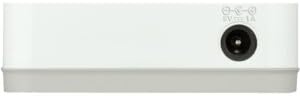
الشكل 2: مؤخرة view of the D-Link GO-SW-5G switch with five Ethernet ports.
3.3. Connect Network Devices
- Connect your network devices (e.g., computers, gaming consoles, network printers, smart TVs) to the remaining available Ethernet ports on the D-Link GO-SW-5G switch using Ethernet cables.
- Each connected device will have its corresponding LED on the front of the switch illuminate, confirming a successful connection.

الشكل 3: أمام view of the D-Link GO-SW-5G switch showing active port LEDs.
4. تعليمات التشغيل
The D-Link GO-SW-5G is an unmanaged switch, meaning it operates automatically without requiring user configuration. Once connected as described in the Setup section, it will begin forwarding network traffic between connected devices.
- التفاوض التلقائي: The switch automatically detects the network speed (10/100/1000 Mbps) and duplex mode (half/full) of connected devices and adjusts accordingly.
- MDI/MDIX التلقائي: All ports support automatic MDI/MDIX crossover, eliminating the need for crossover cables when connecting to other switches or hubs.
- مؤشرات LED: Each port has an LED indicator on the front panel. A lit LED indicates an active link, and blinking indicates network activity.
5. الصيانة
To ensure optimal performance and longevity of your D-Link GO-SW-5G switch, consider the following maintenance guidelines:
- الموقع: ضع المفتاح في مكان بارد وجاف بعيدًا عن أشعة الشمس المباشرة ومصادر الحرارة والرطوبة الزائدة. تأكد من وجود تهوية كافية حول الجهاز.
- تنظيف: Use a soft, dry cloth to clean the exterior of the switch. Avoid using liquid or aerosol cleaners, as they may damage the device.
- إدارة الكابلات: Keep Ethernet cables neatly organized to prevent tangles and accidental disconnections.
- دورة الطاقة: إذا واجهت مشاكل في الشبكة، فإن إعادة تشغيل بسيطة (فصل محول الطاقة لمدة 10 ثوانٍ ثم إعادة توصيله) يمكن أن تحل المشاكل البسيطة في كثير من الأحيان.
6. استكشاف الأخطاء وإصلاحها
If you encounter issues with your D-Link GO-SW-5G switch, refer to the following common troubleshooting steps:
- لا يوجد مؤشر LED للطاقة:
- تأكد من توصيل محول الطاقة بشكل آمن بالمفتاح والمأخذ الكهربائي العامل.
- تأكد من أن المخرج الكهربائي يعمل عن طريق توصيل جهاز آخر.
- No Link/Activity LED for a Connected Device:
- تأكد من توصيل كابل الإيثرنت بإحكام بمنفذ المحول وجهاز الشبكة.
- حاول استخدام كابل إيثرنت مختلف لاستبعاد وجود كابل معيب.
- تأكد من تشغيل الجهاز المتصل وأن محول الشبكة الخاص به يعمل بشكل صحيح.
- حاول توصيل الجهاز بمنفذ مختلف على المفتاح.
- سرعة الشبكة بطيئة:
- Verify that all connected devices and cables support Gigabit Ethernet (1000 Mbps) for optimal performance. The switch will operate at the lowest common speed.
- Ensure your router and internet service provider (ISP) plan support the desired speeds.
- Perform a power cycle on the switch and your router.
- الاتصال المتقطع:
- تحقق من وصلات الكابلات المفكوكة.
- Ensure the switch is not overheating; provide adequate ventilation.
- اختبر باستخدام كابلات إيثرنت مختلفة.
7. المواصفات
| ماركة | دي لينك |
| رقم الموديل | GO-SW-5G/B |
| عدد المنافذ | 5 |
| نوع المفتاح | غير مُدار |
| معدل نقل البيانات | 1 جيجابت في الثانية (10/100/1000 ميجابت في الثانية) |
| الواجهة | آر جيه 45 |
| لون | أبيض |
| وزن العنصر | 0.22 رطل |
| المجلدtage | 100-240 Volts |
| الأجهزة المتوافقة | PC, Mac, and other Ethernet-enabled devices |
| تبديل النسيج | 10 جيجابت في الثانية |
| رمز المنتج الموحد | 790069365669 |
8. الضمان والدعم
الضمان المحدود: The D-Link GO-SW-5G switch comes with a 3-year limited warranty. For detailed terms and conditions, please refer to the warranty information included in your package or visit the official D-Link webموقع.
الدعم الفني: For technical assistance, product registration, or to download the latest firmware and documentation, please visit the دعم دي لينك Webموقع or contact D-Link customer service.