
جونيبر نتووركس WLA532-WW
دليل مستخدم نقطة الوصول اللاسلكية جونيبر WLA532
الموديل: WLA532-WW | العلامة التجارية: جونيبر نتوركس
1. المقدمة
صُممت نقطة الوصول اللاسلكية WLA532 من جونيبر نتوركس لتوفير مستوى عالٍ من التكامل بين الأمان والأداء وسهولة الإدارة، مما يضمن تجربة مثالية لمستخدمي شبكة WLAN مع موثوقية مُحسّنة. يتميز هذا الجهاز بتصميم موفر للطاقة، وبروتوكولات أمان قوية، وجهازَي راديو، وتقنية MIMO 3x3، وثلاثة مسارات مكانية، ومنفذ إيثرنت بسرعة 1 جيجابت. كما يتيح حجمه الصغير نشره بكفاءة. تُساهم WLA532 في خفض النفقات الرأسمالية (CAPEX) من خلال تقليل عدد نقاط الوصول المطلوبة لكل طابق، وتُخفض التكاليف التشغيلية (OPEX) من خلال تقليل الحاجة إلى موظفي تكنولوجيا المعلومات، وذلك بفضل تحسين الموثوقية من خلال تحليل الطيف المتزامن وعمليات النشر المُحسّنة لمصادر التداخل المعروفة.
2. محتويات العبوة
يرجى التأكد من وجود جميع العناصر في طردك. في حال وجود أي عناصر مفقودة أو تالفة، يرجى الاتصال بالبائع أو بدعم جونيبر نتوركس فوراً.
- نقطة وصول لاسلكية من جونيبر WLA532
- حامل تثبيت (للتثبيت على السقف أو الجدار)
- أدوات التثبيت (البراغي والمثبتات)
- دليل البدء السريع / الوثائق
- (اختياري، حسب رقم المنتج) محول طاقة أو حاقن PoE
3. معلومات السلامة
اقرأ جميع تحذيرات السلامة والتعليمات قبل تركيب هذا الجهاز أو تشغيله. احتفظ بهذا الدليل للرجوع إليه مستقبلاً.
- مصدر الطاقة: استخدم فقط محول الطاقة أو مصدر الطاقة عبر الإيثرنت (PoE) المحدد لهذا الجهاز. مستوى صوت غير صحيحtagقد يتسبب ذلك في حدوث أضرار أو حريق.
- تهوية: تأكد من وجود تهوية مناسبة. لا تسد أي فتحات تهوية. قد يؤدي ارتفاع درجة الحرارة إلى تلفها.
- بيئة: لا تعرض الجهاز للماء أو الرطوبة أو درجات الحرارة القصوى. تجنب وضعه بالقرب من مصادر الحرارة أو تحت أشعة الشمس المباشرة.
- الخدمة: لا تحاول فتح أو إصلاح الجهاز بنفسك. أحل جميع أعمال الصيانة إلى فنيين مؤهلين.
- التركيب: تأكد من تثبيت الجهاز بإحكام على سطح ثابت لمنعه من السقوط.
4. الإعداد والتثبيت
يرشدك هذا القسم خلال عملية التثبيت المادي والتشغيل الأولي لنقطة الوصول Juniper WLA532 الخاصة بك.
4.1. جسديا أكثرview
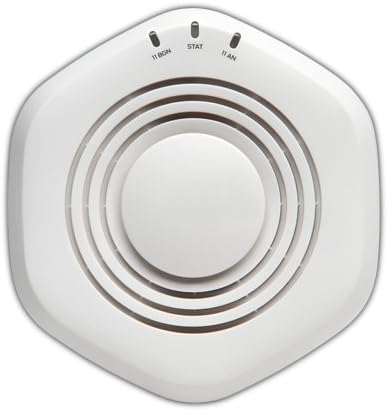
الشكل 1: الجزء العلوي view من نقطة الوصول اللاسلكية Juniper WLA532. لاحظ أضواء المؤشر الخاصة بـ 11 BGN وSTAT و11 AN.
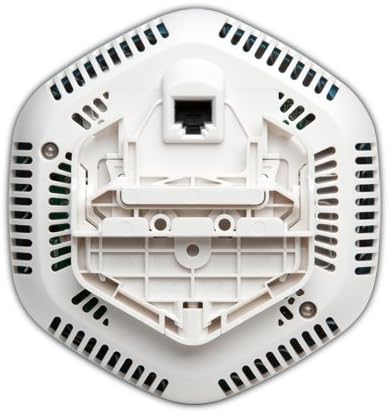
الشكل 2: القاع view من نقطة الوصول اللاسلكية Juniper WLA532، توضح قوس التثبيت المدمج ومنفذ Gigabit Ethernet للاتصال بالشبكة وتقنية Power over Ethernet (PoE).
4.2. تركيب نقطة الوصول
يمكن تركيب جهاز WLA532 على السقف أو الجدار. اختر موقعًا مركزيًا خاليًا من العوائق للحصول على تغطية لاسلكية مثالية.
- إعداد سطح التركيب: استخدم دعامة التثبيت كقالب لتحديد أماكن ثقوب الحفر على السقف أو الجدار.
- تثبيت المراسي: قم بحفر ثقوب تجريبية وأدخل مثبتات الحائط المناسبة إذا كنت تقوم بالتركيب على الجدران الجافة أو الجص.
- تأمين قوس: قم بتثبيت دعامة التثبيت على السطح باستخدام البراغي المرفقة.
- قم بتوصيل نقطة الوصول: قم بمحاذاة نقطة الوصول مع دعامة التثبيت وقم بتدويرها في اتجاه عقارب الساعة حتى تستقر في مكانها بإحكام.
4.3. الاتصال بالشبكة والطاقة
يدعم جهاز WLA532 تقنية Power over Ethernet (PoE) لتسهيل عملية التثبيت.
- اتصال إيثرنت: قم بتوصيل كابل إيثرنت قياسي من محول الشبكة الخاص بك (ويفضل أن يكون محولًا يدعم تقنية PoE) بمنفذ Gigabit Ethernet الموجود في الجزء السفلي من جهاز WLA532.
- الطاقة (PoE): في حالة استخدام محول يدعم تقنية PoE، سيتم تشغيل الجهاز تلقائيًا بمجرد توصيل كابل الإيثرنت.
- الطاقة (محول تيار متردد اختياري): إذا لم تكن تقنية PoE متاحة، فقم بتوصيل محول طاقة التيار المتردد المتوافق من Juniper Networks (يباع بشكل منفصل) بمنفذ إدخال الطاقة الموجود على الجهاز ثم بمأخذ الطاقة.
- التحقق من الطاقة: بمجرد تشغيل الجهاز، ستضيء مؤشرات الإضاءة الموجودة أعلى الجهاز (الشكل 1)، مما يدل على وجود طاقة ونشاط على الشبكة. راجع قسم "مؤشرات الإضاءة" لمزيد من التفاصيل.
4.4. التكوين الأولي
تتضمن عملية التهيئة الأولية عادةً الوصول إلى الجهاز webيمكنك استخدام واجهة إدارة قائمة على نظام التشغيل أو برنامج إدارة الشبكة من جونيبر. راجع دليل تكوين برنامج جونيبر نتووركس WLA532 المنفصل للحصول على تعليمات مفصلة حول إعداد معرّفات الشبكة اللاسلكية (SSIDs) والأمان ومعايير الشبكة الأخرى.
5. تشغيل نقطة الوصول
بمجرد تثبيت جهاز Juniper WLA532 وتكوينه، فإنه يعمل كنقطة وصول لاسلكية، حيث يبث إشارات Wi-Fi للأجهزة العميلة للاتصال بشبكتك.
5.1. مصابيح المؤشر
| ضوء | حالة | وصف |
|---|---|---|
| 11 ليف بلغاري | أخضر صلب | الراديو 802.11b/g/n (2.4 جيجاهرتز) يعمل. |
| وامض باللون الأخضر | نشاط على تردد الراديو 2.4 جيجاهرتز. | |
| احصائيات | أخضر صلب | تم تشغيل الجهاز ويعمل بشكل طبيعي. |
| وامض باللون الأخضر | تحديث البرامج الثابتة جارٍ أو نشاط آخر للنظام. | |
| 11 ان | أخضر صلب | الراديو 802.11a/n (5 جيجاهرتز) يعمل. |
| وامض باللون الأخضر | نشاط على تردد الراديو 5 جيجاهرتز. |
5.2. توصيل أجهزة العميل
يمكن لأجهزة العميل (أجهزة الكمبيوتر المحمولة، والهواتف الذكية، والأجهزة اللوحية) الاتصال بجهاز WLA532 باستخدام شبكة Wi-Fi (SSID) وكلمة المرور المُهيأة. تأكد من أن أجهزتك تدعم معيار 802.11n للحصول على أفضل أداء.
6. الصيانة
تساعد الصيانة الدورية على ضمان طول عمر نقطة الوصول الخاصة بك وأدائها الأمثل.
- تنظيف: امسح الجزء الخارجي من الجهاز برفق بقطعة قماش ناعمة وجافة. لا تستخدم المنظفات السائلة أو البخاخات. تأكد من خلو فتحات التهوية من تراكم الغبار.
- تحديثات البرامج الثابتة: تحقق دوريًا من دعم جونيبر نتوركس webللحصول على أحدث تحديثات البرامج الثابتة، تفضل بزيارة الموقع الإلكتروني. يضمن تحديث البرامج الثابتة باستمرار أفضل أداء وأمان، بالإضافة إلى إمكانية الوصول إلى الميزات الجديدة. اتبع التعليمات المرفقة مع حزمة تحديث البرامج الثابتة بعناية.
- الظروف البيئية: تأكد من أن بيئة التشغيل تبقى ضمن نطاقات درجة الحرارة والرطوبة الموصى بها لمنع حدوث تلف.
7. استكشاف الأخطاء وإصلاحها
يقدم هذا القسم حلولاً للمشاكل الشائعة التي قد تواجهها مع نقطة الوصول Juniper WLA532 الخاصة بك.
7.1. انقطاع التيار الكهربائي / إطفاء الأنوار
- التحقق من مصدر الطاقة: تأكد من توصيل كابل الإيثرنت بشكل آمن بمحول يدعم تقنية PoE أو توصيل محول طاقة تيار متردد متوافق بشكل صحيح بمأخذ طاقة يعمل.
- التحقق من خاصية PoE: في حال استخدام تقنية PoE، تأكد من تهيئة منفذ المحول لدعم هذه التقنية وتزويده بالطاقة. جرب منفذ PoE أو محولًا آخر.
7.2. لا يوجد اتصال لاسلكي
- التحقق من أضواء المؤشر: تأكد من أن ضوءي "11 BGN" و"11 AN" مضاءان باللون الأخضر الثابت، مما يدل على أن أجهزة الراديو تعمل. إذا لم يكن الأمر كذلك، فتحقق من اتصال الشبكة.
- كابل الشبكة: تأكد من أن كابل الإيثرنت الذي يربط نقطة الوصول بشبكتك موصول بإحكام ويعمل بشكل صحيح.
- حالة جهاز التوجيه/المحول: تأكد من أن جهاز التوجيه أو المحول الخاص بك يعمل بشكل صحيح ويوفر الوصول إلى الإنترنت.
- بث SSID: تأكد من بث اسم شبكة الواي فاي (SSID) وظهوره للأجهزة المتصلة. راجع إعدادات نقطة الوصول.
- إعدادات الأمان: تحقق جيدًا من كلمة مرور شبكة Wi-Fi وإعدادات الأمان (مثل WPA2-PSK).
- إعادة التشغيل: أعد تشغيل نقطة الوصول عن طريق فصل مصدر الطاقة الخاص بها وإعادة توصيله.
7.3. بطء سرعة الاتصال اللاسلكي
- تدخل: قد يتأثر أداء الشبكة اللاسلكية بالتداخل من شبكات واي فاي أخرى، أو الهواتف اللاسلكية، أو أجهزة الميكروويف، أو الأجهزة الإلكترونية الأخرى. لذا، يُنصح بتغيير قناة الواي فاي في إعدادات نقطة الوصول.
- قوة الإشارة: تأكد من أن أجهزة العميل تقع ضمن النطاق الأمثل لنقطة الوصول. يمكن أن تؤدي العوائق مثل الجدران السميكة إلى إضعاف الإشارة.
- إمكانيات جهاز العميل: تأكد من أن أجهزة العميل الخاصة بك تدعم معيار 802.11n وتستخدم برامج تشغيل محول الشبكة اللاسلكية المناسبة.
- ازدحام الشبكة: قد يؤدي وجود عدد كبير جدًا من الأجهزة على الشبكة أو استخدام نطاق ترددي عالٍ إلى إبطاء السرعات.
7.4. تعذر الوصول إلى واجهة الإدارة
- عنوان IP: تأكد من أن جهاز الكمبيوتر الخاص بك موجود على نفس شريحة الشبكة مثل نقطة الوصول وأنك تستخدم عنوان IP الصحيح لواجهة الإدارة.
- جدار الحماية: قم بتعطيل أي جدار حماية على جهاز الكمبيوتر الخاص بك مؤقتًا لاستبعاد مشاكل الحظر.
- الرجوع الى ضبط المصنع: كحل أخير، إذا تعذر عليك الوصول إلى الجهاز، فقد تحتاج إلى إعادة ضبط المصنع. راجع دليل تكوين برنامج Juniper Networks WLA532 للحصول على إرشادات حول كيفية إجراء إعادة ضبط المصنع. تحذير: سيؤدي هذا إلى مسح جميع الإعدادات المخصصة.
8. المواصفات الفنية
| ميزة | التفاصيل |
|---|---|
| رقم الموديل | WLA532-WW |
| نوع لاسلكي | 802.11ن |
| فئة نطاق التردد | ثنائي النطاق (2.4 جيجا هرتز و5 جيجا هرتز) |
| معيار الاتصال اللاسلكي | 802.11ن |
| تكنولوجيا الاتصال | إيثرنت، واي فاي |
| بروتوكول الأمان | WPS (إعداد Wi-Fi المحمي) |
| نظام التشغيل | نظام التشغيل Junos |
| وزن العنصر | 13.9 أونصة (393 جرامًا) |
| أبعاد المنتج (الطول × العرض × الارتفاع) | 5.71 × 5.37 × 1.77 بوصة |
| المجلدtage | 48 فولت (تيار مستمر) |
| عدد المعالجات | 1 |
| الاستخدامات الموصى بها | عمل |
| الشركة المصنعة | شركة جونيبر نتوركس |
| أول تاريخ متاح | 6 سبتمبر 2012 |
9. الضمان والدعم
للحصول على معلومات مفصلة حول الضمان، يرجى الرجوع إلى بطاقة الضمان المرفقة مع المنتج أو زيارة موقع جونيبر نتوركس الرسمي. webالموقع. قد تختلف شروط الضمان حسب المنطقة واتفاقية الشراء.
للحصول على الدعم الفني، ووثائق المنتج، وتنزيلات البرامج، وموارد إضافية، يرجى زيارة بوابة دعم جونيبر نتوركس:
عند الاتصال بالدعم، يرجى تجهيز رقم طراز المنتج (WLA532-WW) والرقم التسلسلي.
Ask a question about this manual
Ask about setup, troubleshooting, compatibility, parts, safety, or missing instructions. Manuals+ will review the question and use this page’s manual context to help answer it.