
1. المقدمة
The Genius GX-Gaming SW-G2.1 3000 is a 2.1 channel speaker system designed to enhance audio experiences for gaming, music, and movies. It features a powerful subwoofer for deep bass and two satellite speakers for clear mid and high-range sounds. The system includes a dedicated control box for convenient adjustments and multiple input options for various devices.
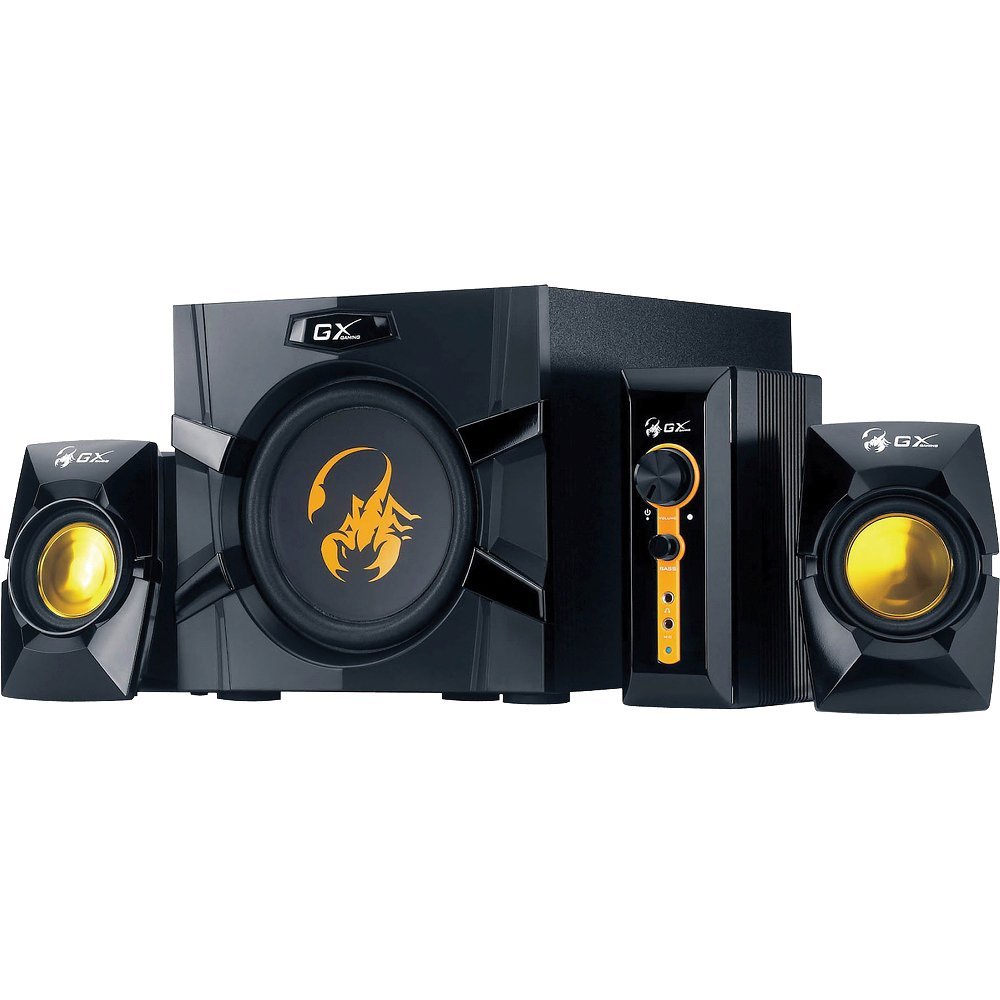
An image showing the Genius GX-Gaming SW-G2.1 3000 speaker system, featuring the subwoofer, two satellite speakers, and the control unit.
2. محتويات العبوة
يرجى التأكد من أن جميع العناصر المدرجة أدناه متضمنة في الحزمة الخاصة بك:
- One (1) Wooden Cabinet Subwoofer
- مكبران صوتيان (2)
- One (1) Control Box
- One (1) Stereo RCA to 3.5mm Audio Cable
- One (1) 3.5mm Plug Audio Cable
- One (1) Microphone Jack Cable
- One (1) Headphone Jack Cable
- One (1) Multi-language User Manual
3. مواصفات المنتج
- إجمالي انتاج الطاقة: 70 واط (RMS)
- مضخم الصوت: Wooden cabinet with a 6.5-inch driver for deep bass
- مكبرات الصوت الفضائية: Two curvaceous speakers with 3-inch metal drivers for clear mid and high tones
- صندوق التحكم: Independent controls for volume and bass adjustment
- الاتصال: Two input jacks (3.5mm standard and two RCA) for PC, TV, DVD, and game devices
- مقابس الصوت: Dedicated microphone jack for online communication and headphone jack for private listening
- استجابة التردد: 35 Hz ~ 20K Hz
- إشارة إلى نسبة الضوضاء: 85 ديسيبل
- وضع توفير الطاقة: Automatically enters sleep mode after 1 minute of inactivity. To resume, ensure audio input device volume is at least 50%.
4. تعليمات الإعداد
- وضع المتحدثين: Place the subwoofer on a stable surface, preferably on the floor, for optimal bass. Position the satellite speakers on either side of your listening area, facing you.
- توصيل مكبرات الصوت الفضائية: Connect the cables from the two satellite speakers to the corresponding output ports on the subwoofer.
- قم بتوصيل صندوق التحكم: Plug the control box cable into the designated port on the subwoofer.
- توصيل مصدر الصوت:
- For PC, MP3/CD players: Use the 3.5mm audio cable to connect your device's audio output to the 3.5mm input on the control box.
- For Game Consoles, DVD Players, TV: Use the stereo RCA to 3.5mm cable. Connect the RCA ends to your device's audio output and the 3.5mm end to the corresponding input on the control box.
- توصيل الطاقة: Plug the subwoofer's power cord into a standard electrical outlet (110V or 220V AC, depending on your region).
- تشغيل الطاقة: Turn on the power switch, usually located on the subwoofer. The system is now ready for use.
5. تعليمات التشغيل
- التحكم في مستوى الصوت: Use the large knob on the control box to adjust the overall volume of the speaker system.
- التحكم في الجهير: Use the dedicated bass knob on the control box to increase or decrease the subwoofer's bass output.
- استخدام الميكروفون: Connect a microphone to the MIC jack on the control box for online communication.
- استخدام سماعة الرأس: Plug your headphones into the headphone jack on the control box for private listening. This will mute the speakers.
- وضع توفير الطاقة: If the system enters sleep mode due to inactivity, ensure your audio input device's volume is set to 50% or higher, then adjust the system's volume using the control box to resume audio.
6. الصيانة
- تنظيف: Use a soft, dry cloth to clean the surfaces of the speakers and control box. Avoid using liquid cleaners or abrasive materials.
- الموقع: Keep the speakers away from direct sunlight, heat sources, and excessive moisture. Ensure adequate ventilation around the subwoofer.
- إدارة الكابلات: تأكد من توصيل جميع الكابلات بإحكام وعدم تشابكها أو انضغاطها لمنع التلف.
- تخزين: في حالة تخزين النظام لفترة طويلة، افصله عن مصدر الطاقة وخزنه في مكان بارد وجاف.
7. استكشاف الأخطاء وإصلاحها
- لا يوجد صوت:
- Ensure the power cable is securely plugged in and the power switch is on.
- Check all audio cables are correctly connected between the source device, control box, and subwoofer.
- Verify the volume knob on the control box is turned up.
- Ensure the audio source device (PC, TV, etc.) is playing audio and its volume is not muted or too low.
- If in Power Saving Mode, increase the audio source device's volume to at least 50%.
- الصوت المشوه:
- Reduce the volume on both the speaker system and the audio source device.
- Adjust the bass level on the control box.
- Ensure speaker cables are not damaged or loosely connected.
- أحد مكبرات الصوت لا يعمل:
- Check the connection of the non-working satellite speaker to the subwoofer.
- Test with another audio source or swap the satellite speaker connections (if possible) to isolate the issue.
8. المواصفات الفنية
| إجمالي الطاقة الناتجة | 70 واط (RMS) |
| طاقة الأقمار الصناعية | 2 × 15 واط |
| قوة مضخم الصوت | 40 واط |
| وحدات التشغيل | Satellites: 2 x 3 inches, Subwoofer: 1 x 6.5 inches |
| استجابة التردد | 35 Hz ~ 20K Hz |
| إشارة إلى نسبة الضوضاء | 85 ديسيبل |
| أبعاد مضخم الصوت (العرض × الارتفاع × العمق) | 230 × 314 × 215 ملم (تقريبًا 9 × 12.4 × 8.5 بوصة) |
| Satellite Dimensions (WxHxD) | 99 × 115 × 143 ملم |
| Controller Dimensions (WxHxD) | 60 × 154 × 170 ملم |
| وزن النظام | 4.66 كجم (حوالي 10.27 رطلاً) |
| مصدر الطاقة | 110 فولت أو 220 فولت تيار متردد |
| الأجهزة المتوافقة | Personal Computer, Television, DVD Players, Game Consoles, MP3/CD players |
| مقابس الإدخال | 3.5mm standard input, two RCA jacks |
| طريقة التحكم | Knobs/Buttons (listed as 'Touch' in some specifications) |
9. الضمان والدعم
This Genius GX-Gaming SW-G2.1 3000 speaker system comes with a ضمان محدود. For specific details regarding warranty coverage, duration, and terms, please refer to the warranty card included in your product packaging or visit the official Genius webموقع.
For technical support, troubleshooting assistance, or service inquiries, please contact Genius customer support through their official website or the contact information provided in your product documentation. When contacting support, please have your product model number (SW-G2.1 3000) and purchase information readily available.