
1. المقدمة
This manual provides essential information for the safe and efficient operation of your Alto Professional TMX160 DFX 16-Channel Powered Mixer. The TMX160 DFX is a versatile audio mixing console featuring 16 input channels, a built-in Alesis digital effects processor, and an integrated power amplifier capable of delivering 750W stereo output at 4Ω or 1500W mono output at 8Ω. It includes 12 XLR microphone inputs with phantom power, 16 line inputs, and stereo RCA inputs, along with a 3-band equalizer on each mono and stereo channel.
Please read this manual thoroughly before using the product to ensure proper setup and operation. Keep this manual for future reference.
2. معلومات السلامة
اتبع دائمًا احتياطات السلامة الأساسية عند استخدام هذا المنتج لتقليل خطر الحريق والصدمة الكهربائية والإصابة للأشخاص.
- مصدر الطاقة: قم بتوصيل الوحدة فقط بمأخذ طاقة تيار متردد بالجهد المحددtage.
- التأريض: Ensure the unit is properly grounded. Do not defeat the safety purpose of the polarized or grounding-type plug.
- الماء والرطوبة: Do not expose this equipment to rain or moisture. Do not use near water.
- تهوية: تأكد من التهوية الكافية. لا تسد فتحات التهوية.
- حرارة: لا تقم بالتثبيت بالقرب من أي مصادر للحرارة مثل المشعات أو فتحات التدفئة أو المواقد أو أي أجهزة أخرى (بما في ذلك ampالمُضخِّمات) التي تنتج الحرارة.
- الكابلات: قم بحماية أسلاك الطاقة من السير عليها أو قرصها.
- الخدمة: يُرجى إحالة جميع أعمال الصيانة إلى فنيين مؤهلين. لا تحاول صيانة هذا المنتج بنفسك.
3. الإعداد
3.1 فك العبوة والتفتيش
Carefully unpack the TMX160 DFX mixer and inspect it for any signs of damage that may have occurred during transit. If any damage is found, contact your dealer immediately.
3.2 توصيل الطاقة
Connect the supplied AC power cord to the mixer's power input and then to a suitable grounded AC power outlet. Ensure the mixer's power switch is in the OFF position before connecting to power.
3.3 توصيل المدخلات
The TMX160 DFX offers a variety of input options:
- Microphone Inputs (MIC 1-12): Use XLR cables to connect microphones to the 12 XLR inputs. Phantom power (+48V) can be activated for condenser microphones.
- مداخل الخط (القنوات 1-16): Use 1/4-inch TRS or TS cables for line-level instruments or devices. Channels 13/14 and 15/16 are stereo line inputs, also accepting RCA for 2-Track In.
- 2-Track In: Connect external audio sources like CD players or media players using RCA cables.
3.4 توصيل المخارج
Connect your speakers or monitoring system to the appropriate outputs:
- مخرجات مكبر الصوت: قم بتوصيل مكبرات الصوت السلبية بمصدر الطاقة amplifier outputs. Ensure the impedance of your speakers matches the mixer's output capabilities (e.g., 4Ω for 750W stereo, 8Ω for 1500W mono).
- Monitor/Aux Outputs: Use these outputs to send signals to stagشاشات العرض الإلكترونية أو معالجات المؤثرات الخارجية.
- Stereo Out/Mono Out: These outputs provide the main mix signal for recording or connecting to additional sound systems.
3.5 التشغيل الأولي
After all connections are made, ensure all channel faders and the main mix fader are at their lowest settings. Turn on any connected devices (e.g., microphones, instruments) first, then power on the TMX160 DFX mixer. Finally, turn on your power ampمكبرات الصوت أو مكبرات الصوت النشطة.
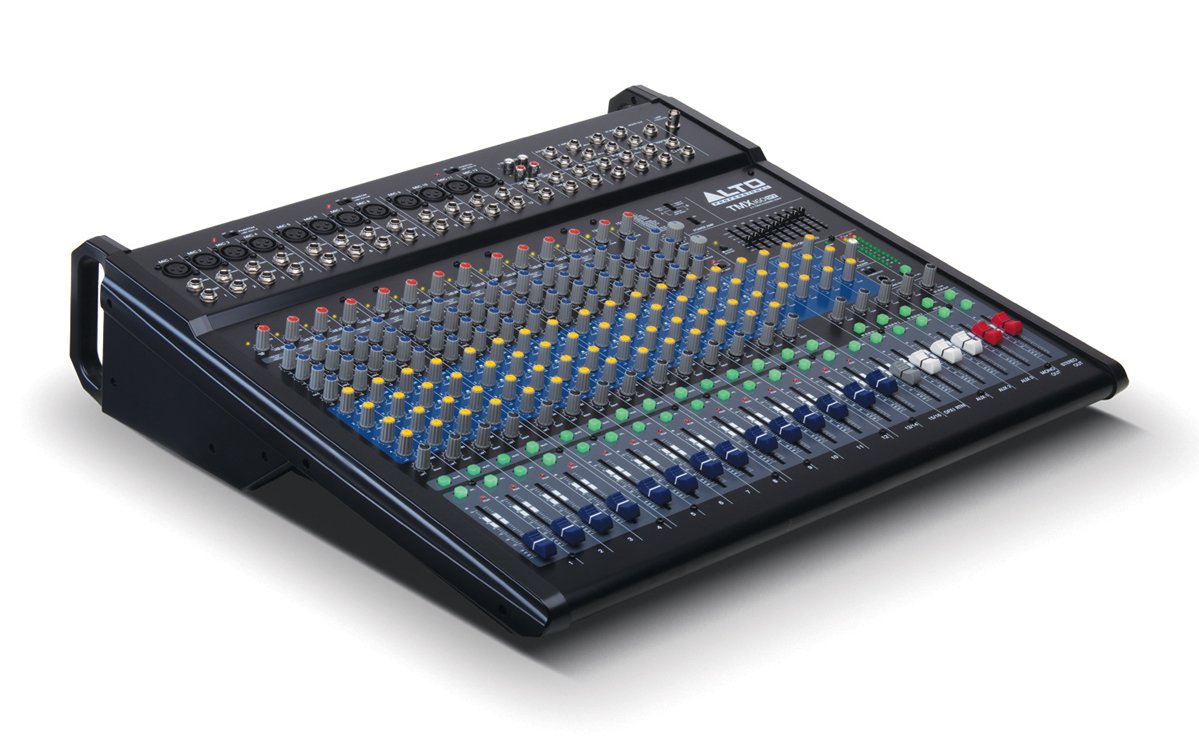
الشكل 1: اللوحة الأمامية منتهيةview of the Alto Professional TMX160 DFX mixer. This image shows the comprehensive layout including microphone and line inputs at the top, channel controls in the middle, and faders at the bottom.
4. التشغيل
4.1 ضوابط القناة
Each input channel (1-16) features a set of controls to shape its sound:
- ربح: Adjusts the input sensitivity for the connected microphone or line-level device. Set this to achieve a strong signal without clipping (distortion).
- معادل الصوت (مرتفع ، متوسط ، منخفض): A 3-band equalizer allows you to boost or cut frequencies (treble, midrange, bass) for each channel.
- يرسل AUX: Controls the amount of signal sent from the channel to the auxiliary outputs (e.g., for monitors or external effects).
- رقم التعريف الشخصي: يحدد موضع إشارة القناة داخل مجال الاستريو (من اليسار إلى اليمين).
- مستوى الصوت (الفيدر): يتحكم في مستوى الصوت الإجمالي للقناة في المزيج الرئيسي.
4.2 القسم الرئيسي
The master section controls the overall output of the mixer:
- أزرار التحكم الرئيسية في الميكس: Control the overall volume of the stereo output.
- DFX (Digital Effects) Controls: Select and adjust parameters for the built-in Alesis digital effects.
- Stereo Graphic EQ: A 7-band graphic equalizer allows for fine-tuning the overall frequency response of the main mix.
- قوة Amp عناصر التحكم: Adjust the output level and mode (Stereo/Mono) for the integrated power ampمكبر.
4.3 Built-in Alesis Digital Effects
The TMX160 DFX features a high-quality Alesis digital effects processor. Use the DFX controls in the master section to browse and select from various effects such as reverb, delay, chorus, and more. Adjust the effect send levels on individual channels and the overall effect return level in the master section to blend the effects into your mix.
الشكل 2: مفصل view of the input channels, showing individual GAIN, EQ, AUX, PAN, and LEVEL controls for precise audio shaping.
5. الصيانة
Proper maintenance ensures the longevity and optimal performance of your TMX160 DFX mixer.
- تنظيف: استخدم قطعة قماش ناعمة وجافة لتنظيف الجزء الخارجي من الخلاط. تجنب استخدام المنظفات الكاشطة أو المذيبات أو الشمع.
- تراب: Regularly remove dust from the ventilation openings to prevent overheating.
- تخزين: عند عدم استخدام الخلاط لفترات طويلة، قم بتخزينه في مكان بارد وجاف، بعيدًا عن أشعة الشمس المباشرة ودرجات الحرارة القصوى.
- التلاشيات والمقابض: Avoid applying excessive force to faders and knobs. Keep them free from dust and debris.
6. استكشاف الأخطاء وإصلاحها
If you encounter issues with your TMX160 DFX, refer to the following common problems and solutions:
- لا يوجد طاقة:
- Check if the power cord is securely connected to both the mixer and the AC outlet.
- تأكد من أن مخرج التيار المتردد يعمل بشكل صحيح.
- تأكد من أن مفتاح الطاقة الموجود على الخلاط في وضع التشغيل.
- لا يوجد إخراج صوت:
- تحقق من جميع توصيلات كابلات الإدخال والإخراج.
- Ensure channel GAIN and LEVEL faders are appropriately set.
- Verify the Main Mix faders are raised.
- Check if connected speakers or power amplifiers are turned on and functioning.
- تأكد من الطاقة Amp controls are set correctly for your speaker configuration.
- الصوت المشوه:
- Reduce the GAIN setting for the input channel.
- Lower the channel LEVEL fader or Main Mix faders.
- تحقق من وجود كابلات تالفة.
- Effects Not Heard:
- Ensure the DFX send controls on the channels are turned up.
- Verify the DFX return level in the master section is raised.
- Check the selected effect program.
If the problem persists after trying these steps, contact Alto Professional customer support.
7. المواصفات
| ميزة | مواصفة |
|---|---|
| ماركة | ألتو بروفيشنال |
| نموذج | TMX160 DFX |
| عدد القنوات | 16 |
| وزن العنصر | 12.5 كيلوغرام |
| تكنولوجيا الاتصال | مساعد |
| مدخل الصوت | XLR, RCA, Line, AUX, 2-Track |
| الشركة المصنعة | في الموسيقى |
| ASIN | B007T1VZ52 |
| Power Output (Stereo) | 750 واط @ 4 Ω |
| Power Output (Mono) | 1500 واط @ 8 Ω |
| مُعادل الصوت | 3-band EQ per channel, Stereo Graphic EQ |
| التأثيرات | Built-in Alesis Digital Effector (24-bit A/D and D/A converters) |
| الأبعاد (العرض × العمق × الارتفاع) | تقريبا. 21.9 × 22.2 × 5.7 بوصة (555 × 565 × 145 ملم) |
8. الضمان والدعم
For warranty information and technical support, please refer to the documentation included with your product or visit the official Alto Professional webالموقع. احتفظ بإيصال الشراء الخاص بك كإثبات للشراء في حالة مطالبات الضمان.
For further assistance, you may contact Alto Professional customer service directly.