
مقدمة
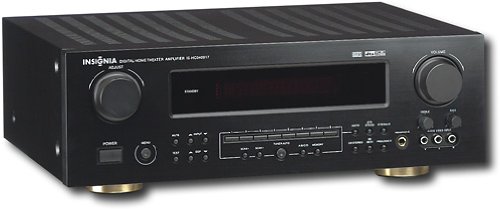
This manual provides essential instructions for the setup, operation, maintenance, and troubleshooting of your Insignia 6.1-Channel 600W Digital Home Theater Receiver, model IS-HC040917. Please read this manual thoroughly before using the receiver to ensure proper and safe operation.
تعليمات السلامة الهامة
- لا تسد أي فتحات تهوية. ثبّت المنتج وفقًا لتعليمات الشركة المصنعة.
- لا تقم بالتثبيت بالقرب من أي مصادر للحرارة مثل المشعات أو فتحات التدفئة أو المواقد أو أي أجهزة أخرى (بما في ذلك ampالمُضخِّمات) التي تنتج الحرارة.
- احمِ سلك الطاقة من أن يدوس عليه أحد أو يضغط عليه، وخاصةً عند المقابس ومنافذ التوصيل الكهربائية ونقطة خروجها من الجهاز.
- استخدم فقط المرفقات/الملحقات المحددة من قبل الشركة المصنعة.
- افصل هذا الجهاز أثناء العواصف الرعدية أو عند عدم استخدامه لفترات طويلة من الزمن.
- قم بإحالة جميع أعمال الصيانة إلى موظفي الخدمة المؤهلين. الصيانة مطلوبة في حالة تعرض الجهاز للتلف بأي شكل من الأشكال.
دليل الإعداد
1. فك التعبئة
Carefully remove the receiver and all accessories from the packaging. Ensure all components are present:
- Insignia IS-HC040917 Receiver
- جهاز التحكم عن بعد
- هوائي حلقة AM
- هوائي سلك FM
- دليل المستخدم (هذا المستند)
2. توصيل مكبرات الصوت
The IS-HC040917 receiver supports a 6.1-channel speaker configuration. Connect your speakers to the corresponding terminals on the rear panel. Ensure correct polarity (+ to + and - to -) for each speaker.
- الجهة الأمامية اليسرى/اليمنى: For main stereo sound.
- مركز: For dialogue.
- Surround Left/Right: For ambient sound effects.
- المحيطي الخلفي: For additional rear channel effects in 6.1 setups.
- Subwoofer (Pre-out): Connect to a powered subwoofer's LFE input.
Note: The receiver is designed for speakers with an impedance of 8 ohms.
3. توصيل مصادر الصوت/الفيديو
Connect your external devices (e.g., DVD player, Blu-ray player, game console, cable box) to the appropriate input jacks on the receiver.
- HDMI: Use HDMI cables for high-definition audio and video signals. The receiver has 3 HDMI input ports.
- الصوت الرقمي (بصري/محوري): For digital audio from devices like CD players or set-top boxes.
- الصوت التناظري (RCA): For standard stereo audio connections from devices like VCRs or older CD players.
- S- فيديو: For video signals from compatible devices.
4. اتصال الهوائي
Connect the supplied AM loop antenna and FM wire antenna to their respective terminals on the rear panel for radio reception.
5. توصيل الطاقة
Once all audio/video and speaker connections are made, plug the receiver's power cord into a standard AC wall outlet.
صورة: Rear panel of the Insignia IS-HC040917 receiver, showing various input and output connections for speakers, audio/video sources (HDMI, RCA, S-Video, Digital), and antenna terminals. This diagram is crucial for correctly wiring the home theater system.
تعليمات التشغيل
1. تشغيل/إيقاف التشغيل
اضغط على قوة زر على اللوحة الأمامية أو جهاز التحكم عن بعد لتشغيل جهاز الاستقبال أو إيقاف تشغيله.
2. اختيار المدخلات
استخدم محدد المدخلات knob/buttons on the front panel or the remote control to choose the desired audio/video source (e.g., HDMI 1, DVD, CD, Tuner).
3. التحكم في مستوى الصوت
اضبط مستوى الصوت الرئيسي باستخدام الزر الكبير مقدار مقبض على اللوحة الأمامية أو الحجم +/- الأزرار الموجودة على جهاز التحكم عن بعد.
4. أوضاع الصوت
The receiver supports various audio modes, including 6.1-channel surround sound. Use the وضع or معالج الإشارة الرقمية buttons on the remote to cycle through available sound modes (e.g., Stereo, Dolby Digital, DTS, Pro Logic).
5. Tuner Operation (AM/FM Radio)
Select the "Tuner" input. Use the فرقة button to switch between AM and FM. Use the لحن +/- buttons to manually tune to stations or الإعداد المسبق +/- to select stored stations. Refer to the remote control for specific tuner functions.
صيانة
1. التنظيف
Wipe the exterior of the receiver with a soft, dry cloth. Do not use liquid cleaners or aerosol sprays, as they may damage the finish or internal components. Ensure the unit is unplugged before cleaning.
2. التهوية
Ensure that the ventilation openings on the top and sides of the receiver are not blocked. Proper airflow is essential to prevent overheating and ensure long-term performance.
3. إدارة الكابلات
Periodically check all cable connections to ensure they are secure. Loose connections can lead to poor audio or video quality.
استكشاف الأخطاء وإصلاحها
| مشكلة | السبب المحتمل | حل |
|---|---|---|
| لا يوجد طاقة | سلك الطاقة غير موصول بالكهرباء؛ مأخذ الطاقة غير نشط. | تحقق من توصيل سلك الطاقة؛ حاول استخدام منفذ مختلف. |
| لا يوجد صوت | Incorrect input selected; speaker wires loose; volume too low; mute activated. | حدد المدخل الصحيح؛ تحقق من توصيلات السماعات؛ ارفع مستوى الصوت؛ قم بإلغاء كتم الصوت. |
| لا يوجد فيديو | Incorrect input selected; video cables loose or incorrect. | Select correct input; check video cable connections (HDMI, S-Video, RCA). |
| جهاز التحكم عن بعد لا يعمل | Batteries depleted; obstruction between remote and receiver; incorrect remote mode. | Replace batteries; remove obstructions; ensure remote is in the correct operating mode. |
تحديد
- نموذج: IS-HC040917
- ماركة: INSIGNIA
- طاقة الإخراج: 600 واط
- عدد القنوات: 6.1 قناة
- وضع إخراج الصوت: محيط
- إجمالي منافذ HDMI: 3
- أنواع الموصلات: 3.5mm Jack, HDMI, RCA, USB
- الأجهزة المتوافقة: المتحدث
- طريقة التحكم: بعيد
- لون: أسود
- رمز المنتج العالمي: 799530659962
- ASIN: B0075C3DN2
الضمان والدعم
For warranty information and customer support, please refer to the warranty card included with your product or visit the official Insignia webموقع. احتفظ بإيصال الشراء الخاص بك لمطالبات الضمان.
For further assistance, you may contact Insignia customer service. Contact details are typically available on the manufacturer's webالموقع أو في عبوة المنتج.