
1. المقدمة
شكرا لك على الشراءasing the Gemini PS3-USB 3 Channel 10-Inch Mixer. This manual provides essential information for the proper setup, operation, and maintenance of your mixer. Please read this manual thoroughly before use to ensure optimal performance and to prevent damage.
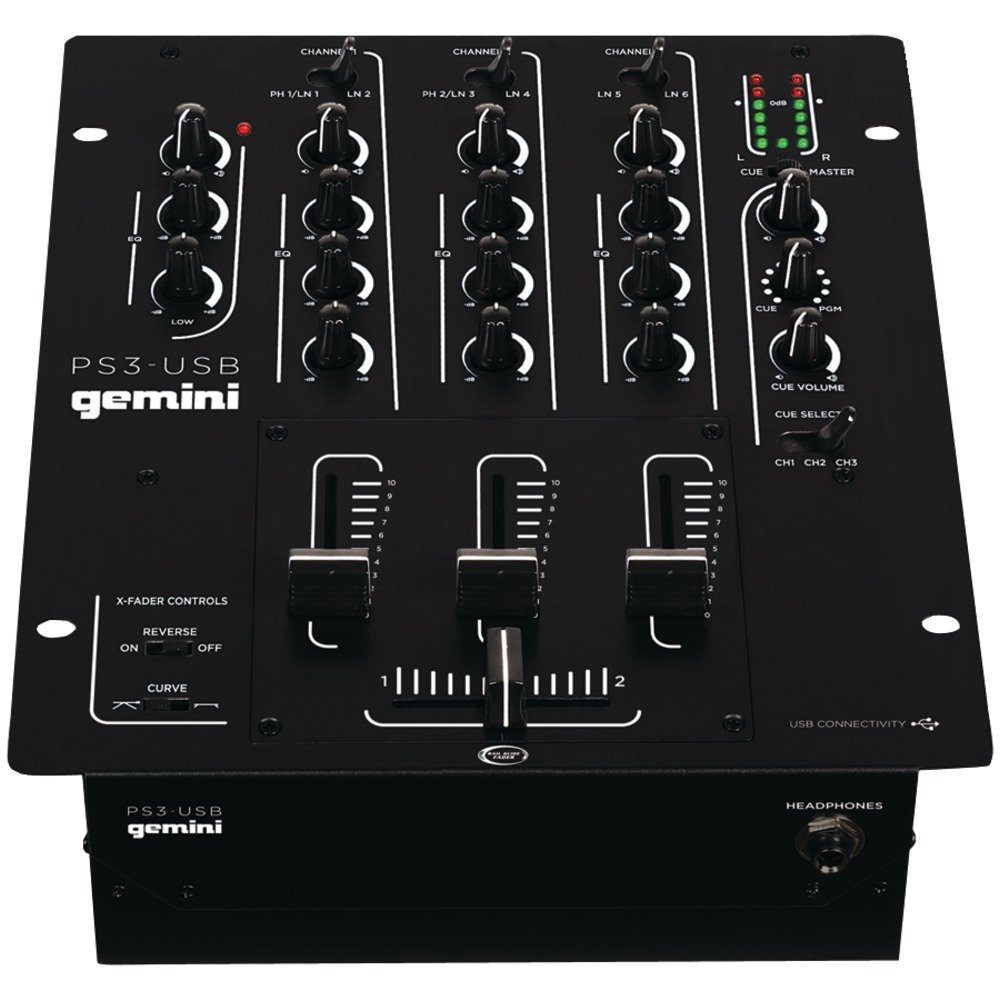
الشكل 1: الجبهة view of the Gemini PS3-USB Mixer, showing controls and inputs.
2. تعليمات السلامة
- مصدر الطاقة: قم بتوصيل الوحدة بمصدر الطاقة المحدد فقط.
- تهوية: تأكد من التهوية الجيدة. لا تسد فتحات التهوية.
- الماء والرطوبة: لا تعرض الجهاز للمطر أو الرطوبة. لا تضع أشياء مملوءة بالسوائل على الجهاز.
- حرارة: احتفظ بالوحدة بعيدًا عن مصادر الحرارة مثل المشعات أو فتحات التدفئة أو المواقد أو الأجهزة الأخرى (بما في ذلك ampالمُضخِّمات) التي تنتج الحرارة.
- تنظيف: نظف فقط بقطعة قماش جافة.
- الخدمة: يُرجى إحالة جميع أعمال الصيانة إلى فنيين مؤهلين. لا تحاول صيانة هذا المنتج بنفسك.
3. الإعداد
3.1 فك التعبئة
Carefully unpack the mixer and check for any signs of damage. Retain the packaging materials for future transport or storage.
3.2 توصيل الطاقة
Connect the provided power adapter to the mixer's power input and then to a suitable electrical outlet.
3.3 اتصالات الصوت
The PS3-USB features 5-line, 3-channel inputs with 2 convertible Phono/Line RCA inputs.
- مداخل فونو/لاين: Connect turntables or line-level devices (CD players, media players) to the RCA inputs. Use the Phono/Line switch to select the appropriate input type for each channel.
- إخراج ماجستير: Connect the Master RCA outputs to your ampمكبر صوت أو مكبرات صوت تعمل بالطاقة.
- إخراج التسجيل: Connect the Record RCA outputs to a recording device if you wish to record your mix.
- سماعات الرأس: Plug your 1/4" (6.3mm) headphones into the front panel headphone connector.
3.4 اتصال USB
Connect the mixer to your Mac or PC using a standard USB cable. This allows for simultaneous playback and recording through your computer's media player software.
4. تعليمات التشغيل
4.1 Controls and Functions Overview
Familiarize yourself with the mixer's layout:
- Channel Gain Control: يضبط مستوى الإدخال لكل قناة.
- 3-Band Rotary EQ: Provides control over High, Mid, and Low frequencies for each channel.
- تلاشي القناة: Control the volume of each individual channel.
- كروس فايدر: A user-replaceable Rail Glide crossfader with curve and reverse controls for blending between channels.
- الحجم الرئيسي: يتحكم في مستوى الإخراج الكلي للخلاط.
- متر VU: Visual indicators for master or cue levels.
- قسم الإشارات: Includes rotary cue volume, CUE/PGM controls, and a split cue switch for headphone monitoring.
- قسم الميكروفون: Features a rotary microphone volume control and a 2-band EQ for microphone input.
4.2 الخلط الأساسي
- Connect your audio sources to the appropriate Phono/Line inputs.
- Set the Phono/Line switch for each channel to match your source.
- Adjust the Gain control for each active channel to achieve a healthy input level without clipping (distortion).
- Use the channel faders to bring up the volume of your desired audio sources.
- Utilize the 3-band EQ to shape the sound of each channel.
- Use the crossfader to smoothly transition between channels.
- Monitor your mix using headphones via the Cue section and adjust the Master Volume for the main output.
4.3 تشغيل وتسجيل الملفات عبر منفذ USB
Once connected via USB, your computer should recognize the PS3-USB as an audio device.
- التشغيل: Select the PS3-USB as the output device in your computer's sound settings or media player software to route audio through the mixer.
- تسجيل: Select the PS3-USB as the input device in your recording software. The mixer's master output will be sent to your computer for recording.
5. الصيانة
- تنظيف: استخدم قطعة قماش ناعمة وجافة لتنظيف الجزء الخارجي من الخلاط. لا تستخدم المنظفات السائلة أو المذيبات.
- Crossfader Replacement: The Rail Glide crossfader is user-replaceable. Refer to the Gemini website or authorized service centers for replacement parts and instructions if needed.
- تخزين: When not in use for extended periods, store the mixer in a cool, dry place, preferably in its original packaging.
6. استكشاف الأخطاء وإصلاحها
| مشكلة | السبب المحتمل | حل |
|---|---|---|
| No sound output from master. | Master volume too low; incorrect input selection; ampمشاكل في مكبر الصوت/السماعة. | Increase Master Volume. Check Phono/Line switches. Verify ampتوصيلات مكبر الصوت/السماعة والطاقة. |
| لا يوجد صوت من قناة معينة. | Channel fader down; Gain too low; incorrect Phono/Line selection; source device off/muted. | Raise channel fader. Adjust Gain. Correct Phono/Line switch. Check source device. |
| صوت مشوه. | Input Gain too high; Master Volume too high; faulty cable. | Reduce channel Gain. Reduce Master Volume. Replace cables. |
| USB recording/playback not working. | Incorrect USB connection; computer audio settings incorrect; driver issues. | Ensure USB cable is securely connected. Select PS3-USB as audio device in computer settings. Restart computer. |
7. المواصفات
- نموذج: بلاي ستيشن 3 يو اس بي
- القنوات: 3
- المدخلات: 5-Line, 2 Convertible Phono/Line RCA, USB
- المخرجات: Master RCA, Record RCA, 1/4" (6.3mm) Headphone
- EQ: 3-Band Rotary EQ per channel, 2-Band EQ for Microphone
- كروس فايدر: User-replaceable Rail Glide with Curve and Reverse controls
- الاتصال: USB for Mac/PC Playback & Recording
- Dimensions (Approximate Shipping): 12.00 بوصة × 10.00 بوصة × 3.25 بوصة
- Weight (Approximate Shipping): 6.2 رطل (2.8 كجم)
- رمز المنتج العالمي: 747705208149
8. الضمان والدعم
This Gemini product is covered by a ضمان لمدة 90 يومًا from the date of purchase. This warranty covers manufacturing defects and workmanship under normal use. It does not cover damage caused by misuse, accident, modification, or unauthorized repair.
For technical support, service inquiries, or warranty claims, please contact your authorized Gemini dealer or visit the official Gemini webموقع لمعلومات الاتصال.
يرجى الاحتفاظ بإثبات الشراء للتحقق من صحة الضمان.