
1. المقدمة
Thank you for choosing the Ultrak Heat Index Solar Powered Stopwatch, Model 830. This device is designed for precise timing and environmental monitoring, offering features such as temperature, humidity, heat index, and dew point calculations. It is ideal for athletes, coaches, and outdoor enthusiasts who require accurate data in various conditions. This manual provides detailed instructions to help you maximize the functionality and lifespan of your stopwatch.
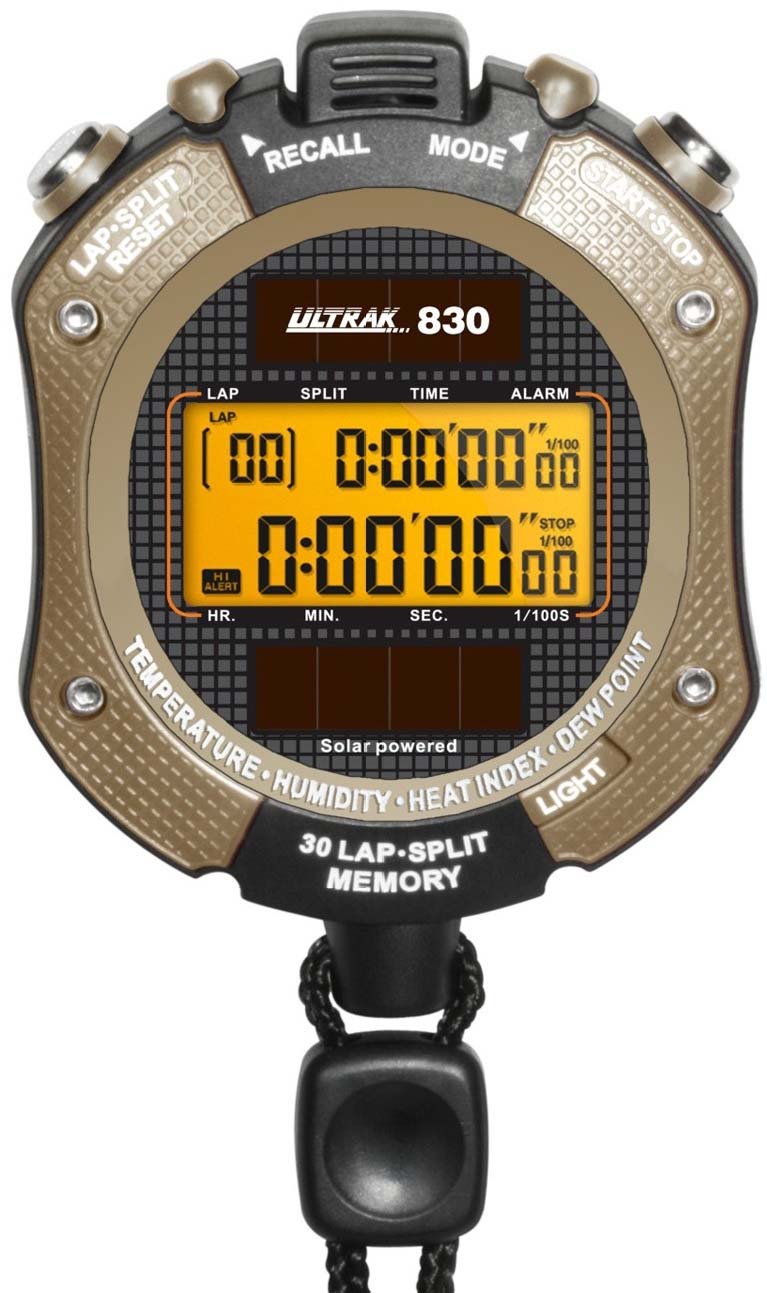
الشكل 1: أمام view of the Ultrak Heat Index Solar Powered Stopwatch, displaying its digital screen and control buttons.
2. الميزات الرئيسية
- Accurate calculation of temperature, humidity, heat index, and dew point.
- 30 dual split recallable memory for tracking multiple laps or splits.
- Measures time up to 10 hours with 1/100 second resolution.
- Presettable countdown timer with an auto-repeat function.
- Displays time, calendar, and features an alarm function.
- LED backlight for visibility in low-light conditions.
- Solar-powered with a back-up lithium battery for continuous operation.
- Water-resistant design for use in various environments.
3. الإعداد والاستخدام الأولي
3.1 التشغيل
The Ultrak 830 is solar-powered. Ensure the solar panel on the front of the stopwatch is exposed to light for initial power-up. A built-in lithium battery provides backup power.
3.2 ضبط الوقت والتاريخ
- في وضع الوقت، اضغط مع الاستمرار على وضع اضغط على الزر حتى تومض الشاشة.
- استخدم البدء/التوقف button to adjust the flashing digit (hours, minutes, seconds, year, month, day).
- اضغط على لاب / إعادة تعيين زر للانتقال إلى الإعداد التالي.
- بمجرد أن تكون جميع الإعدادات صحيحة، اضغط على وضع زر للخروج من وضع الإعداد.
3.3 Activating Backlight
اضغط على ضوء button (usually located on the side or top) to illuminate the display for a few seconds in low-light conditions.
4. تعليمات التشغيل
4.1 وظيفة ساعة الإيقاف
- من وضع الوقت، اضغط على وضع button repeatedly until "STOPWATCH" or a similar indicator appears.
- يضعط البدء/التوقف لبدء التوقيت.
- يضعط لاب / إعادة تعيين to record a lap/split time while the stopwatch continues running. The display will momentarily show the lap time.
- يضعط البدء/التوقف مرة أخرى لإيقاف ساعة الإيقاف مؤقتًا.
- يضعط لاب / إعادة تعيين while paused to reset the stopwatch to zero.
4.2 Recalling Memory
The stopwatch can store up to 30 dual split times. After stopping the stopwatch, press the ذاكرة button (or a designated button, refer to on-device labels) to scroll through recorded lap and split times.
4.3 للعد التنازلي
- Navigate to the "TIMER" mode using the وضع زر.
- اضغط مع الاستمرار لاب / إعادة تعيين للدخول إلى وضع الإعداد.
- يستخدم البدء/التوقف to adjust the hours, minutes, and seconds. Use لاب / إعادة تعيين للتنقل بين الأرقام.
- يضعط وضع لتأكيد الإعداد.
- يضعط البدء/التوقف to begin the countdown. An alarm will sound when the timer reaches zero.
- To activate auto-repeat, ensure this option is enabled in the timer setting mode (if available).
4.4 Heat Index and Environmental Readings
In the dedicated "HEAT INDEX" or "ENVIRONMENT" mode (accessed via the وضع button), the stopwatch will display current temperature, humidity, heat index, and dew point. Allow a few moments for the sensors to stabilize and provide accurate readings, especially after moving to a new environment.
4.5 وظيفة الإنذار
- Go to "ALARM" mode using the وضع زر.
- اضغط مع الاستمرار لاب / إعادة تعيين للدخول في وضع إعداد التنبيه.
- اضبط وقت التنبيه باستخدام البدء/التوقف and move between digits with لاب / إعادة تعيين.
- يضعط وضع للتأكيد.
- Toggle the alarm ON/OFF using البدء/التوقف أثناء وضع التنبيه (وليس وضع الإعداد).
5. الصيانة
- تنظيف: امسح ساعة الإيقاف بقطعة قماش ناعمة.amp قماش. لا تستخدم مواد كيميائية قاسية أو منظفات كاشطة.
- تخزين: Store in a cool, dry place away from direct sunlight when not in use for extended periods.
- مقاومة الماء: The stopwatch is water-resistant, but not waterproof. Avoid submerging it in water or exposing it to high-pressure water jets.
- بطارية: The solar panel charges the internal battery. Ensure regular exposure to light to maintain optimal battery life. No user-replaceable battery is required under normal operation.
6. استكشاف الأخطاء وإصلاحها
| مشكلة | السبب المحتمل | حل |
|---|---|---|
| العرض فارغ أو خافت. | Insufficient light exposure for solar charging. | Expose the solar panel to bright light for several hours. |
| الوقت/التاريخ غير صحيح. | Time/date not set correctly or reset after power loss. | راجع القسم 3.2 "ضبط الوقت والتاريخ" لإجراء التعديل. |
| Stopwatch not responding. | خلل مؤقت في البرنامج. | Attempt a soft reset by pressing all buttons simultaneously for a few seconds (if applicable, consult specific model instructions if available). If not, allow battery to fully drain and recharge. |
| Inaccurate environmental readings. | Sensor obstruction or not enough time for stabilization. | Ensure sensors are clean and unobstructed. Allow 5-10 minutes for readings to stabilize after moving to a new environment. |
7. المواصفات
- نموذج: Ultrak 830
- Timing Resolution: 1/100 ثانية
- Maximum Timing Capacity: 10 ساعات
- ذاكرة: 30 dual split recallable memory
- أجهزة الاستشعار البيئية: Temperature, Humidity, Heat Index, Dew Point
- مصدر الطاقة: Solar powered with lithium backup battery
- عرض: Digital with LED backlight
- مقاومة الماء: Yes (splash resistant, not submersible)
- رمز المنتج العالمي (PTIN): 743223008308
8. الضمان والدعم
Ultrak products are manufactured to high-quality standards. For specific warranty information, please refer to the warranty card included with your purchase or visit the official Ultrak webموقع.
For technical support, troubleshooting assistance beyond this manual, or to inquire about replacement parts, please contact Ultrak customer service through their official webالموقع أو معلومات الاتصال المقدمة مع عبوة المنتج الخاص بك.