
1. المقدمة
This manual provides essential information for the safe and efficient operation of your Datalogic PowerScan M8300-AR910RB Handheld Laser Bar Code Reader. Please read this manual thoroughly before using the device to ensure proper setup, operation, and maintenance. Keep this manual for future reference.
2. معلومات السلامة
احرص دائمًا على مراعاة احتياطات السلامة التالية لمنع الإصابة أو إتلاف الجهاز:
- سلامة الليزر: This device emits a laser beam. Do not stare directly into the laser beam or point it at others. Avoid direct eye exposure.
- سلامة البطارية: Use only Datalogic-approved batteries and charging accessories. Do not expose batteries to extreme temperatures, puncture, or disassemble them. Dispose of batteries according to local regulations.
- الظروف البيئية: Do not operate the device in explosive atmospheres or near flammable materials. Keep the device dry and away from extreme temperatures.
- صيانة: Refer all servicing to qualified service personnel. Do not attempt to open or modify the device.
3. محتويات العبوة
تأكد من وجود جميع العناصر في العبوة:
- Datalogic PowerScan M8300-AR910RB Handheld Laser Bar Code Reader
- بطارية قابلة للإزالة
- Charging/Communication Cradle (may be sold separately depending on configuration)
- USB or Serial Cable (for cradle connection, may be sold separately)
- Power Supply (for cradle, may be sold separately)
- دليل البدء السريع
4. انتهى المنتجview
The Datalogic PowerScan M8300 is a robust, cordless handheld laser bar code reader designed for industrial applications. It features a durable casing and a 910MHz radio for reliable wireless communication.
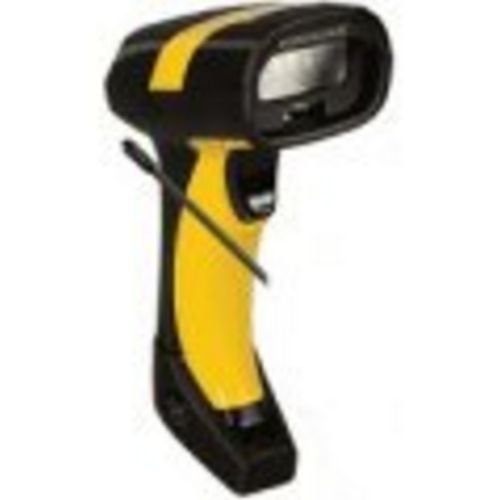
الصورة 1: Datalogic PowerScan M8300 Handheld Laser Bar Code Reader. This image displays the front view of the scanner, highlighting its ergonomic design, scan window, and trigger button.
المكونات الرئيسية:
- نافذة المسح: Located at the front, where the laser beam exits to read barcodes.
- مشغل: Activates the laser for scanning.
- أضواء المؤشر: Provide feedback on scan status, battery level, and communication.
- حجرة البطارية: Located at the base of the handle, housing the removable battery.
- واجهة الاتصال: For wireless data transmission via the 910MHz radio.
5. الإعداد
5.1. تركيب البطارية
- تأكد من إيقاف تشغيل الماسح الضوئي.
- حدد موقع غطاء حجرة البطارية في أسفل المقبض.
- افتح الغطاء وأدخل البطارية القابلة للإزالة، مع التأكد من صحة القطبية.
- أغلق غطاء حجرة البطارية جيدًا.
5.2. شحن البطارية
- Place the scanner into its charging cradle. Ensure the contacts on the scanner align with those on the cradle.
- Connect the power supply to the charging cradle and plug it into an electrical outlet.
- The scanner's indicator light will show charging status (typically amber for charging, green for fully charged).
- اترك البطارية تشحن بالكامل قبل الاستخدام الأول (حوالي 4 ساعات).
5.3. الاتصال بنظام مضيف
The PowerScan M8300 uses a 910MHz radio for wireless communication. It typically connects to a host system (e.g., PC, laptop) via a base station or cradle connected by a USB or serial cable.
- Connect the communication cable (USB or serial) from the charging/communication cradle to your host system.
- Connect the power supply to the cradle and plug it in.
- Place the scanner in the cradle. The scanner and cradle will automatically establish a wireless link.
- Install any necessary drivers or software on your host system as prompted or as instructed by Datalogic documentation for your specific cradle model.
6. تعليمات التشغيل
6.1. تشغيل / إيقاف التشغيل
- لتشغيل: The scanner typically powers on automatically when removed from the cradle or when the trigger is pressed.
- لإيقاف التشغيل: The scanner will enter a low-power sleep mode after a period of inactivity. To fully power off, remove the battery.
6.2. مسح الباركود
- Aim the scan window at the barcode you wish to read.
- اضغط مع الاستمرار على زر التشغيل. سيظهر خط ليزر.
- Position the laser line across the entire barcode.
- Once the barcode is successfully read, the scanner will emit an audible beep and/or an indicator light will illuminate.
- Release the trigger. The scanned data will be transmitted to the connected host system.
6.3 نقل البيانات
The PowerScan M8300 transmits scanned data wirelessly to its paired base station/cradle. Ensure the scanner is within range of its base station for successful data transfer. Out-of-range scanning capabilities may vary by configuration; refer to advanced programming guides for details.
7. الصيانة
7.1. تنظيف الجهاز
- استخدم قطعة قماش ناعمة ونظيفةampبالماء أو بمحلول تنظيف معتدل.
- لا تستخدم المنظفات الكاشطة أو المذيبات أو المواد الكيميائية القاسية.
- Gently wipe the scan window and the exterior of the scanner.
- تأكد من عدم دخول أي سائل إلى فتحات الجهاز.
7.2. العناية بالبطارية
- اشحن البطارية بانتظام.
- تجنب تفريغ البطارية بالكامل بشكل متكرر.
- Store the scanner and spare batteries in a cool, dry place when not in use.
7.3. التخزين
When storing the scanner for extended periods, ensure the battery is partially charged (around 50%) and remove it from the device if possible. Store in a temperature-controlled environment.
8. استكشاف الأخطاء وإصلاحها
If you encounter issues with your PowerScan M8300, refer to the following common problems and solutions:
| مشكلة | السبب المحتمل | حل |
|---|---|---|
| الماسح الضوئي لا يعمل. | بطارية ميتة أو تم تركيبها بشكل غير صحيح. | Check battery installation. Charge the battery. Replace battery if necessary. |
| الماسح الضوئي لا يقرأ الباركود. | Barcode damaged or poorly printed; scan window dirty; incorrect symbology enabled. | Try scanning a different barcode. Clean the scan window. Refer to the programming guide to enable/disable symbologies. |
| No data transmitted to host. | Scanner out of range; base station not connected; communication issue. | Move scanner closer to the base station. Verify base station connection to host. Check base station power. |
| عمر البطارية قصير. | Battery nearing end of life; frequent use; improper charging. | Replace battery. Ensure full charges. Reduce backlight/power settings if configurable. |
If the problem persists, contact Datalogic technical support.
9. المواصفات
The following specifications apply to the Datalogic PowerScan M8300-AR910RB model:
- رقم الموديل: PM8300-AR910RB
- أبعاد المنتج: 2.72 × 4.49 × 8.15 بوصة
- وزن السلعة: 13.9 أونصات
- الشركة المصنعة: محول تناظري رقمي من داتالوجيك
- مصدر الطاقة: تعمل بالبطارية
- تقنية الاتصال: Wireless (910MHz)
- الأجهزة المتوافقة: سطح المكتب، الكمبيوتر المحمول
- رمز المنتج العالمي: 053926383351
10. معلومات الضمان
Datalogic products are covered by a limited warranty against defects in materials and workmanship. The specific terms and duration of the warranty may vary by region and product. Please refer to the warranty card included with your product or visit the official Datalogic webالموقع للحصول على معلومات مفصلة حول الضمان وإجراءات التسجيل.
11. الدعم
For technical assistance, product inquiries, or to report issues, please contact Datalogic customer support:
- Webموقع: Visit the official Datalogic webموقع لموارد الدعم والأسئلة الشائعة وتنزيلات برامج التشغيل.
- اتصال: Refer to the 'Contact Us' section on the Datalogic webموقع إلكتروني لأرقام الهواتف وعناوين البريد الإلكتروني الخاصة بمنطقتك.
When contacting support, please have your product model number (PM8300-AR910RB) and serial number ready.