BlackBerry BB 9900 Bold Touch Smartphone User Manual
Model: BB 9900
1. المقدمة
This manual provides essential instructions for setting up, operating, and maintaining your BlackBerry BB 9900 Bold Touch smartphone. Please read this guide thoroughly to ensure proper use and to maximize the device's capabilities. The BlackBerry BB 9900 Bold Touch combines a capacitive touchscreen with a full QWERTY keyboard, running on BlackBerry OS 7.
2. محتويات العبوة
تأكد من أن الحزمة الخاصة بك تحتوي على العناصر التالية:
BlackBerry BB 9900 Bold Touch Smartphone
بطارية قابلة لإعادة الشحن
شاحن حائط
كابل يو اس بي
دليل المستخدم (هذا المستند)
3. انتهى الجهازview
Familiarize yourself with the physical features of your BlackBerry BB 9900 Bold Touch.
3.1 الجبهة View
الصورة: الجبهة view of the BlackBerry BB 9900 Bold Touch, highlighting the 2.8-inch touchscreen and the physical QWERTY keyboard below it. The device also features a trackpad and call/end buttons.
شاشة تعمل باللمس: 2.8-inch capacitive display for interactive navigation.
لوحة مفاتيح كويرتي: Full physical keyboard for efficient typing.
Optical Trackpad: For precise navigation and selection.
Call/End Buttons: Standard telephony controls.
3.2 خلفي View
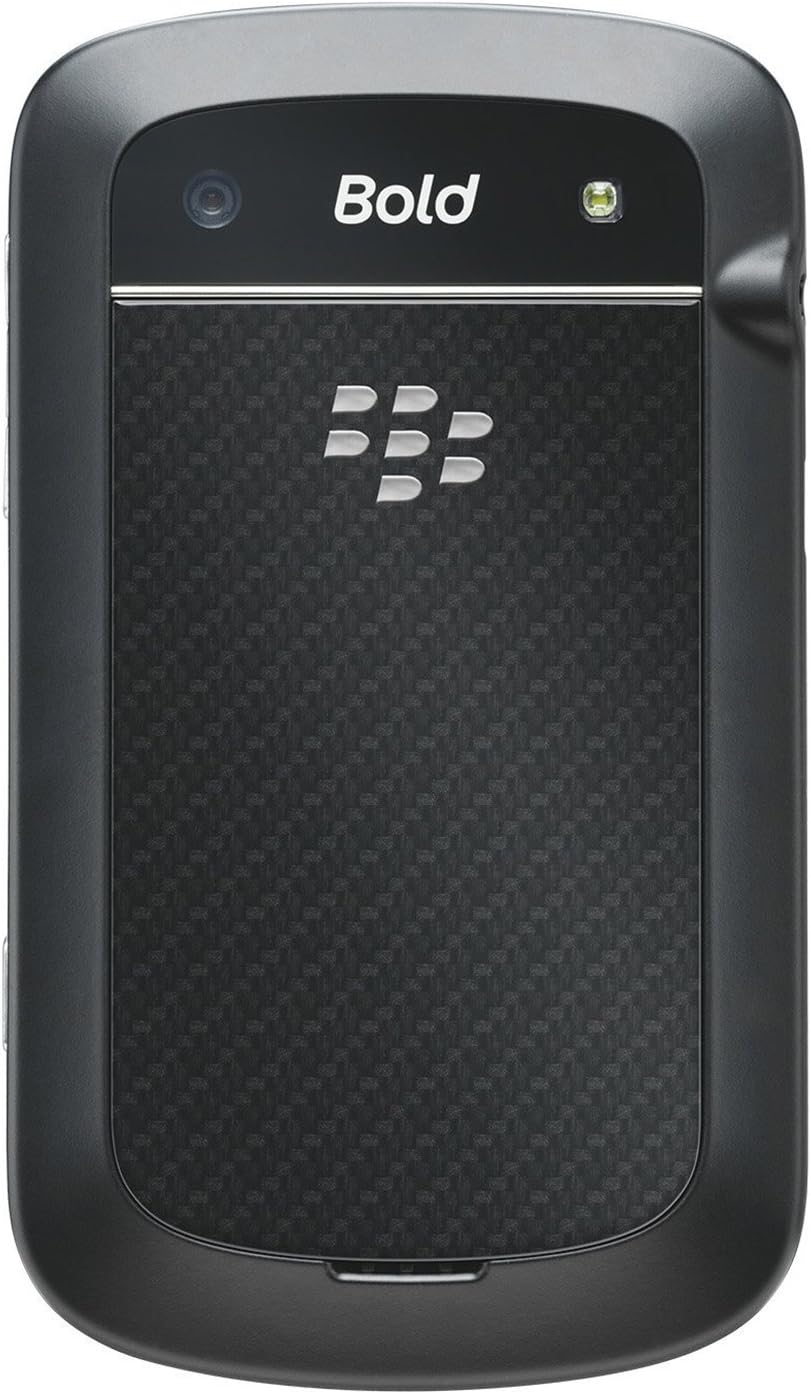
الصورة: الخلفية view of the BlackBerry BB 9900 Bold Touch, featuring the 5-megapixel camera lens, LED flash, and the BlackBerry logo.
كاميرا 5MP: Primary camera with autofocus and LED flash.
غطاء البطارية: Removable cover for battery and SIM card access.
3.3 الجانب View
الصورة: الجانب view of the BlackBerry BB 9900 Bold Touch, illustrating the placement of the volume control buttons and a customizable convenience key.
أزرار التحكم في الصوت: اضبط مستويات الصوت.
Convenience Key: زر اختصار قابل للتخصيص.
4. الإعداد
4.1 إدخال بطاقة SIM
قم بإزالة غطاء البطارية من الجزء الخلفي للجهاز.
حدد موقع فتحة بطاقة SIM.
قم بإدخال بطاقة SIM مع توجيه جهات الاتصال الذهبية لأسفل ومحاذاة الزاوية المقطوعة مع الفتحة.
تأكد من تثبيت بطاقة SIM في مكانها بشكل آمن.
4.2 إدخال البطارية
After inserting the SIM card, align the battery's gold contacts with the contacts in the battery compartment.
اضغط برفق على البطارية في مكانها حتى تسمع صوت نقرة.
استبدال غطاء البطارية.
4.3 شحن الجهاز
Connect the USB cable to the charging port on your device.
Plug the other end of the USB cable into the wall charger, then into a power outlet.
اترك الجهاز يشحن بالكامل قبل الاستخدام الأول. سيُظهر مؤشر البطارية على الشاشة حالة الشحن.
4.4 تشغيل/إيقاف التشغيل
لتشغيل: Press and hold the Power/Lock button (usually located on the top edge) until the BlackBerry logo appears.
لإيقاف التشغيل: Press and hold the Power/Lock button until the 'Power Off' option appears on the screen. Tap 'Power Off' to confirm.
5. تعليمات التشغيل
5.1 نظام الملاحة عبر شاشة اللمس
مقبض: Touch the screen briefly to open applications, select items, or activate buttons.
انتقاد: Drag your finger across the screen to scroll through lists or switch between home screen panels.
التكبير والتصغير: Use two fingers to zoom in or out on photos, web pages, or maps.
5.2 استخدام لوحة مفاتيح QWERTY
The physical QWERTY keyboard allows for fast and accurate text entry. Each key corresponds to a letter, number, or symbol. Use the 'Alt' key for alternate characters and the 'Shift' key for capitalization.
5.3 إجراء المكالمات
From the home screen, tap the Phone icon or press the green Call button.
Enter the phone number using the keyboard.
اضغط على زر الاتصال الأخضر لبدء المكالمة.
لإنهاء المكالمة، اضغط على زر إنهاء المكالمة الأحمر.
5.4 إرسال الرسائل
Tap the Messages icon from the home screen.
Select 'Compose New' or similar option.
أدخل رقم المستلم أو اختر من جهات الاتصال.
اكتب رسالتك باستخدام لوحة مفاتيح QWERTY.
انقر على "إرسال".
5.5 استخدام الكاميرا
انقر على أيقونة الكاميرا لفتح تطبيق الكاميرا.
قم بتأطير اللقطة باستخدام الشاشة كإطار viewمكتشف.
Tap the screen or press the convenience key (if configured) to take a photo.
The 5MP camera features autofocus and an LED flash for improved image quality.
5.6 الاتصال بشبكة Wi-Fi
Go to 'Options' > 'Networks and Connections' > 'Wi-Fi'.
Turn Wi-Fi on. The device will scan for available networks.
حدد الشبكة المطلوبة وأدخل كلمة المرور إذا طُلب منك ذلك.
Once connected, the Wi-Fi indicator will appear in the status bar.
5.7 Using NFC (Near Field Communication)
The BlackBerry BB 9900 Bold Touch supports NFC for short-range wireless communication. This allows for quick pairing with compatible accessories or sharing data with other NFC-enabled devices by tapping them together.
تأكد من تمكين NFC في إعدادات جهازك.
Hold your device close to another NFC-enabled device or tag.
Follow on-screen prompts to complete the desired action (e.g., pairing, data transfer).
6. الصيانة
6.1 تنظيف جهازك
استخدم قطعة قماش ناعمة وخالية من الوبر لمسح شاشة وجسم الجهاز.
تجنب استخدام المواد الكيميائية القاسية، أو المنظفات الكاشطة، أو البخاخات الهوائية.
لا تعرض الجهاز للرطوبة الزائدة.
6.2 العناية بالبطارية
تجنب درجات الحرارة القصوى، والتي يمكن أن تؤدي إلى تدهور أداء البطارية.
استخدم الشاحن الأصلي أو المعتمد فقط.
لا تقم بثقب البطارية أو إتلافها.
6.3 تحديثات البرامج
Periodically check for software updates to ensure your device has the latest features and security enhancements. Updates can typically be found in the device's 'Options' or 'Settings' menu under 'Software Updates'.
7. استكشاف الأخطاء وإصلاحها
7.1 الجهاز لا يعمل
تأكد من إدخال البطارية وشحنها بشكل صحيح.
Connect the device to the charger and wait a few minutes before attempting to power on again.
If the issue persists, try removing and reinserting the battery.
7.2 مشاكل الاتصال بالشبكة
Check if your SIM card is correctly inserted and activated with your carrier.
Verify that cellular data or Wi-Fi is enabled in your device settings.
أعد تشغيل الجهاز.
If using Wi-Fi, ensure your router is working and you have entered the correct password.
7.3 شاشة اللمس لا تستجيب
أعد تشغيل الجهاز.
تأكد من أن الشاشة نظيفة وخالية من الأوساخ أو الرطوبة.
If the issue is intermittent, check for any recent software installations that might be causing conflicts.
8. المواصفات
ميزة
التفاصيل
اسم الموديل
ب ب 9900
نظام التشغيل
نظام التشغيل بلاك بيري 7
عرض
2.8-inch Capacitive Touchscreen, 640 x 480 Resolution
المعالج
Not specified (typically 1.2 GHz for this model)
كبش
768 ميجا بايت
التخزين الداخلي
8 جيجا بايت
الكاميرا الخلفية
5 MP, Autofocus, LED Flash
الاتصال
Wi-Fi 802.11 b/g/n, NFC, Bluetooth, GPS
دعم الشبكة
Quad-band GSM/GPRS/EDGE, Tri-band HSPA+
أبعاد
4.53 × 2.6 × 0.41 بوصة (115 × 66 × 10.5 مم)
وزن
4.6 أونصة (130 جرام)
مقبس الصوت
3.5 ملم
9. الدعم والضمان
9.1 دعم العملاء
For technical assistance, troubleshooting beyond this manual, or service inquiries, please visit the official BlackBerry support website or contact your local service provider. Refer to the packaging or official webالموقع للحصول على تفاصيل الاتصال المحددة.
9.2 معلومات الضمان
Your BlackBerry BB 9900 Bold Touch is covered by a limited warranty. Please refer to the warranty card included in your product packaging or visit the official BlackBerry webللاطلاع على الشروط والأحكام التفصيلية، بما في ذلك فترة الضمان وتفاصيل التغطية، يرجى زيارة الموقع الإلكتروني. احتفظ بإثبات الشراء لتقديم مطالبات الضمان.
Ask a question about this manual
Ask about setup, troubleshooting, compatibility, parts, safety, or missing instructions. Manuals+ will review the question and use this page’s manual context to help answer it.