
مقدمة
This manual provides detailed instructions for the Vivitar PZ3115 Date-A-Print AF Auto Focus 35mm Film Camera. Please read this manual thoroughly before using your camera to ensure proper operation and to achieve optimal photographic results. Keep this manual for future reference.
The Vivitar PZ3115 is a compact 35mm film camera featuring auto-focus capabilities and a versatile Vivitar Series 1 38-115mm power zoom lens. It also includes a Date-A-Print function to imprint the date onto your photographs.
مكونات الكاميرا
Familiarize yourself with the various parts of your Vivitar PZ3115 camera.
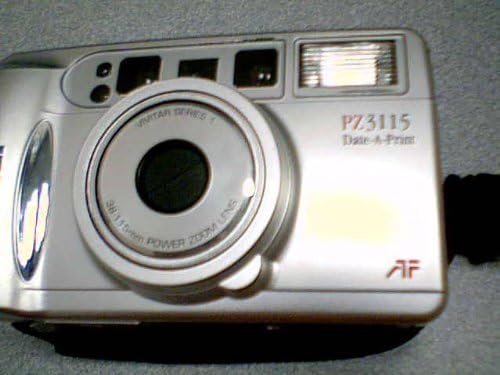
صورة: أمام view of the Vivitar PZ3115 camera, showing the lens, flash, viewfinder, and Vivitar branding.

صورة: مؤخرة view of the Vivitar PZ3115 camera, displaying the film counter, mode select, and set buttons for the Date-A-Print function.
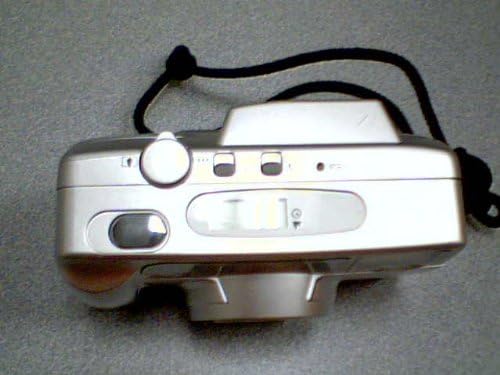
صورة: قمة view of the Vivitar PZ3115 camera, showing the shutter button and film compartment release.
المكونات الرئيسية:
- عدسة: Vivitar Series 1 38-115mm Power Zoom Lens.
- فلاش: Built-in automatic flash.
- Viewمكتشف: لتأليف اللقطات الخاصة بك.
- زر المصراع: لالتقاط الصور.
- أزرار التكبير: To adjust the focal length of the lens.
- حجرة الفيلم: For loading 35mm film.
- حجرة البطارية: For power source.
- Date-A-Print Controls: Buttons for setting and displaying date/time.
يثبت
1. تركيب البطارية
The Vivitar PZ3115 requires batteries for operation. (Battery type not specified in product data, typically CR123A or AA for similar models. Refer to the battery compartment cover for specific type.)
- حدد موقع غطاء حجرة البطارية في الجزء السفلي أو الجانبي للكاميرا.
- Open the cover by sliding or lifting it according to the indicator.
- أدخل البطاريات الجديدة، مع التأكد من صحة القطبية (+/-) كما هو موضح داخل الحجرة.
- أغلق غطاء حجرة البطارية جيدًا.
2. تحميل الفيلم
Use standard 35mm film rolls.
- Open the camera back by sliding the film door latch (usually on the side or top).
- قم بوضع خرطوشة فيلم جديدة مقاس 35 ملم في حجرة الفيلم على الجانب الأيسر.
- Pull the film leader across to the film take-up spool on the right side. Ensure the film perforations engage with the teeth on the take-up spool.
- أغلق الكاميرا من الخلف بقوة حتى يتم تثبيتها.
- Press the shutter button once or twice to advance the film until the film counter displays "1" or the first frame number. The camera will automatically advance the film to the first frame.
3. Setting Date and Time (Date-A-Print)
The Date-A-Print feature allows you to imprint the date or time onto your photos.
- Locate the Date-A-Print display and control buttons on the camera back (refer to the rear view صورة).
- اضغط على وضع button to cycle through display options (Year/Month/Day, Month/Day/Year, Day/Month/Year, Time, Off).
- When the desired format is displayed, press the تعيين button to adjust the blinking digit.
- استخدم يختار الزر (أو وضع again, depending on model) to advance the blinking digit.
- كرر العملية حتى يتم ضبط التاريخ والوقت الصحيحين.
- Select "Off" if you do not wish to imprint the date/time.
تشغيل الكاميرا
1. تشغيل / إيقاف التشغيل
To power on the camera, slide the lens cover open or press the power button (if available). The lens will extend. To power off, close the lens cover or press the power button again.
2. التقاط الصور
- انظر من خلال viewأداة للعثور على الصورة المناسبة لك.
- Use the zoom buttons (usually near the shutter button) to adjust the focal length (38mm wide-angle to 115mm telephoto).
- Gently press the shutter button halfway down. The auto-focus system will engage, and an indicator light (often green) will confirm focus.
- Press the shutter button fully down to take the picture. The film will automatically advance to the next frame.
3. أوضاع الفلاش
The camera features an automatic flash. In low light conditions, the flash will typically fire automatically. Some models may offer manual flash override or red-eye reduction modes. Consult the camera's specific indicators for flash status.
4. إعادة لف الفيلم
Once all frames on the film roll have been exposed, the camera will usually rewind the film automatically. If manual rewind is necessary (e.g., to change film mid-roll), locate the rewind button (often a small recessed button on the bottom or side) and press it. The film counter will count down as the film rewinds into the cartridge.
Once rewinding is complete, open the camera back and remove the film cartridge. Take the exposed film to a photo lab for development.
صيانة
1. تنظيف الكاميرا
- استخدم قطعة قماش ناعمة وخالية من الوبر لمسح جسم الكاميرا.
- For the lens, use a specialized lens cleaning cloth and lens cleaning fluid. Gently wipe in a circular motion from the center outwards. Avoid touching the lens with your fingers.
- احفظ viewfinder clean for clear composition.
- لا تستخدم مواد كيميائية قاسية أو مواد كاشطة.
2. استبدال البطارية
Replace batteries promptly when the low battery indicator appears or if the camera fails to power on. Always use fresh batteries of the correct type.
3. Film Handling and Storage
- Store film in a cool, dry place, away from direct sunlight and high temperatures.
- Load and unload film in subdued light to prevent accidental exposure.
- Have exposed film developed as soon as possible for best results.
4. تخزين الكاميرا
When not in use, store the camera in its case or a protective bag, away from dust, moisture, and extreme temperatures. Remove batteries if storing for extended periods to prevent leakage.
استكشاف الأخطاء وإصلاحها
| مشكلة | السبب المحتمل | حل |
|---|---|---|
| الكاميرا لا تعمل. | البطاريات الميتة أو المثبتة بشكل غير صحيح. | استبدل البطاريات بأخرى جديدة، مع التأكد من القطبية الصحيحة. |
| الفيلم لا يتقدم. | لم يتم تحميل الفيلم بشكل صحيح؛ لم يتم تشغيل قائد الفيلم. | Open camera back in subdued light, re-load film, ensuring leader is properly attached to take-up spool. |
| Flash does not fire in low light. | Flash mode set to "Off" or batteries are low. | Check flash mode settings; replace batteries if low. |
| الصور غير واضحة. | Camera shake; subject too close; auto-focus failed. | Hold camera steady; ensure subject is within minimum focus distance; allow auto-focus to lock before fully pressing shutter. |
| Date/Time imprint is incorrect or not appearing. | Date/Time not set correctly; Date-A-Print function turned off. | Refer to "Setting Date and Time" section to adjust settings or turn on the function. |
تحديد
| ميزة | وصف |
|---|---|
| ماركة | VIVITAR |
| اسم الموديل | Vivitar PZ 3115 Date-A-Print |
| نوع تنسيق الفيلم | 35 ملم |
| عدسة | Vivitar Series 1 38-115mm Power Zoom Lens |
| المميزات الخاصة | Auto Exposure, Date-A-Print |
| التحكم في التعرض | اوتوماتيكي |
| التركيز التلقائي | نعم |
| المكونات المضمنة | Camera Body Only (as per product listing) |