
1. المقدمة وما فوقview
The Pro-User DFC530N is an intelligent microprocessor-controlled battery charger designed for 6V and 12V lead-acid batteries, providing a charging current of up to 5.3 Amperes. This charger is suitable for various battery types including lead-acid, gel, wet cell, MF, VRLA, calcium, and AGM, with capacities ranging from 5 Ah to 120 Ah.
The advanced electronics monitor battery status and apply the appropriate charging current. Once fully charged, the charger switches to a maintenance mode, providing a small current to prevent self-discharge, making it ideal for long-term connection, especially for seasonal vehicles. It features spark protection, short-circuit protection, overheating protection, and reverse polarity protection. The charger comes with both battery clamps and ring terminals with quick-release connectors for versatile connection options. It also includes an acoustic signal and LED warning indicators for operational status.
2. تعليمات السلامة
يرجى قراءة جميع تعليمات السلامة وفهمها جيدًا قبل تشغيل الشاحن. قد يؤدي عدم اتباع هذه التعليمات إلى صدمة كهربائية أو حريق أو إصابة خطيرة.
- تهوية: Always operate the charger in a well-ventilated area. Batteries can produce explosive gases.
- حماية العين: Wear appropriate eye protection (safety glasses) when working near batteries.
- الشرر واللهب: Avoid creating sparks or open flames near the battery or charger.
- فصل الطاقة: Always disconnect the AC power supply from the charger before connecting or disconnecting the battery leads.
- القطبية الصحيحة: Ensure correct polarity when connecting to the battery (positive to positive, negative to negative). The charger has reverse polarity protection, but incorrect connection should still be avoided.
- الأطفال والحيوانات الأليفة: قم بإبقاء الشاحن والبطارية بعيدًا عن متناول الأطفال والحيوانات الأليفة.
- المعدات التالفة: Do not operate the charger if it has been dropped, damaged, or if the cables are frayed.
- الاستخدام الداخلي: This charger is designed for indoor use. While it has an IP65 rating for water resistance, avoid prolonged exposure to rain or extreme moisture.
3. محتويات العبوة
تأكد من وجود جميع العناصر في العبوة:
- Pro-User DFC530N Intelligent Battery Charger Unit
- بطارية Clamps (الأحمر للإيجابية، والأسود للسلبي)
- Ring Terminals with Quick-Release Connector
- التيار المتردد كابل

Image displaying the Pro-User DFC530N intelligent battery charger along with its included accessories: battery clamps, ring terminals with quick-release connectors, and the AC power cable.
4. الإعداد والاتصال
اتبع هذه الخطوات لتوصيل الشاحن بالبطارية:
- تحضير البطارية: Ensure the battery terminals are clean and free of corrosion. If the battery is in a vehicle, ensure the vehicle is turned off.
- حدد طريقة الاتصال: Choose between the battery clamps for temporary connection or the ring terminals for a more permanent setup. Connect your chosen accessory to the charger's quick-release connector.
- الاتصال بالبطارية:
- قم بتوصيل أحمر positive (+) lead from the charger to the إيجابي (+) طرف البطارية.
- قم بتوصيل أسود negative (-) lead from the charger to the سلبي (-) طرف البطارية.
- الاتصال بالطاقة المترددة: Plug the charger's AC power cable into a standard electrical outlet. The charger will automatically begin its charging process.

Image showing the Pro-User DFC530N battery charger connected to a vehicle battery under the hood, illustrating a typical charging setup.
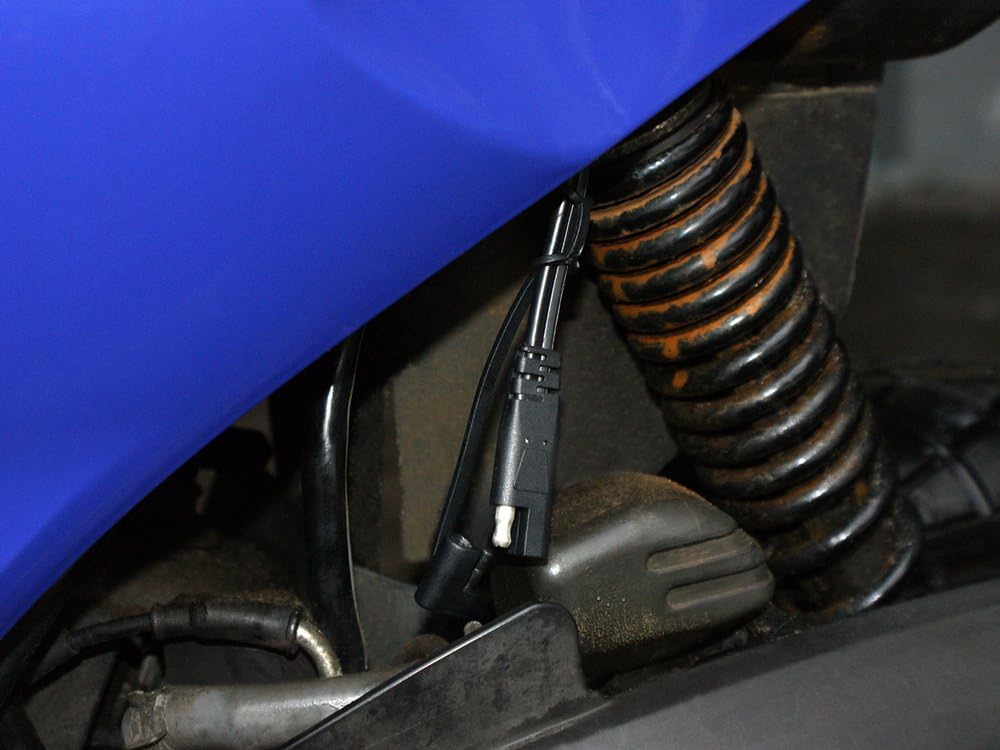
Image demonstrating a permanent connection setup using the ring terminals, secured to a vehicle's battery terminals, with the quick-release connector accessible for charger attachment.
5. تعليمات التشغيل
The DFC530N charger operates automatically once connected to the battery and AC power. It features a 4-stagعملية الشحن الإلكتروني لتحسين صحة البطارية وإطالة عمرها.
LED Indicators and Status:

عن قرب view of the Pro-User DFC530N charger's control panel, highlighting the LED indicators for Reverse, Fault, Power, Charging, and Full status, as well as the mode selection buttons.
- ليد اشارة: يضيء عند توصيل الشاحن بمصدر طاقة التيار المتردد.
- مؤشر LED للشحن: يضيء عند شحن البطارية بشكل فعال.
- الصمام الكامل: Illuminates when the battery is fully charged and the charger has switched to maintenance mode.
- خطأ الصمام: Illuminates if an error occurs (e.g., short circuit, overheating). An acoustic signal may also sound.
- REVERSE LED: Illuminates if the battery leads are connected with incorrect polarity. An acoustic signal may also sound.
عملية الشحن:
- يكتشف الشاحن تلقائيًا حجم البطاريةtagهـ (6 فولت أو 12 فولت).
- It then proceeds through a multi-stage charging cycle, including desulfation (if needed), bulk charge, absorption, and float/maintenance charge.
- The CHARGING LED will be lit during active charging.
- Once the battery reaches full capacity, the FULL LED will illuminate, and the charger will enter a maintenance mode to prevent overcharging and self-discharge. The charger can remain connected indefinitely in this mode.
6. الصيانة
تضمن الصيانة المناسبة طول عمر الشاحن وتشغيله الآمن:
- تنظيف: Disconnect the charger from AC power and the battery before cleaning. Wipe the casinج مع جفاف أو د قليلاًamp قماش. لا تستخدم المذيبات أو المنظفات الكاشطة.
- فحص الكابلات: Regularly inspect the AC power cable and battery leads for any signs of damage, cuts, or fraying. Replace if damaged.
- تخزين: خزّن الشاحن في مكان بارد وجاف عند عدم استخدامه. حافظ على الكابلات ملفوفة بشكل أنيق.
- أطراف البطارية: Ensure battery terminals are clean and free of corrosion for optimal charging.
7. استكشاف الأخطاء وإصلاحها
If you encounter issues with your Pro-User DFC530N charger, refer to the following common problems and solutions:
| مشكلة | السبب المحتمل | حل |
|---|---|---|
| Charger not turning on (no LEDs lit) | لا يوجد تيار متردد؛ مخرج كهربائي معطل؛ شاحن تالف. | Check AC power connection and outlet. Try a different outlet. Inspect charger for damage. |
| FAULT LED is lit / Acoustic signal | Short circuit; Overheating; Internal fault. | Disconnect immediately. Check for short circuits in cables or battery. Allow charger to cool down. If problem persists, contact support. |
| REVERSE LED is lit / Acoustic signal | Incorrect battery polarity connection. | Disconnect AC power. Reconnect battery leads ensuring RED to positive (+) and BLACK to negative (-). |
| Battery not charging (CHARGING LED not lit) | Poor connection; Battery too deeply discharged; Battery fault. | Check all connections for tightness and cleanliness. The charger may not initiate charging if the battery voltage is extremely low. Test battery condition. |
8. المواصفات
Detailed technical specifications for the Pro-User DFC530N Intelligent Battery Charger:
- نموذج: DFC530N
- رقم القطعة: 16605
- حجم الإدخالtage: 220-240V AC, 50/60Hz (typical for EU market)
- حجم الإخراجtage: 6V DC / 12V DC (Automatic Detection)
- تيار الشحن: حتى 5.3 Amperes DC
- أنواع البطاريات: All lead-acid batteries (Lead-Acid, Gel, Wet Cell, MF, VRLA, Calcium, AGM)
- سعة البطارية: 5 أمبير ساعة - 120 أمبير ساعة
- يتحكم: Digital control with built-in 12-bit AD processor
- الشحن Stagالعربية: 4 ثانيةtage charging characteristics with automatic maintenance mode
- ميزات الحماية: Spark protection, short-circuit protection, overheating protection, reverse polarity protection
- المؤشرات: LED status indicators (Power, Charging, Full, Fault, Reverse), Acoustic signal
- تصنيف العلبة: IP65 (Waterproof housing)
- الأبعاد (الطول × العرض × الارتفاع): تقريبًا 164 × 75 × 43 ملم
- وزن: حوالي 0.620 كجم
- الشهادات: TÜV/GS tested
9. الضمان والدعم
للحصول على معلومات الضمان، أو الدعم الفني، أو الاستفسارات المتعلقة بالخدمة، يُرجى الرجوع إلى بطاقة الضمان المرفقة مع المنتج، أو الاتصال بالبائع أو الشركة المصنعة مباشرةً. احتفظ بإثبات الشراء لتقديم مطالبات الضمان.