
1. المقدمة
This manual provides essential instructions for the safe and efficient operation of your Sharp CD-DH950P 240W Mini-Component System. This system features a 5-disc CD changer, a cassette deck, an iPod/iPhone docking station, a USB host for digital audio playback, and an AM/FM tuner. Please read this manual thoroughly before using the system and retain it for future reference.
2. معلومات السلامة
- مصدر الطاقة: قم بتوصيل الوحدة فقط بمأخذ تيار متردد بالجهد المحددtage.
- تهوية: تأكد من التهوية الكافية. لا تسد فتحات التهوية.
- الماء والرطوبة: لا تعرض الوحدة للمطر أو الرطوبة أو السوائل المتساقطة/المتناثرة.
- حرارة: احتفظ بالوحدة بعيدًا عن مصادر الحرارة مثل المشعات أو فتحات التدفئة أو المواقد أو أي أجهزة أخرى تنتج الحرارة.
- تنظيف: افصل الجهاز عن مقبس الكهرباء قبل التنظيف. استخدم قطعة قماش ناعمة وجافة.
- الخدمة: لا تحاول خدمة هذا المنتج بنفسك. قم بإحالة جميع أعمال الصيانة إلى أفراد الخدمة المؤهلين.
3. محتويات العبوة
تأكد من أن الحزمة الخاصة بك تحتوي على العناصر التالية:
- Main Unit (CD-DH950P)
- مكبر الصوت الأيسر
- مكبر الصوت الأيمن
- جهاز التحكم عن بعد بالبطاريات
- هوائي حلقة AM
- هوائي سلك FM
- سلك الطاقة
4. الإعداد
4.1 توصيل مكبرات الصوت
Connect the speaker wires from the main unit to the corresponding terminals on the back of each speaker. Ensure correct polarity (red to red, black to black) for optimal sound quality. The left speaker connects to the left speaker output, and the right speaker to the right speaker output.
4.2 Connecting the Antennas
- هوائي FM: Connect the supplied FM wire antenna to the FM antenna terminal on the rear of the main unit. Extend the wire for better reception.
- هوائي AM: Connect the supplied AM loop antenna to the AM antenna terminals on the rear of the main unit. Position the antenna for best reception.
4.3 توصيل الطاقة
Plug the power cord into the AC IN jack on the rear of the main unit, then plug the other end into a standard AC wall outlet.
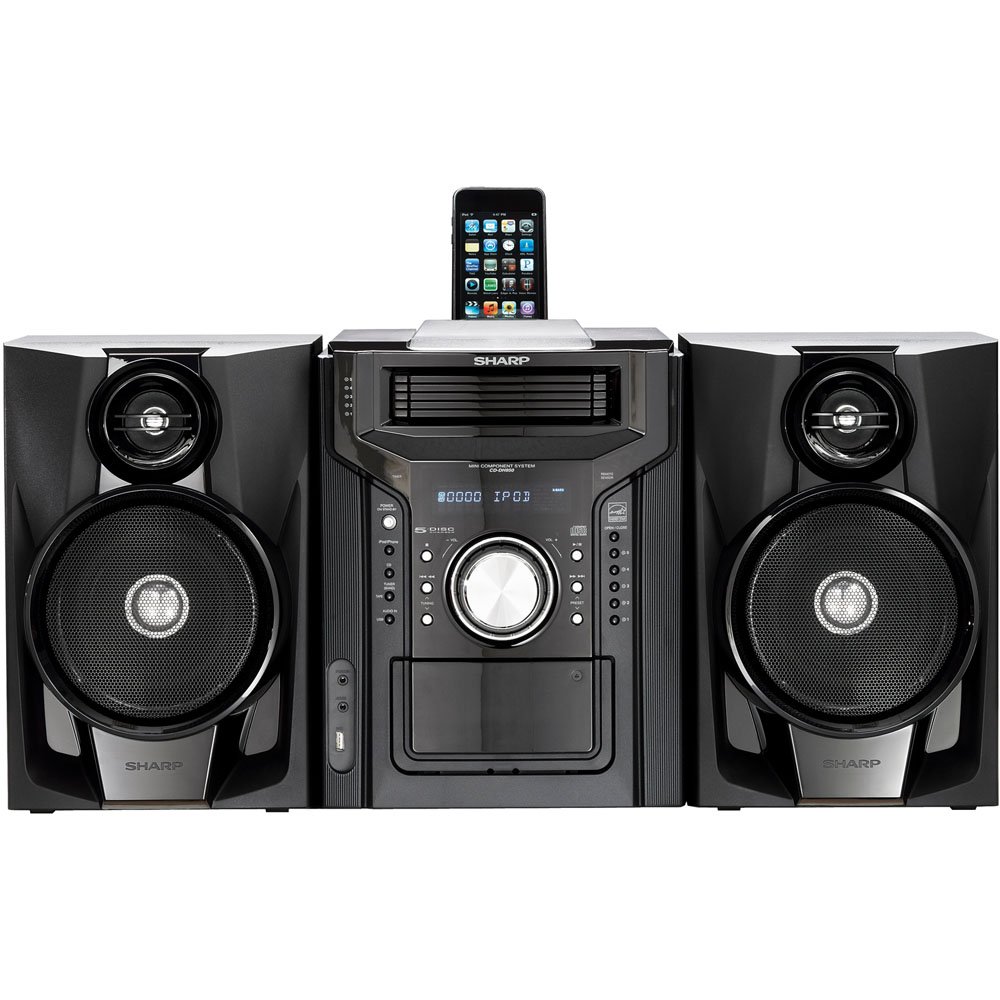
الشكل 4.3.1: بشكل عام view of the Sharp CD-DH950P Mini-Component System, showing the main unit flanked by two speakers, with an iPhone docked on top of the main unit.
5. تعليمات التشغيل
5.1 تشغيل/إيقاف التشغيل والتحكم في مستوى الصوت
- اضغط على قوة اضغط على الزر الموجود على اللوحة الأمامية أو جهاز التحكم عن بعد لتشغيل الوحدة أو إيقاف تشغيلها.
- تدوير مقدار مقبض التحكم الموجود على اللوحة الأمامية أو استخدم المجلد +/- الأزرار الموجودة على جهاز التحكم عن بعد لضبط مستوى الصوت.
تشغيل أقراص مضغوطة 5.2
This system features a 5-disc CD changer.
- اضغط على فتح/إغلاق زر لفتح علبة الأقراص المضغوطة.
- Place up to five CDs on the disc trays, label side up.
- يضعط فتح/إغلاق مرة أخرى لإغلاق الدرج.
- اضغط على CD الزر لتحديد وظيفة القرص المضغوط.
- اضغط على تشغيل/إيقاف مؤقت زر لبدء التشغيل.
- استخدم يتخطى buttons to navigate between tracks or discs.
5.3 تشغيل جهاز الكاسيت
- اضغط على TAPE OPEN/CLOSE button to open the cassette deck.
- أدخل شريط كاسيت.
- اضغط على الشريط button to select the cassette function.
- يضعط يلعب لبدء التشغيل.
- To record, ensure the source is selected (e.g., CD, Tuner) and press the سِجِلّ زر على جهاز تشغيل الكاسيت.
5.4 iPod/iPhone Docking
The system includes a top-mounted docking slot for compatible iPod and iPhone devices (30-pin connector).
- Carefully place your iPod or iPhone into the docking slot.
- The system will automatically switch to iPod/iPhone mode or you may need to press the iPod / iPhone زر.
- Use the system's controls or your device's controls to play music. The device will also charge while docked.
5.5 USB Host Playback
Connect a USB storage device containing MP3 or WMA audio files to the USB port on the front panel.
- أدخل جهاز USB في منفذ USB.
- اضغط على USB الزر لتحديد وظيفة USB.
- Use the playback controls to navigate and play files.
5.6 موالف AM/FM
- اضغط على TUNER زر لاختيار راديو AM أو FM.
- استخدم ضبط +/- أزرار لضبط المحطة يدويًا.
- To auto-scan, press and hold the ضبط +/- أزرار.
- To store a preset, tune to the desired station, then press ذاكرة متبوعًا برقم محدد مسبقًا.
5.7 إدخال الصوت
Connect an external audio device (e.g., MP3 player, smartphone) to the AUDIO IN jack on the front panel using a 3.5mm stereo cable.
- Connect your device to the AUDIO IN jack.
- اضغط على مدخل الصوت زر لتحديد هذا المصدر.
- التحكم في التشغيل من جهازك المتصل.
6. الصيانة
6.1 تنظيف الوحدة
Wipe the exterior of the unit with a soft, dry cloth. Do not use abrasive cleaners, waxes, or solvents. Ensure the unit is unplugged before cleaning.
6.2 CD and Cassette Care
- Handle CDs by their edges to avoid fingerprints and scratches. Clean discs with a soft, lint-free cloth from the center outwards.
- Store cassette tapes away from strong magnetic fields and direct sunlight.
7. استكشاف الأخطاء وإصلاحها
| مشكلة | السبب المحتمل | حل |
|---|---|---|
| لا يوجد طاقة | سلك الطاقة غير موصول؛ مأخذ الطاقة معطل | تأكد من توصيل سلك الطاقة بإحكام؛ جرب منفذًا كهربائيًا آخر |
| لا يوجد صوت | مستوى الصوت منخفض جدًا؛ السماعات غير متصلة؛ تم اختيار مصدر غير صحيح | ارفع مستوى الصوت؛ تحقق من توصيلات السماعات؛ حدد مصدر الإدخال الصحيح |
| القرص المضغوط لا يعمل | Disc inserted incorrectly; Disc is dirty or scratched | Insert disc correctly (label side up); Clean or replace disc |
| استقبال الراديو ضعيف | Antenna not positioned correctly; Weak signal | Adjust position of AM/FM antennas; Try auto-tuning or manual fine-tuning |
| iPod/iPhone not charging/playing | Device not properly docked; Device not compatible (e.g., newer connector) | Re-dock the device; Note that this system uses a 30-pin connector, newer devices may require an adapter (not included) |
8. المواصفات
- ماركة: حاد
- نموذج: CD-DH950P
- إجمالي انتاج الطاقة: 240 Watts RMS (85W/ch FTC)
- تكوين مكبر الصوت: 2.1 قناة
- تنسيقات الصوت المدعومة: سي دي، إم بي 3، وما
- إشارة إلى نسبة الضوضاء: 100 ديسيبل
- الأجهزة المتوافقة: MP3 Player, Smartphone (via 30-pin dock or USB/Audio In)
- الأبعاد (الطول × العرض × الارتفاع): 27.6 × 13.6 × 13.5 بوصة
- وزن السلعة: 24.4 رطل
- رمز المنتج العالمي: 074000369863، 074000369290
9. معلومات الضمان
This product is covered by a 1-year limited warranty from the date of purchase. Please refer to the warranty card included with your product for full terms and conditions, or contact Sharp customer service for details.
10. الدعم
For further assistance, technical support, or service inquiries, please contact Sharp customer service. Contact information can typically be found on the Sharp official webيمكنك الاطلاع على المعلومات المتوفرة في الموقع أو في الوثائق المرفقة مع منتجك.