
Oster CKSTBR9050
Oster Expressbake Bread Maker Instruction Manual
Model: CKSTBR9050-NP | Brand: Oster
مقدمة
Welcome to the world of homemade bread with your new Oster Expressbake Bread Maker. This appliance is designed to simplify the bread-making process, offering a variety of settings for different bread types, doughs, and even jams. Enjoy fresh, delicious bread with minimal effort.
المنتج انتهىview والميزات الرئيسية
The Oster Expressbake Bread Maker (CKSTBR9050-NP) is a versatile kitchen appliance designed for ease of use and consistent results. It features a compact design and intuitive controls.
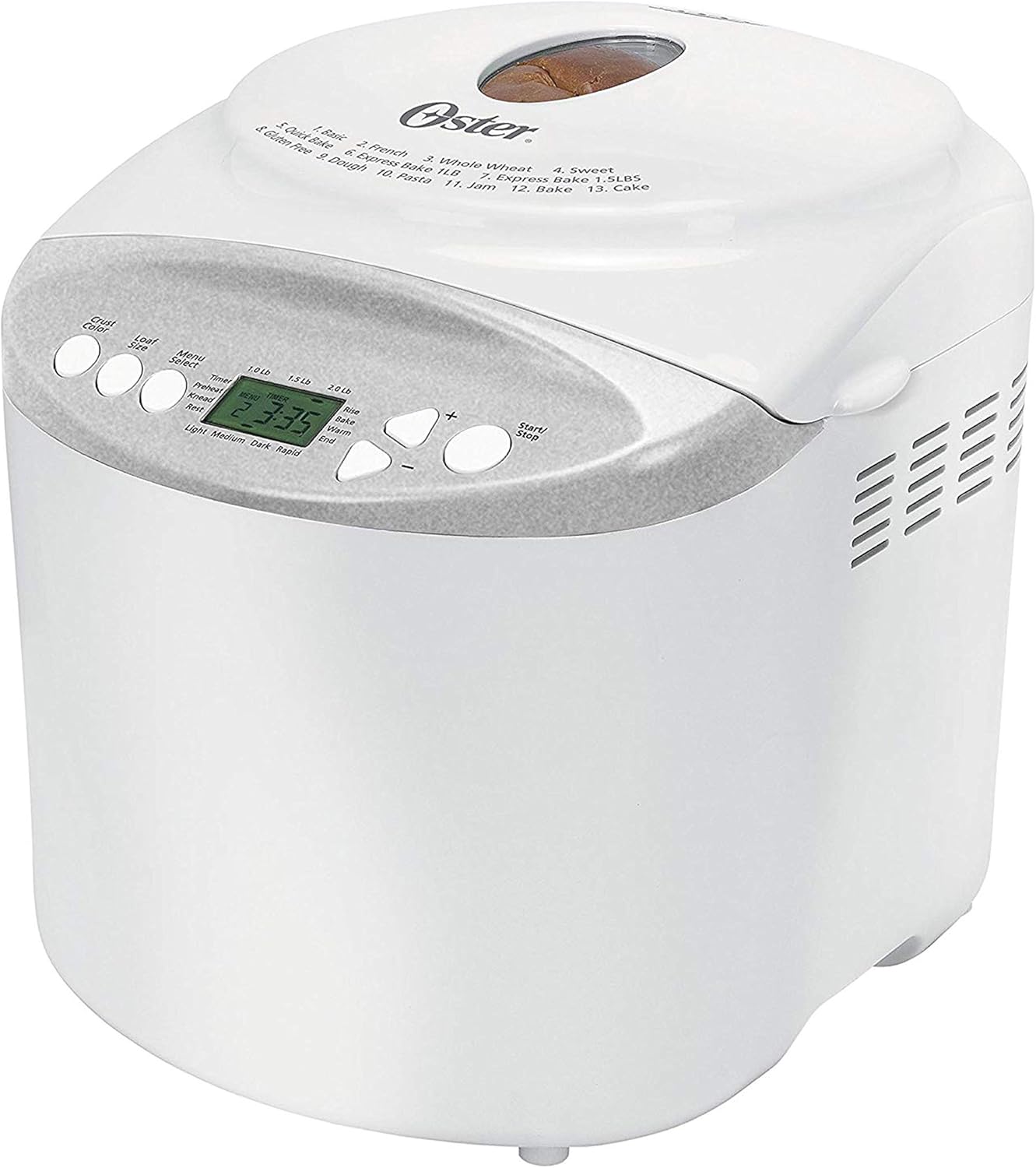
أمام view of the Oster Expressbake Bread Maker, showing the control panel and viewجي النافذة.

داخلي view highlighting the removable lid, nonstick aluminum pan, and easy-to-read LCD display.
المميزات الرئيسية:
- 2-Pound Loaf Capacity: Ideal for families, allowing for larger bread batches.
- 13 إعدادات: Offers a wide range of options for various breads, doughs, and jams.
- Gluten-Free Setting: Dedicated program for preparing gluten-free bread.
- Express Bake Setting: Bakes bread in under an hour for quick results.
- Crust Color Selection: Choose from light, medium, or dark crusts.
- مؤقت قابل للبرمجة لمدة 13 ساعة: Allows for delayed baking, so you can wake up to fresh bread.
- ملحقات مريحة: Includes a measuring cup and spoon.
Product Features Video: A Closer Look
يوفر هذا الفيديو عرضًا مرئيًا مفصلاًview of the Oster Expressbake Bread Maker, showcasing its various components and features, including the bread pan, kneading paddle, and control panel. It highlights the ease of use and the different settings available.
دليل الإعداد
- فك التعبئة: Carefully remove all packaging materials from the bread maker and its accessories.
- تنظيف: Before first use, wash the bread pan and kneading paddle with warm, soapy water. Wipe the exterior of the unit with a damp القماش. تأكد من أن جميع الأجزاء جافة تمامًا قبل التجميع.
- الموقع: ضع صانعة الخبز على سطح ثابت ومستوٍ ومقاوم للحرارة، بعيدًا عن أشعة الشمس المباشرة ومصادر الحرارة. تأكد من وجود تهوية كافية حول الجهاز.
- تركيب صينية الخبز: Insert the kneading paddle onto the shaft inside the bread pan. Place the bread pan into the bread maker, ensuring it clicks securely into place.
- توصيل الطاقة: قم بتوصيل سلك الطاقة بمأخذ كهربائي أرضي.

The included measuring cup and spoon are essential for accurate ingredient measurement.

The control panel displays the 13 available settings for various bread types and functions.
تعليمات التشغيل
Follow these steps for successful bread baking:
- إضافة المكونات: Always add liquid ingredients first, followed by dry ingredients. Create a small well in the dry ingredients for the yeast, ensuring it does not come into direct contact with liquids or salt initially.
- اختر البرنامج: Press the "Menu Select" button to choose from the 13 available settings (e.g., Basic, French, Whole Wheat, Sweet, Gluten-Free, Express Bake, Dough, Jam, Cake).
- اختر حجم الرغيف: Press the "Loaf Size" button to select your desired loaf size (1.0 lb, 1.5 lb, or 2.0 lb).
- حدد لون القشرة: Press the "Crust Color" button to choose your preferred crust shade (Light, Medium, or Dark).
- ابدأ الخبز: Press the "Start/Stop" button to begin the baking cycle. The machine will automatically knead, rise, and bake the bread.
- Delayed Baking (Optional): To use the 13-hour programmable timer, add ingredients, then set the desired delay time before pressing "Start/Stop".
نصائح مهمة للحصول على أفضل النتائج:
- Ensure all ingredients are at room temperature unless otherwise specified in the recipe.
- Measure ingredients precisely. Use the provided measuring cup and spoon for accuracy.
- During the kneading cycle, use a rubber spatula to scrape down any flour from the sides of the pan to ensure all ingredients are incorporated.
- Avoid opening the lid during the baking cycle, especially during the rising phase, as this can affect the bread's texture.
الصيانة والتنظيف
تضمن الصيانة المناسبة طول عمر جهاز صنع الخبز وأدائه الأمثل.
- بعد كل استخدام: Unplug the bread maker and allow it to cool completely before cleaning.
- صينية الخبز ومضرب العجن: Remove the bread pan and kneading paddle. Wash them with warm, soapy water. Do not use abrasive cleaners or scouring pads, as this can damage the nonstick coating. Rinse thoroughly and dry completely.
- الخارج: امسحي الجزء الخارجي من ماكينة الخبز بقطعة قماش ناعمة.amp لا تغمر الجهاز في الماء أو أي سائل آخر.
- غطاء: The inner lid is detachable for easy cleaning. Wipe it down with a damp قطعة قماش.
- تخزين: Store the bread maker in a dry, cool place when not in use.
استكشاف الأخطاء وإصلاحها
If you encounter issues with your bread maker, refer to the common problems and solutions below:
| مشكلة | السبب المحتمل | حل |
|---|---|---|
| Bread is too dense or flat | Too much liquid, old yeast, or incorrect ingredient order. | Reduce liquid slightly. Ensure yeast is fresh. Always add liquids first, then dry ingredients, with yeast last in a well. |
| Bread did not rise | Inactive yeast, water too hot/cold, or too much salt/sugar. | Check yeast expiration. Use water between 77°-85°F. Measure salt and sugar accurately. |
| عجن مضرب عالق في الخبز | حدوث شائع. | Allow bread to cool. Use the provided metal hook to carefully remove the paddle. |
| الآلة لا تبدأ | Not plugged in, lid not closed, or incorrect program selection. | Ensure power cord is securely plugged in. Close the lid firmly. Verify program settings. |
مواصفات المنتج
- رقم الموديل: CKSTBR9050
- لون: أبيض
- سعة الرغيف: حتى 2 رطل
- عدد البرامج: 13
- أبعاد المنتج: 12.1 بوصة عمق × 13.5 بوصة عرض × 13.2 بوصة ارتفاع
- وزن السلعة: 8 رطل
- الشركة المصنعة: أوستر
- رمز المنتج العالمي: 750343688389، 034264440203
- أول تاريخ متاح: 17 يناير 2011

Detailed dimensions of the Oster Expressbake Bread Maker.
الضمان والدعم
For detailed warranty information and customer support, please refer to the official user guide provided with your product or visit the Oster website. A digital version of the user guide is often available for download.
للحصول على مساعدة إضافية، يمكنك أيضًا الرجوع إلى دليل المستخدم (PDF).
Ask a question about this manual
Ask about setup, troubleshooting, compatibility, parts, safety, or missing instructions. Manuals+ will review the question and use this page’s manual context to help answer it.