
مقدمة
The ADATA S102PRO is a high-performance USB 3.0 flash drive designed for fast and reliable data storage and transfer. Its durable design and high-speed interface make it ideal for everyday use, allowing you to carry important files, documents, photos, and videos with ease.
يثبت
Follow these steps to begin using your ADATA S102PRO USB Flash Drive:
- تحديد منفذ USB: Locate an available USB port on your computer. For optimal performance, use a USB 3.0 port (often colored blue internally). The ADATA S102PRO is backward compatible with USB 2.0 ports, but data transfer speeds will be limited to USB 2.0 rates.
- إزالة الغطاء: Carefully remove the protective cap from the USB flash drive to expose the USB connector.
- أدخل محرك الأقراص: Insert the USB connector firmly into the USB port on your computer. Ensure it is inserted correctly; do not force it.
- التعرف على النظام: Your operating system (Windows, macOS, Linux) should automatically detect and install the necessary drivers. A notification may appear indicating that the device is ready for use. The drive will typically appear as a removable disk or volume in your file المستكشف.
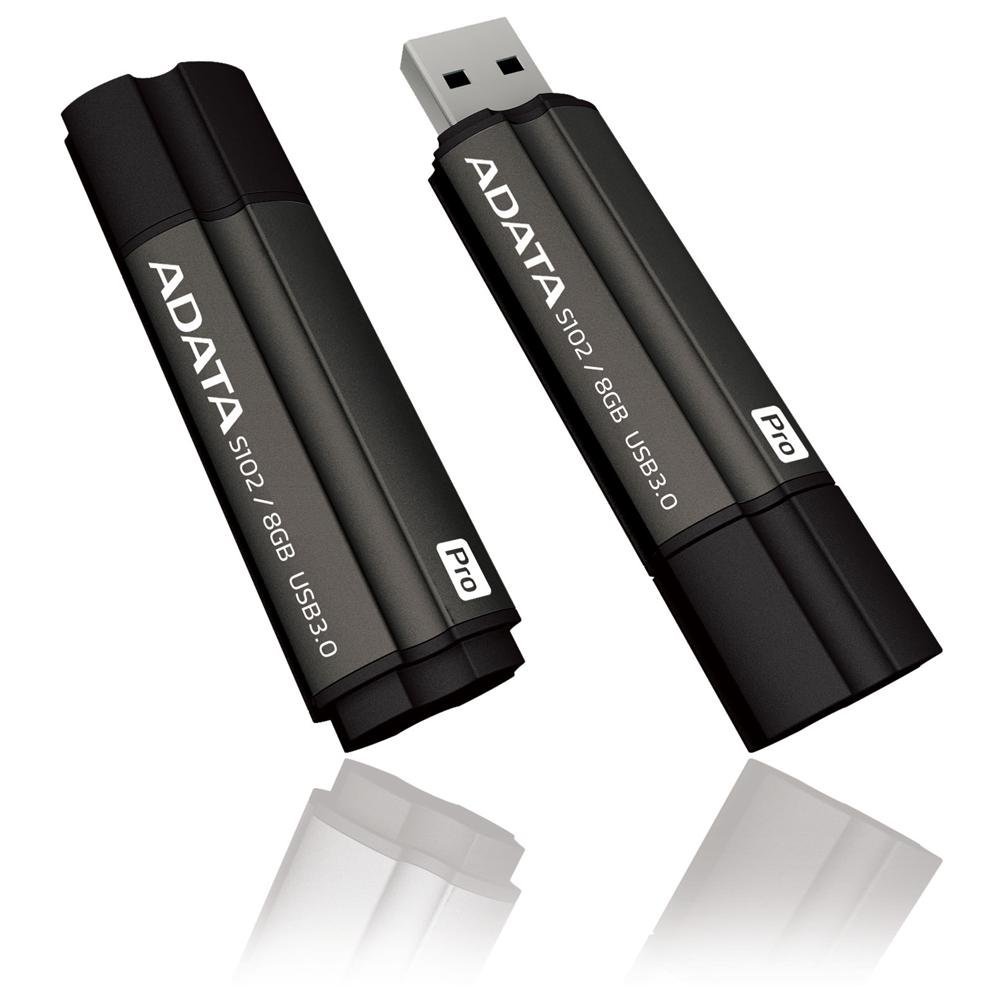
Image: The ADATA S102PRO USB Flash Drive shown with its protective cap on and with the cap removed, revealing the USB 3.0 connector. This illustrates the physical appearance and how to prepare the drive for insertion.
التشغيل
Once the ADATA S102PRO is recognized by your computer, you can begin transferring files:
- الوصول إلى محرك الأقراص:
- الويندوز: Open "This PC" or "My Computer" and locate the drive listed under "Devices and drives" (e.g., "Removable Disk" or a drive letter like E:).
- ماك: سيظهر رمز محرك الأقراص على سطح المكتب أو في الشريط الجانبي لبرنامج Finder ضمن "المواقع".
- نقل Files:
- للنسخ files ل the flash drive, drag and drop them from your computer's folders into the flash drive's window.
- للنسخ files من the flash drive, drag and drop them from the flash drive's window to a folder on your computer.
- You can also use the standard copy (Ctrl+C / Command+C) and paste (Ctrl+V / Command+V) functions.
- إزالة محرك الأقراص بشكل آمن: It is crucial to safely eject the flash drive before physically removing it to prevent data corruption.
- الويندوز: Click the "Safely Remove Hardware and Eject Media" icon in the system tray (bottom-right corner), then select your flash drive and click "Eject." Wait for the "Safe to Remove Hardware" message.
- ماك: Drag the drive icon from the desktop to the Trash, or click the Eject button next to the drive name in the Finder sidebar. Wait for the icon to disappear before removing the drive.
صيانة
Proper care will help ensure the longevity and reliability of your ADATA S102PRO USB Flash Drive:
- حماية الموصل: Always keep the protective cap on the USB connector when the drive is not in use to prevent dust, dirt, and physical damage.
- تجنب الظروف القاسية: Do not expose the drive to extreme temperatures, direct sunlight, high humidity, or strong magnetic fields.
- التعامل معها بحذر: تجنب إسقاط القرص الصلب أو تعريضه لصدمات قوية.
- Do Not Remove During Transfer: Never unplug the drive while data is being read from or written to it. Always follow the safe removal procedure.
- النسخ الاحتياطي المنتظم: While flash drives are reliable, it is always recommended to back up critical data to another storage device or cloud service.
استكشاف الأخطاء وإصلاحها
If you encounter issues with your ADATA S102PRO, try the following solutions:
- لم يتم التعرف على محرك الأقراص:
- تأكد من إدخال محرك الأقراص بالكامل في منفذ USB.
- جرب منفذ USB مختلفًا على جهاز الكمبيوتر الخاص بك.
- قم باختبار محرك الأقراص على جهاز كمبيوتر آخر لاستبعاد وجود مشكلة خاصة بالكمبيوتر.
- Check your computer's Device Manager (Windows) or System Information (macOS) to see if the drive is listed, even if it doesn't appear in File مستكشف/باحث.
- سرعات نقل بطيئة:
- Ensure you are connected to a USB 3.0 port for optimal performance. USB 2.0 ports will limit speeds.
- نقل العديد من الصغيرة fileيمكن أن تكون عملية نقل البيانات أبطأ من نقل عدد قليل من البيانات الكبيرة files.
- Close other applications that might be using system resources or performing disk operations.
- لا يمكن الكتابة Files للقيادة:
- تحقق من امتلاء محرك الأقراص. احذف الملفات غير الضرورية. fileأو نقلها إلى موقع آخر.
- تأكد من file system (e.g., FAT32, NTFS, exFAT) is compatible with your operating system and allows writing. If formatted as NTFS on macOS, you may only have read access without third-party software.
- Check for any software-based write protection or permissions issues on your computer.
تحديد
| ماركة | أداتا |
| اسم الموديل | اس 102 برو |
| رقم الموديل | AT806-4G-CPK |
| سعة تخزين الذاكرة | 4 جيجا بايت |
| واجهة الأجهزة | منفذ USB 3.0 (متوافق مع الإصدارات السابقة USB 2.0) |
| الشركة المصنعة | A-DATA TECHNOLOGY (USA) CO. L |
| رمز المنتج الموحد | 842243005080 |
| ASIN | B004AVOGW8 |
الضمان والدعم
For detailed warranty information, product registration, and technical support, please visit the official ADATA webيمكنك عادةً العثور على موارد الدعم والأسئلة الشائعة ومعلومات الاتصال بخدمة العملاء هناك.
مسؤول شركة ADATA Webموقع: www.adata.com