
Lexmark E360H11A
دليل مستخدم خرطوشة الحبر لبرنامج الإرجاع عالي الإنتاجية لسلسلة طابعات Lexmark E360 و E460 و E462
ماركة: Lexmark | نموذج: E360H11A
مقدمة
This manual provides essential information for the safe and effective use of your Lexmark E360, E460, E462 Series High Yield Return Program Toner Cartridge (Part Number E360H11A). This genuine Lexmark product is designed to deliver consistent, high-quality monochrome laser prints with an estimated yield of 9,000 pages. Please read this manual thoroughly before installation and use.
معلومات السلامة
- احفظ خراطيش الحبر بعيداً عن متناول الأطفال.
- Do not incinerate toner cartridges. Residual toner dust can ignite.
- Avoid inhaling toner dust. If toner gets on your skin or clothing, wash it off immediately with soap and cold water.
- لا تحاول تفكيك خرطوشة الحبر.
- Store cartridges in their original packaging in a cool, dry place away from direct sunlight.
ماذا يوجد في الصندوق
يجب أن تحتوي الحزمة الخاصة بك على العنصر التالي:
- One (1) Lexmark E360, E460, E462 Series High Yield Return Program Toner Cartridge (Part Number E360H11A)
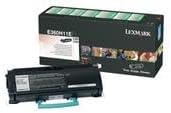
This image displays the Lexmark E360H11A High Yield Return Program Toner Cartridge alongside its retail packaging. The cartridge is black with a light blue handle, and the box features Lexmark branding and product details.
الإعداد والتثبيت
Follow these steps to properly install the toner cartridge in your Lexmark E360, E460, or E462 series printer:
- إيقاف تشغيل الطابعة: Ensure your printer is turned off and unplugged from the power outlet before beginning the installation process.
- افتح الغلاف الأمامي: Open the front cover of your Lexmark printer to access the toner cartridge compartment.
- إزالة الخرطوشة القديمة (إن وجدت): If replacing an old cartridge, carefully pull it straight out of the printer. Place it in a protective bag for recycling.
- فك عبوة الخرطوشة الجديدة: Remove the new Lexmark E360H11A toner cartridge from its packaging. Avoid touching the green drum surface.
- هزة خرطوشة: Gently shake the new cartridge horizontally 5-6 times to distribute the toner evenly.
- إزالة الأختام الواقية: Carefully remove any protective tapes or seals from the cartridge as indicated in your printer's specific manual.
- أدخل خرطوشة جديدة: Align the new cartridge with the guides inside the printer and push it firmly until it clicks into place.
- إغلاق الغلاف الأمامي: أغلق الغطاء الأمامي للطابعة.
- تشغيل الطابعة: Plug in and turn on your printer. The printer will typically perform a self-test and recognize the new cartridge.
Refer to your specific Lexmark printer's user manual for detailed instructions and illustrations.
تعليمات التشغيل
Once the Lexmark E360H11A toner cartridge is installed, your printer is ready for operation. The cartridge functions automatically as part of the printing process.
- الطباعة: Initiate print jobs from your computer or device as you normally would. The printer will draw toner from the cartridge to create monochrome prints.
- مراقبة مستوى الحبر: Most Lexmark printers provide a way to monitor toner levels through the printer's control panel or software utility. Monitor these levels to know when a replacement cartridge will be needed.
- جودة الطباعة: If print quality degrades (e.g., faded prints, streaks), it may indicate a low toner level or an issue with the cartridge. Refer to the Troubleshooting section.
صيانة
يمكن أن يؤدي التعامل السليم مع خرطوشة الحبر وتخزينها بشكل صحيح إلى إطالة عمرها وتحسين أدائها:
- تخزين: Store unused cartridges in their original sealed packaging in a cool, dry environment, away from direct sunlight and extreme temperatures.
- التعامل: Always handle the cartridge by its designated handles or edges. Avoid touching the imaging drum.
- التخلص/إعادة التدوير: This is a Lexmark Return Program Toner Cartridge. Please return the empty cartridge to Lexmark for proper recycling. Instructions for return are typically included with the new cartridge or can be found on the official Lexmark website. Do not dispose of cartridges in regular waste.
استكشاف الأخطاء وإصلاحها
إذا واجهت مشكلات مع خرطوشة الحبر الخاصة بك، ففكر في الحلول الشائعة التالية:
| مشكلة | السبب المحتمل | حل |
|---|---|---|
| مطبوعات باهتة أو فاتحة | مستوى منخفض من الحبر؛ توزيع غير متساوٍ للحبر. | Gently shake the cartridge horizontally. If problem persists, replace the cartridge. |
| خطوط أو بقع على المطبوعات | Dirty imaging drum; damaged cartridge. | Do not touch the drum. If the cartridge is new, ensure all seals are removed. If problem persists, replace the cartridge. |
| رسالة "انخفاض مستوى الحبر" أو "استبدل الخرطوشة" | Toner is genuinely low; cartridge not seated correctly. | Reseat the cartridge firmly. If message persists, replace with a new cartridge. |
| لم يتم التعرف على الخرطوشة | Improper installation; faulty cartridge. | Remove and reinsert the cartridge, ensuring it clicks into place. Restart the printer. If issue continues, contact Lexmark support. |
For more complex issues, consult your printer's specific user manual or the Lexmark support webموقع.
تحديد
| ميزة | التفاصيل |
|---|---|
| نوع المنتج | خرطوشة الحبر |
| ماركة | ليكسمارك |
| رقم القطعة | E360H11A |
| التوافق | Lexmark E360, E460, E462 Series Monochrome Laser Printers |
| تقنية الطباعة | ليزر أحادي اللون |
| إنتاج الصفحة | يصل إلى 9,000 صفحة (ISO/IEC 19752) |
| ميزة خاصة | High Yield, Return Program Cartridge |
| المكونات المضمنة | خرطوشة الحبر |
| ASIN | B00434R3GI |
| تاريخ أول توفر | 15 سبتمبر 2010 |
معلومات الضمان
Lexmark toner cartridges are manufactured to high quality standards. For specific warranty terms and conditions applicable to your Lexmark E360H11A toner cartridge, please refer to the documentation included with your printer or visit the official Lexmark webالموقع. تغطي الضمانات عادةً عيوب المواد والتصنيع في ظل الاستخدام العادي.
يدعم
If you require further assistance or have questions regarding your Lexmark E360, E460, E462 Series High Yield Return Program Toner Cartridge, please contact Lexmark Customer Support:
- ليكسمارك الرسمية Webموقع: www.lexmark.com/support
- الموارد المتاحة على الإنترنت: Access FAQs, drivers, and troubleshooting guides.
- معلومات الاتصال: Find phone numbers or chat options for direct support on the Lexmark support webموقع.
When contacting support, please have your printer model and toner cartridge part number (E360H11A) ready.
Ask a question about this manual
Ask about setup, troubleshooting, compatibility, parts, safety, or missing instructions. Manuals+ will review the question and use this page’s manual context to help answer it.